
Last updated on
Oct 2, 2026

Get the free Certificate of Insurance - Contractor
We are not affiliated with any brand or entity on this form

Fill out
Complete the form online in a simple drag-and-drop editor.

eSign
Add your legally binding signature or send the form for signing.

Share
Share the form via a link, letting anyone fill it out from any device.

Export
Download, print, email, or move the form to your cloud storage.
Why pdfFiller is the best tool for your documents and forms


End-to-end document management
From editing and signing to collaboration and tracking, pdfFiller has everything you need to get your documents done quickly and efficiently.
Accessible from anywhere
pdfFiller is fully cloud-based. This means you can edit, sign, and share documents from anywhere using your computer, smartphone, or tablet.
Secure and compliant
pdfFiller lets you securely manage documents following global laws like ESIGN, CCPA, and GDPR. It's also HIPAA and SOC 2 compliant.
What is Contractor Insurance Certificate
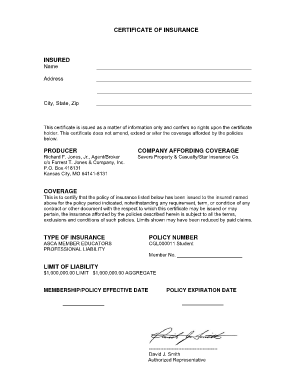
The Certificate of Insurance - Contractor is a business form used by contractors to certify that relevant insurance policies are active. Its primary purpose is to provide proof of insurance coverage to clients and project stakeholders.
pdfFiller scores top ratings on review platforms




Who needs Contractor Insurance Certificate?
Explore how professionals across industries use pdfFiller.

Contractor Insurance Certificate is needed by:
-
Contractors needing to prove insurance coverage
-
Clients requiring proof of insurance for projects
-
Insurance brokers managing policy documents
-
Project stakeholders involved in contract agreements
-
Construction companies validating contractor insurance
Comprehensive Guide to Contractor Insurance Certificate
What is the Certificate of Insurance - Contractor?
The Certificate of Insurance - Contractor serves as a formal document certifying the existence of insurance coverage. It plays a critical role in business agreements, ensuring that all parties have clear evidence of insurance protection prior to undertaking a project. This certificate not only provides assurance to clients but also alleviates potential disputes regarding insurance liabilities.
For contractors, having a completed certificate of insurance is essential. It demonstrates compliance with contractual obligations while providing clients confidence in their financial safety.
Purpose and Benefits of the Certificate of Insurance - Contractor
This document is crucial for both contractors and their clients due to its protective nature in business agreements. It assures that all parties involved are covered under the stipulated insurance requirements, thus minimizing risks associated with unexpected incidents during project execution.
In addition, it ensures compliance with contractual terms, serving as proof that the contractor fulfills necessary insurance obligations, which can be a determining factor in securing contracts.
Key Features of the Certificate of Insurance - Contractor
-
The presence of fillable fields such as NAMED INSURED and INSURER details.
-
Inclusion of provisions and endorsements that specify policy limits and coverage details.
-
Requirements for identifying additional insured parties pertinent to the contract.
Understanding these elements is vital for accurate completion, as they dictate the scope and validity of the insurance coverage presented.
Who Needs the Certificate of Insurance - Contractor?
-
Contractors requiring proof of insurance for project allocation.
-
Clients demanding assurance of contractor coverage before engagement.
-
Project stakeholders who may hold liability interests.
The certificate acts as a safeguard not only for contractors but also for clients and other parties, ensuring everyone is adequately protected in the business relationship.
How to Fill Out the Certificate of Insurance - Contractor Online
-
Navigate to the designated online form using pdfFiller.
-
Access fillable sections where key information will be entered.
-
Complete mandatory fields, including effective dates and policy numbers, with precision.
Utilizing an online platform like pdfFiller simplifies this process, allowing for clarity and corrections before final submission.
Common Errors and How to Avoid Them When Filling Out the Certificate
-
Inaccurate entry of insurer details leading to compliance issues.
-
Neglecting to fill out additional insured sections, which can void the certificate.
It is important to double-check all entries for accuracy. Following the instructions closely can greatly reduce the basis for errors.
How to Submit the Certificate of Insurance - Contractor
Once filled out, the completed Certificate should be submitted to the relevant parties as specified in the contract. Submission methods may vary; typically, this includes electronic formats or physical copies delivered in person or via mail.
Be mindful of any associated submission fees and adhere to deadlines to ensure that the documentation is processed timely.
Security and Compliance When Handling the Certificate of Insurance
When dealing with sensitive data, pdfFiller utilizes cutting-edge security measures, including 256-bit encryption, to protect user information. Compliance with standards such as HIPAA and GDPR further ensures that personal data remains confidential throughout the document handling process.
Understanding the importance of data protection in legal documents reinforces the need for choosing secure platforms for form management.
Example of a Completed Certificate of Insurance - Contractor
Reviewing a sample completed Certificate provides clarity on how various sections should be filled. Key fields should be annotated to guide users in understanding the necessary information required for accuracy and compliance.
Embrace the Ease of Completing Your Certificate of Insurance - Contractor with pdfFiller
Using pdfFiller for filling out, signing, and submitting your Certificate of Insurance streamlines the process. The platform offers advantages in convenience, security, and efficiency, ensuring that users can manage their document needs effectively. With its user-friendly interface, pdfFiller supports contractors in navigating their insurance documentation smoothly.
How to fill out the Contractor Insurance Certificate
-
1.Start by accessing pdfFiller and logging into your account if you’re not already logged in.
-
2.Search for 'Certificate of Insurance - Contractor' in the template library or use the provided link to open the form directly.
-
3.Begin filling out the 'NAMED INSURED' field by entering the full name of the entity that holds the insurance policy.
-
4.Next, move to the 'INSURER(S) LICENSED TO CONDUCT BUSINESS IN ONTARIO AND/OR CANADA' field and input the name of your insurance company.
-
5.Gather relevant documents such as policy numbers, effective dates, expiry dates, and coverage limits before starting to ensure accuracy.
-
6.For any additional insureds required by your contract, fill in the appropriate section with their names and any relevant details.
-
7.Ensure that you complete all required fields to avoid errors when submitting the form. Pay attention to signing fields.
-
8.Review the filled form carefully. Check that all information is correct to prevent processing delays.
-
9.Once satisfied with the accuracy of your details, save your completed form in pdfFiller.
-
10.You can either download the form to your device or submit it directly through pdfFiller to the necessary parties as required.

What are the eligibility requirements for using this form?
Any contractor operating in Ontario with an active insurance policy can use the Certificate of Insurance - Contractor to provide proof of coverage for their projects.
Are there specific deadlines for submitting this form?
Although deadlines vary depending on the contract terms, it is advisable to submit the Certificate of Insurance as soon as possible to avoid project delays. Review your agreement for specific timing.
How can I submit the Certificate of Insurance?
You can submit the completed Certificate of Insurance directly from pdfFiller by emailing it to your clients and project stakeholders or downloading it for physical submission.
What supporting documents do I need to provide with this form?
In addition to the Certificate of Insurance, you may need to attach copies of insurance policies, coverage summaries, and endorsements as required by your contract.
What are some common mistakes to avoid when completing this form?
Ensure all fields are filled out accurately, particularly the named insured and insurer details. Avoid leaving any required fields blank to prevent delays in processing.
How long does it take to process the Certificate of Insurance?
Processing times can vary based on the insurance provider and the contractual agreement. Generally, processing should be completed quickly, especially if submitted electronically.
Is notarization required for this form?
No, notarization is not required for the Certificate of Insurance - Contractor. Ensure it is signed by an authorized representative before submission.
Related Content
Related Forms


Related Catalogs
Get the latest insights from our blog


If you believe that this page should be taken down, please follow our DMCA take down process
here
.
This form may include fields for payment information. Data entered in these fields is not covered by PCI DSS compliance.