
Last updated on
Oct 2, 2026

Canada WSIB REO6 2007-2026 free printable template
We are not affiliated with any brand or entity on this form

Fill out
Complete the form online in a simple drag-and-drop editor.

eSign
Add your legally binding signature or send the form for signing.

Share
Share the form via a link, letting anyone fill it out from any device.

Export
Download, print, email, or move the form to your cloud storage.
Why pdfFiller is the best tool for your documents and forms


End-to-end document management
From editing and signing to collaboration and tracking, pdfFiller has everything you need to get your documents done quickly and efficiently.
Accessible from anywhere
pdfFiller is fully cloud-based. This means you can edit, sign, and share documents from anywhere using your computer, smartphone, or tablet.
Secure and compliant
pdfFiller lets you securely manage documents following global laws like ESIGN, CCPA, and GDPR. It's also HIPAA and SOC 2 compliant.
What is Canada WSIB REO6
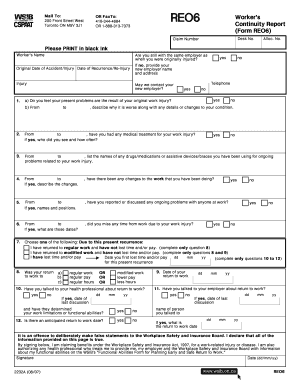
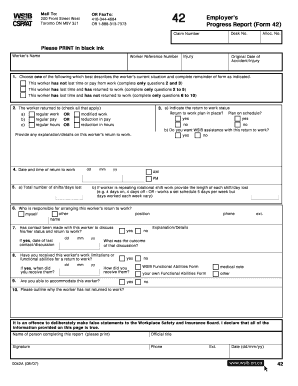
The Continuity Report Form REO6 is a performance review document used by workers in Ontario to report on their work-related injury or disease status.
pdfFiller scores top ratings on review platforms




Who needs Canada WSIB REO6?
Explore how professionals across industries use pdfFiller.

Canada WSIB REO6 is needed by:
-
Workers who have experienced a work-related injury or disease.
-
Employers managing workplace safety and insurance claims.
-
Insurance professionals handling benefit claims under the Workplace Safety and Insurance Act.
-
Health care providers involved in the treatment of workplace injuries.
Comprehensive Guide to Canada WSIB REO6
What is the Continuity Report Form REO6?
The Continuity Report Form REO6 is a vital document used in Ontario for workers to report on the status of their work-related injuries or diseases. This form's significance lies in its role within the framework of the Workplace Safety and Insurance Act, 1997, ensuring that workers have a systematic way to communicate their current health condition and employment status.
By utilizing the continuity report form REO6, employees can play an essential part in documenting crucial information about their injuries. This process not only aids in the claim for benefits but helps maintain accurate records that are significant for workplace safety management.
Purpose and Benefits of the Continuity Report Form REO6
Workers must complete the Continuity Report Form REO6 to substantiate their claims for benefits under the Workplace Safety and Insurance Act. This form documents the ongoing status of the worker's injury or illness, allowing for a more streamlined claims process.
The advantages of utilizing the form extend beyond mere compliance. The continuity report assists in tracking medical treatments and changes in work duties, providing clarity for both the worker and their employer. Additionally, submitting a well-completed form can expedite the benefits process, making it easier for workers to receive the support they need.
Who Needs to Complete the Continuity Report Form REO6?
The Continuity Report Form REO6 is primarily for workers who have sustained a work-related injury or illness and need to report changes in their condition. This includes individuals in various sectors, including manufacturing, healthcare, and office environments.
Eligibility for completing this form typically includes workers who have previously submitted a workplace injury report and are undergoing ongoing medical treatment. Understanding the eligibility criteria ensures that those who require assistance are adequately supported throughout their recovery process.
How to Fill Out the Continuity Report Form REO6 Online
Completing the Continuity Report Form REO6 online involves a series of straightforward steps:
-
Access the online form through a secure platform.
-
Fill in all required fields, ensuring accuracy in personal and medical information.
-
Review the form for completeness and clarity before submission.
-
Follow any specific instructions, such as signing requirements.
It is advisable to use black ink when printing the form if completing it manually, and to verify that all information is clearly legible.
Common Errors and How to Avoid Them
Mistakes can occur when filling out the continuity report form REO6, which may lead to delays in processing. Some common errors include providing incomplete information or misrepresenting medical details.
To avoid submission issues, it is recommended to:
-
Double-check personal details for accuracy.
-
Ensure all sections of the form are filled out completely.
-
Review any instructions regarding signatures and supporting documents.
Submission Methods for the Continuity Report Form REO6
After completing the Continuity Report Form REO6, there are several submission methods available:
-
Online submission through a designated portal.
-
Mailing the completed form to the appropriate address.
-
Delivering the form in person at the local office.
Each method comes with its specific guidelines and deadlines, so it is essential to familiarize yourself with these details to ensure successful submission and timeliness in receiving benefits.
Tracking Your Submission and What Happens Next
Once the Continuity Report Form REO6 is submitted, tracking its status is crucial. Workers can typically monitor their submission through designated online platforms or by contacting the relevant office directly.
After submission, users can expect a response that may include follow-up actions or additional requests for information. Being aware of the potential timelines can aid in managing expectations during the claims process.
Security Measures with the Continuity Report Form REO6
Security is paramount when handling the Continuity Report Form REO6, as it contains sensitive information regarding an individual's health and employment. The forms are typically protected with robust measures such as encryption and compliance with privacy regulations.
To ensure the security of personal data, users should always submit the form through secure methods and verify that their information is stored appropriately, reducing risks related to data breaches.
How pdfFiller Can Assist You with the Continuity Report Form REO6
pdfFiller provides an efficient solution for managing the Continuity Report Form REO6. With features such as easy editing, eSigning, and secure document storage, users can handle their forms with confidence.
This platform simplifies the form-filling process, ensuring that workers can complete and submit their continuity reports without unnecessary obstacles.
Get Started with Your Continuity Report Form REO6 Today!
When ready to fill out the continuity report form REO6, utilizing pdfFiller can facilitate a smooth experience. The platform's user-friendly interface allows for easy form completion and submission online, making the process efficient and straightforward.
How to fill out the Canada WSIB REO6
-
1.Access pdfFiller and search for the Continuity Report Form REO6 using the search bar.
-
2.Once you find the form, click on it to open it within the pdfFiller interface.
-
3.Review the form fields and gather necessary information about your current employment status, medical treatment, and any changes in your injury condition.
-
4.Use the fillable fields to enter your personal information clearly; make sure to PRINT in black ink when prompted.
-
5.Complete all required sections, ensuring that you provide accurate details to avoid delays in processing your claim.
-
6.If there are checkboxes, mark them as applicable to your situation and follow any additional instructions provided in the form.
-
7.Once you have filled out the form, review all information for accuracy and completeness.
-
8.Finalizing the form can be done by clicking the 'Finish' button within pdfFiller, where you’ll have options to save, download, or submit your form.
-
9.Choose the method of submission that suits you best; you can download a copy or directly submit your form if that option is available.

Who is eligible to fill out the Continuity Report Form REO6?
Any worker in Ontario who has sustained a work-related injury or disease and needs to report on their condition is eligible to complete the Continuity Report Form REO6.
What is the deadline for submitting the Continuity Report Form REO6?
While specific deadlines may vary, it's essential to submit the Continuity Report Form REO6 promptly to ensure timely processing of your benefits claims under the Workplace Safety and Insurance Act.
How can I submit the Continuity Report Form REO6?
You can submit the Continuity Report Form REO6 via pdfFiller by following the submission prompts after filling the form, or you can print it out and send it to the required office as per your situation.
What supporting documents are required with the Continuity Report Form REO6?
Typically, you may need to provide medical documentation regarding your injury or disease, records of treatments received, and any other documentation that supports your claim for benefits.
What common mistakes should I avoid when filling out the form?
Common mistakes include omitting required fields, providing unclear information, and failing to sign the form. Always double-check for completeness and accuracy before submission.
How long does it take to process the Continuity Report Form REO6?
Processing times can vary. However, it typically takes several weeks for forms submitted through the Workplace Safety and Insurance Board to be processed. You should always follow up for updates if necessary.
What if I make an error while filling out the Continuity Report Form REO6?
If you make an error, it's best to revise it directly within pdfFiller before finalizing the form. If it's already submitted, contact your employer or the claims office for instructions on amending the submitted form.
Related Content
Related Forms




Get the latest insights from our blog


If you believe that this page should be taken down, please follow our DMCA take down process
here
.
This form may include fields for payment information. Data entered in these fields is not covered by PCI DSS compliance.