
Last updated on
Sep 12, 2026

Canada Certificate of Insurance - City of Brampton 2007 free printable template
We are not affiliated with any brand or entity on this form

Fill out
Complete the form online in a simple drag-and-drop editor.

eSign
Add your legally binding signature or send the form for signing.

Share
Share the form via a link, letting anyone fill it out from any device.

Export
Download, print, email, or move the form to your cloud storage.
Why pdfFiller is the best tool for your documents and forms


End-to-end document management
From editing and signing to collaboration and tracking, pdfFiller has everything you need to get your documents done quickly and efficiently.
Accessible from anywhere
pdfFiller is fully cloud-based. This means you can edit, sign, and share documents from anywhere using your computer, smartphone, or tablet.
Secure and compliant
pdfFiller lets you securely manage documents following global laws like ESIGN, CCPA, and GDPR. It's also HIPAA and SOC 2 compliant.
What is Canada Certificate of Insurance - City of Brampton
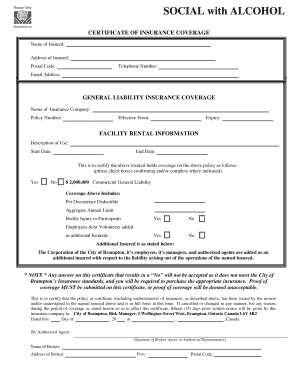
The Brampton Liability Insurance Certificate is a business form used by insurance brokers to certify that insurance policies are active for the insured named.
pdfFiller scores top ratings on review platforms




Who needs Canada Certificate of Insurance - City of Brampton?
Explore how professionals across industries use pdfFiller.

Canada Certificate of Insurance - City of Brampton is needed by:
-
Insurance Brokers
-
Businesses requiring liability insurance
-
Contractors working in Brampton
-
Vendors partnering with city entities
-
Real estate professionals
-
Event organizers needing coverage
Comprehensive Guide to Canada Certificate of Insurance - City of Brampton
Overview of the Brampton Liability Insurance Certificate
The Brampton Liability Insurance Certificate serves a critical purpose for insurance brokers in Ontario. This document certifies that the insurance policies detailed within have been issued and are currently in force for the named insured. Key details required on the form include the name and address of the insured, type of insurance, effective dates, and limits of liability. Additionally, the certificate must be signed by the insurance broker, ensuring authenticity and compliance. Understanding this Ontario insurance form is essential for effective risk management in business operations.
Purpose and Benefits of the Brampton Liability Insurance Certificate
This certificate is necessary for several reasons, particularly in establishing trust between businesses and vendors. It acts as verification that specific insurance policies are active, which is crucial for risk mitigation. When vendors require certification, businesses need to provide this document to demonstrate their coverage. Moreover, including the City of Brampton as an additional insured on the policy offers an added layer of protection and assurances, promoting responsible business practices.
Key Features of the Brampton Liability Insurance Certificate
-
The form contains fillable fields such as NAME OF INSURED and ADDRESS OF INSURED.
-
It requires the TYPE OF INSURANCE to be clearly indicated along with the effective and expiry dates.
-
The signature of the insurance broker is mandatory to authenticate the form.
-
Specific clauses for the Corporation of the City of Brampton are included to protect both parties involved.
Who Needs the Brampton Liability Insurance Certificate?
This form is essential for various stakeholders in the insurance and business sectors. Insurance brokers play a pivotal role by facilitating the issuance of this certificate. Additionally, any business or vendor working with the City of Brampton requires this documentation to comply with regulatory demands. Scenarios, such as entering vendor contracts with the City, underscore the importance of having this certificate readily available to avoid disputes and maintain transparency.
How to Fill Out the Brampton Liability Insurance Certificate Online
Filling out the Brampton Liability Insurance Certificate online is a straightforward process using pdfFiller. Begin by accessing the form through the platform, where you can fill it out directly. Ensure accuracy by carefully entering the information in the designated fields. pdfFiller’s user-friendly interface simplifies form completion, making it accessible for all users regardless of technical skill.
Common Mistakes to Avoid When Filling the Brampton Liability Insurance Certificate
-
One frequent mistake is entering incorrect or inconsistent dates which can lead to documentation issues.
-
Missing the insurance broker's signature can result in delays or rejections of the form.
-
Review the form thoroughly before submission to ensure all fields are completed accurately.
-
Ensuring correct information is vital to avoid complications during contract validations.
Security and Compliance When Using the Brampton Liability Insurance Certificate
When utilizing pdfFiller for the Brampton Liability Insurance Certificate, users can rest assured about the security of their data. With 256-bit encryption and compliance with HIPAA and GDPR, pdfFiller prioritizes document protection, especially when handling sensitive information. Users should feel confident regarding privacy concerns upon submission, reinforcing the trustworthiness of using this platform for their forms.
Next Steps After Completing the Brampton Liability Insurance Certificate
Once you have completed the Brampton Liability Insurance Certificate, it is essential to follow a few key steps. First, you can download, save, or print the completed form directly from pdfFiller for your records. Next, consider the submission methods available to you; submitting the form to the Corporation of the City of Brampton is typically required. Keeping a copy for your records is also critical in case of future inquiries or audits.
Harness the Power of pdfFiller for Your Insurance Needs
Using pdfFiller for the Brampton Liability Insurance Certificate provides various advantages including ease of use, security, and efficiency. The platform not only facilitates straightforward form completion but also offers additional features that can assist with various insurance documents and forms. Start utilizing pdfFiller today to enhance your experience with managing essential insurance documentation.
How to fill out the Canada Certificate of Insurance - City of Brampton
-
1.Access the Brampton Liability Insurance Certificate on pdfFiller by searching for its name in the document library.
-
2.Once you find the form, click on it to open the editable document in the pdfFiller interface.
-
3.Before filling out the form, gather necessary information including the name and address of the insured, and details about the insurance coverage.
-
4.Navigate through the fillable fields like 'NAME OF INSURED', 'ADDRESS OF INSURED', 'TYPE OF INSURANCE', and relevant dates by clicking on each field to input your information.
-
5.Ensure that all fields are completed, as incomplete information may delay processing.
-
6.Once you have entered all the required information, review the certificate for accuracy to avoid any mistakes.
-
7.Look for the signature field and use pdfFiller's e-sign feature to have the insurance broker sign the document electronically.
-
8.After finalizing the form and obtaining signatures, you can save the completed document in your pdfFiller account.
-
9.To download the filled form, click on the download button in the toolbar and select your desired file format.
-
10.If you need to submit the form to any parties, check if docs can be submitted directly via pdfFiller or prepare it for email.

Who needs to fill out the Brampton Liability Insurance Certificate?
This form must be filled out by insurance brokers on behalf of their clients to certify that the insurance policies are active and valid.
What information do I need to prepare before completing the form?
Before filling out the form, gather the name and address of the insured, details of the insurance type, effective dates, and limits of liability.
Can I submit the form electronically?
Yes, you can electronically sign and submit the Brampton Liability Insurance Certificate through pdfFiller or download it and send it manually via email.
What are some common mistakes when filling out this form?
Common mistakes include leaving required fields blank, misspelling the name of the insured, and not obtaining necessary signatures. Review the document carefully before submission.
How long does it take to process this form?
Processing times may vary depending on the organization receiving the certificate. Typically, you should allow a few business days for any required approvals.
Is notarization required for this form?
No, the Brampton Liability Insurance Certificate does not require notarization. It only needs the insurance broker's signature.
Where can I find the Brampton Liability Insurance Certificate to fill out?
You can find the Brampton Liability Insurance Certificate on pdfFiller by searching for its name in their document library.
Canada Certificate of Insurance - City of Brampton Form Versions
Related Content
Related Forms



Related Catalogs
Get the latest insights from our blog



If you believe that this page should be taken down, please follow our DMCA take down process
here
.
This form may include fields for payment information. Data entered in these fields is not covered by PCI DSS compliance.