
Last updated on
Nov 7, 2026
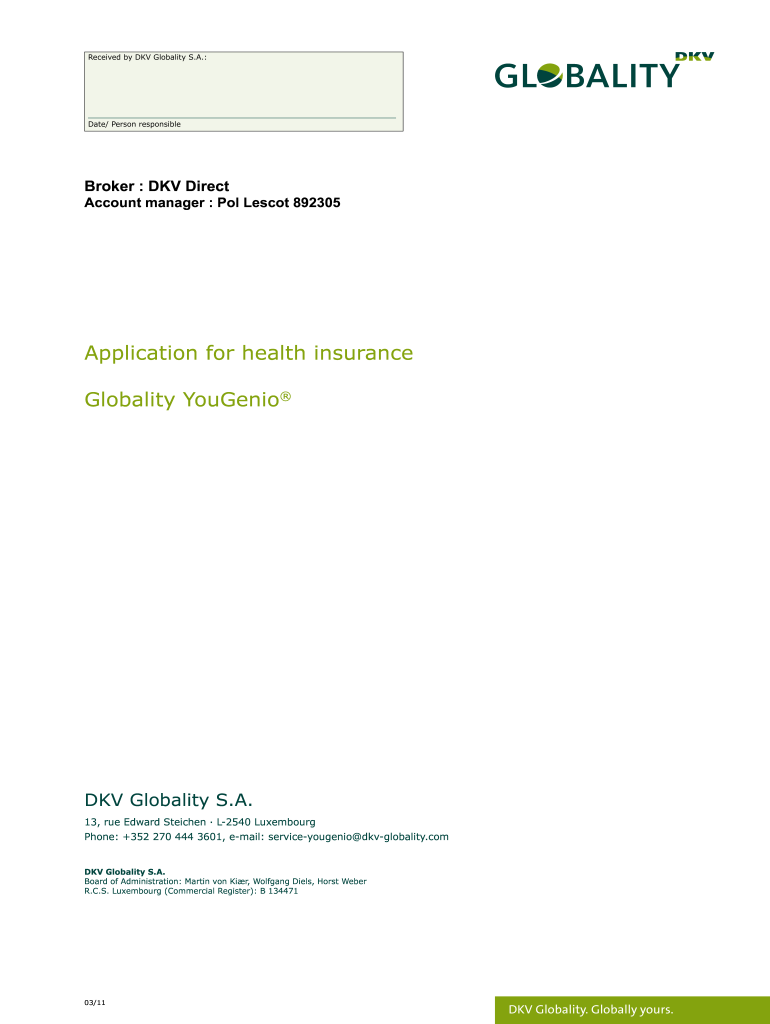
DKV Globality Application for Health Insurance 2011 free printable template
We are not affiliated with any brand or entity on this form

Fill out
Complete the form online in a simple drag-and-drop editor.

eSign
Add your legally binding signature or send the form for signing.

Share
Share the form via a link, letting anyone fill it out from any device.

Export
Download, print, email, or move the form to your cloud storage.
Why pdfFiller is the best tool for your documents and forms


End-to-end document management
From editing and signing to collaboration and tracking, pdfFiller has everything you need to get your documents done quickly and efficiently.
Accessible from anywhere
pdfFiller is fully cloud-based. This means you can edit, sign, and share documents from anywhere using your computer, smartphone, or tablet.
Secure and compliant
pdfFiller lets you securely manage documents following global laws like ESIGN, CCPA, and GDPR. It's also HIPAA and SOC 2 compliant.
What is DKV Globality Application for Health Insurance
The Application for Health Insurance is a healthcare form used by individuals and families to apply for a health insurance contract under the Globality YouGenio® program.
pdfFiller scores top ratings on review platforms




Who needs DKV Globality Application for Health Insurance?
Explore how professionals across industries use pdfFiller.

DKV Globality Application for Health Insurance is needed by:
-
Individuals seeking health insurance coverage
-
Families applying for health insurance policies
-
Intermediaries assisting clients with insurance applications
-
Co-insured persons needing to provide their information
-
Healthcare providers seeking consent for patients
Comprehensive Guide to DKV Globality Application for Health Insurance
What is the Application for Health Insurance?
The Application for Health Insurance, specifically designed under the Globality YouGenio® program, is a crucial document for securing health coverage in Luxembourg. This form serves individuals seeking to initiate a health insurance contract and is intended for residents who meet basic eligibility criteria. It enables users to apply for health insurance tailored to their individual needs.
Eligibility requirements generally include residency in Luxembourg and additional factors which will be outlined in subsequent sections.
Purpose and Benefits of the Health Insurance Application
The primary purpose of applying using the Application for Health Insurance is to secure comprehensive health coverage along with vital financial protection. This application facilitates access to the Globality YouGenio® program, which offers various health plans designed to meet individual needs.
-
Guarantees financial safety in medical emergencies.
-
Provides tailored health plans based on personal circumstances.
-
Streamlines the application process for individual health insurance.
Who Needs the Application for Health Insurance?
This application form is essential for several key participants involved in the health insurance process. Applicants, intermediaries, and co-insured persons must all engage with this form to ensure proper processing of their health coverage applications.
-
Applicants: Individuals applying for health insurance.
-
Intermediaries: Agents or representatives assisting the applicant.
-
Co-insured Persons: Family members or other insured individuals covered under the same policy.
Individuals should consider applying for health insurance when seeking to safeguard their health and financial well-being.
Eligibility Criteria for the Application for Health Insurance
To qualify for the Application for Health Insurance, applicants must meet specific eligibility criteria. Primarily, this application is available to residents of Luxembourg.
-
Age: Applicants must meet the minimum age requirements set by the program.
-
Health Status: Certain health conditions may affect eligibility.
-
Residency: Proof of residence in Luxembourg is required.
How to Fill Out the Application for Health Insurance Online (Step-by-Step)
Completing the Application for Health Insurance online involves a series of straightforward steps:
-
Access the online form through the designated platform.
-
Enter personal details such as name, date of birth, and health information.
-
Utilize fillable fields for accurate information entry, including checkboxes for selections.
-
Review all sections for completeness before submitting.
Common Errors and How to Avoid Them
Applicants often encounter frequent mistakes while submitting their health insurance application. To ensure the submission is correct, awareness of these common errors is crucial:
-
Missing signatures from required parties.
-
Incorrect or incomplete information in any section of the form.
To avoid these pitfalls, double-check all information and ensure that all necessary signatures are provided prior to submission.
Submission Methods for the Health Insurance Application
Once the Application for Health Insurance is completed, applicants have multiple methods available for submission:
-
Online Submission: Use the designated portal for electronic submission.
-
Postal Mail: Print and send the completed form to the specified address.
Be mindful of any associated fees or deadlines for submission to prevent delays in your health coverage application.
What Happens After You Submit the Application for Health Insurance?
After submitting the Application for Health Insurance, applicants can expect a series of procedural steps:
-
Confirmation of received application.
-
Tracking options to verify the status of the application.
Subsequent steps will be communicated, and applicants should be prepared for potential follow-up requests or evaluations based on their submissions.
Security and Compliance for the Application for Health Insurance
Security is paramount when handling sensitive information in the Application for Health Insurance. pdfFiller ensures a secure process through various measures:
-
Data encryption methods to protect personal information.
-
Compliance with HIPAA and GDPR regulations to uphold privacy standards.
Users can proceed with confidence knowing their sensitive health information is safeguarded throughout the application process.
Experience the Benefits of Using pdfFiller to Complete Your Application
pdfFiller offers a user-friendly platform that simplifies the health insurance application process. Users can take advantage of the following features:
-
Convenient online document editing and form filling.
-
eSigning capabilities for quick and secure signature collection.
By utilizing pdfFiller, applicants can ensure their health insurance application is completed efficiently while maintaining high standards of privacy and security.
How to fill out the DKV Globality Application for Health Insurance
-
1.Access pdfFiller and search for 'Application for Health Insurance'. Open the form to begin filling it out.
-
2.Familiarize yourself with the layout and navigation tools of pdfFiller, including the toolbar for editing and filling in fields.
-
3.Before filling out the form, gather all necessary personal information including names, birthdates, and details of any co-insured persons.
-
4.Start with the applicant's personal details, entering the first name, surname, and date of birth in the designated fields in pdfFiller.
-
5.Next, fill out the sections that require health information and desired plan levels. Use available checkboxes to select options where appropriate.
-
6.Continue to the sections requiring signatures. Ensure the applicant, intermediary, and co-insured persons sign the form electronically using pdfFiller.
-
7.Review all entries for accuracy and completeness, checking all sections for necessary information before finalization.
-
8.Once satisfied, save the document in your preferred format or download it directly from pdfFiller. You can also submit the form electronically if the submission method allows.

Who is eligible to fill out the Application for Health Insurance?
The application is primarily for individuals and families seeking health insurance through the Globality YouGenio® program. Each applicant and co-insured person must provide their details.
What documents are required to complete the form?
You will need personal identification details, information about any health conditions, and the specifics of the desired insurance plan. Ensure you have all necessary information ready before starting.
How do I submit the completed Application for Health Insurance?
After completing the form on pdfFiller, you can either download it for physical submission or submit electronically if that option is available. Check your insurance provider's guidelines.
Are there any deadlines for submitting this application?
Deadlines may vary based on the insurance provider's requirements. It's best to submit the application as soon as possible to avoid any lapse in coverage.
What should I do if I make a mistake on the form?
If you make a mistake, use pdfFiller's editing tools to correct any fields before finalizing the document. You can erase incorrect entries or inputs seamlessly.
How long does it take for the application to be processed?
Processing times can vary. Typically, applicants should allow several days to weeks for the insurance company to assess and respond to the application.
What common mistakes should I avoid when filling out this form?
Ensure that all required sections are filled out completely, pay attention to signature requirements, and double-check for accuracy to avoid delays in processing.
DKV Globality Application for Health Insurance Form Versions
Related Forms




Get the latest insights from our blog


If you believe that this page should be taken down, please follow our DMCA take down process
here
.
This form may include fields for payment information. Data entered in these fields is not covered by PCI DSS compliance.