
Last updated on
Oct 31, 2026
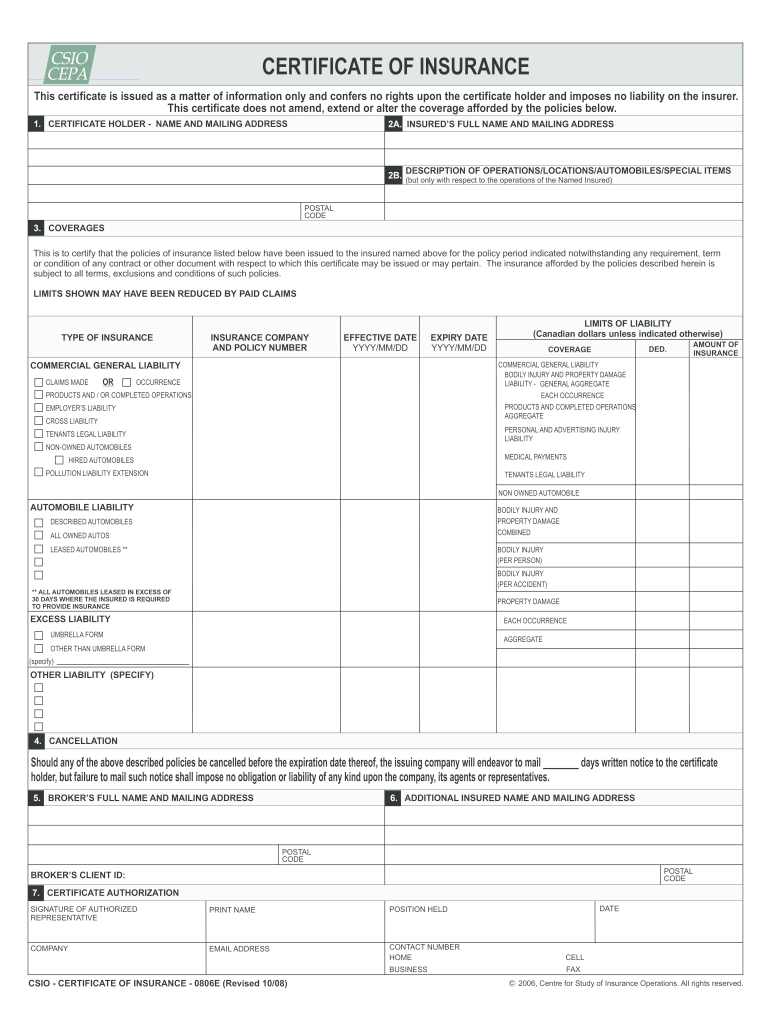
Get the free Certificate of Insurance
We are not affiliated with any brand or entity on this form

Fill out
Complete the form online in a simple drag-and-drop editor.

eSign
Add your legally binding signature or send the form for signing.

Share
Share the form via a link, letting anyone fill it out from any device.

Export
Download, print, email, or move the form to your cloud storage.
Why pdfFiller is the best tool for your documents and forms


End-to-end document management
From editing and signing to collaboration and tracking, pdfFiller has everything you need to get your documents done quickly and efficiently.
Accessible from anywhere
pdfFiller is fully cloud-based. This means you can edit, sign, and share documents from anywhere using your computer, smartphone, or tablet.
Secure and compliant
pdfFiller lets you securely manage documents following global laws like ESIGN, CCPA, and GDPR. It's also HIPAA and SOC 2 compliant.
What is COI Certificate
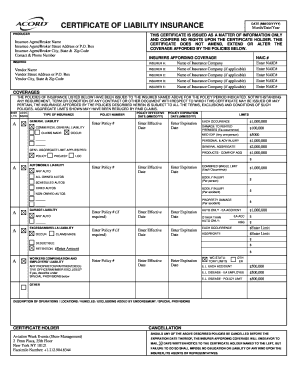
The Certificate of Insurance is a business document used by authorized representatives to verify insurance coverage for an insured party.
pdfFiller scores top ratings on review platforms




Great so far! The only thing I'd like is the ability to edit in Helvetica
it's a little bit too expensive for me. I will not have to use it very often, maybe only once or twice a month for work, but i do require the premium package for all of the features that i need to have. so it just seems crazy to me to pay almost $200 a year for something im only going to use 24 times the whole year. other than the too high price, i think its a great program!
Who needs COI Certificate?
Explore how professionals across industries use pdfFiller.

COI Certificate is needed by:
-
Business Owners needing to prove insurance coverage to clients.
-
Contractors requiring proof of insurance for project bids.
-
Real Estate Agents managing property transactions.
-
Event Organizers showing insurance compliance for venues.
-
Vendors needing assurance of coverage from suppliers.
Comprehensive Guide to COI Certificate
What is a Certificate of Insurance?
A Certificate of Insurance is a vital document that serves to verify that an insured party has active insurance coverage. This certificate outlines the essential details about the coverage, ensuring that all parties involved can verify insurance status. Key components typically included in this document are the insured's information, coverage details, and the certificate holder's name and address.
The certificate often encompasses aspects such as the description of operations and cancellation notices. It is particularly relevant in business contexts, where a certificate of insurance template ensures clarity and compliance with industry requirements. Understanding the structure of an insurance coverage certificate is crucial for proper usage, especially within Canadian markets.
Purpose and Benefits of the Certificate of Insurance
Businesses and individuals require the Certificate of Insurance for numerous reasons. It provides substantial assurance to clients, partners, and regulatory bodies by confirming that appropriate coverage is in place. Not only does it serve as proof of insurance, but it also facilitates trust and credibility within contractual relationships.
Some specific benefits include compliance with industry regulations and enhanced business reputation. As a necessary business insurance document, it helps to streamline processes associated with various transactions and partnerships, reinforcing the importance of obtaining an insurance verification form.
Who Needs a Certificate of Insurance?
Typically, various parties require a Certificate of Insurance for protection and compliance. This includes contractors, vendors, and service providers in specific industries such as construction and healthcare. Each of these sectors frequently mandates proof of insurance to mitigate risks associated with business operations and service delivery.
Understanding the obligation to provide this commercial general liability form can be crucial in maintaining industry standards, ensuring that policies align with the necessary insurance policy certificate requirements.
Key Features of the Certificate of Insurance
The Certificate of Insurance is structured with several important fields. Key sections include the description of operations, cancellation notices, and the signature of an authorized representative, which is particularly significant for validation purposes.
Each feature serves a specific role; for instance, the cancellation notice informs parties about the potential termination of coverage. A comprehensive understanding of the canadian insurance form layout is essential when preparing the insurance contract document.
How to Fill Out the Certificate of Insurance Online (Step-by-Step Guide)
Filling out the Certificate of Insurance online can be done efficiently using pdfFiller. Follow these step-by-step instructions to complete the document accurately:
-
Begin by opening the form in pdfFiller.
-
Fill out the 'Certificate Holder - Name and Mailing Address' field with the appropriate details.
-
Provide the 'Insured’s Full Name and Mailing Address' as required.
-
Ensure the description of operations aligns with the specifics of the insurance policy.
-
Review all fields for accuracy before proceeding to submit the document.
-
Finally, obtain the signature of the authorized representative to validate the certificate.
By following these steps, you can create a complete and compliant csio certificate of insurance using an insurance verification form.
Common Errors to Avoid When Completing the Certificate of Insurance
When filling out the Certificate of Insurance, avoid common mistakes that could lead to delays or rejections. Frequently encountered issues include incomplete fields and inaccuracies in the insured's information. Additionally, overlooking the cancellation notice can create compliance problems.
To mitigate these errors, always validate the details before submission. Utilize a certificate of insurance template for guidance, ensuring that the insurance coverage certificate meets all necessary requirements.
Submission Methods and Delivery of the Certificate of Insurance
Several methods are available for submitting the completed Certificate of Insurance, including electronic submission via platforms like pdfFiller or traditional mail. Each method comes with its own processing timeline, emphasizing the importance of choosing the most suitable option for your needs.
Submitting the document correctly ensures timely processing and compliance with industry standards, reinforcing the necessity of utilizing a business insurance document for various transactions. Always verify submission protocols linked to your insurance policy certificate.
Security and Compliance for the Certificate of Insurance
Security is paramount when handling sensitive documents such as the Certificate of Insurance. pdfFiller employs robust security measures like 256-bit encryption to protect personal and financial information during the filling and submission processes.
Moreover, pdfFiller adheres to compliance requirements related to privacy laws such as HIPAA and GDPR, ensuring that your insurance contract document and canadian insurance certificate remain safeguarded throughout their lifecycle.
How pdfFiller Can Assist with Your Certificate of Insurance Needs
pdfFiller offers a range of features designed to simplify filling out the Certificate of Insurance. These include eSigning capabilities, cloud storage for easy access, and the availability of templates to expedite the process.
Leveraging these tools can enhance your efficiency when completing an insurance coverage certificate. Take advantage of pdfFiller's capabilities to streamline your document management process and ensure timely compliance with your insurance needs.
How to fill out the COI Certificate
-
1.Access the Certificate of Insurance form by navigating to pdfFiller and using the search bar to locate it.
-
2.Open the form in your browser, allowing you to view all fillable fields clearly.
-
3.Gather the necessary information beforehand, including certificate holder's details and the insured's name and address.
-
4.Begin entering data in the designated fields, using the easy-to-navigate interface to move from one field to another seamlessly.
-
5.Complete the sections regarding operations and coverages to ensure accurate coverage information is documented.
-
6.Once all fields are filled, double-check the entries for accuracy to avoid common mistakes.
-
7.Review the completed form carefully, ensuring all required information is included, especially the signature of the authorized representative.
-
8.After verifying all details, save your progress using the 'Save' option on pdfFiller.
-
9.You can download the completed form directly to your device or submit it electronically through the platform.

Who can fill out the Certificate of Insurance?
The Certificate of Insurance can be filled out by authorized representatives of a business or organization. This is typically someone who holds the authority to certify insurance coverage details.
Is there a deadline for submitting the Certificate of Insurance?
While deadlines can vary by contract or requirement, it's advisable to submit the Certificate of Insurance as soon as possible to avoid delays in project approvals or contractual obligations.
What supporting documents are required with this form?
Generally, no specific documents are required to submit the Certificate of Insurance itself. However, it's essential to have the actual insurance policy documentation ready for verification as needed.
How do I avoid mistakes when filling out the Certificate of Insurance?
To avoid common mistakes, ensure all fields are filled out accurately, double-check the names and addresses, and verify that the signature is from an authorized representative.
How long does it take to process the Certificate of Insurance?
Processing times can vary based on the insurance provider; however, once submitted, allow at least a few business days for confirmation and responses regarding coverage details.
Can I edit the Certificate of Insurance after submitting it?
Once the Certificate of Insurance is submitted, it would typically need to be amended by contacting your insurance provider for corrections. Ensure all information is accurate before final submission.
Related Content
Related Forms





Related Catalogs
Get the latest insights from our blog


If you believe that this page should be taken down, please follow our DMCA take down process
here
.
This form may include fields for payment information. Data entered in these fields is not covered by PCI DSS compliance.