
Last updated on
Oct 2, 2026

Get the free Enrollment/Waiver Application and Change Form
We are not affiliated with any brand or entity on this form

Fill out
Complete the form online in a simple drag-and-drop editor.

eSign
Add your legally binding signature or send the form for signing.

Share
Share the form via a link, letting anyone fill it out from any device.

Export
Download, print, email, or move the form to your cloud storage.
Why pdfFiller is the best tool for your documents and forms


End-to-end document management
From editing and signing to collaboration and tracking, pdfFiller has everything you need to get your documents done quickly and efficiently.
Accessible from anywhere
pdfFiller is fully cloud-based. This means you can edit, sign, and share documents from anywhere using your computer, smartphone, or tablet.
Secure and compliant
pdfFiller lets you securely manage documents following global laws like ESIGN, CCPA, and GDPR. It's also HIPAA and SOC 2 compliant.
What is Enrollment Waiver Form
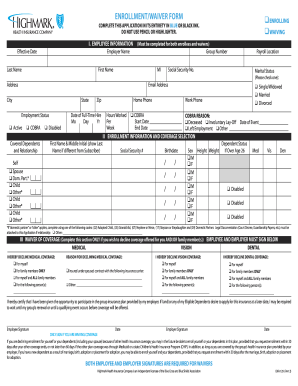
The Enrollment/Waiver Application and Change Form is a healthcare document used by employees to enroll in or waive group health coverage for themselves and their dependents.
pdfFiller scores top ratings on review platforms




Who needs Enrollment Waiver Form?
Explore how professionals across industries use pdfFiller.

Enrollment Waiver Form is needed by:
-
Employees seeking health coverage or waiver options.
-
Employers managing employee health benefits.
-
HR professionals handling insurance enrollments.
-
Insurance agents assisting with healthcare plans.
-
Dependents of employees needing coverage insight.
Comprehensive Guide to Enrollment Waiver Form
What is the Enrollment/Waiver Application and Change Form?
The Enrollment/Waiver Application and Change Form allows employees in Pennsylvania to either enroll in or waive group health coverage for themselves and their dependents. This form is crucial for ensuring that both employees and employers have accurate health insurance information. Completing this form correctly is essential to maintain proper health insurance coverage.
Key details include that it serves both employees and employers, highlighting the importance of precise completion for health insurance enrollment. The form effectively manages the relationship between employee benefits enrollment and the legal requirements for employers.
Purpose and Benefits of the Enrollment/Waiver Application and Change Form
Employees need the Enrollment/Waiver Application and Change Form to either enroll in health coverage or decline it. This distinction between enrollment and waiver is significant in making informed healthcare choices. Completing this form brings advantages such as clear documentation for both employees and employers, thus simplifying the enrollment process for health benefits.
Through accurate completion, users can navigate group health insurance applications more proficiently, ensuring they receive appropriate coverage tailored to their needs.
Key Features of the Enrollment/Waiver Application and Change Form
The Enrollment/Waiver Application and Change Form is structured to gather essential information such as the Employee Name, Group Number, and Authorized Signature. The fillable format of the form enhances convenience, particularly when using platforms like pdfFiller. Users must complete specific sections, which include various checkboxes and signature fields.
-
Employee Name
-
Group Number
-
Effective Date of Coverage
-
Authorized Signature (Required)
Who Needs to Complete the Enrollment/Waiver Application and Change Form?
Eligible parties who must complete this form include employees, their dependents, and employers. Various scenarios necessitate the use of this form, such as when changing insurance plans or adding dependents. Understanding the specific requirements set by Pennsylvania ensures compliance and facilitates the enrollment process.
How to Fill Out the Enrollment/Waiver Application and Change Form Online (Step-by-Step)
Filling out the Enrollment/Waiver Application and Change Form online via pdfFiller is a straightforward process. Follow these steps to accurately complete the form:
-
Access the form on pdfFiller.
-
Input your Employee Name in the designated field.
-
Provide other required information like your Group Number and Effective Date of Coverage.
-
Complete any checkboxes applicable to your enrollment or waiver.
-
Sign the form electronically by providing your Authorized Signature.
Ensure each section is filled out thoroughly to avoid any processing delays.
Submission Methods and Delivery of the Enrollment/Waiver Application and Change Form
There are multiple submission options for the Enrollment/Waiver Application and Change Form, including online and physical submission methods. To submit the form using pdfFiller, follow the detailed instructions provided on the platform. After submission, users can confirm and track their submissions for peace of mind.
Common Errors to Avoid When Submitting the Enrollment/Waiver Application and Change Form
Several frequent mistakes can occur when filling out the Enrollment/Waiver Application and Change Form, such as overlooking required fields or incorrect signatures. Reviewing your form meticulously before submission is critical to prevent delays. Additionally, adhering to submission deadlines will facilitate timely processing of the application.
-
Missing signatures
-
Errors in required fields
Security and Compliance When Handling the Enrollment/Waiver Application and Change Form
When completing the Enrollment/Waiver Application and Change Form, data integrity and security are paramount. Utilizing services like pdfFiller ensures compliance with regulations such as HIPAA and GDPR to protect sensitive information. Users can trust pdfFiller to manage their documents securely.
Maximizing Your Experience with pdfFiller for the Enrollment/Waiver Application and Change Form
Utilizing pdfFiller's features enhances the ease of completing the Enrollment/Waiver Application and Change Form. Its cloud-based platform offers convenience, security, and an efficient document management process. Users are encouraged to leverage these tools for a streamlined experience in filling out forms and managing sensitive documentation.
How to fill out the Enrollment Waiver Form
-
1.To access the Enrollment/Waiver Application and Change Form on pdfFiller, navigate to the website and log in to your account. Search for the form by entering its name in the search bar.
-
2.Once you locate the form, click on it to open it in the pdfFiller interface. Familiarize yourself with the layout, including sections that require your input.
-
3.Before filling out the form, gather all necessary information, such as your personal details, dependents' information, any existing insurance coverages, and reasons for waiving coverage, if applicable.
-
4.Begin filling out the form by clicking into each field. Enter your information accurately in the designated areas. Use checkboxes where required and ensure that all mandatory fields are completed.
-
5.Review the form carefully to ensure all information is correct. Double-check names, dates, and numbers, as any errors may delay processing.
-
6.After verifying the details, navigate to the signature area. You and your employer will need to provide signatures to validate the application. Follow the prompts in pdfFiller to electronically sign the form.
-
7.Once all sections are completed and signed, you can save your work. Utilize pdfFiller’s options to download the completed form, store it in your account, or submit it directly to your employer or relevant party.

Who is eligible to use the Enrollment/Waiver Application and Change Form?
This form is intended for employees who wish to enroll in or waive group health coverage, along with their dependents, as part of their employee benefits package.
Is there a deadline for submitting this form?
Deadlines may vary based on employer policies or specific plan enrollment periods. It is advised to check with your HR department or employer for the exact submission timelines.
How do I submit the completed form?
You can submit the completed form electronically through pdfFiller or download it and send it to your HR department or employer based on their submission requirements.
Are any supporting documents required with the form?
Typically, you may need to attach documents related to existing coverage or reasons for waiving health coverage. Always verify with your employer for their specific requirements.
What mistakes should I avoid when filling out this form?
Common mistakes include leaving fields blank, providing inaccurate information, and not obtaining the required signatures. Ensure all sections are completed and review your entries before submission.
How long does processing take after submission?
Processing times for the Enrollment/Waiver Application and Change Form can vary. It usually depends on the employer’s schedule and their human resources processes, so inquire about the expected timeframe.
What happens if I need to make changes after submitting the form?
If changes are needed post-submission, contact your HR department immediately. They will guide you on how to amend your application in accordance with their policies.
Related Content
Related Forms




Get the latest insights from our blog


If you believe that this page should be taken down, please follow our DMCA take down process
here
.
This form may include fields for payment information. Data entered in these fields is not covered by PCI DSS compliance.