
Last updated on
Nov 9, 2026
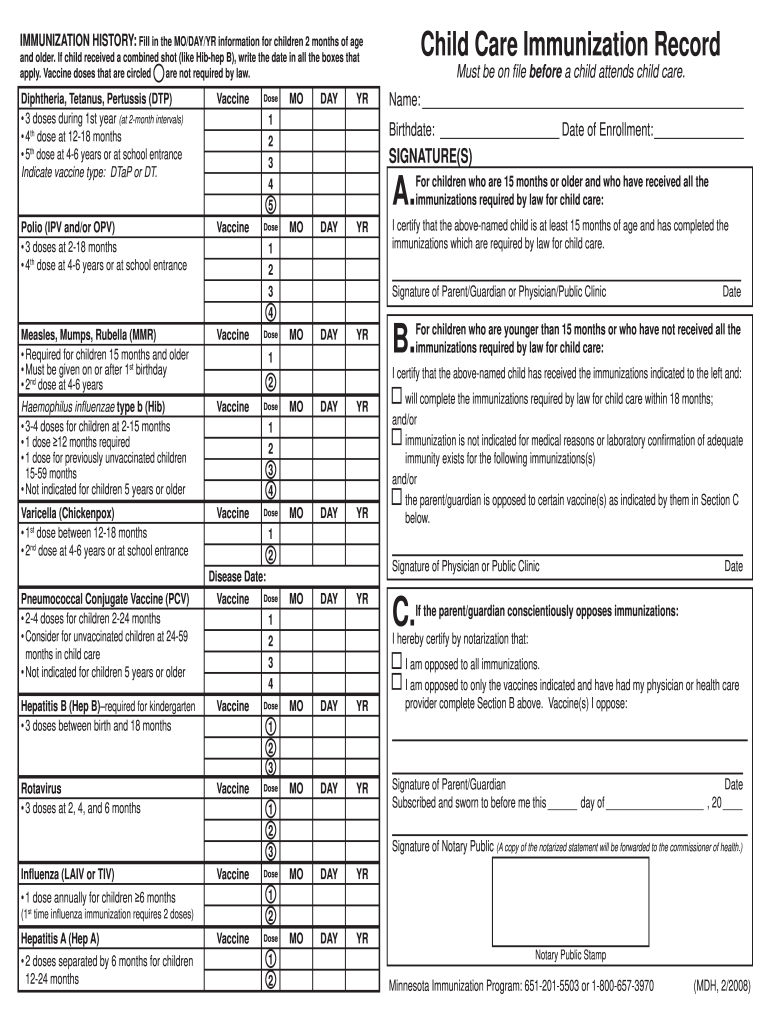
MN IC 140-0163 2008 free printable template
pdfFiller is not affiliated with any government organization

Fill out
Complete the form online in a simple drag-and-drop editor.

eSign
Add your legally binding signature or send the form for signing.

Share
Share the form via a link, letting anyone fill it out from any device.

Export
Download, print, email, or move the form to your cloud storage.
Why pdfFiller is the best tool for your documents and forms


End-to-end document management
From editing and signing to collaboration and tracking, pdfFiller has everything you need to get your documents done quickly and efficiently.
Accessible from anywhere
pdfFiller is fully cloud-based. This means you can edit, sign, and share documents from anywhere using your computer, smartphone, or tablet.
Secure and compliant
pdfFiller lets you securely manage documents following global laws like ESIGN, CCPA, and GDPR. It's also HIPAA and SOC 2 compliant.
What is MN IC 140-0163
The Child Care Immunization Record is a healthcare form used by parents and guardians to document children's immunization history required for child care admission in Minnesota.
pdfFiller scores top ratings on review platforms




Who needs MN IC 140-0163?
Explore how professionals across industries use pdfFiller.

MN IC 140-0163 is needed by:
-
Parents or guardians of children
-
Physicians or public clinic staff
-
Notary public officials
-
Child care providers
-
Health care administrators
-
Legal guardians
Comprehensive Guide to MN IC 140-0163
What is the Child Care Immunization Record?
The Child Care Immunization Record is a legal document utilized in Minnesota to log a child's immunization history, crucial for their enrollment in child care facilities. This form ensures that vital immunization information is documented, helping to safeguard public health through proper tracking of immunization statuses.
By law, child care providers must maintain this immunization record before children can attend their facilities. The documentation serves as a vital tool for parents and healthcare providers in managing children's health and ensuring compliance with state regulations.
Purpose and Benefits of the Child Care Immunization Record
The Child Care Immunization Record is essential for both parents and child care facilities. Its primary purpose is to guarantee that children fulfill mandatory immunization requirements prior to attending child care. This record plays a critical role in public health, assisting in the prevention of disease outbreaks by tracking and verifying immunization statuses.
Additionally, it simplifies health management for parents and guardians while providing necessary documentation for physicians. This ensures a streamlined process when addressing children’s health needs, facilitating effective communication among healthcare providers, parents, and child care facilities.
Who Needs the Child Care Immunization Record?
This form is required for various stakeholders involved in the child's health care process. Key parties include:
-
Parents/Guardians: Responsible for accurately filling in the child's immunization information.
-
Physicians/Public Clinics: Must sign the document to validate the immunization history provided.
-
Notary Public: Required to notarize the form in certain situations, ensuring authenticity.
These roles are critical to ensuring compliance with Minnesota law concerning child care immunization records.
Key Features of the Child Care Immunization Record
The Child Care Immunization Record includes several essential features designed to facilitate accurate documentation. Among these are:
-
Fillable fields for the child’s name, immunization dates, and required signatures.
-
Instructions for completing the form, including notarization requirements and compliance details.
-
Adherence to Minnesota child care regulations, confirming its legitimacy as a required document.
How to Fill Out the Child Care Immunization Record Online (Step-by-Step)
To efficiently complete the Child Care Immunization Record using pdfFiller, follow these steps:
-
Access the pdfFiller platform and locate the Child Care Immunization Record template.
-
Gather all necessary information, including the child's vaccination history and personal details.
-
Carefully fill out the form, ensuring all fields are completed accurately.
-
Check for completeness and verify the data entered before submission.
-
Save and download the finalized document for your records.
How to Sign or Notarize the Child Care Immunization Record
When it comes to signing the Child Care Immunization Record, understanding the difference between digital and wet signatures is crucial. Digital signatures can be completed online via pdfFiller, providing a quick and efficient method. However, in certain situations, a wet signature may be required.
For notarization, the following steps should be taken:
-
Complete the form with all required information.
-
Schedule an appointment with a notary public to verify the authenticity of the signature.
-
Present appropriate identification during the notarization process.
-
Ensure the notary completes their section on the form for validity.
Where to Submit the Child Care Immunization Record
Upon filling out the Child Care Immunization Record, submitting it correctly is essential. Here’s how:
-
Physical Submission: Deliver the completed form directly to the child care facility.
-
Digital Submission: Utilize email or online portals provided by the child care center for submission.
Be mindful of submission timelines to ensure your child can begin attending the child care facility without delays.
Security and Compliance for the Child Care Immunization Record
Data security is a top priority when handling sensitive documents like the Child Care Immunization Record. pdfFiller employs robust security measures, including 256-bit encryption and compliance with HIPAA and GDPR, to protect user information.
To ensure your data remains secure during the form submission process:
-
Use pdfFiller for securely storing and sharing the immunization record.
-
Verify the platform’s compliance with necessary regulations.
-
Follow best practices for handling confidential documents.
Real-Life Examples and Templates for the Child Care Immunization Record
Utilizing templates can greatly streamline the process of completing the Child Care Immunization Record. Here are some benefits of using templates:
-
Access to sample completed forms to guide your entries.
-
Time savings by reducing the need for repeated data entry.
-
Downloadable templates for easy access and convenience.
Templates ensure that all necessary information is captured accurately and in compliance with state requirements.
Empower Your Child’s Health Journey with pdfFiller
Using pdfFiller to manage your Child Care Immunization Record offers numerous advantages, including user-friendly features and enhanced security. The platform enables parents and guardians to efficiently fill out, sign, and manage their child's immunization records online.
pdfFiller also provides additional resources and support to help you navigate the documentation process seamlessly.
How to fill out the MN IC 140-0163
-
1.Access the Child Care Immunization Record on pdfFiller by searching for the form title in the platform's search bar.
-
2.Open the form and familiarize yourself with all sections, noting where you need to input data.
-
3.Gather essential information about the child's immunization history, including dates and types of vaccines received.
-
4.Fill out the child's details in the designated fields such as name, date of birth, and guardianship status.
-
5.Enter the immunization dates and types accurately in the provided fields to ensure compliance with child care requirements.
-
6.Coordinate with the relevant physician, public clinic, or notary public for their signature as required based on the child's immunization status.
-
7.After completing all sections, carefully review the form for any errors or omissions to ensure all information is accurately displayed.
-
8.Finalize your document by saving it on pdfFiller or submit it directly if available.
-
9.Download or print the completed form as a PDF for your records or for submission to the child care facility.

Who is required to sign the Child Care Immunization Record?
The Child Care Immunization Record must be signed by a physician, staff from a public clinic, or a notary public, depending on the child's immunization status and age.
What information is needed to complete the Child Care Immunization Record?
You will need the child's full name, date of birth, immunization dates, types of vaccines received, and the signature of an authorized individual (physician, public clinic, or notary public).
Is there a deadline for submitting the Child Care Immunization Record?
Yes, the Child Care Immunization Record must be on file at the child care facility before the child can attend, so it is important to submit it as soon as possible.
Can the Child Care Immunization Record be filled out online?
Yes, you can fill out the Child Care Immunization Record online using pdfFiller, which allows for electronic completion, saving, and submission of the form.
What happens if I make a mistake on the Child Care Immunization Record?
If you notice a mistake after submitting the form, contact the child care facility immediately to request a correction; ensure to keep copies of your submission for reference.
Are there any fees associated with notarizing the Child Care Immunization Record?
Typically, notary public services might charge a fee for their signature; it is advisable to check with the notary prior to the appointment.
Does the Child Care Immunization Record need to be updated frequently?
Yes, it should be updated whenever the child receives new vaccinations to ensure that the record remains current and complies with child care admission requirements.
MN IC 140-0163 Form Versions
Related Content
Related Forms



Related Catalogs
Get the latest insights from our blog


If you believe that this page should be taken down, please follow our DMCA take down process
here
.
This form may include fields for payment information. Data entered in these fields is not covered by PCI DSS compliance.