
Last updated on
Nov 6, 2026
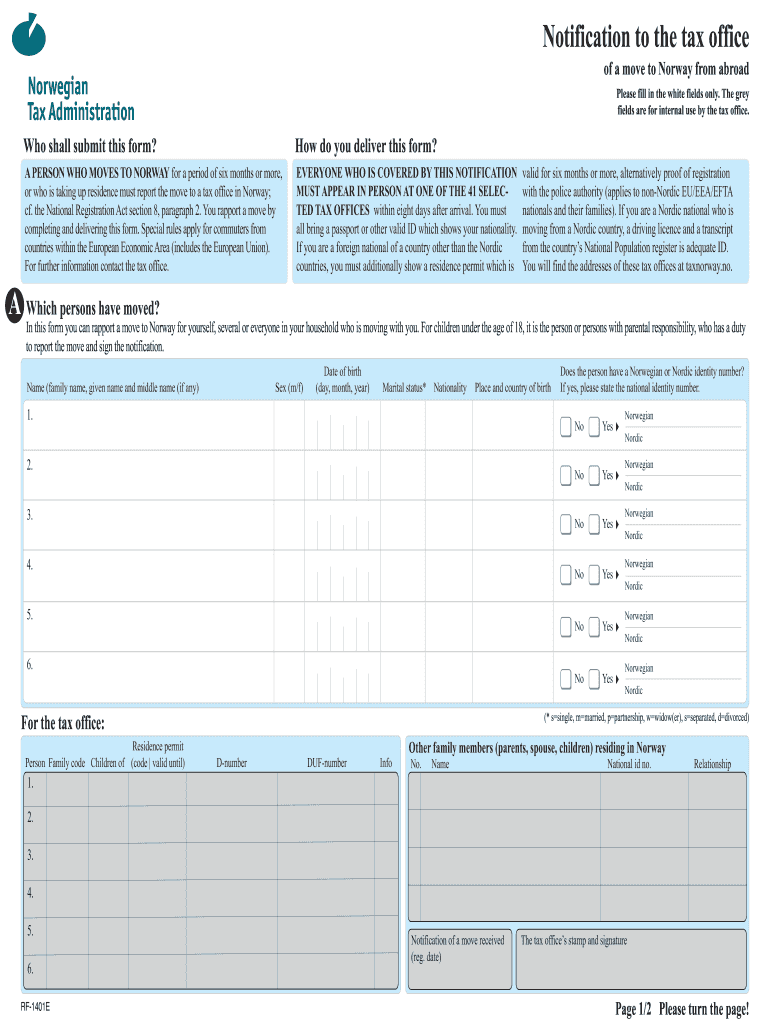
NO RF-1401E free printable template
We are not affiliated with any brand or entity on this form

Fill out
Complete the form online in a simple drag-and-drop editor.

eSign
Add your legally binding signature or send the form for signing.

Share
Share the form via a link, letting anyone fill it out from any device.

Export
Download, print, email, or move the form to your cloud storage.
Why pdfFiller is the best tool for your documents and forms


End-to-end document management
From editing and signing to collaboration and tracking, pdfFiller has everything you need to get your documents done quickly and efficiently.
Accessible from anywhere
pdfFiller is fully cloud-based. This means you can edit, sign, and share documents from anywhere using your computer, smartphone, or tablet.
Secure and compliant
pdfFiller lets you securely manage documents following global laws like ESIGN, CCPA, and GDPR. It's also HIPAA and SOC 2 compliant.
What is NO RF-1401E
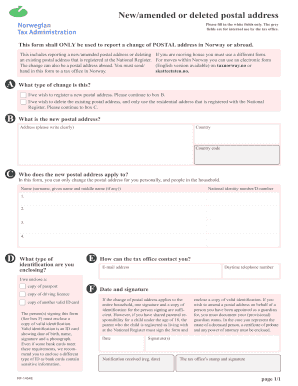
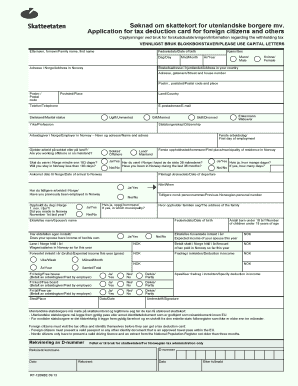
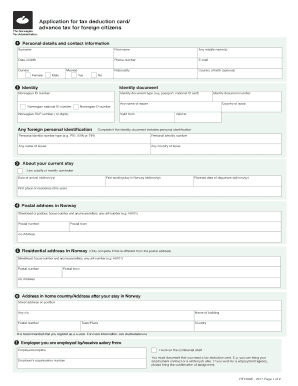
The Norway Tax Office Move Notification Form is a government document used by individuals relocating to Norway to officially notify the Norwegian tax office of their move.
pdfFiller scores top ratings on review platforms




This is an excellent tool that helps me in my small business.
Great service Highly recommend. To anyone looking for collating documents and so forth.
Who needs NO RF-1401E?
Explore how professionals across industries use pdfFiller.

NO RF-1401E is needed by:
-
Individuals moving to Norway for six months or more
-
Foreign residents registering their residence in Norway
-
Legal representatives handling moves on behalf of others
-
Citizens seeking to ensure compliance with Norwegian tax regulations
Comprehensive Guide to NO RF-1401E
What is the Norway Tax Office Move Notification Form?
The RF-1401E form, known as the Norway Tax Office Move Notification Form, serves to inform the Norwegian tax office about an individual's relocation to Norway. This form must be submitted by anyone moving to Norway for a period of six months or more. Required personal information includes the individual's name, date of birth, nationality, and new address to ensure proper registration.
Purpose and Benefits of the Norway Tax Office Move Notification Form
Timely submission of the Norway Tax Office Move Notification Form is critical due to legal obligations. It is essential for individuals planning to stay in Norway for over six months. Early submission facilitates residence registration and helps in managing tax considerations more effectively. Ensuring compliance can streamline the relocation process and enhance your experience adjusting to life in Norway.
Who Needs to File the Norway Tax Office Move Notification Form?
This form is necessary for individuals moving to Norway for durations exceeding six months. Additionally, legal representatives may submit the form on behalf of those who are unable to do so. Understanding who is obligated to file ensures proper compliance and the maintenance of legal residency status in Norway.
How to Fill Out the Norway Tax Office Move Notification Form Online
Filling out the Norway Tax Office Move Notification Form online can be accomplished through pdfFiller. Follow these steps to ensure a seamless process:
-
Access the RF-1401E form on the pdfFiller platform.
-
Carefully fill in all required fields, ensuring to complete only the designated white fields.
-
Double-check your entries for accuracy before submission.
By following these guidelines, you can avoid common mistakes and ensure the form is completed correctly.
Field-by-Field Instructions for Completing the Norway Tax Office Move Notification Form
To correctly fill out the Norway Tax Office Move Notification Form, pay attention to each section. Here are specific instructions for some key fields:
-
Name: Use the format for family name, given name, and middle name (if applicable).
-
Date of birth: Ensure accuracy in the format used.
-
New address: Provide complete details to avoid processing delays.
Be aware of common errors, such as failing to sign the form, which can lead to compliance issues.
Important Deadlines and Submission Guidelines for the Norway Tax Office Move Notification Form
Individuals are required to submit the Norway Tax Office Move Notification Form within eight days of arriving in Norway. There are several methods available for submission:
-
Online through the pdfFiller platform, ensuring efficient processing.
-
Printed formats can also be submitted by mailing to the appropriate tax office.
Adhering to these deadlines will help avoid any legal complications.
Consequences of Not Filing or Late Filing the Norway Tax Office Move Notification Form
Failure to file the Norway Tax Office Move Notification Form or late submissions can lead to significant risks. Potential repercussions include:
-
Fines imposed for non-compliance.
-
Complications with tax obligations.
-
Issues related to residency status in Norway.
Understanding these consequences underscores the importance of submitting the form on time.
Security and Compliance When Handling the Norway Tax Office Move Notification Form
When dealing with the Norway Tax Office Move Notification Form, ensuring the privacy and security of personal information is paramount. pdfFiller employs advanced encryption methods along with compliance with standards like HIPAA and GDPR, assuring users that their sensitive details are handled securely throughout the process.
How to Use pdfFiller to Complete the Norway Tax Office Move Notification Form
Utilizing pdfFiller to manage the Norway Tax Office Move Notification Form offers numerous benefits. Key features include:
-
Fillable forms that simplify the process.
-
eSignature options for convenience.
-
Document management tools to keep your submissions organized.
These features foster a seamless experience when completing the form online.
Download and Save Your Norway Tax Office Move Notification Form
After completing the Norway Tax Office Move Notification Form, downloading and saving the document is straightforward. Follow these steps:
-
Click on the download option to export your filled form in PDF format.
-
Choose secure methods to save and share the document as needed.
This ensures that you have a readily accessible copy of your important documentation.
How to fill out the NO RF-1401E
-
1.Access the Norway Tax Office Move Notification Form on pdfFiller by searching for 'Norway Tax Office Move Notification Form' in the template library.
-
2.Open the form in pdfFiller to view the fillable sections that require your information.
-
3.Before you start filling out the form, gather necessary documents, such as your passport, identification details like your date of birth and nationality, and your new address in Norway.
-
4.Begin with the first section of the form, input your family name, given name, and any middle names. Use the labeled input fields to guide your responses.
-
5.Continue filling out fields for your date of birth and nationality, ensuring all details match your identification documents for accuracy.
-
6.Utilize the checkboxes where applicable and leave any pre-filled fields unaltered as instructed. Follow the prompts and guidelines provided within the form to avoid errors.
-
7.Once you have filled in all required white fields, double-check your entries for any typographical errors or missing information.
-
8.After reviewing your form in pdfFiller, use the preview feature to visualize how the final document will look. This helps ensure everything is correct before submission.
-
9.Save the completed form to your pdfFiller account or download it to your device in your preferred format, typically as a PDF.
-
10.To submit, follow the instructions provided for sending the form to the appropriate Norwegian tax office, which may include mailing it or submitting it online, if available.

Who is eligible to use the Norway Tax Office Move Notification Form?
Any individual planning to move to Norway for six months or longer must complete and submit the Norway Tax Office Move Notification Form to inform the tax office about their residency.
What is the deadline for submitting this notification form?
The form must be submitted within eight days of your arrival in Norway to ensure compliance with tax registration requirements.
How do I submit the Norway Tax Office Move Notification Form?
You can submit the completed form via mail or through an online submission portal if available. Ensure that you follow the guidelines set by the Norwegian tax office.
What supporting documents do I need to submit with the form?
Typically, you will need to provide valid identification documents such as your passport and any other proof of your new address in Norway, but always check for specific requirements.
What common mistakes should I avoid when filling out the form?
Ensure that all the information matches your documents, avoid leaving required fields blank, and follow instructions carefully, especially regarding signature requirements.
How long does it take for the Norway Tax Office to process this form?
Processing times can vary, but generally, expect confirmation or further instructions within a few weeks. Check the official tax office website for the most accurate estimates.
Is there a fee for submitting the Norway Tax Office Move Notification Form?
There is no fee associated with submitting the Norway Tax Office Move Notification Form, making it a free requirement for individuals moving to Norway.
Related Content
Related Forms

Get the latest insights from our blog


If you believe that this page should be taken down, please follow our DMCA take down process
here
.
This form may include fields for payment information. Data entered in these fields is not covered by PCI DSS compliance.