
Last updated on
Nov 9, 2026

Standard Bank Form 00186940 2009 free printable template
pdfFiller is not affiliated with any government organization

Fill out
Complete the form online in a simple drag-and-drop editor.

eSign
Add your legally binding signature or send the form for signing.

Share
Share the form via a link, letting anyone fill it out from any device.

Export
Download, print, email, or move the form to your cloud storage.
Why pdfFiller is the best tool for your documents and forms


End-to-end document management
From editing and signing to collaboration and tracking, pdfFiller has everything you need to get your documents done quickly and efficiently.
Accessible from anywhere
pdfFiller is fully cloud-based. This means you can edit, sign, and share documents from anywhere using your computer, smartphone, or tablet.
Secure and compliant
pdfFiller lets you securely manage documents following global laws like ESIGN, CCPA, and GDPR. It's also HIPAA and SOC 2 compliant.
What is Standard Bank Form 00186940
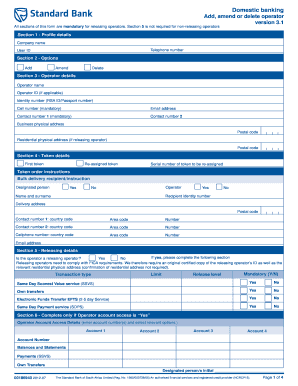
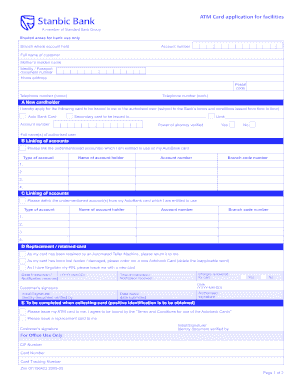
The Standard Bank Operator Access Form is a business document used by authorized personnel to establish or modify operator access for business banking services.
pdfFiller scores top ratings on review platforms




Who needs Standard Bank Form 00186940?
Explore how professionals across industries use pdfFiller.

Standard Bank Form 00186940 is needed by:
-
Business banking account holders
-
Compliance officers in companies
-
Designated persons acting for organizations
-
Finance departments managing banking services
-
Administrative staff handling banking permissions
Comprehensive Guide to Standard Bank Form 00186940
What is the Standard Bank Operator Access Form
The Standard Bank Operator Access Form serves a crucial role in business banking by facilitating the management of operator access paths. This form is designed to streamline processes related to the addition, amendment, or deletion of these access paths, ensuring that businesses can effectively oversee who has access to their banking services. Operator access paths are important as they dictate how employees interact with business banking systems, enhancing both security and operational efficiency.
Purpose and Benefits of the Standard Bank Operator Access Form
Businesses need the Standard Bank Operator Access Form to manage operator access clearly and efficiently. Utilizing this form offers several benefits, including:
-
Streamlined processes for adding or modifying user access
-
Enhanced security by controlling who can access sensitive banking information
-
Improved administrative capabilities for organizations managing multiple operators
Overall, the form simplifies the complex task of managing operator access paths, making it an essential tool for business banking.
Key Features of the Standard Bank Operator Access Form
The Standard Bank Operator Access Form contains several critical components that facilitate its use. Key sections include:
-
Profile Details: Information about the business and account
-
Operator Details: Identifying information for the individual operators
-
Account Access: Specification of what accounts the operator can access
It includes multiple fillable fields that guide users through the information required to complete the form accurately, with explicit instructions to ensure proper completion.
Who Needs the Standard Bank Operator Access Form
The intended audience for the Standard Bank Operator Access Form includes designated persons within an organization who are responsible for managing operator access. This typically encompasses roles such as administrators and managers tasked with overseeing banking operations. For businesses that handle numerous operators, having a clear and structured method for managing these access paths is invaluable.
How to Fill Out the Standard Bank Operator Access Form Online (Step-by-Step)
To complete the Standard Bank Operator Access Form online, follow these steps:
-
Gather all necessary information, including operator and account details.
-
Access the form via the appropriate online platform.
-
Fill in the profile and operator details as prompted.
-
Review the information for accuracy and completeness.
-
Proceed to the signing section.
Organizing your information beforehand can significantly streamline the filling process, ensuring accuracy and efficiency.
How to Sign the Standard Bank Operator Access Form
Signing the Standard Bank Operator Access Form is a vital step for validation. A designated person must sign the document to confirm the accuracy of the provided information. There are two primary options for signature:
-
Digital signature: Convenient for quick online processing
-
Wet signature: Required for traditional mailing and in-person submissions
Understanding the implications of each signature type can assist in compliance and ensure timely processing.
Where to Submit the Standard Bank Operator Access Form
Upon completing the Standard Bank Operator Access Form, it is crucial to submit it correctly. The submission options are as follows:
-
Online submission via the Business Online Admin Office
-
Postal submission to the specified administrative office
Ensuring that the form is sent to the right location is essential for timely processing.
What Happens After You Submit the Standard Bank Operator Access Form
After submitting the Standard Bank Operator Access Form, users can expect a confirmation of receipt. Typically, the process includes tracking the status of the submission, which allows businesses to stay informed about processing timelines. Understanding what to expect post-submission is essential for maintaining smooth operational flow within banking services.
Common Errors and How to Avoid Them
Filling out the Standard Bank Operator Access Form can lead to common pitfalls. Frequent mistakes include:
-
Incomplete information in profile and operator sections
-
Incorrect signatures or missing signatures
To avoid these issues, reviewing the completed form for accuracy before submission is highly recommended. This diligence can prevent delays and complications.
Enhancing Your Experience with pdfFiller for the Standard Bank Operator Access Form
Using pdfFiller to manage the Standard Bank Operator Access Form offers numerous advantages. Key capabilities include:
-
Editing and filling forms with ease
-
Secure electronic signing options
-
Compliance with security standards including HIPAA and GDPR
pdfFiller's user-friendly interface and robust security features make it an ideal solution for handling sensitive documents, further enhancing user experience.
How to fill out the Standard Bank Form 00186940
-
1.Access the Standard Bank Operator Access Form on pdfFiller by searching the form name in the document search bar and selecting the correct template.
-
2.Open the form and familiarize yourself with each section. Ensure that you have the necessary information, including operator details and account access requirements, available for input.
-
3.Begin by filling out the profile details section, including the business name and contact information as required.
-
4.Proceed to fill in the operator details, specifying the name, position, and the access rights needed for each designated operator.
-
5.Utilize pdfFiller’s customizable fields such as checkboxes for defining access paths. Be thorough and ensure all required fields are completed.
-
6.When all fields are filled, review the form for accuracy. Use pdfFiller's review tools to confirm that all information is correct and complete.
-
7.Once you have reviewed and finalized your entries, save the document to your pdfFiller account for easy access.
-
8.You can download the completed form in your preferred format or submit it directly through the platform, following the company’s procedures for submission to the relevant Business Online Admin Office.

Who is eligible to fill out the Standard Bank Operator Access Form?
The Standard Bank Operator Access Form is intended for authorized representatives within organizations, such as compliance officers or designated persons responsible for business banking access.
What information do I need to complete this form?
You will need the organization’s profile details, including the business name, operator details, account information, and specifics on access paths required for operators.
How can I submit the completed form?
Once filled, the completed Standard Bank Operator Access Form can be submitted through pdfFiller by following the submission guidelines specified by your Business Online Admin Office.
Are there any common mistakes to avoid while filling out this form?
Common mistakes include missing required fields, incorrect operator details, and failing to get the form signed by the designated person before submission.
What happens after I submit the form?
After submitting the Standard Bank Operator Access Form, it is processed by the Business Online Admin Office, which may contact you for additional information if needed.
Is notarization needed for this form?
No, notarization is not required for the Standard Bank Operator Access Form. It must be signed by a designated person only.
How long does it take for the submission to be processed?
Processing times can vary based on the organization’s workload, but typically, you can expect a response within a few business days post-submission.
Standard Bank Form 00186940 Form Versions
Related Content
Related Forms




Related Catalogs
Get the latest insights from our blog


If you believe that this page should be taken down, please follow our DMCA take down process
here
.
This form may include fields for payment information. Data entered in these fields is not covered by PCI DSS compliance.