
Last updated on
Oct 31, 2026
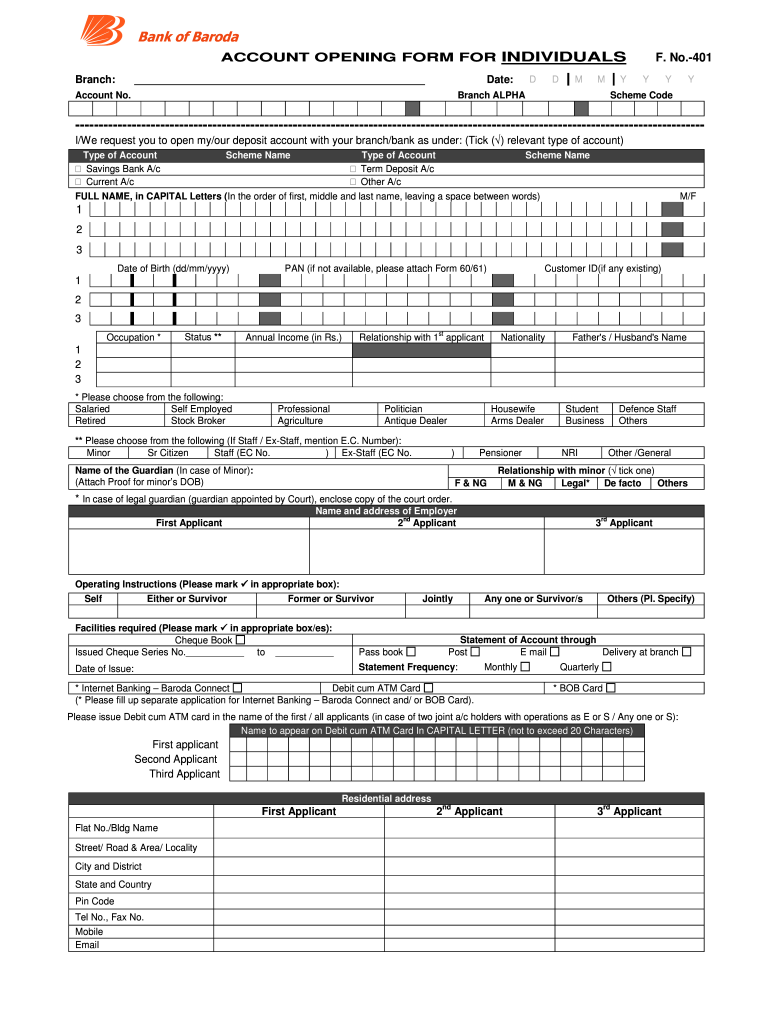
India Bank of Baroda Form 401 2008 free printable template
We are not affiliated with any brand or entity on this form

Fill out
Complete the form online in a simple drag-and-drop editor.

eSign
Add your legally binding signature or send the form for signing.

Share
Share the form via a link, letting anyone fill it out from any device.

Export
Download, print, email, or move the form to your cloud storage.
Why pdfFiller is the best tool for your documents and forms


End-to-end document management
From editing and signing to collaboration and tracking, pdfFiller has everything you need to get your documents done quickly and efficiently.
Accessible from anywhere
pdfFiller is fully cloud-based. This means you can edit, sign, and share documents from anywhere using your computer, smartphone, or tablet.
Secure and compliant
pdfFiller lets you securely manage documents following global laws like ESIGN, CCPA, and GDPR. It's also HIPAA and SOC 2 compliant.
What is India Bank of Baroda Form 401
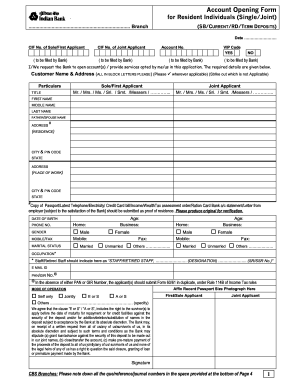
The Bank of Baroda Account Opening Form is a business document used by individuals to request the opening of a deposit account with the bank in India.
pdfFiller scores top ratings on review platforms




Find it very easy to use. I have pre-filled forms - all I need to do is change the name and address of the client.
This is my first time using but it seems to be user friendly and easy to navigate.
Who needs India Bank of Baroda Form 401?
Explore how professionals across industries use pdfFiller.

India Bank of Baroda Form 401 is needed by:
-
Individuals looking to open a bank account
-
Existing Bank of Baroda customers acting as introducers
-
Bank officials processing account applications
-
Small business owners needing a business account
-
Students applying for a personal account
Comprehensive Guide to India Bank of Baroda Form 401
What is the Bank of Baroda Account Opening Form?
The Bank of Baroda Account Opening Form is a vital document used by individuals to request the opening of a deposit account with the bank. This form is specifically designed for use in India and includes necessary personal information, such as your full name, date of birth, and PAN. Essential for regulatory compliance, this form ensures that applicants provide the required personal details when opening an account at Bank of Baroda.
The form plays a central role in initiating the account opening process and is crafted to facilitate a smooth transition into banking with the institution.
Purpose and Benefits of the Bank of Baroda Account Opening Form
The Bank of Baroda Account Opening Form serves multiple purposes, making it crucial for prospective account holders. By completing this form, individuals can reap various benefits associated with having a deposit account, such as secure banking and easy access to financial services.
Using the official Bank of Baroda form is important, as adherence to the bank’s regulations ensures a smooth application process. Compliance not only preserves the integrity of your information but also enhances the convenience of managing your banking needs.
Who Needs the Bank of Baroda Account Opening Form?
This form is intended primarily for residents of India who meet specific eligibility criteria, such as age requirements. Individuals looking to open a savings or current account must fill out the form accurately.
-
All applicants must provide necessary documentation, including their identification and residence proof.
-
The role of the introducer is significant; their signature on the form validates that the applicant meets the bank's requirements.
-
Bank officials play a critical role in verifying the application and ensuring all documentation is complete and compliant.
Key Features of the Bank of Baroda Account Opening Form
The Bank of Baroda Account Opening Form incorporates several features that facilitate efficient completion. With fillable fields and checkboxes, the form is designed for easy navigation, ensuring that users can easily find the required sections.
-
Each form includes detailed operating instructions that guide users on how to fill out necessary information accurately.
-
The user-friendly layout makes it simple to identify required declarations and sections for specific facilities needed.
How to Fill Out the Bank of Baroda Account Opening Form Online (Step-by-Step)
Filling out the Bank of Baroda Account Opening Form online involves several steps to ensure accuracy and completeness. Follow these detailed instructions for each section of the form:
-
Begin by entering your personal details, ensuring to use capital letters for your full name.
-
Detailed instructions guide you to accurately complete each field to minimize errors.
-
Review your inputs thoroughly before submitting the form to avoid common mistakes.
Review and Validation Checklist for the Bank of Baroda Account Opening Form
Before submitting your completed Bank of Baroda Account Opening Form, it's crucial to conduct a thorough review. This validation process helps to prevent delays in your application.
-
Ensure all required signatures are present, including those of the applicant, introducer, and bank official.
-
Check that all necessary documents are included with your submission.
-
Be aware of common errors, such as missing fields or incorrect personal details, which can lead to processing issues.
Submission Methods for the Bank of Baroda Account Opening Form
The completed Bank of Baroda Account Opening Form can be submitted through various methods, providing convenience to prospective customers. Submission options include both in-person and online methods.
-
In-person submissions can be made at any branch of Bank of Baroda.
-
Online submissions are also possible, further streamlining the application process.
-
Be mindful of important deadlines and processing times for applications to ensure timely account opening.
Security and Compliance for the Bank of Baroda Account Opening Form
When filling out the Bank of Baroda Account Opening Form, security is paramount. The bank employs comprehensive data protection measures to safeguard your personal information during the application process.
-
All submissions are handled in compliance with relevant laws, including GDPR, ensuring that your data is protected.
-
The use of secure platforms, such as pdfFiller, ensures sensitive information remains confidential during handling.
How pdfFiller Can Help with Your Bank of Baroda Account Opening Form
pdfFiller offers valuable support for users looking to fill out the Bank of Baroda Account Opening Form efficiently. With its cloud-based features, users can edit and manage forms online securely.
-
Utilize pdfFiller to create fillable forms that meet all your submission needs effortlessly.
-
The platform also supports eSigning, making the submission process more convenient.
-
With pdfFiller, you can ensure a hassle-free experience when filling out and submitting your account opening form.
How to fill out the India Bank of Baroda Form 401
-
1.To access the Bank of Baroda Account Opening Form on pdfFiller, begin by navigating to the pdfFiller website and using the search bar to locate the specific form.
-
2.Once located, click on the form to open it in the pdfFiller interface, where you can start completing it online.
-
3.Before filling out the form, gather necessary personal information, including your full name, date of birth, PAN, occupation, and residential address.
-
4.Begin filling in the fields of the form, carefully following instructions provided alongside each section. For instance, write your name in uppercase letters and separate first, middle, and last names with spaces.
-
5.Pay attention to checkboxes for selecting operating instructions and additional facilities you want, ensuring you mark those according to your preferences.
-
6.After inputting your details, review the entire form to ensure all information is accurate to avoid common mistakes, such as misspelling names or incorrect PAN.
-
7.Finalize your form by signing it electronically within pdfFiller, confirming you meet all eligibility requirements.
-
8.Once completed, save your work by clicking the 'Save' option. You can also choose to download the filled form in PDF format or submit it directly through pdfFiller.

Who is eligible to use the Bank of Baroda Account Opening Form?
Any individual or entity interested in opening a deposit account with the Bank of Baroda can use this form. This includes first-time account holders and existing customers who need to introduce new applicants.
What documents are required to complete the account opening form?
To fill out the Bank of Baroda Account Opening Form, you will typically need to provide identification proof (such as PAN), address proof, and date of birth. Also, existing customers acting as introducers may need to include their account details.
How can I submit the completed Account Opening Form?
You can submit the completed form either by downloading it once filled and delivering it physically to your nearest Bank of Baroda branch or directly through pdfFiller if the submission feature is available.
Are there any fees associated with opening an account using this form?
Typically, banks may charge fees related to account opening or maintenance. It’s advisable to check with the Bank of Baroda for any specific fees or offers applicable when opening an account.
What common mistakes should be avoided when filling out the form?
Common mistakes include omitting necessary information, misspelling names, or entering incorrect identification numbers like PAN. Always double-check your entries to prevent delays in processing.
How long does it usually take to process the account opening form?
The processing time for the Bank of Baroda Account Opening Form can vary, but typically it may take anywhere from a few hours to a few days depending on completeness, accuracy, and current workload.
Is there a specific way to complete the signature on the form?
Yes, ensure your signature is consistent and legible. If you're signing electronically on pdfFiller, follow the prompts to create a signature that matches your physical one to avoid issues.
India Bank of Baroda Form 401 Form Versions
Related Content
Related Forms



Related Catalogs
Get the latest insights from our blog


If you believe that this page should be taken down, please follow our DMCA take down process
here
.
This form may include fields for payment information. Data entered in these fields is not covered by PCI DSS compliance.