
Last updated on
Oct 2, 2026

Get the free Form 6 Application for Electoral Roll Inclusion
We are not affiliated with any brand or entity on this form

Fill out
Complete the form online in a simple drag-and-drop editor.

eSign
Add your legally binding signature or send the form for signing.

Share
Share the form via a link, letting anyone fill it out from any device.

Export
Download, print, email, or move the form to your cloud storage.
Why pdfFiller is the best tool for your documents and forms


End-to-end document management
From editing and signing to collaboration and tracking, pdfFiller has everything you need to get your documents done quickly and efficiently.
Accessible from anywhere
pdfFiller is fully cloud-based. This means you can edit, sign, and share documents from anywhere using your computer, smartphone, or tablet.
Secure and compliant
pdfFiller lets you securely manage documents following global laws like ESIGN, CCPA, and GDPR. It's also HIPAA and SOC 2 compliant.
What is Electoral Roll Form 6
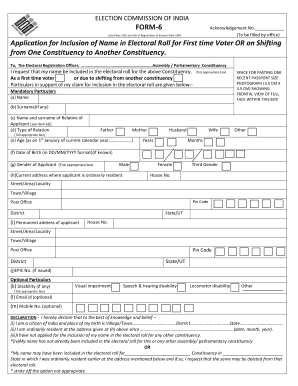
The Form 6 Application for Electoral Roll Inclusion is a government document used by Indian citizens to apply for the inclusion of their name in the electoral roll of a specific constituency.
pdfFiller scores top ratings on review platforms




Who needs Electoral Roll Form 6?
Explore how professionals across industries use pdfFiller.

Electoral Roll Form 6 is needed by:
-
Indian citizens seeking to register as voters
-
Individuals moving to a new constituency
-
First-time voters wanting to participate in elections
-
Residents needing to update their electoral details
-
Citizens aiming to ensure eligibility for upcoming elections
Comprehensive Guide to Electoral Roll Form 6
What is the Form 6 Application for Electoral Roll Inclusion?
The Form 6 application serves a crucial function in India's voter registration process, allowing citizens to include their names in the electoral roll. This form is instrumental for any Indian citizen aspiring to participate in elections. By filling out Form 6, individuals can ensure their right to vote in their respective constituencies.
Significantly, Form 6 not only allows for voter inclusion but also embodies the democratic essence of India, empowering citizens to engage in the electoral process actively.
Benefits of the Form 6 Application for Electoral Roll Inclusion
Completing the Form 6 application brings numerous advantages to citizens. Inclusion in the electoral roll is the primary requirement for participating in elections, enabling individuals to exercise their voting rights. Furthermore, when citizens engage in the electoral process, it fosters a sense of empowerment and responsibility towards their community and nation.
By ensuring that their voices are heard through voting, citizens can influence policies and decisions that affect their lives.
Who Needs to Fill Out the Form 6 Application for Electoral Roll Inclusion?
The Form 6 application targets Indian citizens over the age of 18 who wish to register as voters. This includes various demographics, such as first-time voters and individuals who have recently moved to new constituencies. Filling out this form is essential for all eligible applicants to participate in the electoral process effectively.
It is crucial for these citizens to understand their eligibility and the importance of timely application to secure their voting rights.
Eligibility Criteria for the Form 6 Application
To successfully submit Form 6, applicants must meet specific eligibility criteria. Firstly, they must be Indian citizens and at least 18 years old. Additionally, applicants should provide proof of residency within their constituency and may need to submit identification documents to support their application.
-
Age: Must be at least 18 years old
-
Citizenship: Must be an Indian citizen
-
Residency: Current address must be in the registered constituency
-
Identification: Supporting documents required for verification
How to Fill Out the Form 6 Application for Electoral Roll Inclusion Online
Filling out the Form 6 application online is a straightforward process that can be done in a few simple steps. Begin by accessing the online application portal and locate the form. Fill in the required fields, including your name, age, date of birth, and address. Additionally, ensure that you declare your residency and citizenship accurately.
-
Access the online application portal for Form 6.
-
Complete all fillable fields with accurate information.
-
Review your entries for correctness before submission.
Common Errors to Avoid When Filling Out the Form 6
During the application process, applicants often make common mistakes that can delay their registration. Errors in personal information, such as incorrect names or dates, can lead to complications. It's important to double-check all details and ensure documents are correctly submitted.
-
Check your personal information for accuracy.
-
Ensure all required documents are included.
-
Confirm that your residency declaration is truthful.
Submission Methods for the Form 6 Application
There are various methods for submitting the completed Form 6 application. Applicants can choose between online submission through the electoral commission's website or offline submission to the local Electoral Registration Officer. Understanding the appropriate method based on local regulations is essential for successful application processing.
-
Online submission via the electoral commission’s website.
-
Offline submission to the Electoral Registration Officer in your locality.
What Happens After You Submit the Form 6 Application?
Upon submitting the Form 6 application, users can expect a processing period for their application. Tracking the status of the application is advised to ensure timely updates. After processing, applicants will receive confirmation regarding their inclusion on the electoral roll and may need to follow up if additional information is requested.
Security and Privacy Considerations for Your Form 6 Application
Handling sensitive information during the Form 6 application process necessitates careful attention to security and privacy. Utilizing secure platforms, such as pdfFiller, ensures compliance with data protection regulations. It's essential to ensure your information remains protected during submission.
pdfFiller employs advanced security measures, including 256-bit encryption, to safeguard your personal data.
Experience Benefits with pdfFiller for Your Form 6 Application
Using pdfFiller can enhance your experience when filling out and submitting the Form 6 application. With features such as editing, eSigning, and secure document sharing, pdfFiller simplifies the registration process. Leveraging such tools allows users to enjoy a seamless and efficient application experience.
How to fill out the Electoral Roll Form 6
-
1.Access pdfFiller and search for 'Form 6 Application for Electoral Roll Inclusion' using the search function.
-
2.Open the form by clicking on the provided link which takes you to the editable version.
-
3.Begin by entering your personal information in the designated fields, such as your Name, Age, Date of Birth, and Place of Birth.
-
4.Make sure to accurately fill in your current address, ensuring it matches your proof of residence.
-
5.Review the declaration of residency and citizenship sections, and verify the details you have entered.
-
6.If applicable, use the checkboxes to indicate the details of family members needing inclusion on the electoral roll.
-
7.Sign the application electronically using the Signature field, following the instructions provided by pdfFiller.
-
8.After completing the form, review all entries to ensure accuracy to avoid common mistakes.
-
9.Once satisfied with the completed form, use the 'Save' option to store your application securely.
-
10.You can also download the filled form as a PDF for personal records or for submitting physically.
-
11.Submit the form electronically through pdfFiller if available, or print it to send to the Electoral Registration Officer of your constituency.

Who is eligible to fill out the Form 6 Application?
Eligibility to fill out the Form 6 Application includes all Indian citizens who are at least 18 years old and reside within the constituency they wish to register in.
What is the deadline for submitting the Form 6 Application?
It's advisable to submit the Form 6 Application well before the election date. Check with local authorities for specific deadlines as they can vary based on electoral cycles.
How can I submit the Form 6 Application?
You can submit the Form 6 Application electronically through pdfFiller or print and send it directly to the Electoral Registration Officer in your constituency.
What documents are required to accompany the Form 6 Application?
Typically, you need proof of identity and residence, such as a passport, utility bill, or Aadhaar card. Ensure that these documents are current and match your details on the form.
What common mistakes should I avoid when filling out the form?
Common mistakes include misspelling your name or address, providing incorrect age or birthdate, and forgetting to sign the application. Double-check all details before submission.
How long does it take to process my Form 6 Application?
Processing times for Form 6 applications can vary. Generally, expect a few weeks for verification; check with your local electoral office for specific timelines.
What should I do if my application is rejected?
If your Form 6 Application is rejected, you may receive a notice explaining the reasons. You can appeal to the electoral office or correct any mistakes and resubmit.
Related Content
Related Forms




Related Catalogs
Get the latest insights from our blog



If you believe that this page should be taken down, please follow our DMCA take down process
here
.
This form may include fields for payment information. Data entered in these fields is not covered by PCI DSS compliance.