
Last updated on
Nov 10, 2026
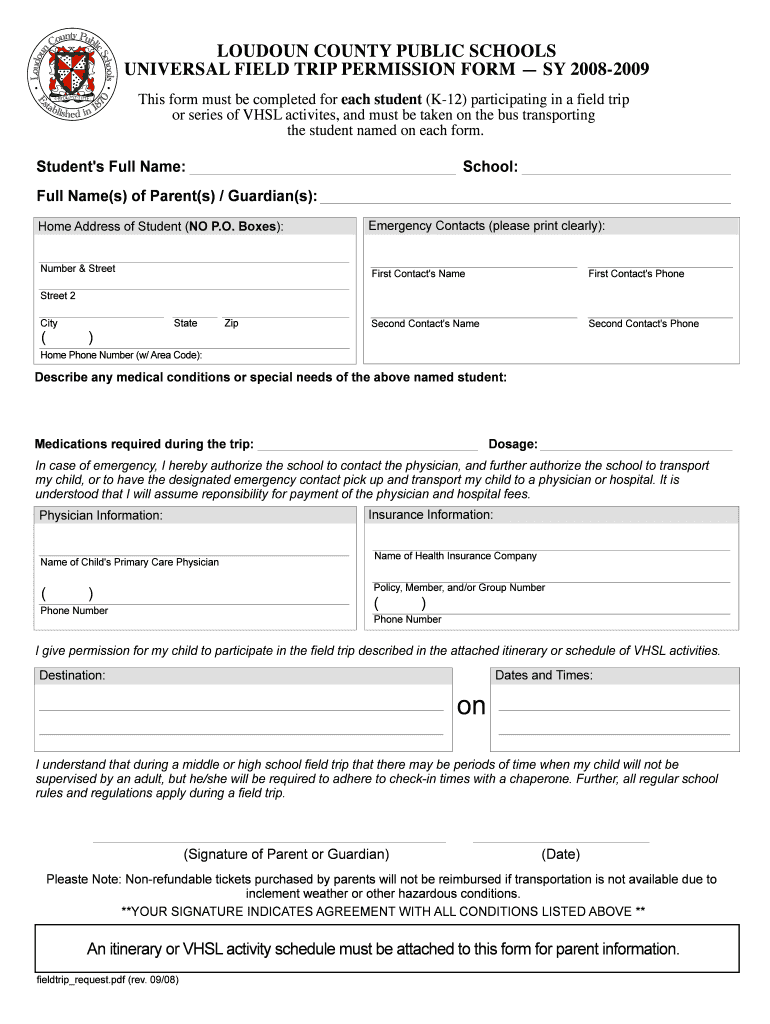
VA LCPS Universal Field Trip Permission Form 2008-2026 free printable template
pdfFiller is not affiliated with any government organization

Fill out
Complete the form online in a simple drag-and-drop editor.

eSign
Add your legally binding signature or send the form for signing.

Share
Share the form via a link, letting anyone fill it out from any device.

Export
Download, print, email, or move the form to your cloud storage.
Why pdfFiller is the best tool for your documents and forms


End-to-end document management
From editing and signing to collaboration and tracking, pdfFiller has everything you need to get your documents done quickly and efficiently.
Accessible from anywhere
pdfFiller is fully cloud-based. This means you can edit, sign, and share documents from anywhere using your computer, smartphone, or tablet.
Secure and compliant
pdfFiller lets you securely manage documents following global laws like ESIGN, CCPA, and GDPR. It's also HIPAA and SOC 2 compliant.
What is VA LCPS Universal Field Trip Permission Form
The Loudoun County Field Trip Permission Form is a document used by parents or guardians to grant consent for K-12 students to participate in school field trips or VHSL activities.
pdfFiller scores top ratings on review platforms




Who needs VA LCPS Universal Field Trip Permission Form?
Explore how professionals across industries use pdfFiller.

VA LCPS Universal Field Trip Permission Form is needed by:
-
Parents or guardians of K-12 students in Loudoun County
-
Teachers planning school field trips
-
School administrators facilitating student activities
-
Coaches involved in VHSL events
-
Educational coordinators overseeing field trip logistics
Comprehensive Guide to VA LCPS Universal Field Trip Permission Form
Understanding the Loudoun County Field Trip Permission Form
The Loudoun County Field Trip Permission Form is an essential document used within the educational framework for K-12 students. This form is significant as it seeks parental or guardian consent for students to engage in field trips, a critical aspect of experiential learning. Obtaining this consent ensures that families are fully informed regarding the details and risks associated with the outings.
The form includes specific fields that must be completed, such as emergency contact information and medical details. This information is crucial for ensuring student safety during these events and facilitates a direct line of communication between parents and schools.
Purpose and Benefits of the Loudoun County Field Trip Permission Form
The primary purpose of the Loudoun County Field Trip Permission Form is to safeguard students' welfare while allowing parents and guardians to give informed consent for their children’s participation in field trips. This document offers several benefits for both the educational institution and families.
-
Enables open communication about school activities, reinforcing partnerships between parents and schools.
-
Ensures that students are accounted for and safe during educational excursions.
-
Facilitates students' participation in enriching educational experiences outside the classroom.
Key Features of the Loudoun County Field Trip Permission Form
This form is structured to ensure clarity and ease of use. Key fields included in the Loudoun County Field Trip Permission Form are as follows:
-
Student's full name
-
Home address of the student
-
Emergency contact information
-
Signature of parent or guardian
These features allow parents to swiftly complete the document while ensuring that all necessary information is captured adequately.
Who Needs the Loudoun County Field Trip Permission Form?
The Loudoun County Field Trip Permission Form is required for all students participating in school-organized field trips. Only parents or legal guardians are authorized to sign this form, confirming their consent for their child's involvement. In certain instances, special activities may necessitate additional consent beyond the standard permissions outlined in the form.
How to Complete the Loudoun County Field Trip Permission Form Online
Filling out the Loudoun County Field Trip Permission Form online is straightforward. Here’s a step-by-step guide:
-
Access the form through pdfFiller's platform.
-
Enter all required information into the designated fields, ensuring accuracy.
-
Pay special attention to specific areas like emergency contacts and medical details.
-
Review your entries before submitting to avoid any errors.
Completing all required fields correctly is essential to ensure smooth processing and avoid delays.
Submission and Delivery of the Loudoun County Field Trip Permission Form
Once the form is completed, parents have multiple submission methods available, including in-person or online options. It is crucial to adhere to any specified timelines for submission to ensure that students can participate in their planned field trips. Additionally, retaining a copy of the completed form is advisable for personal records.
Common Mistakes to Avoid with the Loudoun County Field Trip Permission Form
When filling out the Loudoun County Field Trip Permission Form, various common errors can occur. Here are key pitfalls to avoid:
-
Missing signatures or incomplete fields that could invalidate the form.
-
Incorrect emergency contact details that could jeopardize student safety.
-
Failure to submit the form by the designated deadline, risking participation.
By carefully reviewing the completed form before submission, parents can mitigate these risks effectively.
Security and Privacy When Using the Loudoun County Field Trip Permission Form
Users of the Loudoun County Field Trip Permission Form can feel confident about the security of their information. pdfFiller adheres to strict regulations such as HIPAA and GDPR to ensure compliance and protection of sensitive data. This commitment to security is vital when handling documents that contain personal and medical information.
Making the Process Easier with pdfFiller
pdfFiller offers numerous advantages when managing the Loudoun County Field Trip Permission Form. Users benefit from a user-friendly interface that simplifies document editing, signing, and storage. Feedback from users highlights the platform’s effectiveness in streamlining the form-filling process and providing secure solutions for document handling.
Example of a Completed Loudoun County Field Trip Permission Form
To assist users in understanding the form's requirements, a sample of a completed Loudoun County Field Trip Permission Form can be invaluable. This example demonstrates proper entries in crucial fields, guiding parents on how to complete their forms accurately. It's important to note that variations may occur based on specific field trip details or unique activities.
How to fill out the VA LCPS Universal Field Trip Permission Form
-
1.Access the Loudoun County Field Trip Permission Form by visiting pdfFiller and searching for the form name.
-
2.Once you find the form, click on it to open it in the pdfFiller interface.
-
3.Before filling out the form, gather necessary information such as the student’s full name, home address, emergency contact details, and any medical conditions.
-
4.Begin filling in the form by clicking on the fillable fields provided in pdfFiller.
-
5.Start with the 'Student's Full Name' field, entering the complete name of the student participating in the field trip.
-
6.Next, complete the 'Home Address of Student' field, ensuring all details are accurate for emergency purposes.
-
7.Continue filling out all required fields, including spaces for parent or guardian information and any medical conditions relevant to the student's participation in school activities.
-
8.Check that you provide a valid emergency contact name and phone number, as this is crucial for the student’s safety.
-
9.Once all fields are filled, review the information carefully to ensure accuracy and completeness.
-
10.Pay special attention to the signature field for the parent or guardian; ensure the signature is added to validate the form.
-
11.After thorough review, utilize pdfFiller’s saving features to download a copy of the filled form or submit it directly online through their platform.
-
12.Make sure to keep a copy of the signed form for your records.

Who is eligible to fill out the Loudoun County Field Trip Permission Form?
Eligibility to fill out this form is limited to parents or guardians of K-12 students enrolled in Loudoun County Public Schools. Only individuals with legal custody can grant permission.
What information do I need to provide when filling out the form?
You will need to provide the student's full name, home address, emergency contact information, any medical conditions, and the signature of a parent or guardian to complete the Loudoun County Field Trip Permission Form.
Where do I submit the completed field trip permission form?
The completed form must be submitted to the student's teacher or school administrator prior to the scheduled field trip. Ensure it is returned promptly to avoid any issues.
What common mistakes should I avoid when completing the form?
Common mistakes include omitting essential information like emergency contact details or not signing the form. Double-check all entries before submission to ensure accuracy.
When is the deadline to submit the permission form?
Submission deadlines for the Loudoun County Field Trip Permission Form can vary by school. Typically, forms should be returned at least one week before the scheduled field trip.
Is notarization required for this permission form?
No, notarization is not required for the Loudoun County Field Trip Permission Form. Just a signature from a parent or guardian is sufficient.
What should I do if I make a mistake on the form?
If you make a mistake on the form, it is best to correct it by crossing out the error and writing the correct information. Alternatively, you can restart on a new form for clarity.
Related Content
Related Forms





Related Catalogs
Get the latest insights from our blog


If you believe that this page should be taken down, please follow our DMCA take down process
here
.
This form may include fields for payment information. Data entered in these fields is not covered by PCI DSS compliance.