
Last updated on
Nov 9, 2026

IRS 8655 2012 free printable template
pdfFiller is not affiliated with IRS

Fill out
Complete the form online in a simple drag-and-drop editor.

eSign
Add your legally binding signature or send the form for signing.

Share
Share the form via a link, letting anyone fill it out from any device.

Export
Download, print, email, or move the form to your cloud storage.
Why pdfFiller is the best tool for your documents and forms


End-to-end document management
From editing and signing to collaboration and tracking, pdfFiller has everything you need to get your documents done quickly and efficiently.
Accessible from anywhere
pdfFiller is fully cloud-based. This means you can edit, sign, and share documents from anywhere using your computer, smartphone, or tablet.
Secure and compliant
pdfFiller lets you securely manage documents following global laws like ESIGN, CCPA, and GDPR. It's also HIPAA and SOC 2 compliant.
What is IRS 8655
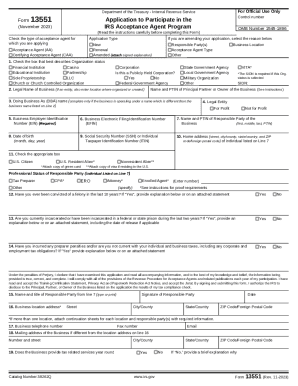
The IRS Form 8655 is a tax document used by taxpayers to authorize a reporting agent to sign and file tax returns on their behalf.
pdfFiller scores top ratings on review platforms




It is a wonderful program to use now that I have figured out what today. It is very easy to move around in the program too. Thank you for the intro videos too!
So nice to have and our members love it!
dope one i like it and i hope they put more effort in upgrading this App
Very convenient and easy to use
wonderful taught me a lot very useful and helpful
Excellent.
Who needs IRS 8655?
Explore how professionals across industries use pdfFiller.

IRS 8655 is needed by:
-
Taxpayers seeking professional tax assistance
-
Certified public accountants (CPAs) preparing tax returns
-
Tax professionals acting as reporting agents
-
Businesses hiring a reporting agent for tax compliance
-
Individuals wanting to delegate tax responsibilities
Comprehensive Guide to IRS 8655
What is the IRS Form 8655 Reporting Agent Authorization?
IRS Form 8655 serves as a crucial document for taxpayers seeking to designate a reporting agent authorized to manage tax-related responsibilities. This form allows the reporting agent to file various types of tax returns on behalf of the taxpayer, streamlining tax processes significantly.
A reporting agent can be a tax professional or financial advisor who helps taxpayers by handling different tax returns. The IRS Form 8655 is essential for ensuring that the agent is officially recognized by the IRS to act in this capacity, which enhances the efficiency of the overall tax filing process.
Purpose and Benefits of the IRS Form 8655 Reporting Agent Authorization
The primary purpose of the IRS Form 8655 is to empower taxpayers to delegate their tax filing tasks to qualified professionals. Utilizing this taxpayer authorization form provides numerous benefits, including the alleviation of stress associated with complex tax regulations.
By entrusting tax responsibilities to a reporting agent, taxpayers can achieve efficient management of their tax-related processes. Furthermore, working with a qualified agent can significantly reduce the risk of filing errors, ensuring compliance with IRS regulations and deadlines.
Key Features of the IRS Form 8655 Reporting Agent Authorization
When filling out the IRS Form 8655, users should be mindful of several key features that are critical to the completion process. Essential fields include the taxpayer’s name, Employer Identification Number (EIN), and the taxpayer's signature, all of which must be filled out accurately.
It’s crucial to specify the types of tax returns and payments the reporting agent is authorized to handle. Additionally, following the instructions provided on the form can facilitate a proper and efficient completion.
Who Needs the IRS Form 8655 Reporting Agent Authorization?
The IRS Form 8655 is predominantly beneficial for taxpayers who require assistance with their tax submissions. This includes individuals, small business owners, and other entities that may find the tax filing process overwhelming and complex.
Scenarios in which this form becomes necessary typically involve taxpayers who wish to ensure professional handling of their tax matters. Eligibility criteria for both taxpayers and reporting agents define who can complete the form and act as an authorized agent.
How to Fill Out the IRS Form 8655 Reporting Agent Authorization Online (Step-by-Step)
To fill out the IRS Form 8655 online, follow these steps:
-
Access the IRS Form 8655 template on a reliable platform.
-
Enter the taxpayer's name and Employer Identification Number (EIN) in the specified fields.
-
Complete all essential sections, ensuring accuracy in all details provided.
-
Review the form for common mistakes, such as missing signatures or incorrect EINs.
-
Utilize tools available on pdfFiller for an efficient form completion process.
How to Sign the IRS Form 8655 Reporting Agent Authorization
Signing the IRS Form 8655 is an essential step in authorizing a reporting agent. Taxpayers have the option for either a digital or wet signature, with both requiring different methods of execution.
For secure eSigning, you can use pdfFiller, which streamlines the process and ensures proper authentication. Remember, failing to provide a valid signature can lead to delays or potential rejection of the submitted form.
Where to Submit the IRS Form 8655 Reporting Agent Authorization
Once completed, the IRS Form 8655 must be submitted through designated channels. There are two primary submission methods: electronic submission through the IRS e-file system or paper submission via mail.
It is crucial to know where to send the completed form based on your chosen method. Additionally, processing times vary, and certain tracking options may be available to monitor the status of your submission.
What Happens After You Submit the IRS Form 8655 Reporting Agent Authorization?
After submission, taxpayers can expect confirmation of receipt through various means, depending on the method used for submission. Typically, a timeline for processing the form is communicated, providing an idea of when to anticipate responses from the IRS.
If the IRS requires further information or corrections, there are established next steps that taxpayers should follow. Being prepared for potential requests can facilitate smooth communication and timely resolutions.
Utilizing pdfFiller for IRS Form 8655 Reporting Agent Authorization
pdfFiller offers a comprehensive solution for managing the IRS Form 8655, making the process of eSigning and filling forms straightforward and secure. The platform is equipped with advanced features enabling easy creation and management of tax documents, enhancing user convenience.
To get started with pdfFiller, users can explore its robust capabilities while benefiting from industry-standard security measures that protect sensitive tax information, ensuring peace of mind throughout the document handling process.
How to Fill Out Small Business Tax Forms Online with pdfFiller
Struggling with your Schedule C or not sure how to file business taxes as a sole proprietor, LLC, or self-employed professional? This step-by-step pdfFiller tutorial walks you through completing IRS Schedule C quickly and accurately — no printing, no scanning, no stress. Whether you're handling small business tax deductions, tracking self-employed taxes, or preparing your full business tax return, pdfFiller makes it simple right in your browser.

How to fill out the IRS 8655
-
1.To access the IRS Form 8655 on pdfFiller, go to the platform and search for 'IRS Form 8655' or navigate through the tax forms section.
-
2.Open the form in pdfFiller’s editor where you can start filling out the necessary information.
-
3.Before you begin completing the form, gather information such as your Employer Identification Number (EIN), taxpayer name, address, and details about the reporting agent.
-
4.Using pdfFiller's interface, click on each fillable field and enter the required information, ensuring accuracy in all details, especially in the taxpayer's and reporting agent's sections.
-
5.As you complete the form, utilize checkboxes for relevant authorizations and follow the specific instructions provided in the form's fields.
-
6.Once all information is entered, review the filled-out form carefully to ensure that all required fields are completed and no mistakes are present.
-
7.Finalizing the form can be done by saving the document as a PDF. You can either download it directly to your device or send it via email directly through pdfFiller.
-
8.If you need to submit the completed form, ensure you follow the instructions regarding submission methods as provided by the IRS or your tax professional.

Who needs to fill out IRS Form 8655?
IRS Form 8655 must be filled out by taxpayers who wish to authorize a reporting agent to handle their tax filings and payments. This form is particularly relevant for those needing assistance to ensure compliance with tax obligations.
What are the eligibility requirements for using Form 8655?
Any taxpayer in the United States can use IRS Form 8655 to appoint a reporting agent. It is essential that the taxpayer is in good standing with the IRS and is either an individual or a business entity.
How do I submit IRS Form 8655?
The completed IRS Form 8655 should be sent to the appropriate IRS office as instructed in the form. Often, this can be done via mail or certain electronic submission methods, depending on your situation.
What information do I need before filling out the form?
Before filling out IRS Form 8655, gather the taxpayer's name, address, Employer Identification Number (EIN), and details about the reporting agent, including their name and address.
What common mistakes should I avoid when completing Form 8655?
Common mistakes include leaving required fields blank, providing incorrect EINs, or failing to sign the form where specified. Always double-check your information before submitting.
Are there fees associated with submitting Form 8655?
There are typically no fees for submitting IRS Form 8655 itself. However, you may incur costs if you hire a reporting agent or tax professional to assist you with preparations or submissions.
How long is IRS Form 8655 effective?
IRS Form 8655 remains effective until revoked by the taxpayer or the reporting agent. This means you do not need to resubmit unless there is a change in your reporting authorization.
IRS 8655 Form Versions
Related Content
Related Forms





Get the latest insights from our blog


If you believe that this page should be taken down, please follow our DMCA take down process
here
.
This form may include fields for payment information. Data entered in these fields is not covered by PCI DSS compliance.