
Last updated on
Nov 9, 2026
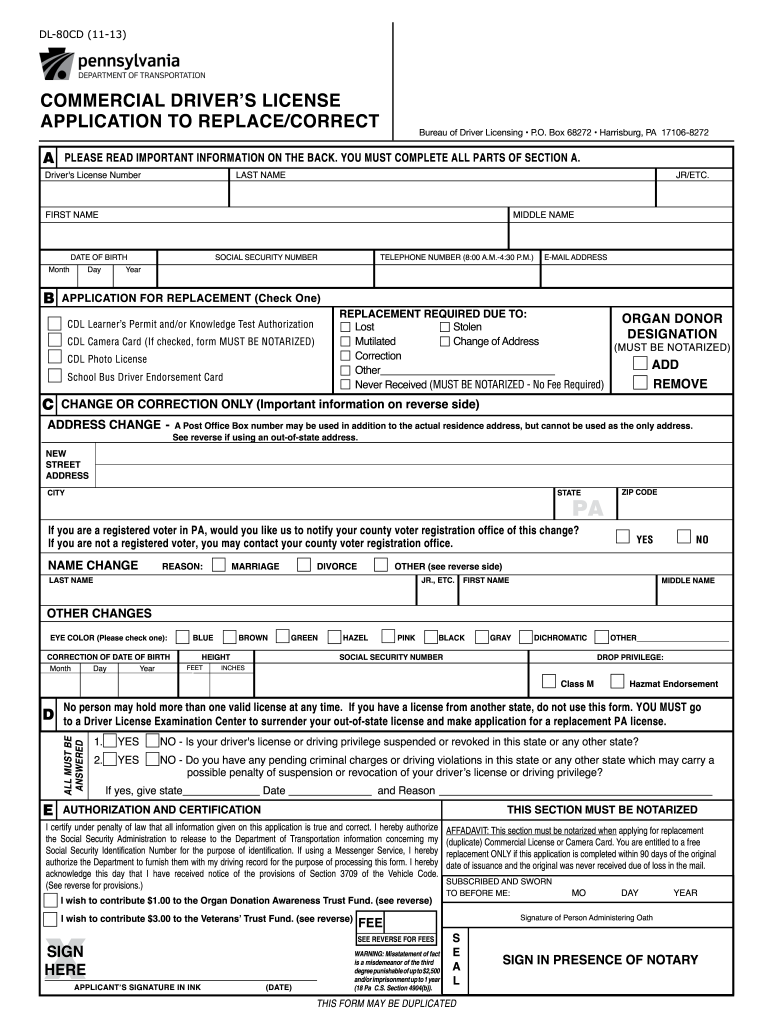
PA DL-80CD 2013 free printable template
pdfFiller is not affiliated with any government organization

Fill out
Complete the form online in a simple drag-and-drop editor.

eSign
Add your legally binding signature or send the form for signing.

Share
Share the form via a link, letting anyone fill it out from any device.

Export
Download, print, email, or move the form to your cloud storage.
Why pdfFiller is the best tool for your documents and forms


End-to-end document management
From editing and signing to collaboration and tracking, pdfFiller has everything you need to get your documents done quickly and efficiently.
Accessible from anywhere
pdfFiller is fully cloud-based. This means you can edit, sign, and share documents from anywhere using your computer, smartphone, or tablet.
Secure and compliant
pdfFiller lets you securely manage documents following global laws like ESIGN, CCPA, and GDPR. It's also HIPAA and SOC 2 compliant.
What is PA DL-80CD
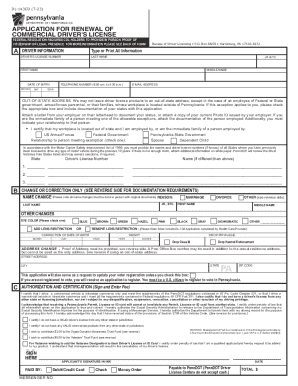
The Pennsylvania Commercial Driver’s License Replacement Form is a government document used by residents of Pennsylvania to replace or correct their Commercial Driver's License (CDL).
pdfFiller scores top ratings on review platforms




I was needing a temporary custody order for my grandchildren. I found exactly what I needed on PDFfiller and it made for a great experience. I will be using this product as needed in the care and control of my Grandkids life.
Quick and easy, a real efficient way to professional complete pdf forms for business or personal use.
Who needs PA DL-80CD?
Explore how professionals across industries use pdfFiller.

PA DL-80CD is needed by:
-
Commercial drivers in Pennsylvania needing a license replacement.
-
Individuals whose CDL has been lost or stolen.
-
Applicants requiring corrections to their CDL information.
-
Residents applying for notarized forms related to driving.
-
People needing to update their personal details on their CDL.
-
Drivers seeking to comply with state licensing regulations.
Comprehensive Guide to PA DL-80CD
What is the Pennsylvania Commercial Driver’s License Replacement Form?
The Pennsylvania Commercial Driver’s License Replacement Form, officially designated as the DL-80CD form, serves to replace or correct a Commercial Driver’s License (CDL) in Pennsylvania. This form is essential when a CDL has been lost, stolen, or when corrections are needed on the license.
Applicants must notarize the form before submitting it to the Bureau of Driver Licensing located in Harrisburg, PA to ensure the authenticity of their request. This step is crucial in maintaining the integrity of the CDL replacement process.
Purpose and Benefits of the Pennsylvania Commercial Driver’s License Replacement Form
The primary purpose of the Pennsylvania CDL replacement form is to ensure that individuals maintain a valid and legally recognized commercial driver’s license. Having a valid CDL is not only a legal requirement but also an important aspect of safety on the roads.
This form simplifies the replacement process, making it more efficient for applicants. By using the DL-80CD form correctly, individuals can protect their personal identification and legal rights, ensuring they are not at risk of legal issues associated with an invalid or incorrect CDL.
Eligibility Criteria for the Pennsylvania Commercial Driver’s License Replacement Form
To be eligible to use the Pennsylvania Commercial Driver’s License Replacement Form, applicants must meet certain criteria. These include requirements such as age, residency, and the specific nature of the request—whether for a replacement or a correction of existing information.
Additionally, it is vital that applicants provide accurate personal details on the form to facilitate a smooth processing experience. Inaccuracies could lead to delays or rejections of the application.
How to Fill Out the Pennsylvania Commercial Driver’s License Replacement Form Online (Step-by-Step)
Filling out the Pennsylvania CDL replacement form online involves several critical steps:
-
Enter personal information, including Driver's License Number, Last Name, First Name, Date of Birth, and Social Security Number.
-
Select the appropriate reason for replacement or correction.
-
Ensure all required fields are completed accurately and clearly.
-
Review the document for any missing signatures or information.
-
Notarize the completed form before submission.
Accuracy in completion, particularly regarding notarization and signatures, is essential to prevent delays in processing the application.
Common Errors and How to Avoid Them When Completing the Form
Applicants often encounter common errors that can hinder their application process. Frequent mistakes include missing signatures, providing incorrect information, and leaving fields incomplete.
To minimize these errors, applicants should adopt the following best practices:
-
Thoroughly review the form before submission to ensure all sections are filled out accurately.
-
Double-check notarization requirements to ensure compliance with submission standards.
Where to Submit the Pennsylvania Commercial Driver’s License Replacement Form
Once completed, the Pennsylvania Commercial Driver’s License Replacement Form must be submitted to the Bureau of Driver Licensing. Applicants have the option to submit their form either in person or via mail.
Be aware that there may be fees associated with processing the replacement form, and it's advisable to check the exact submission methods and potential costs prior to sending the application.
What Happens After You Submit the Pennsylvania Commercial Driver’s License Replacement Form?
After submitting the Pennsylvania CDL replacement form, applicants can expect to receive a confirmation receipt. This receipt acknowledges that the application has been received and is being processed.
Processing times can vary, and applicants will need to monitor the application status. Possible outcomes include approval of the request or a request for further information if there are issues with the application.
Security and Compliance for the Pennsylvania Commercial Driver’s License Replacement Form
When submitting the Pennsylvania Commercial Driver’s License Replacement Form, applicants can be assured of the security of their personal information. Stringent security measures, such as encryption and compliance with privacy regulations, protect sensitive data throughout the submission process.
It is crucial to ensure that personal information remains confidential. pdfFiller adheres to high security standards, providing a safe platform for managing sensitive documents.
Utilizing pdfFiller for Your Pennsylvania Commercial Driver’s License Replacement Form
pdfFiller offers valuable features that assist in completing and managing the Pennsylvania CDL replacement form. Users can benefit from robust editing capabilities, eSigning options, and submission tracking.
Accessing templates and fillable versions of the DL-80CD form is straightforward on the pdfFiller platform. Utilizing pdfFiller’s user-friendly environment ensures a reliable and efficient completion process for applicants.
How to fill out the PA DL-80CD
-
1.Access the Pennsylvania Commercial Driver’s License Replacement Form on pdfFiller by searching for 'DL-80CD' or by navigating to the relevant government form section.
-
2.Once the form loads, familiarize yourself with its layout, which includes blank fields and checkboxes.
-
3.Begin by entering your personal information, ensuring you provide your Driver's License Number, Last Name, First Name, Date of Birth, and Social Security Number accurately.
-
4.Follow each instruction carefully, making sure to fill in all required fields marked with an asterisk or otherwise indicated.
-
5.For any fields that require notarization, be prepared to print the form and sign it in front of a notary public.
-
6.Before finalizing the form, take a moment to review all entered information for accuracy and completeness to avoid delays.
-
7.Once reviewed, you can save your progress or finalize the document directly on pdfFiller.
-
8.You have the option to download the completed form as a PDF or submit it electronically via pdfFiller's submission features.

Who is eligible to use the Pennsylvania CDL Replacement Form?
Any resident of Pennsylvania who holds a Commercial Driver's License and needs to replace or correct it due to loss, theft, or errors in personal information is eligible to use this form.
What supporting documents are required for this form?
You will need to provide personal identification details, such as your Driver's License Number, Social Security Number, and notarized signature if required. No additional documents are typically needed for a replacement.
What should I do if I made a mistake while filling out the form?
If you notice a mistake after filling out the form, you can edit the fields directly on pdfFiller. Ensure all information is accurate before finalizing and submitting the form.
Where do I submit the completed Pennsylvania CDL Replacement Form?
The completed form should be submitted to the Bureau of Driver Licensing in Harrisburg, PA. You can check for electronic submission options through pdfFiller or submit by mail.
Is there a fee for replacing my Commercial Driver’s License in Pennsylvania?
Typically, there is a fee associated with replacing a CDL; however, the exact amount can vary. Check with the Pennsylvania Department of Transportation for the most current fee information.
How long does it take to process the CDL Replacement Form?
Processing times for the CDL Replacement Form can vary but typically take a few weeks. It's advisable to apply for your replacement well in advance if you need it by a specific date.
Can I fill out this form online, or do I need to print it out?
You can fill out the Pennsylvania CDL Replacement Form online using pdfFiller's fillable fields. However, some sections, like notarization, may require printing and signing before submission.
PA DL-80CD Form Versions
Related Content
Related Forms



Related Catalogs
Get the latest insights from our blog


If you believe that this page should be taken down, please follow our DMCA take down process
here
.
This form may include fields for payment information. Data entered in these fields is not covered by PCI DSS compliance.