
Last updated on
Oct 2, 2026

Get the free Application to Reduce Vehicle and Traffic Charges
pdfFiller is not affiliated with any government organization

Fill out
Complete the form online in a simple drag-and-drop editor.

eSign
Add your legally binding signature or send the form for signing.

Share
Share the form via a link, letting anyone fill it out from any device.

Export
Download, print, email, or move the form to your cloud storage.
Why pdfFiller is the best tool for your documents and forms


End-to-end document management
From editing and signing to collaboration and tracking, pdfFiller has everything you need to get your documents done quickly and efficiently.
Accessible from anywhere
pdfFiller is fully cloud-based. This means you can edit, sign, and share documents from anywhere using your computer, smartphone, or tablet.
Secure and compliant
pdfFiller lets you securely manage documents following global laws like ESIGN, CCPA, and GDPR. It's also HIPAA and SOC 2 compliant.
What is Traffic Charge Reduction App
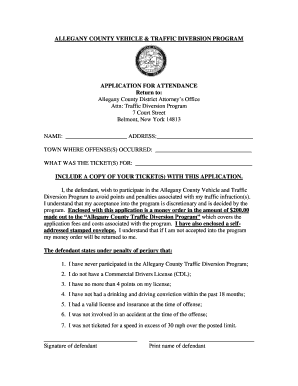
The Application to Reduce Vehicle and Traffic Charges is a legal form used by individuals in New York to request a reduction of traffic-related charges.
pdfFiller scores top ratings on review platforms




Who needs Traffic Charge Reduction App?
Explore how professionals across industries use pdfFiller.

Traffic Charge Reduction App is needed by:
-
Individuals facing vehicle and traffic charges in New York
-
Legal representatives assisting clients with traffic issues
-
Residents seeking to reduce penalties for traffic violations
-
Individuals contesting charges in court
-
Drivers aiming to maintain a clean driving record
Comprehensive Guide to Traffic Charge Reduction App
What is the Application to Reduce Vehicle and Traffic Charges?
The Application to Reduce Vehicle and Traffic Charges is a formal legal request utilized within the New York legal system. This document is essential for individuals seeking to lower their financial burden due to vehicle and traffic charges, particularly in instances of financial hardship or other mitigating circumstances. The form serves as a critical means to advocate for reduced penalties, making it vital for impacted motorists.
Purpose and Benefits of the Application to Reduce Vehicle and Traffic Charges
This application primarily benefits individuals by potentially reducing fines and penalties associated with vehicle and traffic offenses. Some advantages of utilizing the vehicle and traffic charge reduction application include:
-
Lower financial burden due to reduced charges
-
Enhanced chances for favorable outcomes in legal proceedings
By pursuing this application, applicants can alleviate some of the stress related to their legal situations.
Eligibility Criteria for the Application to Reduce Vehicle and Traffic Charges
Determining eligibility for the application involves assessing personal criteria as well as the types of charges applicable. Eligible individuals typically must meet the following requirements:
-
Be of a specified age, as mandated by New York law
-
Meet residency requirements
The types of charges that can be addressed through this application include any vehicle and traffic-related offenses that may qualify for reduction.
How to Fill Out the Application to Reduce Vehicle and Traffic Charges Online
Completing the application form online can streamline the process. Follow these steps to successfully fill out the application:
-
Access the online form via the designated platform.
-
Enter required personal information such as Name and Date of Birth.
-
Review all details for accuracy.
-
Sign the document electronically.
-
Submit the completed form as directed.
Emphasizing accuracy in this step is crucial to avoid any delays in processing.
Common Errors and How to Avoid Them in the Application to Reduce Vehicle and Traffic Charges
Applicants should be mindful of common pitfalls that could hinder their submission process. To avoid mistakes, consider the following tips:
-
Ensure all required signatures are included.
-
Double-check the accuracy of charge details and personal information.
Taking the time to thoroughly review the application can help facilitate smoother processing and minimize the chances of rejection.
Submission Methods for the Application to Reduce Vehicle and Traffic Charges
Once the application is completed, it is essential to understand the submission methods available. Options for submitting the form include:
-
In-person delivery to the appropriate District Attorney's office.
-
Mailing the completed form following specified guidelines.
Be aware of any specific submission requirements when choosing a method for delivery.
What Happens After You Submit the Application to Reduce Vehicle and Traffic Charges?
After submission, understanding the next steps is vital. The post-submission process includes:
-
A timeline for processing the application, which can vary.
-
Notification processes regarding the outcome of your request.
-
Options available for tracking the status of your submission.
Being proactive in following up can ensure that you remain informed throughout the process.
Using pdfFiller to Complete the Application to Reduce Vehicle and Traffic Charges
pdfFiller offers a user-friendly platform that can significantly simplify the application process for reducing vehicle and traffic charges. Key features of pdfFiller include:
-
Editing capabilities for text and images directly within the form.
-
eSigning functionality for secure submission.
-
Document sharing options that enhance collaboration if needed.
The platform ensures security and compliance, protecting sensitive user data throughout the application process.
Sample Completed Application to Reduce Vehicle and Traffic Charges
To provide a clearer understanding, a sample completed application can serve as a helpful reference. This example typically includes annotations that explain each section, highlighting:
-
Common mistakes often encountered during submission.
-
Guidelines on how to avoid errors based on real scenarios.
A visual representation of a completed form can aid applicants in ensuring their submissions are accurate and complete.
How to fill out the Traffic Charge Reduction App
-
1.Access the Application to Reduce Vehicle and Traffic Charges form on pdfFiller by searching for its name in the pdfFiller template library. Once located, click on the form to open it in the pdfFiller editor.
-
2.Familiarize yourself with the pdfFiller interface. Use the toolbar to navigate through the document, and click on each fillable field to enter the required information.
-
3.Before filling out the form, gather necessary documents such as your driver's license, any relevant court notifications, and personal details including your full name and date of birth.
-
4.Carefully fill out each section of the form, entering accurate details as instructed. If prompted, add your signature where required, using the signature tool provided by pdfFiller.
-
5.Once you have completed all required fields, review the form for accuracy. Check for spelling errors and ensure all necessary information is included.
-
6.After reviewing, finalize your application by saving it within pdfFiller. You can opt to download the completed form for your records or submit it directly to the District Attorney's office from pdfFiller, following the software's submission guidelines.

Who is eligible to use the Application to Reduce Vehicle and Traffic Charges?
Residents of New York who have received vehicle and traffic charges and are seeking to reduce their penalties can use this form. Ensure you meet all local requirements before applying.
What documents do I need to submit along with this application?
Typically, no additional documents are required, but having supporting documentation such as your driver's license and any related court notices can be beneficial for reference during completion.
How do I submit the completed application?
Once completed, the application must be submitted directly to the District Attorney's office. You can either print and mail it or use the submission feature on pdfFiller if available.
Is there a deadline for submitting the application to reduce charges?
While specific deadlines can vary, it is crucial to submit your application as soon as possible after receiving the charges to maximize your chances for consideration. Check with local guidelines for specific timing.
What are common mistakes to avoid when filling out this form?
Common mistakes include inaccurate personal information, forgetting to sign the form, and failing to review for errors before submission. Take your time to ensure accuracy.
How long does it take for the application to be processed?
Processing times can vary based on the volume of requests at the District Attorney's office. Generally, expect a response within a few weeks.
Do I need to notarize the form?
No, this form does not require notarization. However, ensure you follow all other submission guidelines carefully.
Related Forms


Get the latest insights from our blog


If you believe that this page should be taken down, please follow our DMCA take down process
here
.
This form may include fields for payment information. Data entered in these fields is not covered by PCI DSS compliance.