
Last updated on
Nov 9, 2026

CMCJAL 1003 2004-2026 free printable template
pdfFiller is not affiliated with any government organization

Fill out
Complete the form online in a simple drag-and-drop editor.

eSign
Add your legally binding signature or send the form for signing.

Share
Share the form via a link, letting anyone fill it out from any device.

Export
Download, print, email, or move the form to your cloud storage.
Why pdfFiller is the best tool for your documents and forms


End-to-end document management
From editing and signing to collaboration and tracking, pdfFiller has everything you need to get your documents done quickly and efficiently.
Accessible from anywhere
pdfFiller is fully cloud-based. This means you can edit, sign, and share documents from anywhere using your computer, smartphone, or tablet.
Secure and compliant
pdfFiller lets you securely manage documents following global laws like ESIGN, CCPA, and GDPR. It's also HIPAA and SOC 2 compliant.
What is CMCJAL 1003
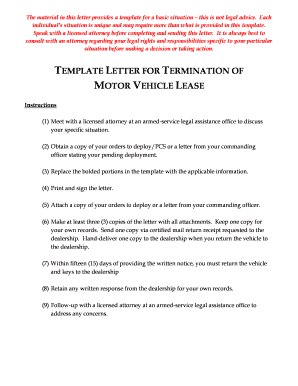
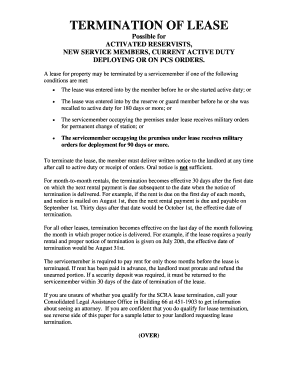
The Servicemembers Civil Relief Act Auto Lease Termination is a legal document used by servicemembers to formally terminate their motor vehicle lease under the SCRA.
pdfFiller scores top ratings on review platforms




Who needs CMCJAL 1003?
Explore how professionals across industries use pdfFiller.

CMCJAL 1003 is needed by:
-
Servicemembers looking to terminate a vehicle lease
-
Military personnel affected by the Servicemembers Civil Relief Act
-
Lessee seeking to cancel auto leases due to military orders
-
Legal professionals assisting military clients
-
Organizations providing support to servicemembers
-
Lessors managing leases with military personnel
Comprehensive Guide to CMCJAL 1003
Understanding the Servicemembers Civil Relief Act Auto Lease Termination
The Servicemembers Civil Relief Act (SCRA) provides vital protections for military personnel, particularly in the context of auto leases. This legislation allows servicemembers to terminate their vehicle lease when faced with deployment or reassignment. By understanding the conditions under which one can invoke this right, military personnel can mitigate potential financial burdens related to vehicle leases during service-related relocations.
Recognition of the SCRA's significance ensures that servicemembers can leverage these benefits and avoid complications associated with lease obligations during times of duty.
Purpose and Benefits of the SCRA Auto Lease Termination Form
The SCRA Auto Lease Termination Form serves a crucial role in protecting military members' rights. This form streamlines the lease termination process, providing a standardized way for servicemembers to notify lessors of their intent to terminate a lease due to active duty. Using this form can help prevent financial penalties that could arise from failing to comply with lease agreements.
By facilitating timely lease termination, servicemembers can focus on their duties, knowing that their financial obligations regarding vehicle leases are properly handled.
Eligible Users for the Servicemembers Civil Relief Act Auto Lease Termination Form
The SCRA Auto Lease Termination Form is specifically designed for active duty servicemembers and their dependents. Eligibility is determined by factors such as active duty status and the receipt of defined military orders.
Furthermore, spouses and dependents of servicemembers also have rights under the SCRA, granting them access to this form in specific situations, thereby extending protections to military families in times of need.
How to Complete the SCRA Auto Lease Termination Form Online
Completing the SCRA Auto Lease Termination Form online is a straightforward process. Start by collecting the necessary information, which includes your name, address, details of the vehicle, and your military orders. Pay special attention to accurately filling in specific fields, including the odometer disclosure statement, to avoid submission errors.
It's essential to review the form for completeness and correctness before finalizing your submission, as any inaccuracies might delay the processing of your lease termination.
Key Features of the Servicemembers Civil Relief Act Auto Lease Termination Form
This user-friendly form includes several features designed to facilitate ease of use for servicemembers. Among these features are:
-
Fillable fields, allowing for straightforward completion online.
-
Checkboxes to designate applicable statuses, simplifying the process.
-
Sections for additional remarks or special circumstances, tailored to individual needs.
-
A review checklist that helps prevent errors prior to final submission.
These elements ensure that users can efficiently navigate the form while adhering to SCRA protocols.
Submission Methods for the SCRA Auto Lease Termination Form
Once completed, the SCRA Auto Lease Termination Form can be submitted through various methods. Servicemembers have the option to submit their forms online for quick processing. In addition, they can opt for traditional methods, such as mailing the form in person.
It is important to adhere to necessary steps based on the chosen submission method. Additionally, servicemembers should be aware of crucial timelines to ensure their lease terminations are processed effectively without delay.
Consequences of Not Filing the SCRA Lease Termination Form on Time
Timely submission of the SCRA Lease Termination Form is critical to avoid unfavorable outcomes. Failing to file on time could result in financial penalties, including continued lease obligations that servicemembers may wish to escape. Moreover, legal implications may arise from not adhering to SCRA guidelines, underscoring the necessity of understanding one’s rights under this legislation.
It is prudent for servicemembers to prioritize the submission to safeguard their financial interests and legal standings.
Security and Compliance When Handling SCRA Auto Lease Termination Documents
When filling out the SCRA Auto Lease Termination Form, it is essential to use secure platforms that protect sensitive information. pdfFiller is committed to user privacy, employing measures such as document encryption and compliance with regulations like HIPAA and GDPR.
Utilizing a secure platform for submitting legal documents ensures that servicemembers can confidently manage their information without compromising confidentiality.
Get Started with pdfFiller for Your SCRA Auto Lease Termination Needs
pdfFiller provides a cloud-based solution for servicemembers looking to manage their document needs efficiently. With features such as online editing, eSigning, and seamless storage, pdfFiller makes it easy to fill out the SCRA Auto Lease Termination Form.
The platform's user-friendly interface allows military personnel to focus on their service while ensuring their lease termination processes are handled smoothly and securely.
How to fill out the CMCJAL 1003
-
1.Access pdfFiller and log in to your account. Click on 'Templates' and search for 'Servicemembers Civil Relief Act Auto Lease Termination.' Open the form from the results.
-
2.Familiarize yourself with the pdfFiller interface. Locate the fields that need to be completed based on the form's requirements.
-
3.Gather all necessary information before you start filling out the form. You will need your name, address, details about the vehicle, and your military orders.
-
4.Start by entering your name and address in the designated fields. Make sure the information is accurate to avoid complications.
-
5.Next, fill in the vehicle details such as make, model, year, and VIN. Take your time to enter this information correctly.
-
6.Incorporate your military orders into the appropriate field, ensuring to include the effective start date that justifies your lease termination.
-
7.Complete the odometer disclosure statement as required, noting the current miles on the vehicle.
-
8.Review all entries, verifying that everything is accurate and matches the required information.
-
9.Once complete, check for any blank fields or errors. Use the pdfFiller review tools to catch any mistakes.
-
10.When satisfied, save your completed document in pdfFiller. You can then download it as a PDF or opt to submit it directly to the lessor through pdfFiller.

Who is eligible to use the Servicemembers Civil Relief Act Auto Lease Termination form?
The form is specifically designed for active duty servicemembers and their dependents under the Servicemembers Civil Relief Act (SCRA) who wish to terminate their auto leases.
Is there a deadline for submitting the auto lease termination notice?
Yes, the notice must be submitted within a time frame defined by your military orders. Typically, it should be done promptly upon receiving deployment orders.
How do I submit the completed form?
You can submit the completed form to your lessor through physical mail or potentially via email, depending on the lessor's submission policies.
What documents or information do I need to provide with the form?
You will need your lease agreement, military orders, and details of the vehicle to complete the form and serve as supporting documents if required.
What are common mistakes to avoid when filling out this form?
Ensure all information is accurate and complete. Common errors include incorrect vehicle details, missing military order documentation, or failing to sign the form.
How long does it take for the lease termination to be processed?
Processing times can vary depending on the lessor. It's advisable to follow up after submission to ensure the termination request is being processed.
Do I need to get the form notarized?
No, the Servicemembers Civil Relief Act Auto Lease Termination form does not require notarization; however, it must be signed by the lessee.
Related Forms



Related Catalogs
Get the latest insights from our blog


If you believe that this page should be taken down, please follow our DMCA take down process
here
.
This form may include fields for payment information. Data entered in these fields is not covered by PCI DSS compliance.