
Last updated on
Oct 31, 2026

CA REG 590 2007 free printable template
pdfFiller is not affiliated with any government organization

Fill out
Complete the form online in a simple drag-and-drop editor.

eSign
Add your legally binding signature or send the form for signing.

Share
Share the form via a link, letting anyone fill it out from any device.

Export
Download, print, email, or move the form to your cloud storage.
Why pdfFiller is the best tool for your documents and forms


End-to-end document management
From editing and signing to collaboration and tracking, pdfFiller has everything you need to get your documents done quickly and efficiently.
Accessible from anywhere
pdfFiller is fully cloud-based. This means you can edit, sign, and share documents from anywhere using your computer, smartphone, or tablet.
Secure and compliant
pdfFiller lets you securely manage documents following global laws like ESIGN, CCPA, and GDPR. It's also HIPAA and SOC 2 compliant.
What is CA REG 590
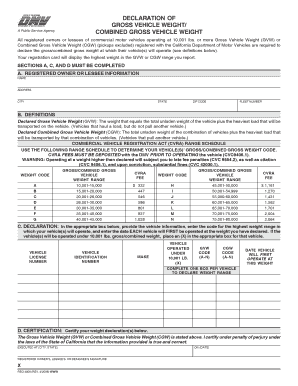
The California Commercial Registration Request form is a government document used by applicants to change vehicle registration from automobile to commercial for business or hire purposes.
pdfFiller scores top ratings on review platforms




Who needs CA REG 590?
Explore how professionals across industries use pdfFiller.

CA REG 590 is needed by:
-
Business owners seeking commercial vehicle registration
-
Individuals transporting passengers for hire
-
Fleet operators managing commercial vehicles
-
Transport service providers
-
Entrepreneurs using vehicles for business purposes
-
Vehicle owners shifting registration for commercial use
Comprehensive Guide to CA REG 590
What is the California Commercial Registration Request?
The California Commercial Registration Request allows applicants to transition their vehicles from automobile to commercial status using the REG 590 form. This form is essential for those intending to use their vehicles for business, including transporting passengers for hire or other commercial purposes. By completing the REG 590 form, users ensure they comply with legal obligations related to vehicle registration.
This form is particularly important for businesses and individuals who need to register vehicles that are utilized in a commercial capacity. Certain scenarios where this form is necessary include situations such as providing transportation services or using the vehicle primarily for business-related activities.
Purpose and Benefits of the California Commercial Registration Request
The primary purpose of the REG 590 form is to facilitate the registration of vehicles as commercial, allowing access to specialized DMV services. Some of the key benefits of this registration include regulatory compliance, which helps avoid penalties and ensures legal adherence during vehicle operation.
-
Businesses that register their vehicles as commercial may enjoy tax advantages.
-
This registration often provides enhanced liability coverage and legal protections.
-
Transitioning to commercial registration is necessary to comply with state vehicle use regulations.
Completing this registration aligns businesses with legal requirements and helps streamline their operations, making it an essential process for commercial vehicle users.
Eligibility Criteria for the California Commercial Registration Request
Eligibility to apply for the California Commercial Registration Request is defined by specific criteria, including the types of businesses and the specifications of the vehicles to be registered. It is important for applicants to review the following criteria:
-
Types of businesses that qualify include those engaging in transportation and other commercial activities.
-
Vehicles must meet certain specifications, including size and weight limitations.
-
Applicants must fulfill age and identification requirements to validate their applications.
Verifying eligibility ensures a smoother application process and reduces the risk of complications during submission.
Required Documents and Supporting Materials
Applicants must gather specific documents to successfully complete the REG 590 form. The required documents include:
-
Certificate of Title to prove ownership of the vehicle.
-
Weight certificates if necessary for certain vehicle categories.
-
Prior automobile license plates if transitioning from previous registration.
A comprehensive checklist will help ensure that all supporting materials are collected before starting the application process, which can save time and avoid delays.
How to Fill Out the California Commercial Registration Request Online (Step-by-Step)
Filling out the REG 590 form online can be done efficiently by following these steps:
-
Begin by accessing the form through the appropriate online portal.
-
Complete the 'Vehicle ID Number' field along with other required sections.
-
Check each entry for completeness and accuracy before submission.
-
Utilize digital tools such as pdfFiller for ease of form completion.
Taking the time to ensure that all sections are correctly filled will prevent potential issues during the submission process.
Submission Methods and Delivery for the California Commercial Registration Request
Once the REG 590 form is completed, applicants have several submission options. These methods include:
-
Online submission through the designated DMV portals.
-
Mailing the completed form to the appropriate DMV office.
-
In-person submission at local DMV locations.
Understanding the delivery methods can help manage expectations regarding processing times and ensure the form is submitted correctly.
Common Errors and How to Avoid Them
Users often encounter common pitfalls while completing the REG 590 form, which can delay approval. Frequent mistakes include:
-
Entering incorrect Vehicle Identification Numbers (VINs).
-
Omitting required signatures or dates on the form.
Double-checking entries and utilizing available resources can mitigate these risks and ensure a successful application.
Tracking Your Submission and What Happens After You Submit
After submitting the REG 590 form, applicants can track their registration request status by following these steps:
-
Log into the DMV online portal to check the application status.
-
Note the expected timelines for receiving confirmation of registration.
If additional information is requested or an application is denied, applicants should be prepared to respond promptly to facilitate their registration process.
Security and Privacy in Submitting the California Commercial Registration Request
When submitting the REG 590 form online, safeguarding personal information is crucial. pdfFiller implements robust security measures that include:
-
256-bit encryption for document protection.
-
Compliance with HIPAA and GDPR regulations.
It is essential for users to be aware of best practices for protecting their privacy both during and after the submission of sensitive documents.
Enhance Your Experience with pdfFiller for the California Commercial Registration Request
Utilizing pdfFiller can greatly enhance your experience while completing the REG 590 form. The platform offers tools such as:
-
eSignature capabilities for quick document signing.
-
Automatic form storage to easily manage submissions.
These features can help streamline the registration process and simplify the overall experience for users.
How to fill out the CA REG 590
-
1.To access the California Commercial Registration Request form on pdfFiller, navigate to the platform's website and use the search function to find 'REG 590 form'.
-
2.Once located, click on the form to open it in the pdfFiller interface. Familiarize yourself with the available editing tools on the sidebar.
-
3.Before filling out the form, ensure you have your vehicle's Certificate of Title, any necessary weight certificates, and previous license plate details ready.
-
4.Start by entering the Vehicle ID Number in the designated field. Then, fill in the Year and Make of your vehicle as requested.
-
5.Locate the checkboxes available in Part 1 or Part 2 of the form that correspond to your vehicle type and tick the appropriate options based on your vehicle's specifications.
-
6.After completing all necessary fields, check all inputs for accuracy. Review the form thoroughly to ensure all required sections are filled out correctly.
-
7.Finalize your application by signing and dating the form in the prompted area, confirming you certify the details provided are accurate.
-
8.Once you are satisfied with the completed form, use the save feature to store your changes. You can choose to download it as a PDF or directly submit it through pdfFiller’s platform.

Who is eligible to use the California Commercial Registration Request form?
Individuals and businesses in California who wish to register a vehicle for commercial use can use the California Commercial Registration Request form, provided they have proper vehicle documentation.
What supporting documents are required for the registration request?
Applicants must provide a Certificate of Title, a weight certificate if applicable, and the completed registration form, along with previous automobile license plates.
How long does it take to process the registration form?
Processing times can vary but typically take several weeks. It’s advisable to submit your form well in advance of any deadlines.
What methods are available for submitting the form after completing it?
Once filled out, the form can be saved and downloaded for mailing, or it may be submitted electronically through specific state DMV portals.
What are common mistakes to avoid when filling out the form?
Ensure all fields are filled in completely and accurately. Common errors include missing signatures, incorrect vehicle details, or not providing required supporting documents.
Is notarization required for the California Commercial Registration Request?
No, notarization is not required for this form, simplifying the submission process for applicants.
Can I make changes to the form after submitting it?
Once submitted, you typically cannot make changes to the registration request. It is important to review all information carefully before submission.
CA REG 590 Form Versions
Related Content
Related Forms


Get the latest insights from our blog


If you believe that this page should be taken down, please follow our DMCA take down process
here
.
This form may include fields for payment information. Data entered in these fields is not covered by PCI DSS compliance.