
Last updated on
Oct 2, 2026

Get the free Affidavit of Proof of Identity
We are not affiliated with any brand or entity on this form

Fill out
Complete the form online in a simple drag-and-drop editor.

eSign
Add your legally binding signature or send the form for signing.

Share
Share the form via a link, letting anyone fill it out from any device.

Export
Download, print, email, or move the form to your cloud storage.
Why pdfFiller is the best tool for your documents and forms


End-to-end document management
From editing and signing to collaboration and tracking, pdfFiller has everything you need to get your documents done quickly and efficiently.
Accessible from anywhere
pdfFiller is fully cloud-based. This means you can edit, sign, and share documents from anywhere using your computer, smartphone, or tablet.
Secure and compliant
pdfFiller lets you securely manage documents following global laws like ESIGN, CCPA, and GDPR. It's also HIPAA and SOC 2 compliant.
What is Proof Identity Affidavit
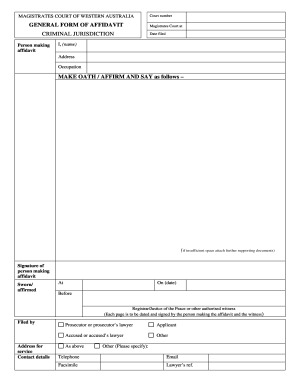
The Affidavit of Proof of Identity is a legal document used by individuals in Western Australia to support applications in the Family Court, requiring identity verification details.
pdfFiller scores top ratings on review platforms




Who needs Proof Identity Affidavit?
Explore how professionals across industries use pdfFiller.

Proof Identity Affidavit is needed by:
-
Individuals applying to the Family Court of Western Australia
-
Deponents providing proof of identity
-
Witnesses certifying signatures
-
Legal professionals assisting clients
-
Notaries Public or Justices of the Peace
Comprehensive Guide to Proof Identity Affidavit
What is the Affidavit of Proof of Identity?
The Affidavit of Proof of Identity is a crucial legal document specifically utilized in family court in Western Australia. It plays a vital role in substantiating applications by verifying an individual’s identity in various legal proceedings.
-
The affidavit must detail relevant information regarding both the applicant and respondent.
-
This document serves to uphold the integrity of identity verification, which is fundamental in legal matters.
Purpose and Benefits of the Affidavit of Proof of Identity
This affidavit is significant as it assists in the verification of identity in a variety of legal contexts. The benefits of utilizing an identity affidavit extend beyond mere verification; it facilitates smoother court proceedings and ensures safe identification of parties involved.
-
Helps in expediting judicial processes by providing necessary identity validation.
-
Reduces the risk of misidentification, thereby enhancing legal clarity and security.
Key Features of the Affidavit of Proof of Identity Template
The template for the Affidavit of Proof of Identity includes several essential components that ensure its validity and effectiveness. Each section of the template is deliberately structured to capture critical identification details.
-
Required details include the names, addresses, and a recent photograph of the individual.
-
Sections such as 'Signature of Deponent' and specific witnessing requirements are clearly outlined in the template.
Who Needs the Affidavit of Proof of Identity?
The individuals who typically need to submit this affidavit include both the deponents and witnesses involved in the affidavit process. Understanding the roles of these parties is crucial for proper execution of the affidavit.
-
The deponent is the person making the statement and must provide accurate information.
-
A witness plays a critical role in verifying the authenticity of the deponent's statements.
How to Fill Out the Affidavit of Proof of Identity Online
Filling out the Affidavit of Proof of Identity online is straightforward and can be accomplished using platforms like pdfFiller. Following a structured process helps ensure that users complete the affidavit correctly.
-
Access the form via pdfFiller and begin by entering your personal details in the designated fields.
-
Gather necessary documentation, including identification and address verification, before filling out the form.
-
Complete all required fields, making sure to check for accuracy and completeness.
Field-by-Field Instructions for Completing the Affidavit of Proof of Identity
Providing detailed instructions for each section is essential to prevent common errors when completing the affidavit. Missteps during completion can hinder the document's acceptance in court.
-
Each field should be carefully filled out according to the specified requirements to ensure validity.
-
Common mistakes, such as missing signatures or incorrect information, should be avoided by double-checking each entry.
How to Sign or Notarize the Affidavit of Proof of Identity
Signing and notarizing the Affidavit of Proof of Identity require adherence to specific guidelines. Proper authorization strengthens the legitimacy of the document.
-
A wet signature is often required, but electronic signature options may also be permissible.
-
Witnesses can include a Justice of the Peace, Notary Public, or Lawyer to ensure the affidavit meets legal standards.
Where to Submit the Affidavit of Proof of Identity
Submission of the Affidavit of Proof of Identity can be done through various methods, including both in-person and digital formats. Understanding the correct procedure is critical for timely processing.
-
In-person submissions require visiting the appropriate court office, while digital submissions can typically be completed through respective online portals.
-
Tracking your submission and understanding expected processing times can prevent unnecessary delays.
Security, Compliance, and Privacy for the Affidavit of Proof of Identity
Ensuring the safety of sensitive information when completing the affidavit is paramount. Robust security measures are in place to protect user data.
-
pdfFiller employs 256-bit encryption and is compliant with both HIPAA and GDPR, safeguarding your documents.
-
Prioritizing privacy and data protection when completing legal documents helps to reassure users of their confidentiality.
Experience the Benefits of Using pdfFiller for Your Affidavit of Proof of Identity
Utilizing pdfFiller for the Affidavit of Proof of Identity streamlines the completion process significantly. This platform offers several key functionalities that enhance user experience.
-
Editing tools and eSigning options make form handling simple and efficient.
-
Users can access their documents from any device, making it convenient to complete requirements on the go.
How to fill out the Proof Identity Affidavit
-
1.Visit pdfFiller's website and log into your account or create a new account if you don’t have one.
-
2.In the search bar, enter 'Affidavit of Proof of Identity' to locate the form quickly.
-
3.Click on the form to open it in the editing interface.
-
4.Gather necessary information, including names, addresses, and a recent photograph of the applicant.
-
5.Begin filling out the form by clicking on the respective fields, entering required details where prompted.
-
6.Make sure to fill in the 'Deponent (name):' section accurately with your full name.
-
7.Continue to complete all fields as directed, paying attention to checkboxes and instructions provided.
-
8.Once all information is entered and verified, review the entire document for accuracy.
-
9.Select the option to sign the document electronically within pdfFiller, ensuring your signature is added.
-
10.Instruct your chosen witness to review and sign in the designated area using their electronic signature.
-
11.Save your progress regularly to avoid losing any completed fields while working on the form.
-
12.After signing and reviewing, click on the 'Save' button to store the document securely in your pdfFiller account.
-
13.Select the option to download your completed Affidavit of Proof of Identity as a PDF to print, or choose to submit it directly if required.

Who is eligible to sign the Affidavit of Proof of Identity?
The deponent must be an individual providing identity verification, while a witness can be a Justice of the Peace, Notary Public, or Lawyer to validate the signature.
Is there a deadline for submitting this affidavit?
While specific deadlines may vary, it's essential to submit the affidavit in line with the Family Court application's requirements to avoid delays.
What methods can I use to submit the affidavit?
You can submit the completed affidavit either directly to the Family Court, or as needed, submit a digital copy through your legal representative.
Are there any supporting documents required with the affidavit?
Typically, you may need to provide identification documents such as a driver's license or passport alongside your affidavit to verify your identity.
What are common mistakes to avoid when filling out this form?
Ensure all personal information is accurate, signatures are complete, and required sections are filled out to prevent rejection or processing delays.
How long does it take to process the affidavit once submitted?
Processing times can vary, but generally, you should allow a few weeks for the Family Court to review and respond to the affidavit.
What should I do if I need to make changes after signing?
If changes are needed post-signing, you may need to create a new affidavit as modifications can invalidate the completed document.
Related Content
Related Forms




Related Catalogs
Get the latest insights from our blog


If you believe that this page should be taken down, please follow our DMCA take down process
here
.
This form may include fields for payment information. Data entered in these fields is not covered by PCI DSS compliance.