
Last updated on
Sep 28, 2026
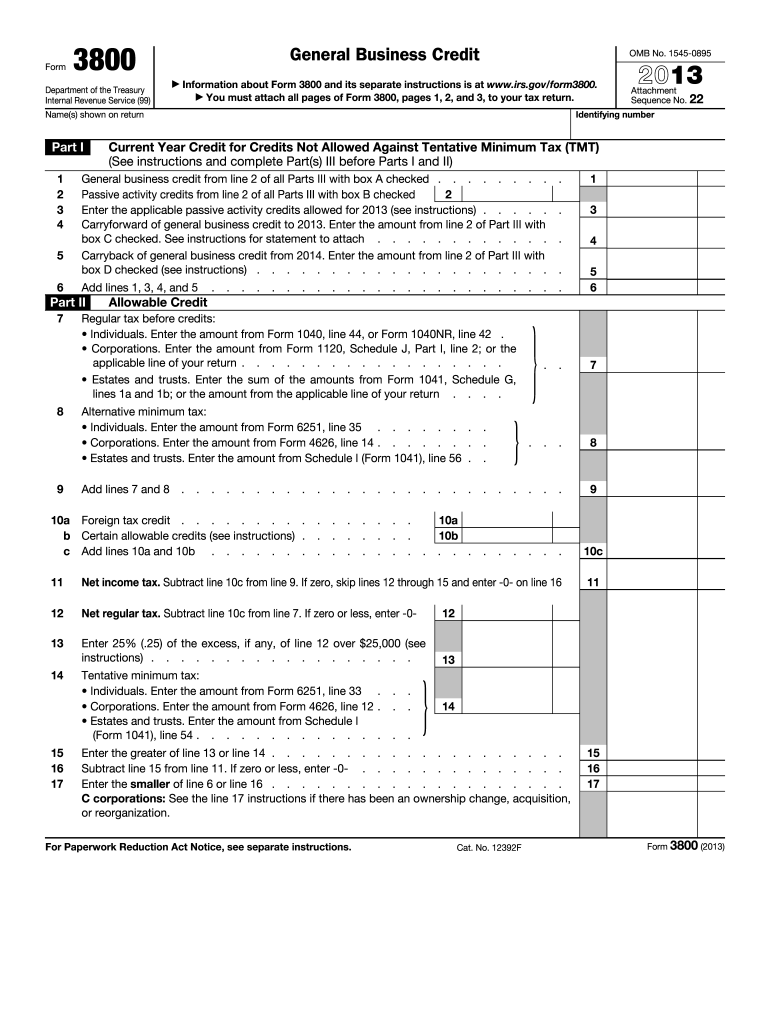
IRS 3800 2013 free printable template
pdfFiller is not affiliated with IRS

Fill out
Complete the form online in a simple drag-and-drop editor.

eSign
Add your legally binding signature or send the form for signing.

Share
Share the form via a link, letting anyone fill it out from any device.

Export
Download, print, email, or move the form to your cloud storage.
Why pdfFiller is the best tool for your documents and forms


End-to-end document management
From editing and signing to collaboration and tracking, pdfFiller has everything you need to get your documents done quickly and efficiently.
Accessible from anywhere
pdfFiller is fully cloud-based. This means you can edit, sign, and share documents from anywhere using your computer, smartphone, or tablet.
Secure and compliant
pdfFiller lets you securely manage documents following global laws like ESIGN, CCPA, and GDPR. It's also HIPAA and SOC 2 compliant.
What is IRS 3800
The IRS Form 3800 General Business Credit is a tax document used by individuals, corporations, estates, and trusts to calculate and report general business credits for the tax year 2013.
pdfFiller scores top ratings on review platforms




Who needs IRS 3800?
Explore how professionals across industries use pdfFiller.

IRS 3800 is needed by:
-
Individual taxpayers claiming business tax credits
-
Corporations applying for general business credits
-
Estates and trusts reporting business credits
-
Tax professionals assisting clients with credits
-
Small business owners seeking to maximize tax benefits
-
Accountants managing client tax returns
-
Tax preparation services handling multiple forms
Comprehensive Guide to IRS 3800
What is IRS Form 3800 General Business Credit?
IRS Form 3800 is an essential tax document utilized in the United States for reporting general business credits, particularly for the tax year 2013. This form allows various entities—including individuals, corporations, estates, and trusts—to calculate their eligible credits accurately. It is crucial for taxpayers to attach this form to their federal tax return to ensure they claim all appropriate credits effectively.
This form serves a key role in helping businesses take advantage of available business tax credits, making it an important aspect of the tax filing process.
Purpose and Benefits of IRS Form 3800
IRS Form 3800 streamlines the calculation of business tax credits and can lead to noteworthy tax savings for eligible taxpayers. By utilizing this form, businesses can efficiently assess and claim all applicable general business credits, which can significantly reduce their overall tax liability.
Furthermore, using Form 3800 can simplify the tax filing process, helping taxpayers avoid potential errors and ensuring they receive the maximum tax benefits possible.
Who Needs IRS Form 3800 General Business Credit?
Various categories of taxpayers are required to complete IRS Form 3800. These include:
-
Individuals claiming business credits
-
Corporations that qualify for general business credits
-
Estates and trusts eligible for applicable credits
There may also be unique situations, such as certain tax credits available to non-profit organizations and small businesses, where this form is necessary to ensure compliance and optimal credit claims.
Eligibility Criteria for IRS Form 3800
To successfully claim general business credits using IRS Form 3800, several eligibility criteria must be met. Key requirements include:
-
Qualifying business activities that align with IRS definitions
-
Specific expenses that can generate credits, such as research and development costs
Understanding these criteria is essential for taxpayers to ensure they properly document their claims and maximize eligible benefits.
How to Fill Out IRS Form 3800 Online (Step-by-Step)
Completing IRS Form 3800 online can be a straightforward process when following these steps:
-
Access the fillable form through a reliable provider like pdfFiller.
-
Fill in the relevant sections, including identifying information and credit details.
-
Double-check all entries for accuracy before finalizing.
Best practices include utilizing the digital tools available to avoid common errors and improve data entry efficiency.
Common Errors to Avoid When Filling out IRS Form 3800
Completing IRS Form 3800 correctly is crucial to avoid potential pitfalls. Frequent mistakes include:
-
Misreporting income or credit amounts
-
Neglecting to include necessary documentation
It is vital for taxpayers to double-check key fields and ensure all information is accurate, as these errors can lead to complications in tax filings.
Submission Methods for IRS Form 3800
Once the form is completed, taxpayers have various submission options. They may submit IRS Form 3800:
-
Electronically through e-filing services
-
By mail to the appropriate IRS address
It’s essential for users to be aware of submission deadlines to ensure timely processing of their credits.
Security and Compliance When Using IRS Form 3800
Handling IRS Form 3800 involves sensitive tax information, making data security a critical concern. Utilize services like pdfFiller, which offer robust security measures, such as:
-
256-bit encryption to protect sensitive information
-
Compliance with SOC 2 Type II, HIPAA, and GDPR standards
Additionally, maintaining proper records of tax documents is vital for compliance and future reference.
Experience Seamless Filing with pdfFiller
pdfFiller provides an efficient way to complete IRS Form 3800, simplifying the entire filing process through its user-friendly platform. Users can benefit from features such as eSigning and document sharing, which can further enhance their experience. Take advantage of pdfFiller for a hassle-free approach to form filling and ensure you submit your IRS Form 3800 correctly and securely.
How to Fill Out Small Business Tax Forms Online with pdfFiller
Struggling with your Schedule C or not sure how to file business taxes as a sole proprietor, LLC, or self-employed professional? This step-by-step pdfFiller tutorial walks you through completing IRS Schedule C quickly and accurately — no printing, no scanning, no stress. Whether you're handling small business tax deductions, tracking self-employed taxes, or preparing your full business tax return, pdfFiller makes it simple right in your browser.

How to fill out the IRS 3800
-
1.To access IRS Form 3800 on pdfFiller, visit the website and use the search bar to find 'IRS Form 3800'. Select the form from the search results to open it in the editor.
-
2.Once the form opens, begin by reviewing the instructions provided to ensure you understand each section before entering any information.
-
3.Gather necessary information, such as your name, Identifying number, and any current year credits you will report. Collect any supporting documents that contain this information.
-
4.Next, click on the blank fields to input your data. Use pdfFiller's tools to fill in your name, Identifying number, and enter the amount from Form 1040, line 44 where indicated.
-
5.As you complete each section of the form, double-check that you have filled in all required fields. Ensure that the entered figures match your supporting documentation.
-
6.After completing the form, review your entries for any errors or omissions. Utilize pdfFiller’s review tools, which help identify any incomplete sections.
-
7.When you are satisfied with your form, save your progress. You can choose to download the completed form to your device or submit it directly if you are using a compatible electronic filing method.
-
8.If you need to submit the form to the IRS, follow the specific submission procedures outlined in the IRS instructions, including attaching it to your tax return.

Who needs to complete IRS Form 3800?
IRS Form 3800 is for individuals, corporations, estates, and trusts that want to claim general business credits for the tax year 2013. Business owners, tax professionals, and accountants frequently utilize this form.
What are the deadlines for submitting Form 3800?
Form 3800 must be submitted along with your tax return. Ensure you file your tax return by the deadline, typically April 15, unless an extension is granted.
What documents are required to complete Form 3800?
To complete Form 3800, you will need your name, Identifying number, and amounts from supporting documents that report eligible current year credits. Ensure all figures are accurately sourced from IRS-approved documentation.
How can I submit IRS Form 3800?
IRS Form 3800 can be submitted by attaching it to your paper tax return or by filing electronically if using compatible e-filing software. Make sure to follow any specific IRS guidelines for your submission method.
What are common mistakes to avoid with Form 3800?
Common mistakes include failing to fill out all required fields, neglecting to verify figures against supporting documents, and missing the submission deadline. Double-check your entries for accuracy.
How long does it take to process Form 3800?
Processing times for IRS Form 3800 can vary based on your submission method and the IRS backlog. Generally, e-filed returns are processed faster than paper submissions, typically within 21 days.
Are there any fees associated with filing Form 3800?
There are no specific fees for filing IRS Form 3800 itself; however, you may incur fees from tax preparation services or software used to complete your tax return. Always check with your provider for details.
IRS 3800 Form Versions
Related Content
Related Forms






Get the latest insights from our blog



If you believe that this page should be taken down, please follow our DMCA take down process
here
.
This form may include fields for payment information. Data entered in these fields is not covered by PCI DSS compliance.