
Last updated on
Oct 2, 2026

Get the free Work Zone Traffic Control Inspection Form
We are not affiliated with any brand or entity on this form

Fill out
Complete the form online in a simple drag-and-drop editor.

eSign
Add your legally binding signature or send the form for signing.

Share
Share the form via a link, letting anyone fill it out from any device.

Export
Download, print, email, or move the form to your cloud storage.
Why pdfFiller is the best tool for your documents and forms


End-to-end document management
From editing and signing to collaboration and tracking, pdfFiller has everything you need to get your documents done quickly and efficiently.
Accessible from anywhere
pdfFiller is fully cloud-based. This means you can edit, sign, and share documents from anywhere using your computer, smartphone, or tablet.
Secure and compliant
pdfFiller lets you securely manage documents following global laws like ESIGN, CCPA, and GDPR. It's also HIPAA and SOC 2 compliant.
What is Traffic Control Inspection
The Work Zone Traffic Control Inspection Form is a document used by inspectors to evaluate and document the safety and compliance of traffic control measures in work zones.
pdfFiller scores top ratings on review platforms




Who needs Traffic Control Inspection?
Explore how professionals across industries use pdfFiller.

Traffic Control Inspection is needed by:
-
Traffic inspectors responsible for ensuring work zone safety.
-
Construction project managers overseeing roadwork.
-
Local government agencies managing public safety.
-
Contractors involved in road construction projects.
-
Safety officers monitoring compliance during work operations.
Comprehensive Guide to Traffic Control Inspection
What is the Work Zone Traffic Control Inspection Form?
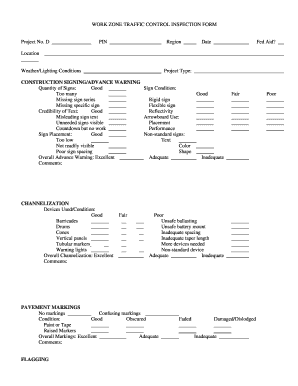
The Work Zone Traffic Control Inspection Form serves to assess the safety and compliance of traffic control measures in active work zones. This form evaluates critical components such as advance warning signs, channelizing devices, pavement markings, and flagging. Ensuring that these elements are properly documented is essential for maintaining a safe work environment.
Purpose and Benefits of the Work Zone Traffic Control Inspection Form
This form is vital for enhancing safety in work zones. By properly completing the work zone safety form, project managers can ensure compliance with safety standards and protocols. This not only prevents accidents but also fosters accountability among construction teams. Benefits extend to minimizing liabilities and enhancing operational efficiency during projects.
Key Features of the Work Zone Traffic Control Inspection Form
The Work Zone Traffic Control Inspection Form is structured with multiple fillable fields and evaluation sections. Users will find sections dedicated to submitting information about the project location, prevailing weather conditions, and specific traffic control measures. Each section is designed to facilitate thorough assessments of work zone safety.
-
Fillable fields for detailed project information
-
Evaluation sections for assessing each traffic control component
-
Instructions for user completion, such as 'Circle One' and 'Explain'
Who Needs the Work Zone Traffic Control Inspection Form?
The primary users of this form include inspectors and traffic coordinators responsible for conducting safety evaluations. Construction and maintenance project managers must also be familiar with this form to ensure that all safety protocols are adhered to. It is essential for anyone involved in traffic control permit applications to understand the importance of this inspection form.
How to Fill Out the Work Zone Traffic Control Inspection Form Online (Step-by-Step)
Filling out the Work Zone Traffic Control Inspection Form online can be accomplished by following these steps:
-
Access the form through the designated platform.
-
Complete all required fillable sections accurately.
-
Review each entry for completeness and clarity.
-
Use the provided instructions to guide your responses.
-
Submit the completed form electronically or via alternative methods.
Common Errors and How to Avoid Them
When completing the Work Zone Traffic Control Inspection Form, several common errors can arise. These include incomplete fields, unclear handwriting, and overlooking required information. To prevent these mistakes:
-
Double-check all entries before submission.
-
Utilize digital tools to ensure clarity and precision.
-
Follow the form's instructions meticulously.
Submission Methods and Delivery for the Work Zone Traffic Control Inspection Form
After completing the Work Zone Traffic Control Inspection Form, users can submit it through various methods. Options include electronic submission directly through the form platform or printing and mailing the completed form. Choosing the most efficient submission method is crucial to ensure timely processing.
What Happens After You Submit the Work Zone Traffic Control Inspection Form?
Once the Work Zone Traffic Control Inspection Form is submitted, users can expect a confirmation of receipt. The processing involves reviewing the submitted information for accuracy and compliance. Users can track the status of their submission as it progresses through the approval stages.
Security and Compliance for the Work Zone Traffic Control Inspection Form
Security measures are paramount when handling important documents such as the Work Zone Traffic Control Inspection Form. pdfFiller ensures the safety of user information through robust encryption protocols and adherence to regulatory compliance standards. This provides users with peace of mind regarding their data security.
Enhancing Your Experience with pdfFiller for the Work Zone Traffic Control Inspection Form
Utilizing pdfFiller’s comprehensive tools can significantly improve your experience in filling out the Work Zone Traffic Control Inspection Form. Features designed to enhance user efficiency include easy text editing, form creation, and the ability to eSign documents. These functionalities streamline the entire process of form completion and submission.
How to fill out the Traffic Control Inspection
-
1.Access the Work Zone Traffic Control Inspection Form on pdfFiller by searching for its title in the pdfFiller search bar.
-
2.Once found, click on the form to open it in the pdfFiller editor, where you can begin filling out the necessary fields.
-
3.Gather essential information such as the project location, weather conditions, and the specific type of work being conducted prior to starting the form.
-
4.Navigate the form using the sidebar to locate different sections, which include fillable fields for project details and checkboxes for evaluation criteria.
-
5.As you fill out the form, ensure to provide clear and detailed information, especially in areas that require explanations or descriptions.
-
6.After completing the form, review all entries for accuracy and completeness; use pdfFiller's preview feature to see the finished product.
-
7.Once satisfied with the form, save your work, download a copy for your records, or submit the form electronically if required.

Who is eligible to use the Work Zone Traffic Control Inspection Form?
The Work Zone Traffic Control Inspection Form is primarily intended for traffic inspectors, construction project managers, and safety officers engaged in monitoring compliance for work zones.
What supporting documents do I need to complete this form?
You may need project plans, weather reports, and previous inspection records to provide accurate details when completing the Work Zone Traffic Control Inspection Form.
How do I submit the completed Work Zone Traffic Control Inspection Form?
After completing the form on pdfFiller, you can submit it electronically through the platform or print and mail it to the appropriate local government agency.
What are common mistakes to avoid when filling out this form?
Common mistakes include omitting necessary project details, failing to check evaluation criteria thoroughly, and not reviewing the form for accuracy prior to submission.
Is there a deadline for submitting the Work Zone Traffic Control Inspection Form?
While specific deadlines may vary by local agency, it is essential to submit the form promptly after inspections are completed to ensure compliance with safety regulations.
What are the processing times for the inspection form?
Processing times can differ based on the local agency's workload, but typically it may take a few days to a couple of weeks to receive feedback or approval.
Do I need to notarize the Work Zone Traffic Control Inspection Form?
No, the Work Zone Traffic Control Inspection Form does not require notarization, making it simpler to complete and submit.
Related Content
Related Forms

Related Catalogs
Get the latest insights from our blog


If you believe that this page should be taken down, please follow our DMCA take down process
here
.
This form may include fields for payment information. Data entered in these fields is not covered by PCI DSS compliance.