
Last updated on
Oct 19, 2026

NY NYCERS F551 2012 free printable template
pdfFiller is not affiliated with any government organization

Fill out
Complete the form online in a simple drag-and-drop editor.

eSign
Add your legally binding signature or send the form for signing.

Share
Share the form via a link, letting anyone fill it out from any device.

Export
Download, print, email, or move the form to your cloud storage.
Why pdfFiller is the best tool for your documents and forms


End-to-end document management
From editing and signing to collaboration and tracking, pdfFiller has everything you need to get your documents done quickly and efficiently.
Accessible from anywhere
pdfFiller is fully cloud-based. This means you can edit, sign, and share documents from anywhere using your computer, smartphone, or tablet.
Secure and compliant
pdfFiller lets you securely manage documents following global laws like ESIGN, CCPA, and GDPR. It's also HIPAA and SOC 2 compliant.
What is NY NYCERS F551
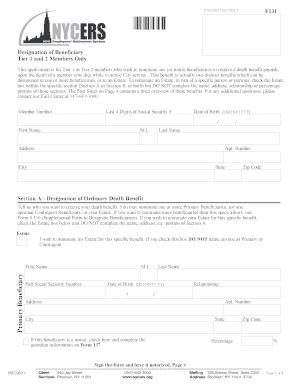
The NYCERS Retirement Option Election Form is a legal document used by Tier 1 retired members of the New York City Employees' Retirement System to elect a retirement option that ensures ongoing income for their designated beneficiaries.
pdfFiller scores top ratings on review platforms




Who needs NY NYCERS F551?
Explore how professionals across industries use pdfFiller.

NY NYCERS F551 is needed by:
-
Tier 1 retired members of NYCERS
-
Beneficiaries of NYCERS members
-
Notary Public or Commissioner of Deeds
-
Financial advisors assisting with retirement options
-
Legal professionals advising on retirement planning
Comprehensive Guide to NY NYCERS F551
What is the NYCERS Retirement Option Election Form?
The NYCERS Retirement Option Election Form is a crucial document for Tier 1 members of the New York City Employees' Retirement System (NYCERS). This form enables members to select their retirement options, which significantly impacts their financial security in retirement. It specifically allows members to designate beneficiaries who will receive a continued income after their death.
This form plays a vital role for Tier 1 members in making informed decisions about their retirement options, such as the choice between a lump sum payment and other benefit options. Correct completion of this form is essential to ensure that members’ wishes are carried out effectively.
Purpose and Benefits of the NYCERS Retirement Option Election Form
The NYCERS Retirement Option Election Form serves multiple purposes that enhance the livelihood of both members and their designated beneficiaries. By completing this form, members can ensure that their beneficiaries receive financial support upon their passing.
Among the options available within the form are the Return of Reserve (Option 1) and Lump Sum Payment (Option 4). Each selection offers different financial outcomes, making it imperative for members to understand their implications fully.
Who Needs the NYCERS Retirement Option Election Form?
This form is specifically designed for Tier 1 retired members of the NYCERS. It is necessary for members to complete this document to formalize their retirement option choices, especially regarding the designation of beneficiaries.
Identifying the right beneficiaries is a crucial task, as it determines who will benefit from the member’s retirement options in the event of their death. Therefore, understanding the audience who must fill out this form is key to ensuring all legal requirements are met.
How to Fill Out the NYCERS Retirement Option Election Form Online
Completing the NYCERS Retirement Option Election Form online is made easy through platforms like pdfFiller. Here is a step-by-step guide:
-
Access the form via the pdfFiller platform.
-
Fill in necessary details such as Member Number, Name, and Date of Birth.
-
Select the desired retirement option and complete the respective sections.
-
Review all information for accuracy and completeness.
-
Print the form and prepare it for notarization.
Each field requires careful attention to detail to ensure that the form is validated correctly.
Requirements and Notarization for the NYCERS Retirement Option Election Form
In order for the NYCERS Retirement Option Election Form to be considered valid, it is imperative that it meets specific legal requirements. Both the member and a Notary Public or Commissioner of Deeds must provide their signatures on the form.
Notarization is a critical step, as it prevents potential issues regarding the authenticity of the document. Without it, the form may be rejected, resulting in delays or complications in processing retirement benefits.
Common Errors and How to Avoid Them
When filling out the NYCERS Retirement Option Election Form, members may encounter several common errors. Some of these include:
-
Failure to sign the form correctly.
-
Omitting required beneficiary information.
-
Inaccurate entries in important fields such as Member Number or Date of Birth.
To prevent these mistakes, members should double-check each section before submission and refer back to the instructions provided. Ensuring completeness and accuracy is essential.
Submission Methods and Deadlines for the NYCERS Retirement Option Election Form
Members have multiple options for submitting the completed NYCERS Retirement Option Election Form. They can either:
-
Mail the form directly to NYCERS.
-
File the form in person at the NYCERS Brooklyn office.
Being aware of critical submission deadlines is also essential to avoid processing delays. Members should plan their submissions accordingly to ensure prompt review of their choices.
Security and Compliance Handling Your NYCERS Retirement Option Election Form
When utilizing pdfFiller to manage the NYCERS Retirement Option Election Form, users can trust in the platform’s robust security measures. The service implements 256-bit encryption to safeguard sensitive information.
Furthermore, pdfFiller complies with various regulations, including HIPAA and GDPR, ensuring that all personal data is handled with the utmost care and privacy protection.
Next Steps After Submitting the NYCERS Retirement Option Election Form
After members have submitted the NYCERS Retirement Option Election Form, they may want to monitor the status of their application. They can typically check the processing status through NYCERS' online services.
Additionally, members may need to take follow-up actions or make amendments to their submissions if issues arise. Being proactive during this phase helps ensure that benefits are managed effectively.
Using pdfFiller to Simplify the NYCERS Retirement Option Election Process
pdfFiller offers a suite of features that significantly streamline the process of completing the NYCERS Retirement Option Election Form. Users can easily edit, sign, and secure their forms online without requiring software installations.
The convenience of a cloud-based solution allows members to manage their documents efficiently, making the overall process of filling out the form simpler and more reliable.
How to fill out the NY NYCERS F551
-
1.To access the NYCERS Retirement Option Election Form on pdfFiller, visit their website and use the search bar to locate the form by its name.
-
2.Once opened, review the form fields outlined in the instructions. Make sure you have all required information before starting.
-
3.Begin by entering your 'Member Number,' 'First Name,' 'Middle Initial,' and 'Last Name' in the designated fields.
-
4.Fill in your 'Date of Birth' and 'Address' accurately to avoid delays in processing your form.
-
5.Select your desired retirement option between Option 1 (Return of Reserve) or Option 4 (Lump Sum Payment) by checking the corresponding box.
-
6.Designate beneficiaries by providing their names and relevant information required on the form.
-
7.After completing all fields, review your entries carefully for any errors or missing details.
-
8.Consider consulting a notary public to have the form notarized, as this is a requirement for submission.
-
9.Once finalized, use pdfFiller's options to save your completed form securely on your device.
-
10.You can download the form as a PDF or submit it directly through pdfFiller if applicable.
-
11.If mailing the form, send it to the NYCERS address or deliver it personally to their Brooklyn office.

Who is eligible to use the NYCERS Retirement Option Election Form?
Only Tier 1 retired members of the New York City Employees' Retirement System can use the NYCERS Retirement Option Election Form to elect retirement options for their beneficiaries.
What are the deadlines for submitting the form?
It is essential to submit the NYCERS Retirement Option Election Form promptly to ensure that your chosen retirement option is effective upon your retirement date. Check with NYCERS for any specific deadlines.
What submission methods are available for this form?
The form can be mailed to NYCERS or delivered in person at their Brooklyn office. Ensure that it is properly notarized before submission.
What documents do I need to support this form?
You typically need to provide personal identification, proof of retirement eligibility, and information about your designated beneficiaries to support the completion of the NYCERS Retirement Option Election Form.
What common mistakes should I avoid when filling out the form?
Ensure all fields are filled out completely and accurately, particularly your personal details and beneficiary information. Avoid omitting the notarization step, as this is essential for validity.
How long will it take for my form to be processed by NYCERS?
Processing times can vary based on the volume of submissions. Generally, expect several weeks for your form to be processed and for you to receive confirmation of your retirement option.
Can I modify my elected retirement option after submission?
Once submitted, changing your elected retirement option can be complicated. Contact NYCERS directly for guidance on modifying any submitted information, especially after your retirement has commenced.
NY NYCERS F551 Form Versions
Related Forms





Get the latest insights from our blog


If you believe that this page should be taken down, please follow our DMCA take down process
here
.
This form may include fields for payment information. Data entered in these fields is not covered by PCI DSS compliance.