
Last updated on
Oct 31, 2026

Case Western Reserve University Health Service Occupational Health Medical History 2013-2026 fre...
pdfFiller is not affiliated with any government organization

Fill out
Complete the form online in a simple drag-and-drop editor.

eSign
Add your legally binding signature or send the form for signing.

Share
Share the form via a link, letting anyone fill it out from any device.

Export
Download, print, email, or move the form to your cloud storage.
Why pdfFiller is the best tool for your documents and forms


End-to-end document management
From editing and signing to collaboration and tracking, pdfFiller has everything you need to get your documents done quickly and efficiently.
Accessible from anywhere
pdfFiller is fully cloud-based. This means you can edit, sign, and share documents from anywhere using your computer, smartphone, or tablet.
Secure and compliant
pdfFiller lets you securely manage documents following global laws like ESIGN, CCPA, and GDPR. It's also HIPAA and SOC 2 compliant.
What is Case Western Reserve University Health Service Occupational Health Medical History
The Case Western Reserve University Occupational Health Medical History Form is a healthcare document used by employees to provide essential medical history information for workplace safety and health assessments.
pdfFiller scores top ratings on review platforms




This program has been my saving grace, freeing up valuable time
PROCESS SERVER FORM WAS EASY TO ACCESS AND FILL OUT
Who needs Case Western Reserve University Health Service Occupational Health Medical History?
Explore how professionals across industries use pdfFiller.

Case Western Reserve University Health Service Occupational Health Medical History is needed by:
-
Current employees of Case Western Reserve University
-
Human Resources personnel managing employee health records
-
Occupational health professionals evaluating employee medical history
-
University health services conducting health assessments
-
Staff in charge of workplace safety compliance
Comprehensive Guide to Case Western Reserve University Health Service Occupational Health Medical History
What is the Case Western Reserve University Occupational Health Medical History Form?
The Case Western Reserve University Occupational Health Medical History Form is a vital document used by employees to convey essential medical information. This form serves various purposes, including gathering personal information and a detailed medical history. Certification by the employee is crucial, as it confirms the accuracy of the submitted information, ensuring workplace safety and health compliance.
Key components of the form include sections for personal details, medical history, and immunization records. These elements play a critical role in the overall health management of employees.
Purpose and Benefits of the Case Western Reserve University Occupational Health Medical History Form
Completing the Occupational Health Medical History Form is a fundamental step for employees at Case Western Reserve University. It offers numerous benefits, such as enhancing workplace safety through accurate medical histories. This form is essential for maintaining compliance with health regulations that govern employee well-being.
Providing complete and accurate information aids in better health management, ensuring that employees receive appropriate care and support at work.
Key Features of the Case Western Reserve University Occupational Health Medical History Form
The Occupational Health Medical History Form includes several important features designed to streamline the completion process. Notably, it offers fillable fields for personal and medical information, allowing for easy data entry.
Additionally, the form includes sections for immunization records and details about the work environment. It also boasts a user-friendly design with clear instructions to assist employees in filling out the form accurately.
Who Needs to Complete the Case Western Reserve University Occupational Health Medical History Form?
This form is required for various employees within Case Western Reserve University. Specifically, it targets new hires and current employees in specific roles or departments where health checks may be necessary.
Understanding the impact of this form is crucial, as it ensures that all employees meet the health requirements relevant to their positions. Documentation of medical history serves not only new employees but also current staff who might need updates to their health records.
How to Fill Out the Case Western Reserve University Occupational Health Medical History Form Online
Filling out the Occupational Health Medical History Form online is straightforward. Here's a step-by-step guide for employees:
-
Access the form through the designated university platform.
-
Carefully enter your personal information in the specified fields.
-
Complete the medical history section, being thorough and accurate.
-
Review all entries to ensure no information is omitted.
-
Submit the form as instructed.
Common pitfalls include overlooking required fields. It is essential to double-check all entries to prevent submission errors.
What Happens After You Submit the Case Western Reserve University Occupational Health Medical History Form?
After submission, the processing of the Occupational Health Medical History Form typically involves several steps. Employees can expect confirmation notifications regarding their submission status.
During this time, it is also possible to check the status of the form through the designated channels. In case amendments or corrections are needed post-submission, employees should follow the outlined procedures for making changes.
Security and Compliance for the Case Western Reserve University Occupational Health Medical History Form
Security is a top priority when handling the Occupational Health Medical History Form. pdfFiller employs robust security measures, including 256-bit encryption, to protect sensitive data.
Compliance with HIPAA and GDPR regulations is strictly maintained to ensure confidentiality while filling out the form. Employees can trust that their information is secure during the entire submission process.
How pdfFiller Can Help with the Case Western Reserve University Occupational Health Medical History Form
Using pdfFiller to complete the Occupational Health Medical History Form offers substantial advantages. This platform allows for easy editing, e-signing, and sharing of documents, making the process more efficient.
To fill out the form using pdfFiller, follow the simple steps provided within the platform. This ensures a secure and streamlined method of completing and submitting necessary forms.
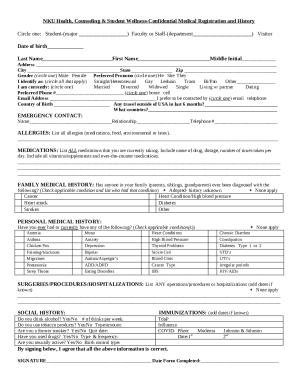
Sample of a Completed Case Western Reserve University Occupational Health Medical History Form
Providing a sample of the completed Occupational Health Medical History Form is beneficial for clarity. This representation illustrates what a filled-out form looks like, emphasizing the importance of accurate and complete information.
The sample includes detailed explanations for each section, showcasing how best to fill out the form correctly. Accuracy is crucial, as illustrated by the potential discrepancies that may arise from incomplete information.
Your Next Steps for Utilizing the Case Western Reserve University Occupational Health Medical History Form
Engaging with the Occupational Health Medical History Form is an important step in safeguarding health at work. Utilizing pdfFiller simplifies the process of filling out, signing, and submitting the form efficiently.
Explore the features available on pdfFiller to enhance your experience and ensure that you complete the necessary documentation effectively.
How to fill out the Case Western Reserve University Health Service Occupational Health Medical History
-
1.To access the Case Western Reserve University Occupational Health Medical History Form, visit pdfFiller and log in to your account or sign up if you are a new user.
-
2.Once logged in, navigate to the 'Forms' section and search for 'Case Western Reserve University Occupational Health Medical History Form' to find the specific form.
-
3.Open the form by clicking on it, which will load it into the pdfFiller editing interface.
-
4.Before filling out the form, gather necessary personal medical information, including details about any past medical conditions, immunizations, and workplace hazards you may have encountered.
-
5.Begin filling in the personal information section by typing in your name, employee ID, and contact details in the designated fields.
-
6.Proceed to complete the medical history section by selecting checkboxes or entering information about previous illnesses, conditions, and surgeries as prompted.
-
7.Filling in the immunization records requires you to type in dates and types of immunizations received. Ensure accuracy to reflect your medical history correctly.
-
8.Review the work environment section, detailing any known exposures or potential hazards you have faced while working for the university.
-
9.After completing all fields, double-check the accuracy of the information provided for any inconsistencies or omissions.
-
10.Once satisfied with your entries, finalize the form by selecting the submit or finish option within pdfFiller.
-
11.To save your work, choose the download option or save it within pdfFiller for later submission or printing.

Who is required to fill out the Occupational Health Medical History Form?
All current employees of Case Western Reserve University are required to complete this form as part of the occupational health assessment process, ensuring workplace safety and health compliance.
Are there any deadlines for submitting the form?
It’s crucial to submit the Case Western Reserve University Occupational Health Medical History Form as soon as possible, especially before starting any new role or position within the university, to comply with health regulations.
How can I submit the completed form?
After completing the form on pdfFiller, you can submit it directly through the platform, or download it for printing and manual submission to your HR department, as per university guidelines.
What supporting documents are needed with this form?
Typically, you might need to provide documentation related to previous medical conditions or vaccination records along with your Occupational Health Medical History Form, as specified by university health services.
What common mistakes should I avoid while filling out the form?
Ensure to provide complete and accurate information in all sections of the form. Common mistakes include forgetting to sign the document or leaving sections incomplete, which may cause delays in processing.
What is the processing time after submitting the form?
Processing times can vary, but generally, you can expect a response within one to two weeks after submission, depending on the volume of forms being processed by the university's office.
What if I have concerns about the information I provide?
If you have concerns, consider discussing them with a supervisor or a representative from the university’s health services before filling out the form to ensure your information is accurate and complete.
Related Content
Related Forms

Related Catalogs
Get the latest insights from our blog



If you believe that this page should be taken down, please follow our DMCA take down process
here
.
This form may include fields for payment information. Data entered in these fields is not covered by PCI DSS compliance.