
Last updated on
Oct 19, 2026

Kaiser Permanente 02334-040 2014-2026 free printable template
pdfFiller is not affiliated with any government organization

Fill out
Complete the form online in a simple drag-and-drop editor.

eSign
Add your legally binding signature or send the form for signing.

Share
Share the form via a link, letting anyone fill it out from any device.

Export
Download, print, email, or move the form to your cloud storage.
Why pdfFiller is the best tool for your documents and forms


End-to-end document management
From editing and signing to collaboration and tracking, pdfFiller has everything you need to get your documents done quickly and efficiently.
Accessible from anywhere
pdfFiller is fully cloud-based. This means you can edit, sign, and share documents from anywhere using your computer, smartphone, or tablet.
Secure and compliant
pdfFiller lets you securely manage documents following global laws like ESIGN, CCPA, and GDPR. It's also HIPAA and SOC 2 compliant.
What is Kaiser Permanente 02334-040
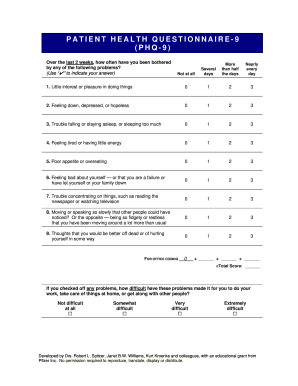
The PHQ-9 and Relationship Review Form is a healthcare assessment tool used by patients to evaluate mental health and relationship stress over the last two weeks.
pdfFiller scores top ratings on review platforms




Who needs Kaiser Permanente 02334-040?
Explore how professionals across industries use pdfFiller.

Kaiser Permanente 02334-040 is needed by:
-
Patients seeking mental health evaluation
-
Mental health professionals assessing patient wellbeing
-
Healthcare providers conducting relationship stress assessments
-
Counselors focusing on relationship issues
-
Researchers analyzing mental health trends
-
Clinical facilities offering mental health services
Comprehensive Guide to Kaiser Permanente 02334-040
What is the PHQ-9 and Relationship Review Form?
The PHQ-9 and Relationship Review Form is an essential healthcare assessment tool designed to evaluate an individual's mental health and relationship stress over the past two weeks. The form includes a series of questions aimed at identifying symptoms of depression and anxiety, offering a holistic overview of mental well-being and relationship dynamics. By assessing both personal mental health and relationship conditions, users can gain insights that foster better discussions with healthcare professionals.
Purpose and Benefits of the PHQ-9 and Relationship Review Form
Mental health assessments, such as the PHQ-9 and Relationship Review Form, are critical for individuals facing emotional challenges. These assessments help users gain a clearer understanding of their mental state, enabling them to articulate their feelings and experiences more effectively. Users benefit by capturing a global distress score, which serves as a valuable reference during therapy or consultations. Moreover, the insights derived from this form can significantly enhance self-awareness and engagement in the healing process.
Key Features of the PHQ-9 and Relationship Review Form
The PHQ-9 and Relationship Review Form includes several key features that users should note:
-
Clear instructions for filling out the form, ensuring an intuitive user experience.
-
A detailed scoring methodology that helps interpret levels of distress accurately.
-
Robust confidentiality and privacy measures designed to protect personal data.
Who Should Use the PHQ-9 and Relationship Review Form?
This form is intended for a variety of users, particularly adults and couples. Anyone experiencing difficulties with mental health or relationship stress can benefit from completing the PHQ-9 and Relationship Review Form. It is especially relevant in contexts like therapy sessions or self-assessment scenarios, making it a versatile tool for many individuals.
How to Fill Out the PHQ-9 and Relationship Review Form Online
To fill out the PHQ-9 and Relationship Review Form online, follow these steps:
-
Access the form via pdfFiller on your web browser.
-
Review each section carefully, entering the requested information as per the provided instructions.
-
Utilize the accessible features of the platform for assistance if necessary.
Common Mistakes to Avoid When Filling Out the PHQ-9 and Relationship Review Form
While completing the form, users should be mindful of common pitfalls. Frequent errors include misinterpreting questions or failing to provide complete responses. To ensure accuracy:
-
Review and validate entries before submission.
-
Reflect honestly on personal experiences, as this enhances the quality of self-assessment.
How to Save, Download, and Submit the PHQ-9 and Relationship Review Form
Once you've completed the PHQ-9 and Relationship Review Form, consider the following options for saving and submitting:
-
Save your completed form in various formats using pdfFiller’s functionalities.
-
Choose between electronic submission or printing it out for physical delivery.
-
Keep track of your submissions and plan for any necessary follow-up actions.
Security and Compliance for the PHQ-9 and Relationship Review Form
Security and privacy are paramount when handling sensitive information. PdfFiller employs strict security measures, including 256-bit encryption, to protect user data. Additionally, the form adheres to HIPAA and GDPR regulations, ensuring compliance with standards for safeguarding personal health information. Users can feel assured regarding the confidentiality of their mental health data.
Get Started with the PHQ-9 and Relationship Review Form Today
Engaging with the PHQ-9 and Relationship Review Form is easy and convenient through pdfFiller’s platform. Users will appreciate the user-friendly features designed to simplify the form-filling experience. Taking this step is crucial for those looking to connect with healthcare professionals based on their self-assessment outcomes.
How to fill out the Kaiser Permanente 02334-040
-
1.To access the PHQ-9 and Relationship Review Form on pdfFiller, go to the pdfFiller website and log in to your account. If you do not have an account, you can sign up for free or access the form through a shared link.
-
2.Once logged in, use the search bar to find the PHQ-9 and Relationship Review Form. You can type in the form's name in the search field to locate it quickly or browse through the healthcare forms category.
-
3.After opening the form, you will see multiple fields requiring your input. Review the instructions provided at the top of the form to understand how to proceed. This form includes checkboxes and number options, so familiarize yourself with the layout.
-
4.Before filling out the form, ensure you have gathered all necessary information. Think about your mental health experiences over the last two weeks and be ready to reflect on your relationship dynamics and any stress factors.
-
5.Begin completing the form by circling numbers as indicated next to each question to indicate your experiences. Follow the instructions carefully, such as circling only one number per line for clarity.
-
6.As you fill in the form, check your answers for accuracy. If the form requires specific details, ensure all responses are consistent with your personal experiences and feelings.
-
7.Once you have completed the form, review your responses thoroughly to ensure nothing is missed. If desired, share your completed form with a healthcare provider by using the 'Share' option in pdfFiller, which allows you to send it via email or a shareable link.
-
8.To save your work, click the 'Save' button in the pdfFiller interface. You can download a copy of your completed form as a PDF file by selecting the 'Download' option. Choose your preferred format and location on your device.
-
9.If you need to submit the form, follow your healthcare provider's instructions. Typically, you can send the form via email or upload it directly through their patient portal.

Who is eligible to fill out the PHQ-9 and Relationship Review Form?
Any patient seeking an evaluation of their mental health and relationship stress can fill out the PHQ-9 and Relationship Review Form. It is typically used by individuals experiencing symptoms of depression or anxiety.
Are there any deadlines for submitting this form?
Submission deadlines may vary depending on your healthcare provider. It is advisable to check with your provider for any specific time frames they might have for completing and returning the form.
How do I submit the completed PHQ-9 and Relationship Review Form?
You can submit the completed form by either emailing it directly to your healthcare provider or uploading it through their designated online patient portal, if available.
What supporting documents do I need to submit with this form?
Typically, no additional supporting documents are required with the PHQ-9 and Relationship Review Form. However, it’s best to confirm with your healthcare provider if they require any other information.
What are common mistakes to avoid when filling out the form?
Common mistakes include misinterpreting the instructions, circling multiple numbers for a single question, and not being honest about experiences. Take your time to read and answer each question carefully.
How long does it take to process this form once submitted?
Processing times can vary depending on the healthcare provider. Generally, you may hear back within a few days, but it’s best to check with your provider for an estimated timeframe.
What if I have concerns about answering specific questions on the form?
If you are uncomfortable answering any questions, consider discussing your concerns with your healthcare provider. They can provide guidance and support in navigating sensitive topics.
Related Forms



Get the latest insights from our blog


If you believe that this page should be taken down, please follow our DMCA take down process
here
.
This form may include fields for payment information. Data entered in these fields is not covered by PCI DSS compliance.