
Last updated on
Nov 9, 2026

Stevens Institute of Technology Employee Self Evaluation Form 2007-2026 free printable template
pdfFiller is not affiliated with any government organization

Fill out
Complete the form online in a simple drag-and-drop editor.

eSign
Add your legally binding signature or send the form for signing.

Share
Share the form via a link, letting anyone fill it out from any device.

Export
Download, print, email, or move the form to your cloud storage.
Why pdfFiller is the best tool for your documents and forms


End-to-end document management
From editing and signing to collaboration and tracking, pdfFiller has everything you need to get your documents done quickly and efficiently.
Accessible from anywhere
pdfFiller is fully cloud-based. This means you can edit, sign, and share documents from anywhere using your computer, smartphone, or tablet.
Secure and compliant
pdfFiller lets you securely manage documents following global laws like ESIGN, CCPA, and GDPR. It's also HIPAA and SOC 2 compliant.
What is Stevens Institute of Technology Employee Self Evaluation Form
The Employee Self Evaluation Form is a performance review document used by employees at Stevens Institute of Technology to assess their own job performance and identify areas for improvement.
pdfFiller scores top ratings on review platforms




Who needs Stevens Institute of Technology Employee Self Evaluation Form?
Explore how professionals across industries use pdfFiller.

Stevens Institute of Technology Employee Self Evaluation Form is needed by:
-
Employees seeking to evaluate their performance.
-
Managers conducting performance reviews.
-
Human Resources personnel for review documentation.
-
New employees preparing for assessments.
-
Training and development coordinators.
-
Career development advisors.
Comprehensive Guide to Stevens Institute of Technology Employee Self Evaluation Form
What is the Employee Self Evaluation Form?
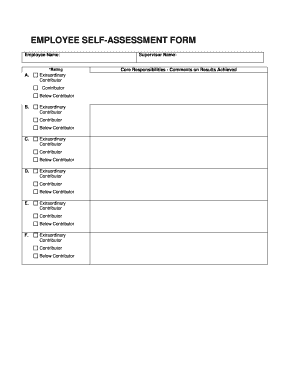
The Employee Self Evaluation Form is designed as a beneficial tool for employees at Stevens Institute of Technology to introspectively assess their own performance. This form plays a pivotal role in helping prepare employees for formal evaluations and discussions with management. Key components of the form include sections for objective titles, specific duties, personal accomplishments, and identified areas for improvement, making it a comprehensive resource for self-assessment.
Purpose and Benefits of the Employee Self Evaluation Form
Using the Employee Self Evaluation Form offers significant advantages for both staff and management. It promotes self-reflection, encouraging employees to take accountability for their progress and achievements. Additionally, the form aligns employee goals with the overarching objectives of the organization. This alignment is critical to fostering effective communication and open dialogue during performance review sessions.
Key Features of the Employee Self Evaluation Form
The Employee Self Evaluation Form encompasses essential components and functionalities that enhance its usability. Its sections include objective titles, specific duties, notable accomplishments, and areas for improvement. Users will find various blank fields and checkboxes for personal completion, streamlining the evaluation process. Instructions provided in the form guide users in filling it out effectively.
Who Needs the Employee Self Evaluation Form?
This form is primarily utilized by employees at Stevens Institute of Technology as part of their self-assessment process. It is also an important resource for supervisors and HR personnel who participate in the evaluation process. Additionally, employees across different levels and departments can benefit from utilizing this form to enhance their performance review experiences.
How to Fill Out the Employee Self Evaluation Form Online (Step-by-Step)
-
Access the Employee Self Evaluation Form through pdfFiller’s platform.
-
Input objective titles and fill in the sections dedicated to duties and accomplishments.
-
Articulate areas for improvement in a constructive manner, ensuring clarity and depth.
-
Review the filled-out form for completeness and accuracy.
-
Save or download the document as needed for submission.
Common Errors and How to Avoid Them
When completing the Employee Self Evaluation Form, users commonly encounter pitfalls that can diminish the quality of their submission. Frequent mistakes include leaving fields incomplete or providing vague comments. Strategies to avoid these errors include proofreading the document thoroughly and validating information before submission. Moreover, it's advisable to review the form with a peer or supervisor for constructive feedback.
Submission Methods and Tips After Completing the Employee Self Evaluation Form
After completing the Employee Self Evaluation Form, users have several options for submitting their work. They can save, download, print, and submit the form directly through pdfFiller. Users should also consider various methods for sharing their completed evaluations with supervisors or human resources. Tracking options may also be available post-submission to ensure the form has been received and reviewed.
Why Choose pdfFiller for Your Employee Self Evaluation Form Needs?
Choosing pdfFiller for accommodating your Employee Self Evaluation Form needs presents numerous advantages. The platform offers a cloud-based PDF editor that ensures ease of use and accessibility from any device. With strong security features, including 256-bit encryption and compliance with HIPAA and GDPR, users can trust that their sensitive information is protected. The platform also includes helpful capabilities, such as eSigning and efficient form filling, enhancing the overall user experience.
Sample or Example of a Completed Employee Self Evaluation Form
Providing a filled-out example of the Employee Self Evaluation Form can serve as a valuable visual reference. The example illustrates how to effectively articulate objectives and accomplishments while adhering to best practices for clarity and completeness. Users can draw inspiration from the annotations included in the example to emulate successful evaluations in their self-assessments.
Enhance Your Performance Review Experience Today
Users are encouraged to take the initiative to begin filling out their Employee Self Evaluation Form using pdfFiller’s seamless platform. This user-friendly tool offers security and comprehensive support throughout the document management process, making it an optimal choice for managing self-evaluations. With a widespread user base, pdfFiller is a trusted solution for form management in professional settings.
How to fill out the Stevens Institute of Technology Employee Self Evaluation Form
-
1.To begin, access pdfFiller and search for the Employee Self Evaluation Form using the title or provided keywords.
-
2.Once located, click on the form to open it in the editor. Familiarize yourself with the layout and sections provided.
-
3.Before filling out the form, gather necessary information such as recent performance objectives, accomplishments, and insights on areas needing improvement.
-
4.Begin completing the form by entering your details in the designated fields. Pay attention to sections such as objective titles and specific duties.
-
5.Use the comment fields to provide thoughtful insights about your job performance, ensuring you articulate your achievements clearly.
-
6.Review your completed form by cross-checking your entries with your gathered information, ensuring accuracy and completeness.
-
7.Finalize the form by saving it. You can download a copy for your records or submit it directly via pdfFiller as needed.

Who is eligible to use the Employee Self Evaluation Form?
The Employee Self Evaluation Form is designed for employees at Stevens Institute of Technology who are preparing for their performance review process.
Is there a deadline for submitting this form?
While specific deadlines may vary, it is typically advisable to complete and submit this form prior to your scheduled performance review meeting.
How do I submit the completed form?
After completing the form on pdfFiller, you can submit it electronically through the platform or download it to submit via email or in person, as per your company's procedures.
What supporting documents do I need to attach?
Generally, no supporting documents are required for this form. However, having recent performance evaluations or feedback can be beneficial for context.
What are common mistakes to avoid when filling out the form?
Common mistakes include not being specific in detailing accomplishments or areas for improvement, and failing to proofread before submission. Ensure clarity and accuracy.
How long does it take for the form to be processed?
Processing times vary based on your department's review schedule. Usually, performance reviews occur shortly after form submission.
Can I edit the form after saving it on pdfFiller?
Yes, pdfFiller allows you to edit the form even after saving it, making it convenient to make revisions if necessary before final submission.
Related Forms



Related Catalogs
Get the latest insights from our blog


If you believe that this page should be taken down, please follow our DMCA take down process
here
.
This form may include fields for payment information. Data entered in these fields is not covered by PCI DSS compliance.