
Last updated on
Oct 2, 2026

Get the free University Employee Visitor ID Badge Request Form
We are not affiliated with any brand or entity on this form

Fill out
Complete the form online in a simple drag-and-drop editor.

eSign
Add your legally binding signature or send the form for signing.

Share
Share the form via a link, letting anyone fill it out from any device.

Export
Download, print, email, or move the form to your cloud storage.
Why pdfFiller is the best tool for your documents and forms


End-to-end document management
From editing and signing to collaboration and tracking, pdfFiller has everything you need to get your documents done quickly and efficiently.
Accessible from anywhere
pdfFiller is fully cloud-based. This means you can edit, sign, and share documents from anywhere using your computer, smartphone, or tablet.
Secure and compliant
pdfFiller lets you securely manage documents following global laws like ESIGN, CCPA, and GDPR. It's also HIPAA and SOC 2 compliant.
What is ID Badge Request
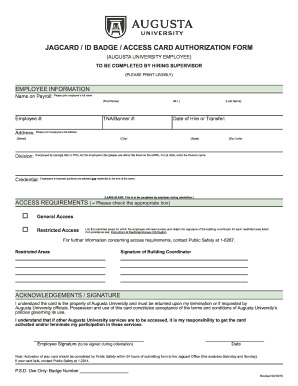
The University Employee Visitor ID Badge Request Form is an employment document used by university staff to request ID badges for employees and visitors at the institution.
pdfFiller scores top ratings on review platforms




Who needs ID Badge Request?
Explore how professionals across industries use pdfFiller.

ID Badge Request is needed by:
-
Department Administrators needing to authorize badge requests
-
KUMC Human Resources personnel for processing and approval
-
Employees requesting access badges for university facilities
-
Visitors needing ID badges for short-term access
-
Departments requiring visitor management solutions
-
Affiliated individuals seeking identification at the university
Comprehensive Guide to ID Badge Request
What is the University Employee Visitor ID Badge Request Form?
The University Employee Visitor ID Badge Request Form is essential for obtaining ID badges for individuals affiliated with the university, including employees and visitors. This form ensures that all requests for ID badges are properly documented and approved. Typically, Department Administrators and KUMC Human Resources must sign off on the form before processing, reinforcing the need for strict oversight in the badge issuance process.
Purpose and Benefits of the University Employee Visitor ID Badge Request Form
This form serves a critical function in maintaining safety and secure identification within the university. An ID badge provides access to restricted areas and enhances overall security for both individuals and the institution. By utilizing this form, users can efficiently navigate the process of obtaining an ID badge, ensuring that all necessary information is submitted systematically.
Who Needs the University Employee Visitor ID Badge Request Form?
The target audience for this form includes new employees, visiting guests, and contractors who require identification. Eligibility criteria typically include having an affiliation with the university, which varies based on role and area of access. Understanding the significance of ID badges is vital, as they play an important role in ensuring security and facilitating access across campus.
How to Fill Out the University Employee Visitor ID Badge Request Form (Step-by-Step)
-
Access the form online through pdfFiller.
-
Provide your first name and last name in the designated fields.
-
Enter your credentials and departmental affiliation.
-
Select the type of access you require.
-
Review all entered information for accuracy before submission.
Submission Process for the University Employee Visitor ID Badge Request Form
The submission of the University Employee Visitor ID Badge Request Form can be accomplished through various methods, including both online and in-person options. Once submitted, the form is directed to KUMC Human Resources and the badge office for review. It's also important to be aware of critical deadlines and estimated processing times to ensure timely badge issuance.
Required Documents and Supporting Materials
When submitting the ID badge request form, certain documents must be included to support your application. Required materials often consist of valid identification and, depending on the requested access type, additional documents may be necessary. Gathering these documents before completing the form will streamline the submission process.
Common Errors and How to Avoid Them
When filling out the University Employee Visitor ID Badge Request Form, applicants frequently make mistakes that can result in delays. Common errors include omitting required fields or entering incorrect information. To prevent these issues, it is advisable to double-check all entered details and utilize pdfFiller's review features for error detection.
Tracking Your Submission and What Happens Next
After submission, users can track the status of their badge request form to stay informed about its progress. It’s important to know what follow-up actions may be necessary, including addressing any potential rejections or amendments that may be required.
Security and Compliance for the University Employee Visitor ID Badge Request Form
Handling sensitive information within the University Employee Visitor ID Badge Request Form necessitates a strong emphasis on security. Compliance with regulations such as HIPAA and GDPR is crucial, especially when using tools like pdfFiller for form completion. Users can be assured that data protection measures are in place, safeguarding all personal information throughout the process.
Utilizing pdfFiller for Your ID Badge Request Form
pdfFiller offers numerous advantages for filling out, signing, and submitting the University Employee Visitor ID Badge Request Form. By leveraging pdfFiller's features, users can ensure a streamlined and efficient experience while managing their ID badge requests.
How to fill out the ID Badge Request
-
1.To start, access the University Employee Visitor ID Badge Request Form on pdfFiller by searching for its name in the platform's search bar or uploading it directly if you have a copy.
-
2.Once the form is open, use the pdfFiller interface to navigate through the document. Click on each field to fill out your details, including first name, last name, department, and type of access needed.
-
3.Before filling out the form, gather your necessary information, such as your credentials and the department details to provide a complete request.
-
4.Carefully complete the required fields, ensuring accuracy in all information. Pay attention to any marked fields that may need signatures from the Department Administrator and KUMC Human Resources.
-
5.After filling out the form, review all inputted information for any errors or missing data. Ensure that you have met all the requirements and have the necessary approvals.
-
6.Once everything is double-checked, finalize your form. Use the pdfFiller options to save your document, and consider downloading a copy for your records before submission.
-
7.Finally, submit your completed form as directed, either by electronically sending it through pdfFiller or following any additional submission guidelines outlined on the form.

What are the eligibility requirements for this form?
To be eligible for the University Employee Visitor ID Badge Request Form, you must be an employee or visitor affiliated with the university. Proper identification and authorization from your Department Administrator are required for processing.
Are there any deadlines associated with submitting this form?
While specific deadlines may vary, it is best to submit the University Employee Visitor ID Badge Request Form as early as possible to ensure timely processing. Allow time for approvals from necessary parties.
How do I submit the form once completed?
After completing the University Employee Visitor ID Badge Request Form, you can submit it through pdfFiller by following the on-screen submission instructions, or check for paper submission guidelines provided on the form.
What supporting documents are required for this form?
You may need to provide identification details and any supporting departmental documentation required for access requests. Be sure to verify requirements with your Department Administrator or HR for precise needs.
What common mistakes should I avoid when filling out this form?
Common mistakes include missing required signatures, incomplete fields, or incorrect identification details. Double-check the form before submission to avoid processing delays.
What are the typical processing times for this request?
Processing times can vary based on departmental workloads and responsiveness. Typically, you should anticipate a few business days, so submit your form promptly.
What should I do if I encounter issues accessing the form?
If you have trouble accessing the University Employee Visitor ID Badge Request Form on pdfFiller, check your internet connection or contact technical support for assistance in retrieving or filling out the form.
Related Forms





Related Catalogs
Get the latest insights from our blog


If you believe that this page should be taken down, please follow our DMCA take down process
here
.
This form may include fields for payment information. Data entered in these fields is not covered by PCI DSS compliance.