
Last updated on
Oct 31, 2026
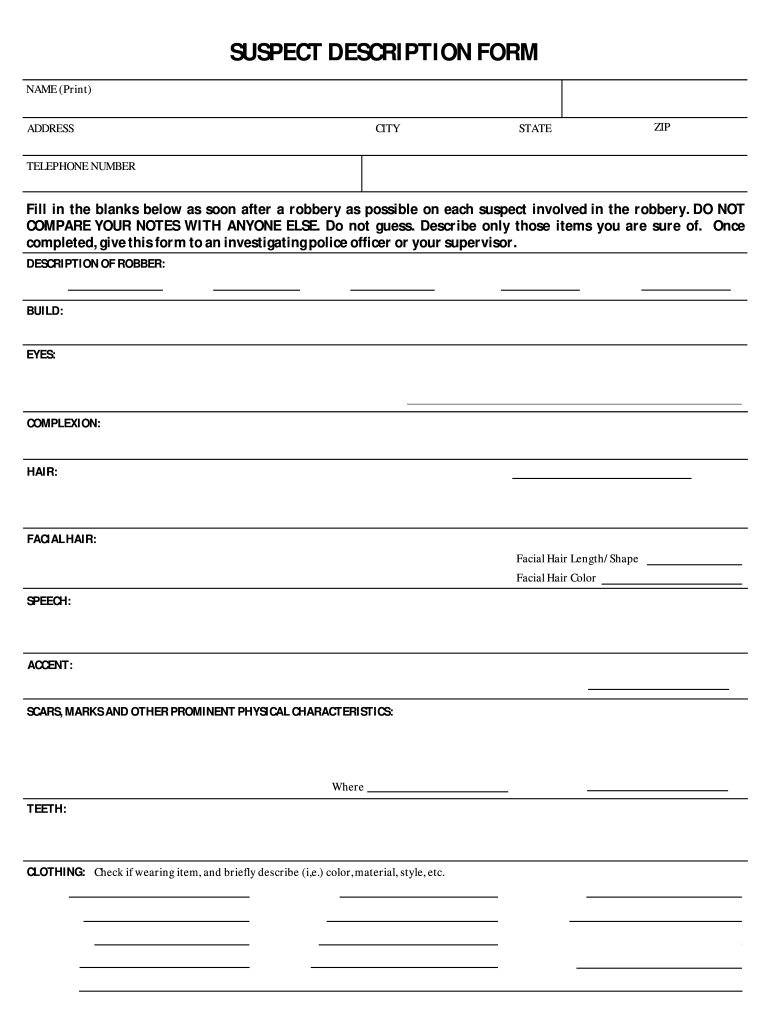
Mount Holyoke College Suspect Description Form free printable template
We are not affiliated with any brand or entity on this form

Fill out
Complete the form online in a simple drag-and-drop editor.

eSign
Add your legally binding signature or send the form for signing.

Share
Share the form via a link, letting anyone fill it out from any device.

Export
Download, print, email, or move the form to your cloud storage.
Why pdfFiller is the best tool for your documents and forms


End-to-end document management
From editing and signing to collaboration and tracking, pdfFiller has everything you need to get your documents done quickly and efficiently.
Accessible from anywhere
pdfFiller is fully cloud-based. This means you can edit, sign, and share documents from anywhere using your computer, smartphone, or tablet.
Secure and compliant
pdfFiller lets you securely manage documents following global laws like ESIGN, CCPA, and GDPR. It's also HIPAA and SOC 2 compliant.
What is Mount Holyoke College Suspect Description Form
The Suspect Description Form is a law enforcement document used by civilians to provide detailed information about a suspect involved in a robbery.
pdfFiller scores top ratings on review platforms




It is fairly easy to navigate and does what it says it will do.
So far my experience has been great! The software has been very user friendly and has increased speed and accuracy with my docutments.
Who needs Mount Holyoke College Suspect Description Form?
Explore how professionals across industries use pdfFiller.

Mount Holyoke College Suspect Description Form is needed by:
-
Victims of robbery seeking to report details.
-
Law enforcement officers collecting information for investigations.
-
Witnesses wishing to contribute to police reports.
-
Community members aiding crime prevention efforts.
-
Citizens reporting suspicious activities.
Comprehensive Guide to Mount Holyoke College Suspect Description Form
What is the Suspect Description Form?
The Suspect Description Form is a critical tool utilized in law enforcement to document detailed information about a suspect involved in criminal activities. Its primary role is to aid police in accurately identifying and apprehending suspects. Offering a comprehensive description facilitates a clearer understanding of the potential threat and aids investigations.
Providing precise details of a suspect is crucial for law enforcement. A well-filled form can significantly influence the outcome of an investigation, enabling authorities to develop leads and enhance public safety.
Purpose and Benefits of the Suspect Description Form
The Suspect Description Form serves various objectives in assisting police investigations. First, it allows witnesses and victims to provide critical information promptly, which can be pivotal for ongoing cases.
Timely submission of this form can have lasting impacts on investigations, ensuring that essential details are captured while they are still fresh in the reporter's mind. This swift action can expedite the identification process and help law enforcement maintain public safety.
Key Features of the Suspect Description Form
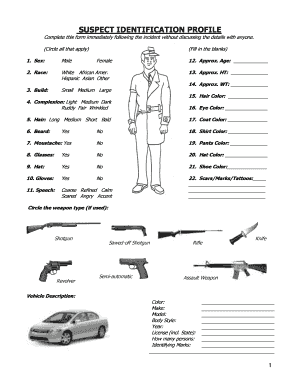
This form is designed with key features that make reporting straightforward and accurate. It includes multiple fields for detailing physical characteristics, including height, weight, hair color, and eye color, which are essential for suspect identification.
-
Sections for clothing descriptions and accessories, which can be crucial in distinguishing the suspect.
-
Dedicated areas for noting down any items carried by the suspect, such as weapons or stolen property.
-
Information fields for vehicle details, including make, model, and license plate number.
Who Needs the Suspect Description Form?
The Suspect Description Form is intended for individuals who have witnessed a crime or are victims themselves. It is vital for anyone who has directly observed or has relevant details about a suspect.
Scenarios where one might be asked to complete this form include incidents of theft, robbery, or any events where a suspect's identity is crucial for law enforcement's follow-up actions.
How to Fill Out the Suspect Description Form Online (Step-by-Step)
Filling out the Suspect Description Form online is a simple process. To get started, access the form through the pdfFiller platform by following these steps:
-
Visit the pdfFiller site and locate the Suspect Description Form.
-
Open the form and begin entering information into the required fields, ensuring accuracy.
-
Review your entries for clarity, ensuring all sections are completed thoroughly.
-
Follow the prompts for submission, which may include a validation process to confirm correctness.
Common Errors and How to Avoid Them
When filling out the Suspect Description Form, users frequently encounter several common pitfalls. Missing information is a typical issue that can compromise the utility of the report.
-
Provide specifics; avoid vague descriptions that may hinder identification.
-
Double-check all details, ensuring that every section is filled completely.
How to Submit the Suspect Description Form
Submitting the completed Suspect Description Form can be done through several methods. The preferred option is to submit the form online via pdfFiller, ensuring a swift and secure process.
Alternatively, users may submit the form in person or via mail to their local law enforcement agency. After submission, users can expect follow-up communication regarding the status of their report.
Security and Compliance for the Suspect Description Form
Security is paramount when submitting sensitive information through the Suspect Description Form. pdfFiller employs advanced measures to protect user data, including 256-bit encryption.
Moreover, pdfFiller complies with applicable laws regarding privacy and data protection, ensuring that the information collected is handled securely and responsibly.
Enhancing Your Experience with pdfFiller
Users are encouraged to take advantage of the many features offered by pdfFiller that can make completing the Suspect Description Form easier. The platform allows for editing texts, annotations, and eSigning to enhance the efficiency of form filling.
Utilizing an online platform not only streamlines the process but also ensures ease and accessibility for users reporting incidents.
Make Your Submission Count
Filling out the Suspect Description Form with precision and detail is essential for aiding law enforcement in their efforts. With the help of pdfFiller, users can easily fill, submit, and track their forms without hassle.
Contributing detailed suspect descriptions is crucial for effective investigations, enhancing safety for all involved.
How to fill out the Mount Holyoke College Suspect Description Form
-
1.Begin by accessing the Suspect Description Form on pdfFiller by searching for the document name in the platform's search bar.
-
2.Once the form is open, familiarize yourself with the various fields and checkboxes designed for specific details about the suspect.
-
3.Before you start filling out the form, collect all necessary information regarding the suspect’s physical characteristics, clothing, jewelry, weapons, and any vehicles involved.
-
4.In the designated fields, clearly describe the suspect's physical features such as height, build, hair color, and any distinguishing marks.
-
5.Next, fill in details about the clothing the suspect was wearing at the time of the robbery, including color, style, and any visible logos.
-
6.If applicable, include information about any jewelry the suspect was wearing, specifying types and notable attributes.
-
7.If the suspect was carrying a weapon, use the form's section to provide specifics about the type of weapon, its appearance, and any identifiable features.
-
8.Provide vehicle details if known, such as make, model, color, and license plate number in the appropriate section of the form.
-
9.Once you have completed all sections, thoroughly review the information for accuracy, ensuring all fields are filled correctly with relevant details.
-
10.After checking, finalize the form by saving your progress, then choose to download it as a PDF or submit it directly through the options provided in pdfFiller.

Who is eligible to fill out the Suspect Description Form?
Any individual who has witnessed a robbery or has relevant information about a suspect is eligible to fill out the Suspect Description Form.
Are there deadlines for submitting this form?
It is recommended to submit the Suspect Description Form as soon as possible after the incident to ensure timely investigation by law enforcement.
How do I submit the Suspect Description Form?
You can submit the form either electronically through pdfFiller's platform or print it for direct submission to a police officer or a local precinct.
What supporting documents are required to submit with this form?
Typically, no additional documents are required; however, any evidence or photographs supporting your description may enhance your submission.
What common mistakes should I avoid when filling out the form?
Be careful to avoid vague descriptions and ensure all fields related to the suspect’s appearance and behavior are completed as thoroughly as possible.
How long does it take for the form to be processed?
Processing time may vary, but law enforcement aims to review submitted forms promptly, often within a few days, depending on workload.
Is notarization required for the Suspect Description Form?
No, the Suspect Description Form does not require notarization or official signatures, making it easier for individuals to complete and submit.
Related Content
Related Forms





Related Catalogs
Get the latest insights from our blog


If you believe that this page should be taken down, please follow our DMCA take down process
here
.
This form may include fields for payment information. Data entered in these fields is not covered by PCI DSS compliance.