
Last updated on
Oct 31, 2026

Get the free PEIMS Demographic Information Sheet
We are not affiliated with any brand or entity on this form

Fill out
Complete the form online in a simple drag-and-drop editor.

eSign
Add your legally binding signature or send the form for signing.

Share
Share the form via a link, letting anyone fill it out from any device.

Export
Download, print, email, or move the form to your cloud storage.
Why pdfFiller is the best tool for your documents and forms


End-to-end document management
From editing and signing to collaboration and tracking, pdfFiller has everything you need to get your documents done quickly and efficiently.
Accessible from anywhere
pdfFiller is fully cloud-based. This means you can edit, sign, and share documents from anywhere using your computer, smartphone, or tablet.
Secure and compliant
pdfFiller lets you securely manage documents following global laws like ESIGN, CCPA, and GDPR. It's also HIPAA and SOC 2 compliant.
What is PEIMS Demographic Form
The PEIMS Demographic Information Sheet is a standardized document used by educational institutions to collect personal and demographic information from students for enrollment and registration purposes.
pdfFiller scores top ratings on review platforms




Who needs PEIMS Demographic Form?
Explore how professionals across industries use pdfFiller.

PEIMS Demographic Form is needed by:
-
School administrators overseeing student enrollment
-
Parents or guardians completing the form for their children
-
Education professionals managing demographic data
-
Employees involved in student registration processes
-
Data managers requiring demographic information for reporting
Comprehensive Guide to PEIMS Demographic Form
What is the PEIMS Demographic Information Sheet?
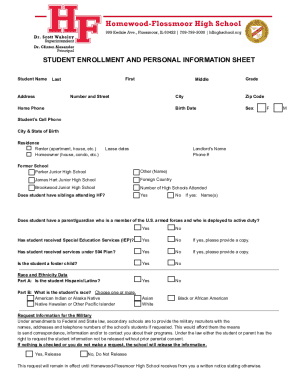
The PEIMS Demographic Information Sheet is a key education demographic form that collects personal and demographic data necessary for student enrollment. It features fields for essential details such as name, address, ethnic group, date of birth, and marital status. Completing this form is mandatory for individuals registering in educational institutions.
Purpose and Benefits of the PEIMS Demographic Information Sheet
This particular education enrollment form plays a vital role in ensuring that educational institutions have accurate demographic data. For individuals, the benefits include a streamlined enrollment process and potential eligibility for various programs. Filling it out correctly enhances school administration's effectiveness, ultimately benefiting the educational experience.
Key Features of the PEIMS Demographic Information Sheet
The PEIMS Demographic Information Sheet includes several key features:
-
Fillable form capabilities suitable for diverse applications.
-
Sections dedicated to spouse and emergency contact information.
-
User-friendly design that improves the overall user experience.
Who Needs the PEIMS Demographic Information Sheet?
This form is crucial for a specific audience, including:
-
Individuals enrolling in schools or educational programs.
-
Administrative personnel responsible for managing student records.
-
Community organizations or agencies requiring demographic data for their services.
How to Fill Out the PEIMS Demographic Information Sheet Online
To complete the PEIMS Demographic Information Sheet effectively, follow these steps:
-
Begin by entering your name and address in the designated fields.
-
Provide details about your ethnic group and date of birth.
-
Include marital status and any other required information.
Pay attention to common pitfalls to ensure that your submission is complete and accurate.
Submission Methods for the PEIMS Demographic Information Sheet
Users have several options for submitting the PEIMS Demographic Information Sheet:
-
Online submission through the pdfFiller platform.
-
Physical submission, including options for mailing or delivering in person.
Be sure to adhere to any submission deadlines to ensure timely processing.
Security and Compliance for the PEIMS Demographic Information Sheet
Handling personal data requires strict security measures. pdfFiller ensures compliance with various regulations through its security features, including 256-bit encryption. Protecting sensitive demographic information is paramount, supported by robust user data retention policies.
What Happens After You Submit the PEIMS Demographic Information Sheet
After submission, users can expect a confirmation process to verify receipt of the form. It may include potential requests for additional information and allow users to track the status of their submission for peace of mind.
How to Correct or Amend the PEIMS Demographic Information Sheet
If errors are discovered after submission, it is essential to take the following steps:
-
Identify the specific errors in the submitted information.
-
Determine whether corrections can be made without resubmitting the entire form.
Maintaining accurate records is important for future reference in educational settings.
Get Started with pdfFiller for Your PEIMS Demographic Information Sheet
Utilizing pdfFiller for the PEIMS Demographic Information Sheet offers numerous benefits. The platform is designed to simplify the form filling and management process. Users will find it helpful, thanks to its support options and user-friendly features, ensuring submissions are accurate and efficient for educational purposes.
How to fill out the PEIMS Demographic Form
-
1.Begin by accessing the PEIMS Demographic Information Sheet on pdfFiller. You can do this by visiting the pdfFiller website and searching for the form using its official name.
-
2.Once you locate the form, click to open it in the pdfFiller interface. Familiarize yourself with the layout, which will feature various fields and options for inputting information.
-
3.Before filling out the form, gather all necessary information, such as your name, address, ethnic group, date of birth, marital status, spouse details, and emergency contact information. Having these details prepared will streamline the process.
-
4.As you navigate the form, fill in each field carefully. Use pdfFiller’s tools to click on a blank field and type in the required information. For checkboxes, simply click to mark your choice.
-
5.Regularly review your entries as you complete the form to ensure all information is accurate and complete. Take advantage of the 'preview' feature in pdfFiller to check how your responses appear on the final document.
-
6.Once you have filled out all necessary fields and double-checked your information, save your progress using the save button. If you need to finalize the form, ensure all sections are complete before proceeding.
-
7.To submit the form, choose your preferred option for downloading or emailing it. You can download the filled form as a PDF or send it directly through email directly from the pdfFiller platform.

Who is eligible to complete the PEIMS Demographic Information Sheet?
Eligibility to complete the PEIMS Demographic Information Sheet typically includes students enrolling in educational institutions, parents or guardians providing information for minors, and educational staff involved in student registration.
Are there specific deadlines for submitting this form?
Deadlines for submitting the PEIMS Demographic Information Sheet vary by school or district. It is recommended to check with your local education authority to ensure timely registration, especially at the start of the school year.
What methods can I use to submit the completed form?
You can submit the completed PEIMS Demographic Information Sheet through various methods such as downloading the filled form and emailing it, or submitting it in-person at your school’s registration office, depending on the institution's procedures.
What supporting documents are required with this form?
While specific supporting documents required with the PEIMS Demographic Information Sheet may vary, it's common to include items like proof of residency, identification, and any other documents specified by your school’s requirements.
What are some common mistakes to avoid when filling out this form?
Common mistakes include leaving fields blank, providing incorrect personal details, or failing to read instructions thoroughly. Ensure to review all entries before submitting to avoid these errors.
What is the typical processing time for this form?
Processing times for the PEIMS Demographic Information Sheet can vary by institution. Generally, expect a few days to a week; however, it’s best to inquire directly with your school's office for specific timelines.
Are there any specific concerns related to this form?
Specific concerns may involve understanding how your demographic data will be used or ensuring the accuracy of the information provided. It’s advisable to reach out to your educational institution for clarity regarding data usage.
Related Forms




Related Catalogs
Get the latest insights from our blog


If you believe that this page should be taken down, please follow our DMCA take down process
here
.
This form may include fields for payment information. Data entered in these fields is not covered by PCI DSS compliance.