
Last updated on
Oct 23, 2026
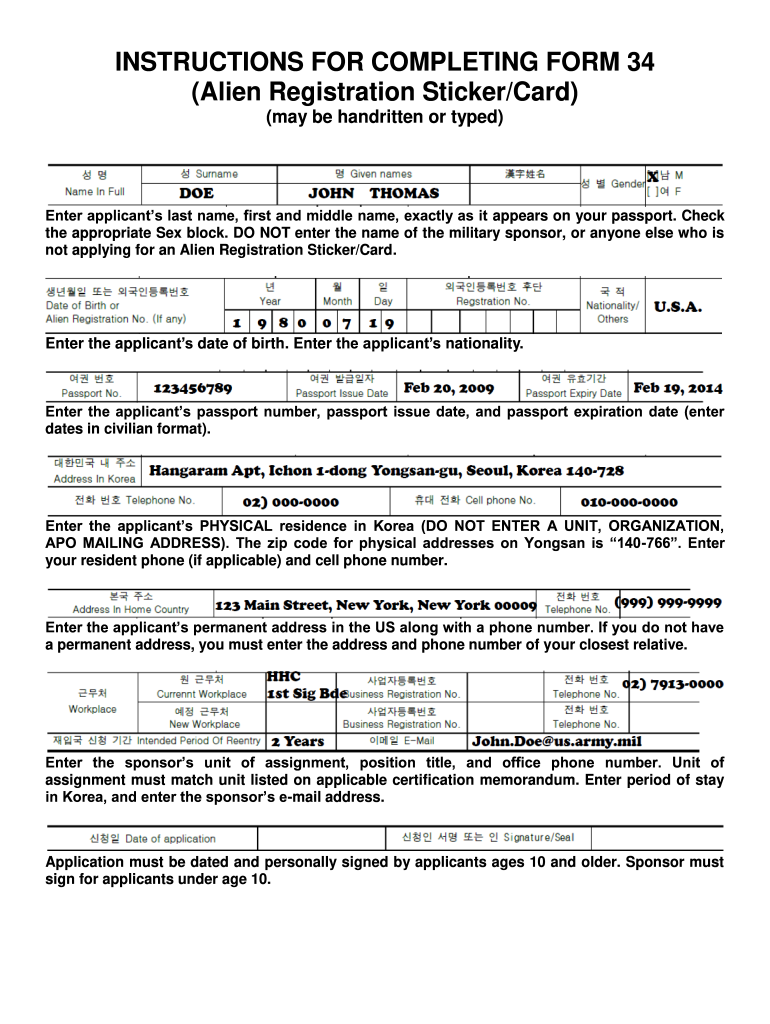
Get the free Form 34 Alien Registration Sticker/Card
We are not affiliated with any brand or entity on this form

Fill out
Complete the form online in a simple drag-and-drop editor.

eSign
Add your legally binding signature or send the form for signing.

Share
Share the form via a link, letting anyone fill it out from any device.

Export
Download, print, email, or move the form to your cloud storage.
Why pdfFiller is the best tool for your documents and forms


End-to-end document management
From editing and signing to collaboration and tracking, pdfFiller has everything you need to get your documents done quickly and efficiently.
Accessible from anywhere
pdfFiller is fully cloud-based. This means you can edit, sign, and share documents from anywhere using your computer, smartphone, or tablet.
Secure and compliant
pdfFiller lets you securely manage documents following global laws like ESIGN, CCPA, and GDPR. It's also HIPAA and SOC 2 compliant.
What is Form 34 Application
The Form 34 Alien Registration Sticker/Card is a government document used by applicants in Korea to apply for an alien registration sticker or card.
pdfFiller scores top ratings on review platforms




Who needs Form 34 Application?
Explore how professionals across industries use pdfFiller.

Form 34 Application is needed by:
-
Foreign nationals residing in Korea
-
Parents applying for alien registration for their children under 10
-
Sponsors assisting foreign nationals with immigration paperwork
-
Individuals needing an official visa application form
-
Korean government officials processing immigration forms
-
Lawyers or consultants helping clients with visa applications
Comprehensive Guide to Form 34 Application
What is the Form 34 Alien Registration Sticker/Card?
The Form 34 Alien Registration Sticker/Card is crucial for individuals applying for residency in Korea. This form serves as a primary document in the immigration process, allowing foreign nationals to register their presence in the country. Form 34 outlines personal details necessary for obtaining the Alien Registration Sticker/Card, making it essential for anyone wishing to live and work legally in Korea.
Any foreigner seeking long-term residency must fill out this form. For many, receiving the Alien Registration Sticker/Card signifies the first step toward legal residency, enabling them to integrate into Korean society more fully. Understanding the significance of this form is vital for a smooth immigration journey.
Purpose and Benefits of the Form 34 Alien Registration Sticker/Card
The benefits of owning an Alien Registration Sticker/Card extend beyond mere identification. Primarily, it grants legal residency status, which is indispensable for living in Korea without fear of legal repercussions. This status enables foreign residents to engage with various services, essential for everyday life.
With the Alien Registration Sticker/Card, individuals gain access to critical services including healthcare, employment opportunities, and even banking privileges. These benefits significantly enhance the quality of life and foster smoother integration into Korean culture.
Who Needs the Form 34 Alien Registration Sticker/Card?
Eligibility for the Form 34 is determined by age and specific circumstances. Generally, applicants aged 10 or older are required to complete the form themselves. Conversely, those younger than 10 need a sponsor to submit the application on their behalf.
Sponsors can be family members or legal guardians, who play a crucial role in the application process by providing personal and identification information for the minor. As such, understanding who needs the form is key to successful registration.
How to Fill Out the Form 34 Alien Registration Sticker/Card Online (Step-by-Step)
Filling out the Form 34 is a straightforward process when using pdfFiller. To complete the form, follow these steps:
-
Access pdfFiller and upload the Form 34 PDF.
-
Fill out the required fields, including your name, date of birth, and passport details.
-
Ensure all fillable fields are completed accurately.
-
Provide your address and any additional requested information.
-
Review the completed form for any errors.
-
Sign the form digitally or prepare for a physical signature if needed.
This method simplifies the filling process, allowing you to focus on ensuring all information is accurately provided.
Common Errors and How to Avoid Them When Filling Out Form 34
Filling out the Form 34 can present several challenges, often leading to common mistakes. Frequent errors include missing required fields, incorrect personal information, or even signature mistakes. Recognizing these pitfalls can expedite your application process.
To minimize mistakes, validate your completed form before submission. Reviewing the document carefully for any discrepancies can save you from potential delays. Double-checking names, dates, and signature requirements is crucial for ensuring a successful application.
How to Sign and Submit the Form 34 Alien Registration Sticker/Card
Understanding how to properly sign and submit Form 34 is essential. There are notable differences between digital and wet signatures. If submitting online, ensure that you apply a digital signature correctly using pdfFiller, which simplifies this step significantly.
Submission methods may vary; form applicants can submit their forms online or in person at designated immigration offices. Knowing your delivery options can streamline the process, ensuring that your application reaches the appropriate officials without delay.
What Happens After You Submit the Form 34 Alien Registration Sticker/Card?
Once the Form 34 is submitted, applicants await a response regarding their residency status. Processing times can differ, so it's advisable to familiarize yourself with what to expect after submission. Monitoring your application status is critical during this waiting period.
In the case of issues arising with your submission, it's important to know the correct procedures for addressing any concerns. Prompt follow-up can alleviate potential complications in your immigration process.
Security and Privacy When Submitting the Form 34 Alien Registration Sticker/Card
When dealing with sensitive documents like the Form 34, security and privacy are vital. pdfFiller incorporates robust security features, including 256-bit encryption, ensuring that your information is safely protected during submission.
Maintaining privacy also includes securely storing records of your submission. Adopting safe practices when handling personal information will bolster your overall data protection during this critical process.
Make Your Form 34 Application Smooth with pdfFiller
Utilizing pdfFiller for completing the Form 34 enhances the overall experience. This platform not only simplifies the form-filling process but also offers editing and eSigning capabilities, making it easier to manage your documents.
The user-friendly interface combined with extensive support options ensures a seamless application process. Trusting in pdfFiller’s security measures provides peace of mind as you navigate your immigration journey.
How to fill out the Form 34 Application
-
1.Access and open the Form 34 Alien Registration Sticker/Card on pdfFiller by searching for the form in the search bar or using a direct link.
-
2.Once the form is open, navigate through the fillable fields using your mouse or keyboard.
-
3.Gather necessary information such as your name, date of birth, passport number, and addresses before starting the form to ensure a smooth filling process.
-
4.Complete each field accurately by clicking on the designated area and typing in the required information.
-
5.Review the form thoroughly to make sure all the information is correct and complete. Pay close attention to sections that require signatures.
-
6.Once finalized, use pdfFiller's tools to save your progress or directly submit the form if you are ready.
-
7.To save the form, click the download option on pdfFiller, and choose your preferred format. You can also print it if necessary.

Who is eligible to apply for the Form 34 Alien Registration Sticker/Card?
Any foreign national residing in Korea, including children under the age of 10, can apply for the Form 34 Alien Registration Sticker/Card. Parents or sponsors must sign on behalf of applicants under 10.
What supporting documents are required for this form?
You will need to provide personal identification such as your passport and any additional documents related to your residency status or immigration status in Korea.
How do I submit the completed Form 34?
After completing the Form 34 on pdfFiller, you can submit it electronically or print it out to take to the local immigration office. Ensure all required signatures are included before submission.
What common mistakes should I avoid when filling out the form?
Be sure to double-check all personal information for accuracy, particularly your passport number and date of birth. Failing to sign the form where required is a common oversight.
What is the processing time for the Form 34?
Processing times can vary, but typically it may take several weeks for the application to be processed. It's advisable to check with your local immigration office for specific timelines.
Is notarization required for the Form 34?
No, notarization is not required for the Form 34 Alien Registration Sticker/Card, simplifying the application process for users.
What should I do if I encounter issues while filling out the form on pdfFiller?
If you experience technical issues while using pdfFiller, check their troubleshooting guides or customer support for assistance. Ensure your browser is up to date for optimal performance.
Related Content
Related Forms




Get the latest insights from our blog


If you believe that this page should be taken down, please follow our DMCA take down process
here
.
This form may include fields for payment information. Data entered in these fields is not covered by PCI DSS compliance.