
Last updated on
Nov 6, 2026
Get the free PhilCare Reimbursement Claim Form
We are not affiliated with any brand or entity on this form

Fill out
Complete the form online in a simple drag-and-drop editor.

eSign
Add your legally binding signature or send the form for signing.

Share
Share the form via a link, letting anyone fill it out from any device.

Export
Download, print, email, or move the form to your cloud storage.
Why pdfFiller is the best tool for your documents and forms


End-to-end document management
From editing and signing to collaboration and tracking, pdfFiller has everything you need to get your documents done quickly and efficiently.
Accessible from anywhere
pdfFiller is fully cloud-based. This means you can edit, sign, and share documents from anywhere using your computer, smartphone, or tablet.
Secure and compliant
pdfFiller lets you securely manage documents following global laws like ESIGN, CCPA, and GDPR. It's also HIPAA and SOC 2 compliant.
What is Reimbursement Claim
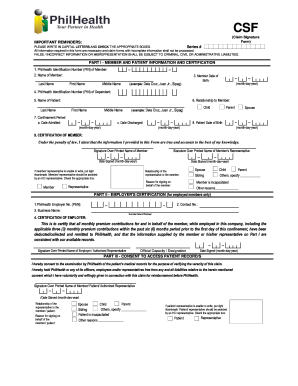
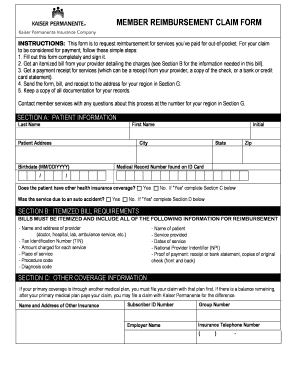
The PhilCare Reimbursement Claim Form is a healthcare document used by members to claim reimbursement for medical expenses incurred under the PhilCare health care plan.
pdfFiller scores top ratings on review platforms




IT IS VERY EASY TO USE AND FILL, SAVE, SEND AND CHANGE PDF DOCUMENTS
GREAT FOR ALL THE BUSY PDF USERS. I RECOMMEND THIS FOR ALL OFFICE WORKERS
Who needs Reimbursement Claim?
Explore how professionals across industries use pdfFiller.

Reimbursement Claim is needed by:
-
PhilCare members seeking reimbursement for medical expenses.
-
Attending physicians providing medical information regarding patients.
-
Employers verifying the employment status of PhilCare members.
-
Healthcare providers submitting claims on behalf of patients.
-
Administrative staff managing healthcare claims.
-
Financial advisors assisting clients with medical expenses.
Comprehensive Guide to Reimbursement Claim
What is the PhilCare Reimbursement Claim Form?
The PhilCare Reimbursement Claim Form is a crucial document for members of the PhilCare health care plan. Its primary purpose is to facilitate the claiming of reimbursements for medical expenses incurred by members. Completing this form requires collaboration among the member, their attending physician, and the employer, ensuring that all necessary information is accurately recorded.
To successfully submit a claim, members must include supporting documents such as receipts and medical reports. This process emphasizes the importance of thoroughness in documentation to expedite claims. By using the healthcare reimbursement form, members can efficiently manage their medical expenses.
Purpose and Benefits of the PhilCare Reimbursement Claim Form
The PhilCare Reimbursement Claim Form serves several important functions for users, primarily simplifying the reimbursement process. By utilizing this form, members can streamline the submission of medical expenses, reducing administrative hurdles associated with claims processing.
Efficient processing can lead to potential cost savings, as prompt submissions help avoid unnecessary delays and ensure timely reimbursements. Submitting claims swiftly is vital for receiving funds without interruptions, making this form an essential tool for PhilCare members.
Who Needs the PhilCare Reimbursement Claim Form?
This form must be completed by specific parties involved in the claims process. The member requesting reimbursement plays a critical role in accurately filling out personal and medical details. The attending physician is responsible for providing medical information, while the employer must confirm the member’s employment status.
Various scenarios, including medical treatments and accidents, necessitate the use of this form. Understanding the eligibility criteria is crucial for effectively utilizing the healthcare reimbursement form to ensure a smooth claims experience.
How to Fill Out the PhilCare Reimbursement Claim Form Online
Filling out the PhilCare Reimbursement Claim Form online can be a seamless process when using pdfFiller. Follow these steps to complete the form:
-
Navigate to the PhilCare Reimbursement Claim Form in pdfFiller.
-
Start by entering the required personal information, ensuring accuracy.
-
Complete the medical details section, including inputs from the attending physician.
-
Gather all signatures from the member, physician, and employer as needed.
Pay attention to fillable fields like 'Name of Patient' and follow specific instructions tailored to each party involved. Be mindful of common errors, such as missing signatures or incorrectly entered information to avoid complications.
Required Documents and Supporting Materials for Submission
Submitting the PhilCare Reimbursement Claim Form necessitates accompanying documentation. Essential supporting documents include:
-
Receipts for medical expenses.
-
Medical reports detailing the treatments received.
-
Any additional evidence relevant to the claim.
Accurate and complete documentation is vital for successful claims processing. Organize these documents carefully to ensure a smooth submission process, ultimately aiding in a quicker reimbursement.
Submission Methods for the PhilCare Reimbursement Claim Form
Once the PhilCare Reimbursement Claim Form is completed, members have various submission options. They can choose to submit their claims online through pdfFiller, by mail, or in-person at designated locations. Each method may have different timelines.
To avoid penalties or delays, make sure to adhere to submission deadlines. Additionally, users can utilize tracking options provided by PhilCare to confirm the receipt of their claims and monitor the progress of their submissions.
What Happens After You Submit the PhilCare Reimbursement Claim Form?
Following the submission of the PhilCare Reimbursement Claim Form, the claims processing timeline begins. Members can expect notifications regarding the status of their claims, which may involve waiting periods for evaluations.
Possible outcomes include approval of the claim, denial, or requests for further information. Understanding this process can help members manage their expectations and stay informed about their claim status.
Security and Compliance When Handling the PhilCare Reimbursement Claim Form
Security is paramount when submitting sensitive documents like the PhilCare Reimbursement Claim Form. pdfFiller implements robust security measures, including encryption and compliance with regulations such as HIPAA and GDPR, ensuring the protection of personal health information.
Members can take proactive steps to safeguard their data when using the form, thereby ensuring that their sensitive medical information remains confidential and secure throughout the process.
How to Access and Download the PhilCare Reimbursement Claim Form PDF
Accessing and downloading the PhilCare Reimbursement Claim Form is a straightforward process. Users can easily download and print the form by following these guidelines:
-
Visit the designated section of pdfFiller for the form.
-
Download the PhilCare Reimbursement Claim Form in PDF format.
-
Ensure the correct version is obtained before completing it.
For those looking to fill the form online, pdfFiller provides editing capabilities that enhance the ease of use, making form completion more efficient.
Empower Your Claim Process with pdfFiller
Utilizing pdfFiller can significantly enhance the efficiency of completing the PhilCare Reimbursement Claim Form. The platform offers valuable features, such as editing capabilities, eSigning, and secure document storage, simplifying the process for users.
By leveraging pdfFiller, members can streamline the filling and signing process while ensuring compliance and security when handling sensitive documents. Embrace the convenience and effectiveness that pdfFiller provides to improve your claims experience.
How to fill out the Reimbursement Claim
-
1.To access the PhilCare Reimbursement Claim Form on pdfFiller, visit their website and use the search bar to enter the form name, or navigate directly to the healthcare forms section.
-
2.Once you've located the form, click on it to open in the pdfFiller interface, where you will see various fillable fields.
-
3.Before filling out the form, ensure you have the necessary information at hand, including personal details, claim specifics, and any supporting documents like receipts.
-
4.Begin by filling in your name and personal information in the designated fields. Use the instructions provided alongside each section for guidance.
-
5.Next, your attending physician should fill out their section with the relevant medical information. Ensure they complete their part and add their signature.
-
6.After that, your employer must confirm your employment status. Make sure they fill out the appropriate fields and provide their signature as required.
-
7.Once all parties have completed their sections, review the entire form carefully. Check for missing information or signatures to avoid delays.
-
8.After a thorough review, you can download a copy of your completed form by clicking the download button in the pdfFiller interface.
-
9.You may also choose to submit the form directly through pdfFiller if your provider allows online submission, or save it for your records and submission via postal mail.

Who is eligible to use the PhilCare Reimbursement Claim Form?
This form is intended for members enrolled in the PhilCare health care plan who wish to claim reimbursement for specific medical expenses.
What supporting documents are required with the form?
You must include receipts for medical expenses and any relevant medical reports. Ensure all documents are clear and legible to facilitate processing.
How do I submit the PhilCare Reimbursement Claim Form?
After completing the form, you can submit it either directly through pdfFiller if allowed, or you may print and send it through the mail as per PhilCare's submission guidelines.
What common mistakes should I avoid when filling out the form?
Be careful to avoid missing signatures, incomplete information, and submitting without the necessary supporting documents, as these can delay processing.
What is the processing time for reimbursement claims?
Processing times can vary, but typically, you should expect a response within 2-6 weeks after submission, depending on PhilCare's processing schedule.
Can my employer fill out the form for me?
No, your employer should only complete their section to confirm your employment status. It is your responsibility to provide all other required information.
Is notarization required for the PhilCare Reimbursement Claim Form?
No, notarization is not required for this form. Ensure that all relevant parties sign the document as indicated.
Related Forms


Get the latest insights from our blog


If you believe that this page should be taken down, please follow our DMCA take down process
here
.
This form may include fields for payment information. Data entered in these fields is not covered by PCI DSS compliance.