
Last updated on
Nov 17, 2026

APH Form 190-11R 2014-2026 free printable template
We are not affiliated with any brand or entity on this form

Fill out
Complete the form online in a simple drag-and-drop editor.

eSign
Add your legally binding signature or send the form for signing.

Share
Share the form via a link, letting anyone fill it out from any device.

Export
Download, print, email, or move the form to your cloud storage.
Why pdfFiller is the best tool for your documents and forms


End-to-end document management
From editing and signing to collaboration and tracking, pdfFiller has everything you need to get your documents done quickly and efficiently.
Accessible from anywhere
pdfFiller is fully cloud-based. This means you can edit, sign, and share documents from anywhere using your computer, smartphone, or tablet.
Secure and compliant
pdfFiller lets you securely manage documents following global laws like ESIGN, CCPA, and GDPR. It's also HIPAA and SOC 2 compliant.
What is APH Form 190-11R
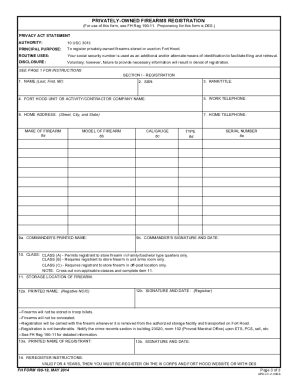
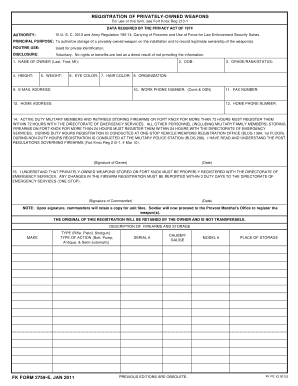
The Firearms Registration Form is a legal document used by individuals to register privately owned firearms on Fort A.P. Hill, Virginia, ensuring compliance with military regulations.
pdfFiller scores top ratings on review platforms




Who needs APH Form 190-11R?
Explore how professionals across industries use pdfFiller.

APH Form 190-11R is needed by:
-
Military personnel owning firearms
-
Sponsors of privately owned firearms
-
Unit Commanders overseeing weapon storage
-
Registration Clerks responsible for processing forms
-
Legal representatives for firearms compliance
-
Security personnel at military installations
Comprehensive Guide to APH Form 190-11R
What is the Firearms Registration Form?
The Firearms Registration Form is a critical document used to formally register privately owned firearms on Fort A.P. Hill, Virginia. It serves to maintain compliance with military regulations outlined in AR 190-11 and FAPH Regulation 190-11. Proper registration is essential to ensure accountability and security for weapon storage on the military base. Understanding the purpose and process of this form is crucial for all firearms owners on base.
Purpose and Benefits of the Firearms Registration Form
This form is necessary for several reasons. First, it ensures compliance with military regulations, which is vital for maintaining order within the base. Additionally, it provides a secure framework for weapon storage agreements and facilitates background checks that enhance accountability. Users can benefit from having their firearms officially recognized, which can also help in legal scenarios.
Who Needs the Firearms Registration Form?
The Firearms Registration Form needs to be completed by several key stakeholders within the military. These include the Owner/Sponsor, who is responsible for the weapon, the Unit Commander, who oversees compliance, and the Registration Clerk, who finalizes the registration process. Understanding eligibility criteria is essential for military personnel and their dependents to ensure that all regulations are met.
When to Submit the Firearms Registration Form
Timeliness is critical when it comes to submitting this form. New firearms must be registered without delay, while existing firearms also have specific deadlines for registration. Late submissions can lead to serious consequences, including penalties or confiscation of the firearm. To avoid these issues, it is advisable to submit the form as soon as possible after acquiring a new firearm or relocating to the base.
How to Fill Out the Firearms Registration Form Online
Filling out the Firearms Registration Form can be done efficiently online. Follow these steps:
-
Gather necessary personal information and firearm details prior to starting the form.
-
Complete each field systematically, ensuring accuracy and clarity.
-
Check the form for common errors before submission, such as missing information.
By adhering to these instructions, users can significantly reduce errors and ensure a smooth registration process.
How to Sign and Submit the Firearms Registration Form
Signing the Firearms Registration Form requires careful attention to the signature requirements. There are two options for signatures: a digital signature or a wet signature, depending on submission methods. Users can submit the form in person or online. It is crucial to obtain all necessary signatures before finalizing the submission to avoid delays in processing.
Fees, Deadlines, and Processing Times for the Firearms Registration Form
Users should be aware of any fees associated with processing this form, although often these may vary. After submission, typical processing times can differ, and tracking the status of the registration is highly recommended to avoid issues. Understanding these aspects can provide clarity and peace of mind regarding the registration process.
Security and Compliance for the Firearms Registration Form
When handling sensitive documents like the Firearms Registration Form, security is paramount. pdfFiller offers multiple security features to safeguard users' information, ensuring compliance with data protection laws like HIPAA and GDPR. Utilizing secure tools for form submission and storage is recommended to maintain privacy and security.
Enhancing Your Experience with pdfFiller
pdfFiller enhances the experience of completing the Firearms Registration Form by offering a wide range of capabilities. These include editing, eSigning, and sharing of documents in a user-friendly manner. Users can fill out forms efficiently while ensuring their documents remain safe and compliant with military standards throughout the process.
How to fill out the APH Form 190-11R
-
1.To access the Firearms Registration Form, visit pdfFiller and use the search function to locate the form by its official name.
-
2.Open the form in the interactive editor, allowing you to fill it out digitally.
-
3.Gather necessary information such as personal identification, firearm details, and any required signatures from the owner, unit commander, and registration clerk before starting.
-
4.Begin filling in the required fields, ensuring to enter accurate personal details and firearm information as specified.
-
5.Utilize the 'checkbox' feature for any yes/no questions, and ensure that you mark your selections appropriately.
-
6.Once all fields are complete, review the form thoroughly to check for errors or incomplete information.
-
7.To finalize the form, click on the 'Save' function to secure your information, and make sure to double-check all entries.
-
8.After ensuring completeness, use the options provided to download or save the form to your device or submit it directly through pdfFiller, following your unit’s submission guidelines.

Who is eligible to complete the Firearms Registration Form?
Individuals who own or sponsor firearms intending to be stored at Fort A.P. Hill are eligible and required to complete this form, along with signatures from designated officials.
What are the necessary steps for submitting the form?
To submit the form, complete all required fields accurately, gather necessary signatures from the owner, unit commander, and registration clerk, and ensure compliance with guidelines before final submission.
Are there any deadlines for submitting the Firearms Registration Form?
Submission deadlines can vary based on specific regulations or commands. It's recommended to check with the relevant military authority for time-sensitive information related to your situation.
What supporting documents are required with the form?
Supporting documents may include proof of ownership, firearm specifications, and any relevant identification. Check with your unit for exact requirements and necessary documentation.
What common mistakes should be avoided when filling out this form?
Be cautious to not skip any required fields, ensure all signatures are collected, and double-check that all information is accurate and corresponding to the regulations to avoid delays.
How long does it take to process the Firearms Registration Form?
Processing times can vary; typically, forms are reviewed within a few weeks. It’s best to reach out to the registration authority for more precise timeline estimates.
How do I handle corrections if I made a mistake on the form?
If you need to correct errors, make the changes clearly and inform your unit commander or registration clerk to ensure the corrections are properly logged and recognized.
Related Forms

Get the latest insights from our blog


If you believe that this page should be taken down, please follow our DMCA take down process
here
.
This form may include fields for payment information. Data entered in these fields is not covered by PCI DSS compliance.