
Last updated on
Nov 9, 2026
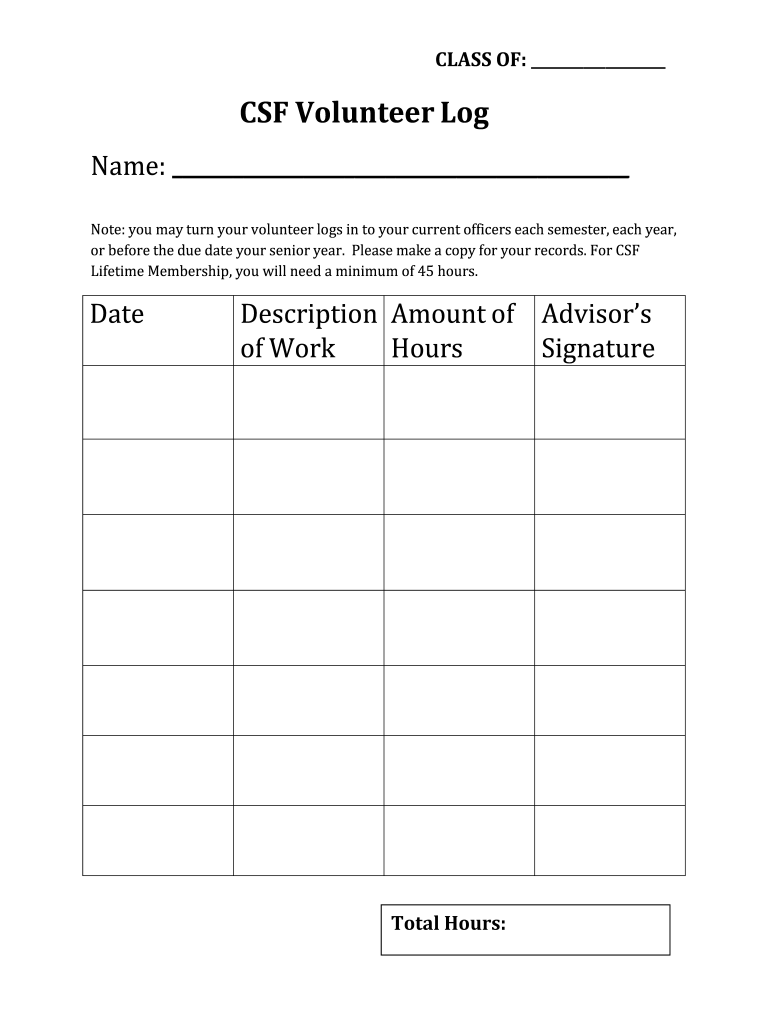
Clovis East High school CSF Volunteer free printable template
pdfFiller is not affiliated with any government organization

Fill out
Complete the form online in a simple drag-and-drop editor.

eSign
Add your legally binding signature or send the form for signing.

Share
Share the form via a link, letting anyone fill it out from any device.

Export
Download, print, email, or move the form to your cloud storage.
Why pdfFiller is the best tool for your documents and forms


End-to-end document management
From editing and signing to collaboration and tracking, pdfFiller has everything you need to get your documents done quickly and efficiently.
Accessible from anywhere
pdfFiller is fully cloud-based. This means you can edit, sign, and share documents from anywhere using your computer, smartphone, or tablet.
Secure and compliant
pdfFiller lets you securely manage documents following global laws like ESIGN, CCPA, and GDPR. It's also HIPAA and SOC 2 compliant.
What is Clovis East High school CSF Volunteer
The CSF Volunteer Log Form is an Activity Participation Form used by students in the California Scholarship Federation to track and report their volunteer hours.
pdfFiller scores top ratings on review platforms




So far it's been a life saver, a little pricey. I won't mark it down for that though.
Nice Application... Using smooth manner..Thank you
Who needs Clovis East High school CSF Volunteer?
Explore how professionals across industries use pdfFiller.

Clovis East High school CSF Volunteer is needed by:
-
Students seeking CSF Lifetime Membership
-
California Scholarship Federation members
-
High school volunteers
-
Advisors overseeing volunteer activities
-
Educational institutions requiring volunteer tracking
Comprehensive Guide to Clovis East High school CSF Volunteer
What is the CSF Volunteer Log Form?
The CSF Volunteer Log Form is an essential tool for students in the California Scholarship Federation (CSF) to track and report their volunteer hours. This form ensures that students can maintain proper records of their community service contributions. Key features of the form include required fields such as the student's name, the date of the activity, a detailed description of the work performed, the number of hours volunteered, and the advisor's signature.
Purpose and Benefits of Using the CSF Volunteer Log Form
Tracking volunteer hours is crucial for CSF membership, as it confirms the commitment to community service. Using the CSF Volunteer Log Form helps organize volunteer activities effectively and ensures compliance with CSF requirements. By maintaining accurate records, students can easily manage their documentation for review during CSF membership evaluations.
Eligibility Criteria for the CSF Volunteer Log Form
To utilize the CSF Volunteer Log Form, students must meet specific eligibility requirements set by the California Scholarship Federation. Membership in CSF typically entails completing a minimum of 45 volunteer hours to qualify for Lifetime Membership. Understanding these criteria is essential for aspiring members who wish to benefit from the program.
How to Fill Out the CSF Volunteer Log Form Online (Step-by-Step)
Filling out the CSF Volunteer Log Form is a straightforward process. Follow these steps to complete your form:
-
Access the fillable version of the form on pdfFiller’s platform.
-
Enter your name in the designated field.
-
Provide the date of your volunteer activity.
-
Describe the work you performed comprehensively.
-
Document the number of hours you contributed.
-
Obtain your advisor's signature to validate your submission.
Common Errors and How to Avoid Them
While filling out the CSF Volunteer Log Form, students may encounter several common errors that could lead to form rejection or delays. Some frequent mistakes include:
-
Incomplete fields that lack necessary information.
-
Inaccurate descriptions that do not reflect the actual volunteer work.
-
Missing advisor signatures, which can invalidate the submission.
To avoid these issues, it is advisable to double-check all entries before submission and ensure that all required fields are filled correctly.
Submission Methods and Delivery of the CSF Volunteer Log Form
Once you have completed the CSF Volunteer Log Form, multiple submission methods are available. You can either submit the form online through pdfFiller or send it via email to your CSF officers. Be mindful of essential deadlines to ensure your submission is accepted on time. After submitting the form, you can expect confirmation of receipt from your CSF officers.
How to Track Your CSF Volunteer Log Form Submission
Tracking the status of your submitted CSF Volunteer Log Form is vital to ensure that your volunteer hours are recorded accurately. Students can follow up on their submission through the pdfFiller platform, where they may find updates on the processing status. Understanding what happens post-submission can help alleviate any anxiety about the approval of your volunteer hours.
Why Choose pdfFiller for Your CSF Volunteer Log Form Needs?
pdfFiller offers several key capabilities that make it ideal for managing your CSF Volunteer Log Form. With features for editing, filling, and securely submitting forms, pdfFiller enhances the overall process of tracking volunteer hours. Users benefit from a platform that emphasizes ease of use, robust security features, and practicality in form management.
Privacy and Data Protection for Your CSF Volunteer Log Form
When using pdfFiller to handle the CSF Volunteer Log Form, security measures are in place to protect sensitive data. The platform complies with HIPAA and GDPR regulations, ensuring that your information is managed safely and responsibly. Students can complete their forms with confidence, knowing that their privacy is a top priority.
Start Using the CSF Volunteer Log Form Today
Engage in a seamless process of documenting and submitting your volunteer hours with the CSF Volunteer Log Form. By utilizing pdfFiller, students can efficiently manage their volunteer logs, ensuring that they meet the California Scholarship Federation requirements without hassle.
How to fill out the Clovis East High school CSF Volunteer
-
1.Access the CSF Volunteer Log Form on pdfFiller by searching for it in the platform's search bar or navigating through the Education Forms category.
-
2.Once the form is open, familiarize yourself with the layout, including fields for entering your name, date, description of work, and amount of volunteer hours.
-
3.Before completing the form, gather all necessary information such as your volunteer activities, the total hours worked, and an advisor who can sign your log.
-
4.Click on each blank field to enter information using pdfFiller's interactive editing tools. Type your name, choose the date from the calendar tool, and provide a brief description of your volunteer work.
-
5.Ensure you accurately fill in the total number of hours you volunteered; check if the hours meet the 45-hour requirement for CSF Lifetime Membership.
-
6.After entering all the required data, review the form carefully for any errors or missing information. Confirm that your advisor’s signature is present at the end of the form.
-
7.Once the form is complete and accurate, use the save options in pdfFiller to download a copy for your records or submit it as directed by your CSF officers.

What are the eligibility requirements to use the CSF Volunteer Log Form?
Students must be members of the California Scholarship Federation and are required to complete a minimum of 45 volunteer hours to qualify for Lifetime Membership.
When should I submit my completed Volunteer Log Form?
You should submit your Volunteer Log Form each semester, during the year, or before the deadline in your senior year to ensure your hours are counted for CSF Lifetime Membership.
How do I submit the completed CSF Volunteer Log Form?
The completed form should be submitted to your current CSF officers. Make sure to check any specific submission guidelines they provide.
What supporting documents do I need to provide with my form?
Typically, no additional documents are required beyond the completed Volunteer Log Form. However, verify whether your advisor's signature is mandatory for submission.
What are common mistakes to avoid when filling out the form?
Ensure all required fields are filled out correctly, including your advisor's signature. Double-check your total volunteer hours to meet the minimum requirement.
How long does it take to process the CSF Volunteer Log Form?
Processing time may vary depending on your California Scholarship Federation officers. It's best to submit your form early to avoid any potential delays.
Can I edit the form after I've saved it?
Yes, pdfFiller allows you to reopen and edit the CSF Volunteer Log Form anytime after saving it, as long as you have access to the document.
Related Forms


Related Catalogs
Get the latest insights from our blog


If you believe that this page should be taken down, please follow our DMCA take down process
here
.
This form may include fields for payment information. Data entered in these fields is not covered by PCI DSS compliance.