
Last updated on
Oct 2, 2026
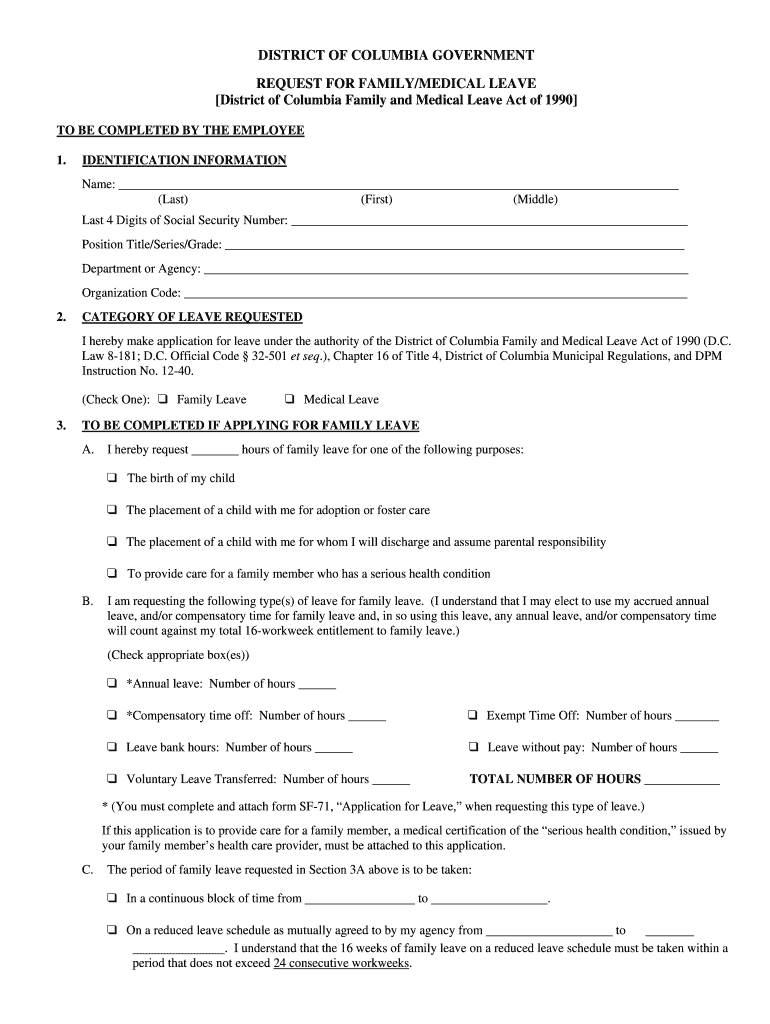
Get the free District of Columbia Family/Medical Leave Request
We are not affiliated with any brand or entity on this form

Fill out
Complete the form online in a simple drag-and-drop editor.

eSign
Add your legally binding signature or send the form for signing.

Share
Share the form via a link, letting anyone fill it out from any device.

Export
Download, print, email, or move the form to your cloud storage.
Why pdfFiller is the best tool for your documents and forms


End-to-end document management
From editing and signing to collaboration and tracking, pdfFiller has everything you need to get your documents done quickly and efficiently.
Accessible from anywhere
pdfFiller is fully cloud-based. This means you can edit, sign, and share documents from anywhere using your computer, smartphone, or tablet.
Secure and compliant
pdfFiller lets you securely manage documents following global laws like ESIGN, CCPA, and GDPR. It's also HIPAA and SOC 2 compliant.
What is DC Leave Request
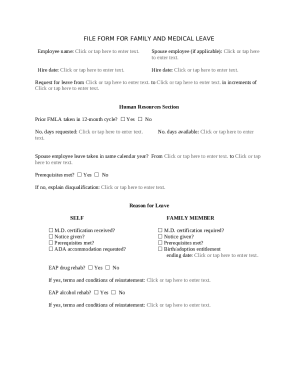
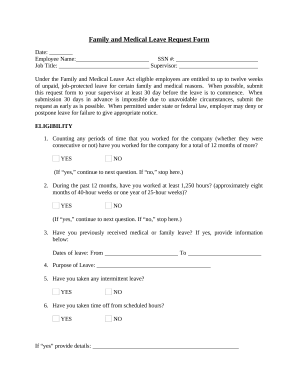
The District of Columbia Family/Medical Leave Request is a government form used by employees to apply for family or medical leave under the District of Columbia Family and Medical Leave Act of 1990.
pdfFiller scores top ratings on review platforms




Who needs DC Leave Request?
Explore how professionals across industries use pdfFiller.

DC Leave Request is needed by:
-
Employees in the District of Columbia seeking family or medical leave.
-
Approving officials responsible for reviewing leave requests.
-
HR personnel managing leave applications within local government agencies.
-
Legal advisors assisting employees with leave entitlements.
-
Healthcare providers involved in certifying medical leave.
Comprehensive Guide to DC Leave Request
What is the District of Columbia Family/Medical Leave Request?
The District of Columbia Family/Medical Leave Request form is essential for employees seeking to apply for family or medical leave as stipulated under the District of Columbia Family and Medical Leave Act of 1990. This form is integral for ensuring that employees receive necessary time off for various personal or familial needs, thereby underscoring their rights within the workplace.
As per the Family and Medical Leave Act of 1990, qualifying employees can benefit from job-protected leave, which aids in balancing work responsibilities and personal health or family obligations. The usage of this form streamlines the leave process while enhancing transparency in employee-employer relations.
Purpose and Benefits of the District of Columbia Family/Medical Leave Request
This form facilitates various types of leave, including but not limited to parental, medical, and caregiver leave, thereby safeguarding the rights of employees under the law. The provision allows employees to take necessary time off without fear of losing their job or benefits.
By utilizing the District of Columbia Family/Medical Leave Request, both employees and employers can experience significant advantages, such as:
-
Clear guidelines on the types of leave available.
-
Streamlined communication regarding leave requests.
-
Legal protections ensuring job security during leave.
Who Needs the District of Columbia Family/Medical Leave Request?
Employees who have qualifying circumstances for family or medical leave are required to complete this form. Eligible employees may include those facing personal illness, caring for a family member, or other situations that necessitate time away from work.
The identification of qualifying circumstances is crucial in order to ensure compliance and effective utilization of leave benefits. By doing so, employees align their needs with the appropriate provisions of the law.
Eligibility Criteria for the District of Columbia Family/Medical Leave Request
To apply for leave using the District of Columbia Family/Medical Leave Request, employees must meet specific eligibility criteria that include:
-
Length of employment with the District government.
-
Minimum hours worked in the preceding year.
Understanding these requirements is vital for a successful application process and to ensure that employees are fully prepared when submitting their requests.
How to Fill Out the District of Columbia Family/Medical Leave Request Online
Filling out the form electronically can streamline the application process. Here is a step-by-step guide:
-
Access the online form on the appropriate government website.
-
Provide personal identification details as requested.
-
Select the type of leave you are applying for.
-
Complete the sections detailing your leave period and reason for leave.
-
Review the form for accuracy before submission.
A field-by-field breakdown will help you navigate common pitfalls and ensure that all required information is accurately provided, reducing the chance of delays in processing.
Required Documents and Supporting Materials
When submitting the District of Columbia Family/Medical Leave Request, specific documents are required. These may include:
-
Medical certification for personal or family illness.
-
Any additional paperwork specific to the type of leave requested.
Gathering all necessary documentation beforehand will facilitate a smoother application process and timely approval of your leave request.
Submission Methods and Delivery
The completed leave request form can be submitted through various methods, including online, via mail, or in-person at designated government offices. It is essential to note the deadlines for each submission method and the expected processing times for decisions regarding your application.
Staying informed about submission timelines ensures that your requests are timely, which is crucial for effective leave management.
What Happens After You Submit the District of Columbia Family/Medical Leave Request?
After submission, the review process will begin, during which your application will be evaluated based on provided information and supporting documentation. Generally, you can expect follow-up communication regarding the status of your request.
Understanding the consequences of not filing or late filing can help you remain compliant and protect your rights throughout this process.
Security and Compliance for the District of Columbia Family/Medical Leave Request
When filling out sensitive forms, it is crucial to prioritize privacy and data protection. Ensuring that your information remains secure is vital. pdfFiller employs several security measures, including:
-
256-bit encryption to protect sensitive data.
-
Compliance with SOC 2 Type II, HIPAA, and GDPR standards.
This commitment to security assures users that their personal and employment-related information is safeguarded throughout the process.
Experience the Ease of Using pdfFiller for Your District of Columbia Family/Medical Leave Request
pdfFiller offers features that significantly simplify the form-filling process, such as an intuitive interface, eSigning capabilities, and extensive document management tools. Utilizing pdfFiller facilitates a hassle-free experience when completing your District of Columbia Family/Medical Leave Request.
By accessing these tools and resources, you can streamline your application and ensure that all necessary steps are efficiently addressed.
How to fill out the DC Leave Request
-
1.Access the District of Columbia Family/Medical Leave Request form on pdfFiller by searching for the form title in the search bar after logging into your account or by navigating directly to the provided link.
-
2.Once the form is open, review the instructions carefully to understand what information is required. Familiarize yourself with the specific sections including personal identification, type of leave, and details about the leave period.
-
3.Gather necessary information before starting. This may include personal contact details, employee ID, and relevant medical documentation or leave duration you're applying for. Having these at hand will streamline the filling process.
-
4.Begin completing the form in pdfFiller by clicking on the designated fields and entering your information. Utilize the fillable fields to ensure your entries are neat and legible. Checkboxes can be easily selected by clicking them.
-
5.Review your filled form for any errors or missing information. pdfFiller has options to save your progress, so make sure to utilize this feature before submitting.
-
6.Finalize your form by checking all entries. Once you're satisfied that everything is correct, proceed to sign the document electronically by following the prompts on the interface.
-
7.Save your completed form using the download function to retain a copy for your records. You can also choose to submit it directly through pdfFiller via email or to the designated agency, depending on the submission methods required by your employer.

What are the eligibility requirements for this leave?
To be eligible for family or medical leave under the District of Columbia Family Leave Act, employees must have worked a certain period and meet specific criteria. Employees should check with their HR department to confirm their eligibility based on individual circumstances.
Is there a deadline for submitting the leave request?
Employees should submit the Family/Medical Leave Request form as early as possible, ideally at least 30 days in advance for foreseeable leave. If the leave is unexpected, notify your employer as soon as practicable to avoid delays in processing.
How do I submit the completed form?
The completed District of Columbia Family/Medical Leave Request can be submitted via email or handed in person to your HR department. Check with your agency for specific submission guidelines and preferred methods.
What supporting documents are required?
Supporting documents may include medical certification from healthcare providers for medical leave requests. Always refer to the guidelines provided by your employer to ensure you have all necessary documentation to accompany your request.
What common mistakes should I avoid when filling out the form?
Common mistakes include failing to complete all required fields, neglecting to sign the document, and submitting the form past the deadline. Double-check all entries and ensure proper signatures from both the employee and the approving official.
How long does it take to process the leave request?
Processing times for leave requests can vary based on the agency’s workload. Typically, allow at least 15 days for your request to be reviewed. For urgent leaves, communicate your needs directly to HR.
Are there fees associated with this leave request?
Generally, there are no fees for submitting the Family/Medical Leave Request form itself; however, acquiring medical documents may entail costs. Always check specifically with your healthcare provider and employer.
Related Content
Related Forms





Related Catalogs
Get the latest insights from our blog


If you believe that this page should be taken down, please follow our DMCA take down process
here
.
This form may include fields for payment information. Data entered in these fields is not covered by PCI DSS compliance.