
Last updated on
Nov 6, 2026
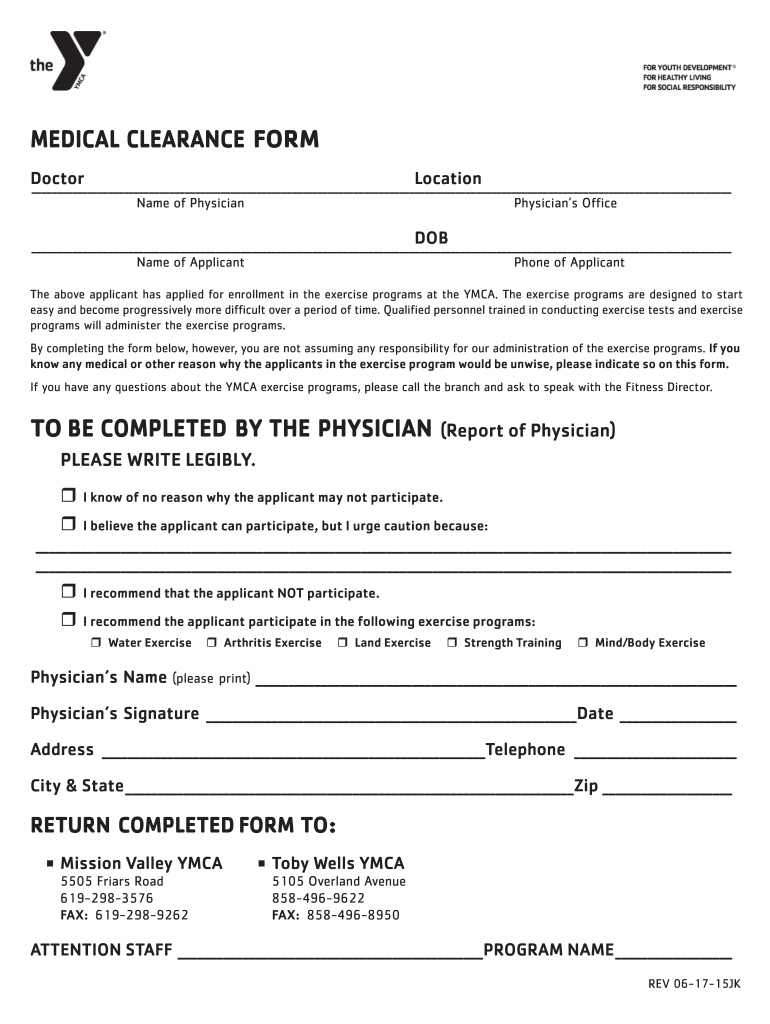
YMCA Medical Clearance Form 2015-2026 free printable template
pdfFiller is not affiliated with any government organization

Fill out
Complete the form online in a simple drag-and-drop editor.

eSign
Add your legally binding signature or send the form for signing.

Share
Share the form via a link, letting anyone fill it out from any device.

Export
Download, print, email, or move the form to your cloud storage.
Why pdfFiller is the best tool for your documents and forms


End-to-end document management
From editing and signing to collaboration and tracking, pdfFiller has everything you need to get your documents done quickly and efficiently.
Accessible from anywhere
pdfFiller is fully cloud-based. This means you can edit, sign, and share documents from anywhere using your computer, smartphone, or tablet.
Secure and compliant
pdfFiller lets you securely manage documents following global laws like ESIGN, CCPA, and GDPR. It's also HIPAA and SOC 2 compliant.
What is YMCA Medical Clearance Form
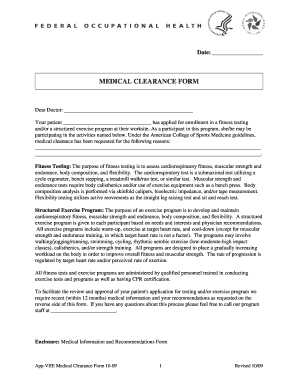
The YMCA Medical Clearance Form is a healthcare document used by applicants to obtain physician approval for participation in YMCA exercise programs.
pdfFiller scores top ratings on review platforms




Who needs YMCA Medical Clearance Form?
Explore how professionals across industries use pdfFiller.

YMCA Medical Clearance Form is needed by:
-
Individuals seeking to join YMCA exercise programs
-
Physicians responsible for providing medical clearance
-
YMCA administrative staff handling participant registrations
-
Fitness program coordinators at YMCA branches
-
Health professionals conducting physical assessments
Comprehensive Guide to YMCA Medical Clearance Form
Understanding the YMCA Medical Clearance Form
The YMCA Medical Clearance Form is a crucial document that ensures the safety of participants in YMCA exercise programs. Designed to obtain physician approval, this form plays a key role in assessing whether individuals can safely engage in fitness activities. By incorporating this physician clearance form, participants can confidently proceed, knowing that they have passed health evaluations required for participation.
Having a signed YMCA Medical Clearance Form helps mitigate risks by confirming that any existing medical conditions have been acknowledged and appropriately addressed by a healthcare professional.
Benefits of Using the YMCA Medical Clearance Form
Completing the YMCA Medical Clearance Form offers numerous advantages for both participants and the YMCA as an organization. The form facilitates safe participation in fitness activities, ensuring that individuals can pursue their health goals without jeopardizing their well-being.
-
Enhances safety protocols by ensuring all participants meet health criteria.
-
Promotes a secure environment within YMCA facilities.
-
Supports YMCA in maintaining compliance with health regulations.
Who Should Complete the YMCA Medical Clearance Form?
The YMCA Medical Clearance Form is particularly important for specific demographics, including individuals with existing health conditions, older adults, and those who are new or returning to fitness programs. It is essential for anyone who may have uncertainties about their medical fitness to complete this form prior to engaging in activities.
New participants and returning members should seriously consider obtaining California YMCA medical form approval to ensure their health is evaluated before involving themselves in exercise programs.
Key Features of the YMCA Medical Clearance Form
The YMCA Medical Clearance Form encompasses several distinct features that set it apart as a vital document for health assessments. It includes fields that require precise information, such as the physician's name, signature, and exercise recommendations.
-
Physician’s name for validation.
-
Clear sections for specific exercise recommendations.
-
Spaces for required signatures to confirm participation approval.
Proper completion of the form is vital as it guarantees accurate health assessments and promotes a thorough understanding of participants' physical statuses.
Step-by-Step Guide to Filling Out the YMCA Medical Clearance Form
Filling out the YMCA Medical Clearance Form correctly is essential for timely approval. Below is a detailed breakdown of the steps to follow when completing the form:
-
Enter the physician’s details accurately, including their name and contact information.
-
Provide information about the individual seeking clearance, including their medical history.
-
Obtain the physician’s signature and ensure they specify any exercise recommendations.
Be cautious of common mistakes, such as leaving fields blank or providing inaccurate details. These oversights can delay processing and approval of the form.
Submission Process for the YMCA Medical Clearance Form
Submitting the completed YMCA Medical Clearance Form can be done through various methods, making the process convenient. Individuals can choose to submit their forms online, mail them, or deliver them in person.
-
Check for submission deadlines to ensure timely entry into desired programs.
-
Be aware of any fees that may accompany the submission.
Utilizing the YMCA fitness program approval process ensures that all forms are handled efficiently, promoting a smoother experience for participants.
Security and Compliance Considerations
When it comes to personal information, security and privacy are of utmost importance. The YMCA Medical Clearance Form is handled with stringent measures in place, including compliance with regulations like HIPAA and GDPR.
Users can be assured that details sent through pdfFiller are protected with 256-bit encryption, maintaining the integrity and confidentiality of sensitive health information.
Leveraging pdfFiller for Your YMCA Medical Clearance Form
Utilizing pdfFiller for completing the YMCA Medical Clearance Form offers enhanced efficiency. With its user-friendly platform, individuals can easily edit and fill out the form securely, all without needing to download any software.
-
Convenient digital signing options streamline the approval process.
-
Document management features ensure vital forms are organized and accessible.
pdfFiller enhances the experience by providing a versatile tool for managing forms effectively.
What to Expect After Submission
After submitting the YMCA Medical Clearance Form, users can expect a confirmation of receipt from the YMCA. Tracking options may be available, allowing participants to monitor their submission status.
Processing and approval timelines can vary, so it’s essential to remain informed about potential next steps once the form has been submitted.
Creating a Complete YMCA Medical Clearance Form: Example and Tips
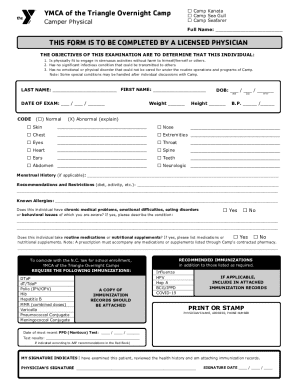
For a better understanding, reviewing a completed YMCA Medical Clearance Form can provide valuable insight. A sample form includes annotations for each input, demonstrating the importance of accuracy in completion.
-
Refer to examples to clarify necessary input for physician details.
-
Ensure all required fields are completed to prevent processing delays.
Utilizing pdfFiller can significantly simplify the process, making it easy and accessible.
How to fill out the YMCA Medical Clearance Form
-
1.Begin by accessing the PDF version of the YMCA Medical Clearance Form on pdfFiller. Visit the pdfFiller website and use the search feature to find the form by its name.
-
2.Once you have opened the form, review each section to familiarize yourself with the layout and required information. This will help in completing it efficiently.
-
3.Gather all necessary information beforehand, including the applicant's personal details, medical history, and specifics about their health status. Make sure you have the physician's credentials if applicable.
-
4.Start filling out the form, paying attention to the blank fields. Use the fillable fields to enter the required information, ensuring accuracy to prevent any issues.
-
5.For any checkboxes or selections, click on the options that apply. Use features like dropdown menus, radio buttons, or checkbox options available in pdfFiller.
-
6.Review each section of the form to ensure that it is completely filled out. Check for any missing information or typos that could affect the processing of the form.
-
7.Once you’ve completed all sections, proceed to finalize the form. Use pdfFiller's tools for editing or correcting any errors, if necessary.
-
8.After confirming that everything is accurate and complete, save your changes. Use the 'Save' button, and choose a location on your device for easy access.
-
9.You can choose to download the completed form or submit it directly through pdfFiller. To submit, look for the submission options provided on the platform and follow the prompts.

Who needs to sign the YMCA Medical Clearance Form?
The YMCA Medical Clearance Form requires a physician's signature to verify that the applicant is medically fit for participation in YMCA exercise programs.
What is the deadline for submitting the form?
It is advisable to submit the YMCA Medical Clearance Form well in advance of the start date for the exercise program to ensure timely processing and approval.
How do I submit the completed form?
You can submit the completed YMCA Medical Clearance Form via email, in person at a YMCA branch, or through the submission options available on pdfFiller.
Are there any supporting documents required?
Typically, the form itself is sufficient, but you may need to provide additional medical documentation or records based on the applicant's health history.
What common mistakes should I avoid when filling out the form?
Ensure all fields are completed accurately, avoid leaving any sections blank, and double-check that the physician's signature is included to prevent delays in processing.
How long does it take to process the form?
Processing times may vary by YMCA branch, but expect a few business days for the form to be reviewed and approved. Check with your local branch for specific details.
Can I edit the form after I've completed it?
Yes, if you are using pdfFiller, you can go back and edit the form as needed before finalizing and submitting it. Take advantage of the platform's editing tools.
Related Forms




Related Catalogs
Get the latest insights from our blog


If you believe that this page should be taken down, please follow our DMCA take down process
here
.
This form may include fields for payment information. Data entered in these fields is not covered by PCI DSS compliance.