
Last updated on
Nov 7, 2026

CA RCEB Vendor Special Incident Report 2008-2026 free printable template
pdfFiller is not affiliated with any government organization

Fill out
Complete the form online in a simple drag-and-drop editor.

eSign
Add your legally binding signature or send the form for signing.

Share
Share the form via a link, letting anyone fill it out from any device.

Export
Download, print, email, or move the form to your cloud storage.
Why pdfFiller is the best tool for your documents and forms


End-to-end document management
From editing and signing to collaboration and tracking, pdfFiller has everything you need to get your documents done quickly and efficiently.
Accessible from anywhere
pdfFiller is fully cloud-based. This means you can edit, sign, and share documents from anywhere using your computer, smartphone, or tablet.
Secure and compliant
pdfFiller lets you securely manage documents following global laws like ESIGN, CCPA, and GDPR. It's also HIPAA and SOC 2 compliant.
What is CA RCEB Vendor Special Incident Report
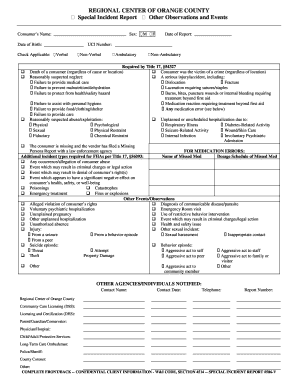
The RCEB Vendor Special Incident Report is a formal document used by vendors in California to report incidents involving consumers with disabilities.
pdfFiller scores top ratings on review platforms




Who needs CA RCEB Vendor Special Incident Report?
Explore how professionals across industries use pdfFiller.

CA RCEB Vendor Special Incident Report is needed by:
-
Healthcare providers serving consumers with disabilities
-
Vendors of support services for individuals with disabilities
-
Compliance officers in healthcare organizations
-
Social workers and case managers
-
Advocates for individuals with disabilities
-
Legal representatives handling disability cases
Comprehensive Guide to CA RCEB Vendor Special Incident Report
What is the RCEB Vendor Special Incident Report?
The RCEB Vendor Special Incident Report is a crucial form used within California's healthcare system to document incidents involving consumers with disabilities. This form is specifically designed to ensure that all incidents are reported accurately and comprehensively, ultimately enhancing consumer safety and care quality.
Both vendors and reporting persons are authorized to use this form. This collaboration facilitates a thorough reporting process, which is essential for compliance and oversight within the state's healthcare framework. Utilizing the California incident report form effectively helps promote accountability and transparency in healthcare services.
Purpose and Benefits of Completing the RCEB Vendor Special Incident Report
The primary objectives of submitting the RCEB Vendor Special Incident Report include ensuring consumer safety and maintaining quality standards across healthcare services. Proper documentation fosters a culture of safety, as it allows for the ongoing assessment of care and incident trends.
Vendors benefit significantly from adhering to healthcare incident reporting standards, as it helps improve compliance with state regulations and enhances overall service delivery. Completing this report can also lead to better outcomes for individuals with disabilities, reinforcing the importance of diligent reporting practices.
Eligibility Criteria for Filing the RCEB Vendor Special Incident Report
Eligibility to file the RCEB Vendor Special Incident Report is typically limited to vendors and designated reporting persons. These roles are crucial for maintaining the integrity of the incident reporting process.
Specific state rules may influence eligibility, ensuring that only qualified individuals engage in reporting incidents. Consequently, understanding the requirements of the California healthcare form is vital for those involved in maintaining accurate and effective record-keeping.
Key Features of the RCEB Vendor Special Incident Report
The RCEB Vendor Special Incident Report is structured to include various fillable fields, including essential details such as consumer name, incident type, and actions taken. Each section is designed to facilitate comprehensive reporting, with some fields featuring checkboxes for ease of use.
-
Consumer's name and personal details
-
Type of incident and brief description
-
Actions taken post-incident
-
Signature field for reporting person
-
Date of incident reporting
By familiarizing oneself with the special incident report template, users can ensure they meet all necessary documentation standards for effective healthcare reporting.
How to Fill Out the RCEB Vendor Special Incident Report Online
Filling out the RCEB Vendor Special Incident Report online using pdfFiller is straightforward. Start by accessing the form through the platform, where users can easily edit fillable fields. Ensuring accuracy in areas such as consumer name, diagnosis, and incident type is crucial for a successful submission.
-
Open the RCEB Vendor Special Incident Report template on pdfFiller
-
Fill in the consumer’s name and date of birth
-
Specify the diagnosis and type of incident
-
Review all entered information for accuracy
Following these steps aids in ensuring a complete and accurate report submission, vital for compliance and care improvement.
Submission Methods for the RCEB Vendor Special Incident Report
Once the RCEB Vendor Special Incident Report is completed, users have several options for submission. Reports can be submitted online through the pdfFiller platform or via mail, depending on preference and convenience.
-
Online submission through pdfFiller provides immediate processing
-
Mail submissions should ensure adequate postage and address accuracy
-
Check for any associated fees with mailing forms
Understanding these vendor incident report guidelines can help streamline the submission process and facilitate timely responses from relevant authorities.
Common Errors and How to Avoid Them When Completing the Form
When filling out the RCEB Vendor Special Incident Report, common errors usually stem from incomplete or inaccurate information. This can lead to delays in processing and necessitate corrections that may hinder timely care improvements.
-
Double-check all fields for completeness
-
Ensure signatures are provided where required
-
Validate dates and incident descriptions carefully
By adhering to a review and validation checklist before submission, reporting persons can minimize errors that may lead to rejection of the report.
Security and Compliance When Handling the RCEB Vendor Special Incident Report
Handling the RCEB Vendor Special Incident Report with care is paramount, especially regarding data security. Utilizing pdfFiller offers several advantages, including 256-bit encryption and compliance with HIPAA regulations to protect sensitive information.
The importance of privacy and data protection cannot be overstated, especially when dealing with vulnerable populations. Maintaining compliance with established security standards ensures that the reporting process is both safe and efficient.
Next Steps: What Happens After You Submit the RCEB Vendor Special Incident Report
After submission, users can expect an initial processing period during which their report will be evaluated. It is recommended to keep track of confirmation methods to verify that the report has been received adequately.
-
Monitor processing times which can vary based on the submission method
-
Instructions for checking the status of the submission should be followed
Understanding the consequences of not filing or late filing reinforces the need for timely submissions to avoid complications.
Use pdfFiller to Complete Your RCEB Vendor Special Incident Report Today
For a seamless experience in completing the RCEB Vendor Special Incident Report, pdfFiller offers an array of tools designed to enhance the document management process. Features like digital signatures and editing tools simplify form completion.
Choosing pdfFiller not only streamlines the filling process but also reinforces the value of security and compliance in managing sensitive healthcare documents.
How to fill out the CA RCEB Vendor Special Incident Report
-
1.Begin by accessing the RCEB Vendor Special Incident Report form on pdfFiller. Use the search feature to quickly find the form by typing its name into the search bar.
-
2.Once you have opened the form, familiarize yourself with the layout. pdfFiller will show you a series of fillable fields that must be completed, including essential details about the incident.
-
3.Before starting to fill in the form, gather the necessary information. This includes the consumer’s name, date of birth, diagnosis, and a detailed description of the incident.
-
4.Click on each fillable field to enter the required information. Use the instructions on the form as guidance on what to include in each section.
-
5.If required, check the appropriate checkboxes to indicate the type of incident and actions taken. Ensure that you provide clear and accurate information.
-
6.After completing the form, review all entries carefully to ensure all information is accurate and no fields are left blank.
-
7.Once you are satisfied with the completed form, you can finalize it on pdfFiller. Look for the 'Save' option to store your progress or the 'Download' button for a PDF version.
-
8.If you need to send the form to someone, look for sharing options to submit it directly through email from pdfFiller, or download it to send it manually.

Who is eligible to submit the RCEB Vendor Special Incident Report?
The form should be completed by vendors who provide services to consumers with disabilities in California and require signing from the reporting person involved in the incident.
What is the deadline for submitting the incident report?
While specific deadlines are not stated in the metadata, it is recommended to submit the RCEB Vendor Special Incident Report as soon as the incident occurs to ensure timely processing and adherence to legal requirements.
How do I submit the completed form?
After completing the form on pdfFiller, you can submit it through options provided in the interface, such as emailing it directly or downloading it to submit via traditional mail or your organization’s preferred channels.
What supporting documents are required for the report?
Supporting documents may vary based on the incident type, but generally, you should include any relevant details or evidence that clarifies the incident circumstances, such as witness statements or medical records.
What common mistakes should be avoided when filling out the form?
Common mistakes include leaving fields blank, not providing detailed descriptions of the incidents, and submitting the form without necessary signatures. Always double-check your entries before submission.
How long does it take to process the incident report?
Processing times can differ based on the organization's procedures. Typically, it can take several days to weeks, depending on the nature of the incident and the required follow-ups.
Can the form be notarized?
The RCEB Vendor Special Incident Report does not require notarization; however, it must be signed by the reporting person to validate the information provided.
Related Forms




Related Catalogs
Get the latest insights from our blog


If you believe that this page should be taken down, please follow our DMCA take down process
here
.
This form may include fields for payment information. Data entered in these fields is not covered by PCI DSS compliance.