
Last updated on
Nov 6, 2026
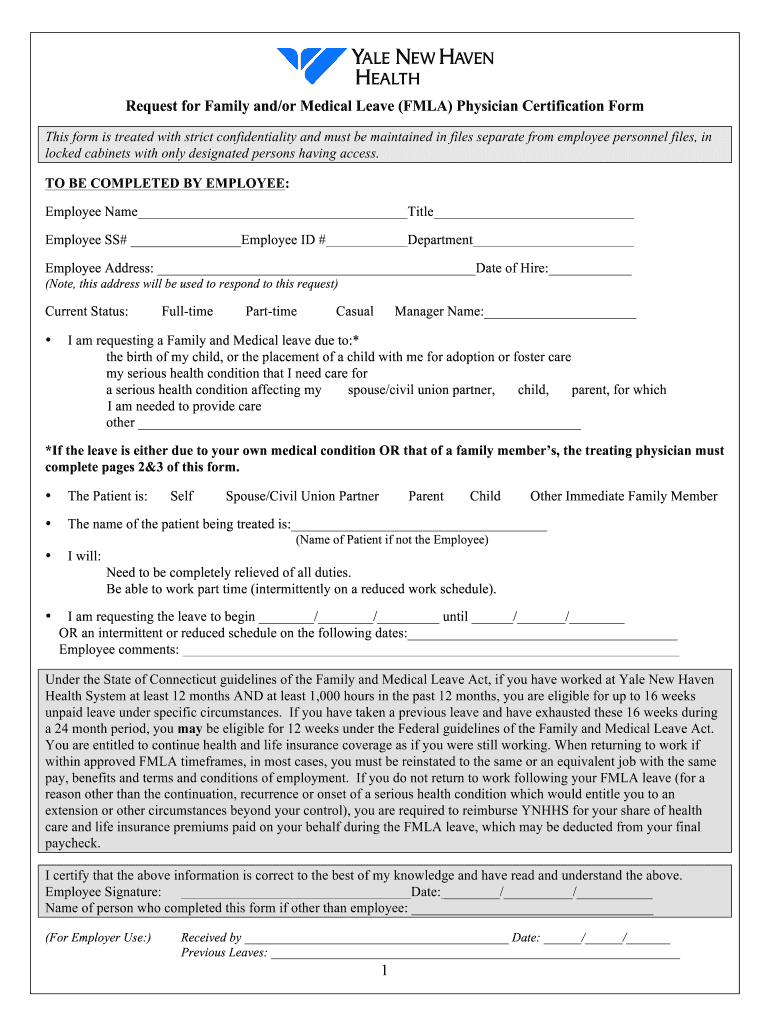
Yale New Haven Hospital Request for Family free printable template
pdfFiller is not affiliated with any government organization

Fill out
Complete the form online in a simple drag-and-drop editor.

eSign
Add your legally binding signature or send the form for signing.

Share
Share the form via a link, letting anyone fill it out from any device.

Export
Download, print, email, or move the form to your cloud storage.
Why pdfFiller is the best tool for your documents and forms


End-to-end document management
From editing and signing to collaboration and tracking, pdfFiller has everything you need to get your documents done quickly and efficiently.
Accessible from anywhere
pdfFiller is fully cloud-based. This means you can edit, sign, and share documents from anywhere using your computer, smartphone, or tablet.
Secure and compliant
pdfFiller lets you securely manage documents following global laws like ESIGN, CCPA, and GDPR. It's also HIPAA and SOC 2 compliant.
What is Yale New Haven Hospital Request for Family
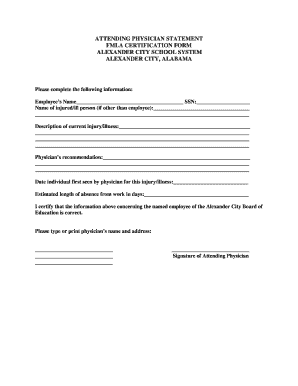
The FMLA Physician Certification Form is a legal document used by employees in Connecticut to request family and medical leave under the Family and Medical Leave Act.
pdfFiller scores top ratings on review platforms




I like the ease of use. I do think the help system needs and upgrade. Should have a searchable index. It is hard to find topics. I am an experienced software guy and just want to find out how to do thinks.
Easy to use
Easy to use. Very intuiative, the prompts were very helpful
Who needs Yale New Haven Hospital Request for Family?
Explore how professionals across industries use pdfFiller.

Yale New Haven Hospital Request for Family is needed by:
-
Employees seeking medical leave under FMLA
-
Physicians certifying medical conditions for leave
-
Employers managing leave requests
Comprehensive Guide to Yale New Haven Hospital Request for Family
What is the FMLA Physician Certification Form?
The FMLA Physician Certification Form is a crucial document used by employees in Connecticut for requesting family and medical leave under the Family and Medical Leave Act (FMLA). This form ensures that the process aligns with legal requirements while safeguarding the rights of employees. Key stakeholders involved in the process include employees, attending physicians, and employers, each playing a vital role in properly executing leave requests.
This specific Connecticut FMLA Form is tailored to address local regulations governing family and medical leave, making it a vital resource for Connecticut employees seeking leave for qualified medical and family reasons.
Purpose and Benefits of the FMLA Physician Certification Form
Completing the FMLA Physician Certification Form correctly is essential for ensuring legal compliance and protecting employees' rights under the Family and Medical Leave Act. This form provides clear documentation about the need for leave, which helps to prevent potential disputes between employees and employers.
Some of the key benefits include:
-
Ensuring compliance with FMLA provisions
-
Providing a formal process for leave requests
-
Safeguarding employee confidentiality in medical matters
Key Features of the FMLA Physician Certification Form
The FMLA Physician Certification Form encompasses several important components, each designed to streamline the leave application process. The main sections of the form typically include employee details, such as name and address, as well as information regarding specific conditions necessitating leave.
Moreover, the form features:
-
Fillable fields for easy data entry
-
Checkboxes to denote various medical conditions
-
A user-friendly layout to assist in completion
Who Needs the FMLA Physician Certification Form?
Employees seeking leave under the Family and Medical Leave Act are required to use the FMLA Physician Certification Form. Eligibility is generally based on specific criteria outlined by the FMLA, which includes having a serious health condition or caring for a family member with such a condition.
Additionally, physicians are involved when certifying the serious health condition, ensuring that employers have the necessary documentation to process leave requests accurately.
How to Fill Out the FMLA Physician Certification Form Online (Step-by-Step)
Filling out the FMLA Physician Certification Form online can simplify the process significantly. Here’s a step-by-step guide to assist you:
-
Start by entering your personal details, including your name and address.
-
Indicate the type of leave required and the reason for the request.
-
Provide any necessary medical information required by your physician.
-
Ensure all fields are filled out accurately to avoid delays.
-
Review the form for any common mistakes before submitting.
Submission Methods and Delivery of the FMLA Physician Certification Form
Once completed, the FMLA Physician Certification Form can be submitted through various methods, including digital submission and traditional mail. Digital options allow for quick delivery and often include tracking features to monitor the submission status.
Typical delivery timelines may vary, but having a reliable method enables employees to follow up promptly after submission. Tracking delivery is advisable to ensure timely processing of leave requests.
What Happens After You Submit the FMLA Physician Certification Form?
Following the submission of the FMLA Physician Certification Form, a process involving both employers and physicians is initiated. Employers review the documentation to determine eligibility for leave, and physicians may also be contacted for any clarifications regarding the medical certification.
Employees should be prepared for possible next steps, such as:
-
Receiving confirmation of leave eligibility
-
Tracking the status of their application
-
Understanding common rejection reasons and solutions if the application is denied
Security and Compliance for the FMLA Physician Certification Form
When handling sensitive documents like the FMLA Physician Certification Form, security is paramount. pdfFiller employs robust security measures, including encryption, to protect the confidentiality of users’ data.
Compliance with regulations such as HIPAA ensures that medical information is handled with the utmost care, reassuring users about the protection of their information throughout the form-filling and submission process.
Sample or Example of a Completed FMLA Physician Certification Form
Providing users with a sample or example of a completed FMLA Physician Certification Form can enhance their understanding of the document. This visual reference can clarify expectations, ensuring that all necessary sections are properly filled out.
Annotations highlighting critical areas and common pitfalls can guide users through the completion process, making it easier to avoid mistakes.
Why Choose pdfFiller for Your FMLA Physician Certification Form Needs
Utilizing pdfFiller for completing your FMLA Physician Certification Form offers several advantages. With features like cloud-based editing and eSigning, users can efficiently manage their forms from any device without the need for downloads.
By simplifying the form-filling process while ensuring security, pdfFiller enhances the user experience, making it a reliable choice for handling essential employment documents.
How to fill out the Yale New Haven Hospital Request for Family
-
1.Access pdfFiller and search for 'FMLA Physician Certification Form' in the templates library.
-
2.Once you locate the form, click on it to open the fillable version in the editor.
-
3.Before starting, gather necessary information such as your personal details, employment information, and specifics of the health condition requiring leave.
-
4.Begin by filling out the employee section. Enter your name, social security number, and address in the designated fields.
-
5.Next, specify the reason for your leave from the checklist provided; ensure to be accurate with your selections.
-
6.Proceed to the physician section where you will need to either input information or print for your doctor to fill out.
-
7.Once the physician has completed their part, return to pdfFiller to complete any remaining fields.
-
8.Review all filled details carefully to ensure accuracy and completeness before finalizing.
-
9.After reviewing, save the document on pdfFiller by selecting the 'Save' option, which allows you to keep it in your online account.
-
10.You can download the filled form as a PDF or send it directly to your employer through pdfFiller options.

Who is eligible for the FMLA Physician Certification Form?
Employees who need to take leave for a serious health condition or to care for a family member with such a condition are eligible to use the FMLA Physician Certification Form.
What is the deadline for submitting the FMLA form?
You should submit the FMLA Physician Certification Form as soon as you know you need leave. It's best to do so at least 30 days before the leave if possible.
How do I submit the FMLA Physician Certification Form?
You can submit the FMLA Physician Certification Form by providing it directly to your employer or through electronic submission if offered by your workplace.
What supporting documents do I need to provide with this form?
Along with the FMLA Physician Certification Form, you may need to provide a medical certificate or documentation from your physician to support your leave request.
What common mistakes should I avoid when filling out this form?
Common mistakes include incorrect personal information, not having the physician complete their section, and failure to submit by the deadline. Always double-check your entries.
How long does it take to process the FMLA leave request?
Processing times for FMLA leave requests can vary, but employers are typically required to notify employees of approval or denial within five business days of receiving the certification.
Can I amend the FMLA Physician Certification Form after submission?
Yes, if your situation changes or if you noticed an error after submitting the form, you can request to amend the FMLA Physician Certification Form by contacting your employer.
Related Content
Related Forms





Related Catalogs
Get the latest insights from our blog


If you believe that this page should be taken down, please follow our DMCA take down process
here
.
This form may include fields for payment information. Data entered in these fields is not covered by PCI DSS compliance.