
Last updated on
Oct 19, 2026

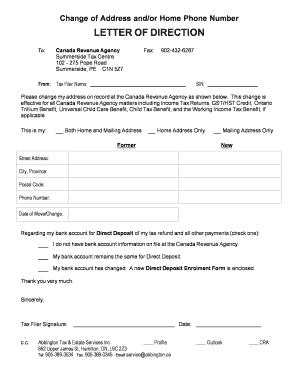
Get the free Canada RC65 Marital Status Change Form
We are not affiliated with any brand or entity on this form

Fill out
Complete the form online in a simple drag-and-drop editor.

eSign
Add your legally binding signature or send the form for signing.

Share
Share the form via a link, letting anyone fill it out from any device.

Export
Download, print, email, or move the form to your cloud storage.
Why pdfFiller is the best tool for your documents and forms


End-to-end document management
From editing and signing to collaboration and tracking, pdfFiller has everything you need to get your documents done quickly and efficiently.
Accessible from anywhere
pdfFiller is fully cloud-based. This means you can edit, sign, and share documents from anywhere using your computer, smartphone, or tablet.
Secure and compliant
pdfFiller lets you securely manage documents following global laws like ESIGN, CCPA, and GDPR. It's also HIPAA and SOC 2 compliant.
What is RC65 Form
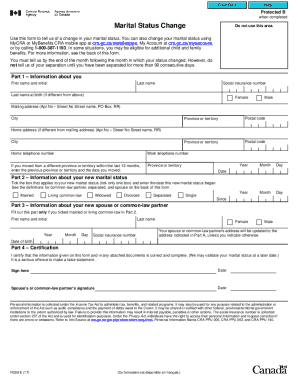
The Canada RC65 Marital Status Change Form is a tax document used by residents of Canada to notify the Canada Revenue Agency of a change in marital status.
pdfFiller scores top ratings on review platforms




Who needs RC65 Form?
Explore how professionals across industries use pdfFiller.

RC65 Form is needed by:
-
Individuals who have recently changed marital status
-
Parents claiming Canada child tax benefits
-
Common-law partners needing to update tax information
-
Tax professionals assisting clients with marital status changes
Comprehensive Guide to RC65 Form
What is the Canada RC65 Marital Status Change Form?
The Canada RC65 form serves as a critical document for notifying the Canada Revenue Agency (CRA) about changes in marital status. This form is essential for ensuring that your tax information remains accurate and up-to-date. By promptly reporting marital status changes, individuals can prevent potential legal implications and maintain compliance with tax regulations.
Failure to notify the CRA can result in complications related to tax benefits, highlighting the importance of this form in the context of Canadian tax obligations.
Purpose and Benefits of the Canada RC65 Marital Status Change Form
The main purpose of the Canada RC65 form is to facilitate timely updates to the CRA regarding changes in marital status. Submitting this form has various benefits, including potential adjustments to tax benefits such as Canada child tax benefits and GST/HST credits. Accurate reporting contributes to peace of mind, ensuring users effectively manage their personal circumstances related to taxes.
Being proactive about changes in marital status can significantly impact tax-related benefits and eligibility.
Who Needs to Complete the Canada RC65 Form?
Individuals undergoing changes in their marital status should complete the Canada RC65 form. This includes various groups:
-
Married couples.
-
Divorced individuals.
-
Common-law partners.
Marital status changes can affect eligibility for various benefits and credits. Therefore, understanding when to file the RC65 form is crucial during these transitions in personal circumstances.
How to Fill Out the Canada RC65 Marital Status Change Form Online (Step-by-Step)
Filling out the Canada RC65 form online can be straightforward when following these steps:
-
Access the form via pdfFiller.
-
Enter your personal information, including your name, social insurance number, and address.
-
Select your current marital status from the provided options.
-
Include details of your spouse or common-law partner as required.
-
Review for completeness and accuracy before submission.
Ensuring that each field is correctly filled enhances the likelihood of prompt processing by the CRA.
Field-by-Field Instructions for the Canada RC65 Form
The RC65 form comprises several fields that require specific information. Below is a breakdown of key sections:
-
Name: Include your first name and last name accurately.
-
Social Insurance Number: Ensure this number is correct to avoid processing delays.
-
Marital Status Checkboxes: Select the appropriate status that reflects your current situation.
Being mindful of common errors in each field will help prevent issues during the submission process.
Review and Validation Checklist for the Canada RC65 Form
Before submitting your Canada RC65 form, use the following checklist to verify accuracy:
-
Check all personal information for correctness.
-
Ensure that marital status is accurately indicated.
-
Review supporting documents, if any, for completeness.
A thorough review can help identify common mistakes that might lead to delays in processing your form.
Submission Methods for the Canada RC65 Form
Once the Canada RC65 form is completed, you can submit it through several methods:
-
Online Submission: Use e-filing services via pdfFiller.
-
Mail: Print and send the completed form to the CRA.
Keeping records of your submissions is essential for future reference and confirmation of receipt by the CRA.
What Happens After You Submit the Canada RC65 Form?
Upon submitting the Canada RC65 form, there are key processes to understand:
-
Monitor the processing time as specified by the CRA.
-
Watch for any notifications or correspondence from the CRA regarding your submission.
-
Be prepared to make adjustments or corrections if you receive feedback.
Understanding these steps will help ensure a smooth transition following your marital status change.
How pdfFiller Can Help You with the Canada RC65 Marital Status Change Form
pdfFiller offers numerous features to simplify the filling of the Canada RC65 form, such as:
-
Easy editing of form fields to tailor personal information.
-
eSigning capabilities for convenient submission.
-
Secure storage ensuring compliance with safety regulations.
Using pdfFiller ensures a hassle-free experience when completing this important tax document.
Next Steps and Resources for Users
Now that you have the necessary information about the Canada RC65 form, you can begin filling it out using pdfFiller. Consider exploring additional resources on marital status implications and tax benefits. If you have further questions or need assistance, do not hesitate to seek help.
How to fill out the RC65 Form
-
1.To access the Canada RC65 Marital Status Change Form on pdfFiller, visit the website and log in to your account.
-
2.Once logged in, use the search bar to find 'Canada RC65 Marital Status Change Form.' Click on the form title to open it.
-
3.Before filling out the form, gather necessary information such as your name, social insurance number, current address, and details about your marital status change.
-
4.Using pdfFiller's interface, click on each field to enter your information in the fillable fields provided, such as 'First name and initial' and 'Last name.'
-
5.Make sure to check the box that reflects your new marital status and provide any required information about your new spouse or common-law partner.
-
6.After filling in all relevant fields, review the form carefully to ensure all information is correct and complete.
-
7.You can also make use of pdfFiller's editing tools to add comments or notes if necessary.
-
8.Once you are satisfied with your completed form, save it using the 'Save' option. Consider creating a copy for your records.
-
9.To download, click on the 'Download' button to receive a PDF version of the completed form to your device.
-
10.If you're ready to submit the form, check for the submission options available on pdfFiller, which may include electronic submission or email options.

Who is eligible to use the Canada RC65 form?
Any individual residing in Canada who experiences a change in marital status is eligible to use the Canada RC65 form to notify the Canada Revenue Agency.
Is there a deadline for submitting the RC65 form?
While there's no strict deadline for submitting the RC65 form, it is advisable to do so promptly after your marital status changes to avoid delays in benefit adjustments.
How do I submit the RC65 form?
You can submit the completed RC65 form electronically via pdfFiller or print it and mail it directly to the Canada Revenue Agency as per instructions provided in the form.
What supporting documents are required with the RC65 form?
Typically, no additional documents are required with the RC65 form; however, it's important to ensure all information filled in the form is accurate and up-to-date.
What mistakes should I avoid when completing the form?
Common mistakes include omitting necessary fields, entering incorrect social insurance numbers, and failing to update any changes regarding your new spouse or partner.
How long does it take for the Canada Revenue Agency to process the RC65 form?
The processing time for the RC65 form can vary but generally takes a few weeks. It's advisable to check your account or contact the CRA for updates regarding your submission.
What should I do if I realize I made an error on my submitted RC65 form?
If you discover an error after submission, contact the Canada Revenue Agency immediately to correct the information. You may need to submit a new form or provide additional information.
Related Content
Related Forms




Get the latest insights from our blog


If you believe that this page should be taken down, please follow our DMCA take down process
here
.
This form may include fields for payment information. Data entered in these fields is not covered by PCI DSS compliance.