
Last updated on
Nov 6, 2026
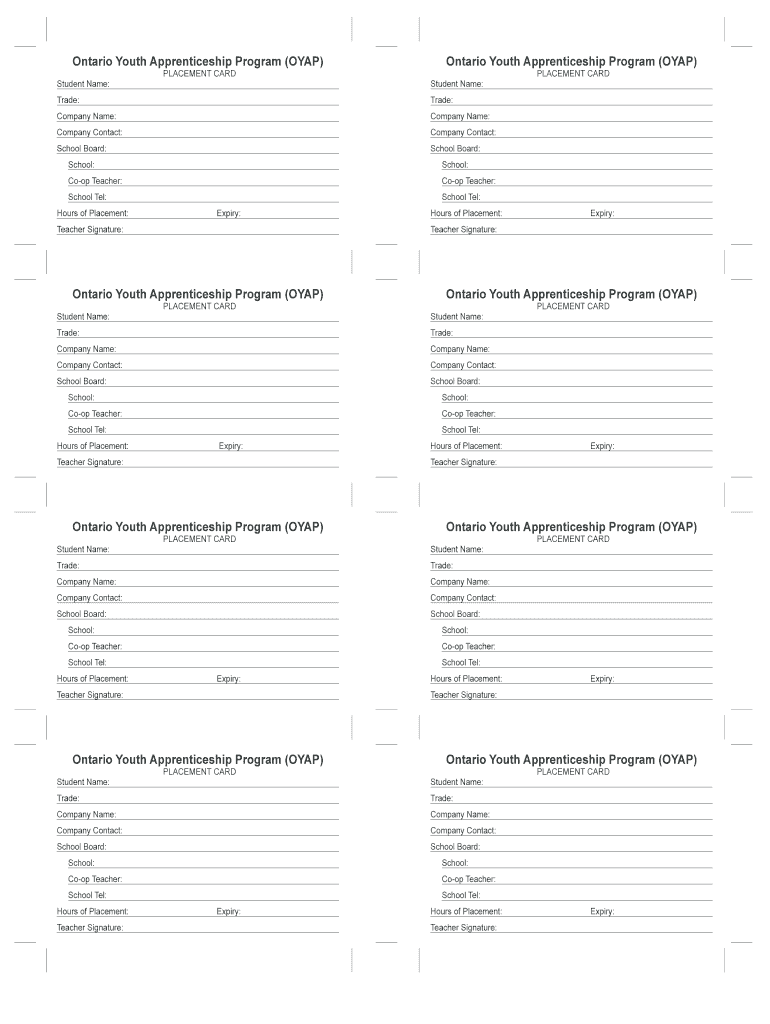
Canada Ontario Youth Apprenticeship Program (OYAP) Placement Card 2008-2026 free printable template
We are not affiliated with any brand or entity on this form

Fill out
Complete the form online in a simple drag-and-drop editor.

eSign
Add your legally binding signature or send the form for signing.

Share
Share the form via a link, letting anyone fill it out from any device.

Export
Download, print, email, or move the form to your cloud storage.
Why pdfFiller is the best tool for your documents and forms


End-to-end document management
From editing and signing to collaboration and tracking, pdfFiller has everything you need to get your documents done quickly and efficiently.
Accessible from anywhere
pdfFiller is fully cloud-based. This means you can edit, sign, and share documents from anywhere using your computer, smartphone, or tablet.
Secure and compliant
pdfFiller lets you securely manage documents following global laws like ESIGN, CCPA, and GDPR. It's also HIPAA and SOC 2 compliant.
What is Canada Ontario Youth Apprenticeship Program (OYAP) Placement Card
The Ontario Youth Apprenticeship Program Placement Card is a document used by educators to record the placement of students in supervised work environments as part of the OYAP.
pdfFiller scores top ratings on review platforms




Who needs Canada Ontario Youth Apprenticeship Program (OYAP) Placement Card?
Explore how professionals across industries use pdfFiller.

Canada Ontario Youth Apprenticeship Program (OYAP) Placement Card is needed by:
-
Teachers supervising student placements in Ontario
-
Students enrolled in the Ontario Youth Apprenticeship Program
-
Employers offering trade placements to students
-
School administrators managing apprenticeship programs
-
Co-op coordinators overseeing student work placements
Comprehensive Guide to Canada Ontario Youth Apprenticeship Program (OYAP) Placement Card
What is the Ontario Youth Apprenticeship Program Placement Card?
The Ontario Youth Apprenticeship Program (OYAP) Placement Card serves a critical role in documenting supervised work placements for students. Legally governed by the Apprenticeship Certification Act and the Trades Qualification and Apprenticeship Act, this card illustrates a student's participation in valuable trade experiences. Related terms such as "student trade placement" and "apprenticeship placement form" help to clarify its purpose and importance in the educational landscape.
Purpose and Benefits of the Ontario Youth Apprenticeship Program Placement Card
This placement card is essential for students, teachers, and employers. For students, it helps in tracking their experiences and progress in trade fields, thereby facilitating their career development. Teachers benefit by having an official record of apprenticeship placements that can be referenced for academic and administrative purposes. Employers also find the card useful for confirming a student’s involvement in a structured work environment.
Key Features of the Ontario Youth Apprenticeship Program Placement Card
The placement card is designed to be user-friendly, featuring specific fields including Student Name, Trade, Company Name, and more. The teacher's signature is required, signifying the authenticity of the placement. Additionally, the fillable form design streamlines the process, allowing for easy completion and submission.
Who Needs the Ontario Youth Apprenticeship Program Placement Card?
This card must be filled out by teachers, students, and educational institutions involved in the Ontario Youth Apprenticeship Program. Employers participating in apprenticeship placements also require the card for documentation purposes. To be eligible to participate in OYAP, students must meet specific criteria established by the program.
How to Fill Out the Ontario Youth Apprenticeship Program Placement Card Online
Filling out the Ontario Youth Apprenticeship Program Placement Card online involves several essential steps:
-
Gather necessary information such as Student Name, Trade, and Company details.
-
Access the fillable form through pdfFiller.
-
Input the requested information in their respective fields.
-
Ensure the form is signed by the teacher before finalization.
This process is facilitated by pdfFiller, which offers convenient online completion and eSigning features.
Submission Methods and Delivery for the Ontario Youth Apprenticeship Program Placement Card
Complete the OYAP Placement Card and choose from various submission methods:
-
Online submission via pdfFiller.
-
Physical submission to the designated school or apprenticeship office.
Be aware of any potential fees and processing times associated with submissions. Confirming submission status is advisable to ensure successful processing.
Common Errors When Filling Out the Ontario Youth Apprenticeship Program Placement Card
When completing the Ontario Youth Apprenticeship Program Placement Card, users often encounter common mistakes such as:
-
Leaving required fields blank.
-
Incorrectly spelling the student's name or trade.
To avoid these errors, it’s crucial to thoroughly review the card before submission. Attention to detail can prevent unnecessary delays in the approval process.
Security and Compliance Considerations for the Ontario Youth Apprenticeship Program Placement Card
Users can trust that their sensitive information is secure when using pdfFiller. The platform is committed to document security, ensuring compliance with applicable regulations like HIPAA and GDPR. It’s essential to securely store completed forms to maintain confidentiality and protect personal data.
Experience Seamless Document Management with pdfFiller
Utilizing pdfFiller enhances the process of managing your forms. Users can easily edit, eSign, and share the Ontario Youth Apprenticeship Program Placement Card. Start leveraging pdfFiller's features today for efficient handling of your documents.
How to fill out the Canada Ontario Youth Apprenticeship Program (OYAP) Placement Card
-
1.To access the Ontario Youth Apprenticeship Program Placement Card, navigate to pdfFiller's website and use the search feature to locate the form.
-
2.Once the form is open, familiarize yourself with the blank fields, including 'Student Name', 'Trade', and 'Company Name'.
-
3.Before starting, gather necessary information such as student details, company contact information, and school data to streamline your filling process.
-
4.Begin filling out the form by entering the student’s name, trade, and other required fields using your keyboard for text input.
-
5.For fields that need specific dates, use pdfFiller's date picker tool to ensure accuracy.
-
6.Once all fields are filled, review the information for any missing or incorrect entries and make necessary corrections.
-
7.After verifying that the form is complete, find the 'Teacher Signature' field and ensure it is signed by the supervising teacher directly on pdfFiller.
-
8.When the form is satisfactorily completed and signed, save your changes within pdfFiller, and use the download option to save a PDF copy on your device.
-
9.You may also submit the form electronically through pdfFiller to the required school or organization by selecting the appropriate submission method.

Who is eligible to use the Ontario Youth Apprenticeship Program Placement Card?
Eligible users include students participating in the Ontario Youth Apprenticeship Program, their teachers, and employers providing supervised work placements.
What information is required to complete the placement card?
You will need to gather student details, including name and trade; company information, such as name and contact; and school information for accurate completion.
What is the submission process for the Ontario Youth Apprenticeship Program Placement Card?
The card must be signed by the teacher and can be submitted to the appropriate school board or workplace coordinator as per individual school policies.
Is there a deadline for submitting this form?
There may be deadlines associated with the apprenticeship program, so it is advisable to submit the placement card as soon as possible to avoid any delays.
What common mistakes should be avoided when filling out the form?
Ensure all fields are filled out completely and accurately, especially contact information, to prevent processing delays or issues with placement confirmations.
Can the placement card be filled out electronically?
Yes, the Ontario Youth Apprenticeship Program Placement Card can be completed electronically via platforms like pdfFiller, making it easier to manage and submit.
What happens if changes are needed after the card has been submitted?
If changes are required after submission, contact the respective school board or employer immediately to discuss the procedure for making amendments.
Related Forms



Related Catalogs
Get the latest insights from our blog


If you believe that this page should be taken down, please follow our DMCA take down process
here
.
This form may include fields for payment information. Data entered in these fields is not covered by PCI DSS compliance.