
Last updated on
Oct 7, 2026

Get the free il452cm01 form
We are not affiliated with any brand or entity on this form

Fill out
Complete the form online in a simple drag-and-drop editor.

eSign
Add your legally binding signature or send the form for signing.

Share
Share the form via a link, letting anyone fill it out from any device.

Export
Download, print, email, or move the form to your cloud storage.
Why pdfFiller is the best tool for your documents and forms


End-to-end document management
From editing and signing to collaboration and tracking, pdfFiller has everything you need to get your documents done quickly and efficiently.
Accessible from anywhere
pdfFiller is fully cloud-based. This means you can edit, sign, and share documents from anywhere using your computer, smartphone, or tablet.
Secure and compliant
pdfFiller lets you securely manage documents following global laws like ESIGN, CCPA, and GDPR. It's also HIPAA and SOC 2 compliant.
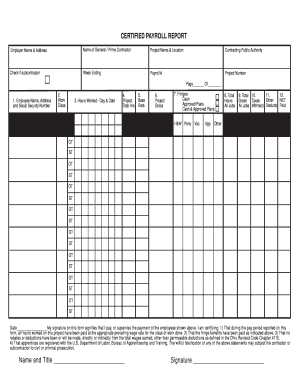
What is Illinois Payroll Transcript
The il452cm01 form is a specific document used for particular legal or administrative purposes within various institutions. It serves to streamline processes related to its intended use.
pdfFiller scores top ratings on review platforms




Who needs Illinois Payroll Transcript?
Explore how professionals across industries use pdfFiller.

Illinois Payroll Transcript is needed by:
-
Individuals involved in legal processes
-
Administrators managing form submissions
-
Professionals requiring official documentation
-
Organizations needing standardized forms
-
Clients seeking to submit information
-
Legal representatives handling cases
Comprehensive Guide to Illinois Payroll Transcript
What is the il452cm01 Form?
The il452cm01 form is a critical document used primarily for specific administrative processes. This form serves to facilitate information collection in regulated environments. Governed by established guidelines, it ensures compliance and accuracy in submissions.
Common scenarios requiring the il452cm01 form include applications in both individual and organizational capacities, where accurate data entry is vital for seamless processing.
Benefits of Using the il452cm01 Form
Utilizing the il452cm01 form streamlines various administrative tasks, significantly simplifying the processes involved. When completed correctly, this form enhances accuracy and compliance, mitigating potential errors.
Moreover, filling out the il452cm01 form efficiently can lead to considerable time savings during application procedures, allowing users to focus on other important activities.
Who Needs the il452cm01 Form?
The il452cm01 form is essential for a range of demographics, particularly individuals and professionals in fields requiring formal documentation. Typical users include those in healthcare, education, and administrative sectors.
Failure to utilize the il452cm01 form in necessary situations can lead to complications, thus it is crucial for individuals in specified scenarios to ensure they are using the form appropriately.
How to Fill Out the il452cm01 Form Online (Step-by-Step)
Filling out the il452cm01 form online can be easily done using a few straightforward steps:
-
Access the form via the pdfFiller platform.
-
Fill in the required fields meticulously, ensuring all information is accurate.
-
Utilize pdfFiller's tools for editing and annotating as necessary.
-
Review the form for any errors or omissions before final submission.
Pay special attention to key fields that often require additional detail to avoid submission issues.
Common Errors to Avoid When Submitting the il452cm01 Form
When completing the il452cm01 form, users frequently encounter errors that can impact the submission process. Common issues include:
-
Inaccurate or incomplete information provided in critical fields.
-
Failure to verify the form against additional requirements before submission.
To enhance accuracy, establish a review system or checklist to confirm that all parts of the form are complete and correct.
Submission Methods for the il452cm01 Form
Once the il452cm01 form is completed, users have several options for submission:
-
Online submission through designated platforms such as pdfFiller.
-
Offline submission via mail or in person, depending on the requirement.
Knowing the submission timelines is important, as it affects the processing of the form and the capability to track its status post-submission.
Essential Documents Required for the il452cm01 Form
Accompanying documents are often necessary when submitting the il452cm01 form. Essential documents may include:
-
Identity verification materials, such as a driver’s license or passport.
-
Supporting documents relevant to the specific purpose of the form.
Organizing these documents efficiently can help streamline the submission process and ensure compliance with all requirements.
How pdfFiller Enhances Your Experience with the il452cm01 Form
pdfFiller significantly improves the process of handling the il452cm01 form through its robust features:
-
Editing functionalities that allow for easy text and image adjustments.
-
Secure storage measures to protect sensitive information.
The platform’s user-friendly interface simplifies form completion, making it accessible for users of various skill levels, thus enhancing overall efficiency.
Security and Compliance for the il452cm01 Form
Security is paramount when dealing with forms like the il452cm01. pdfFiller complies with significant regulations, ensuring that user data is protected appropriately:
-
Implementation of 256-bit encryption to safeguard information.
-
Adherence to HIPAA and GDPR regulations, reflecting a commitment to data privacy.
Users can feel confident that their data remains secure throughout the handling process of the il452cm01 form.
Get Started with Your il452cm01 Form Today!
Begin your process with the il452cm01 form by accessing the pdfFiller platform. Experience the ease of filling out forms online and enjoy the support provided by pdfFiller in navigating your documentation needs.
Create an account with pdfFiller to unlock additional features for an enhanced user experience, making form management simpler and more efficient.
How to fill out the Illinois Payroll Transcript
-
1.Begin by accessing the pdfFiller website and log into your account or create a new one if needed. Use the search bar to find the il452cm01 form.
-
2.Once you have opened the form, review the sections available. Familiarize yourself with the layout to know where to input your information.
-
3.Before filling out the form, gather all necessary information, including personal details and any required documentation that supports your application.
-
4.Click on each field to enter data. Use the text boxes for written responses and checkboxes for selections. Ensure accuracy to avoid mistakes.
-
5.As you complete the form, use pdfFiller's built-in tools to edit text, adjust fields, and modify the layout as needed.
-
6.Once all fields are filled, take a moment to review your entries for correctness. Adjust any data that might need revising to ensure completeness.
-
7.Finalize your form by clicking the 'Save' button. You can also download the completed form to your device or choose to submit it directly through the platform.

Who is eligible to use the il452cm01 form?
Eligibility for the il452cm01 form typically includes individuals or entities who require the specific documentation the form provides. It's important to check if your situation aligns with its intended use.
Are there deadlines associated with this form?
Deadlines can vary based on organizational procedures. Always verify with the relevant authority regarding submission timelines to avoid delays.
How do I submit the il452cm01 form after completing it?
Submission methods may include online submission through pdfFiller, mailing a hard copy, or delivering it in person, depending on the requirements set by the receiving organization.
What supporting documents are required with the il452cm01 form?
Supporting documents often include identification, proof of residency, or specific records relevant to your application. Ensure you include all requested documentation to avoid processing delays.
What are common mistakes to avoid when filling out this form?
Common mistakes include missing signatures, providing incorrect information, or overlooking required fields. Carefully review the form before submission to ensure all parts are completed accurately.
What is the processing time for the submissions of this form?
Processing times for the il452cm01 form can vary widely based on the reviewing authority's workload and policies. Check the official guidelines for expected processing times.
What should I do if I encounter issues while filling out the form?
If you encounter issues while using pdfFiller or with form fields, consider consulting customer support or reviewing tutorials available on the platform for assistance.
Related Content
Related Forms




Related Catalogs
Get the latest insights from our blog


If you believe that this page should be taken down, please follow our DMCA take down process
here
.
This form may include fields for payment information. Data entered in these fields is not covered by PCI DSS compliance.