
Last updated on
Oct 31, 2026
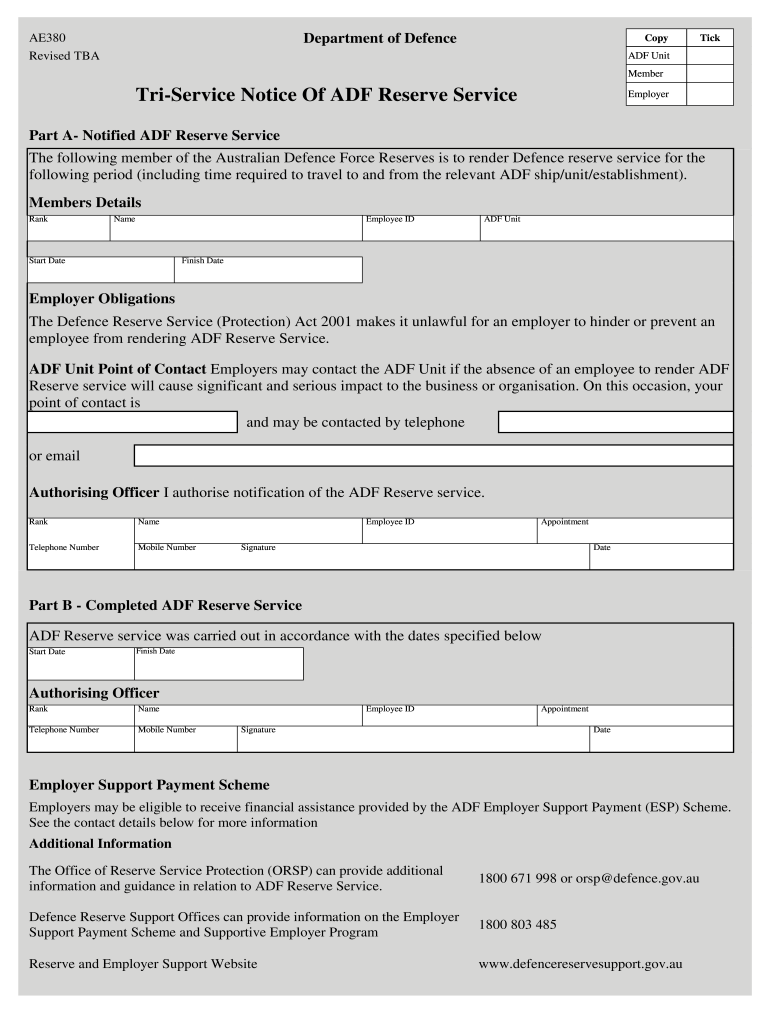
AU AE380 free printable template
pdfFiller is not affiliated with any government organization

Fill out
Complete the form online in a simple drag-and-drop editor.

eSign
Add your legally binding signature or send the form for signing.

Share
Share the form via a link, letting anyone fill it out from any device.

Export
Download, print, email, or move the form to your cloud storage.
Why pdfFiller is the best tool for your documents and forms


End-to-end document management
From editing and signing to collaboration and tracking, pdfFiller has everything you need to get your documents done quickly and efficiently.
Accessible from anywhere
pdfFiller is fully cloud-based. This means you can edit, sign, and share documents from anywhere using your computer, smartphone, or tablet.
Secure and compliant
pdfFiller lets you securely manage documents following global laws like ESIGN, CCPA, and GDPR. It's also HIPAA and SOC 2 compliant.
What is AU AE380
The ADF Reserve Service Employer Notice is a government form used by employers in Australia to notify them of an employee's ADF Reserve Service commitments.
pdfFiller scores top ratings on review platforms




Really quite a simple program
Really quite a simple program. Easy to figure out even for someone technologically challenged like myself!
Works great
Works great, low prices, I only wish I could get an app on my Microsoft computer.
Who needs AU AE380?
Explore how professionals across industries use pdfFiller.

AU AE380 is needed by:
-
Employers of ADF Reserve service members
-
Human resources personnel managing employee notifications
-
Authorising officers responsible for signing the form
-
Employees serving in the ADF Reserve
-
Public sector agencies involved in personnel management
Comprehensive Guide to AU AE380
What is the ADF Reserve Service Employer Notice?
The ADF Reserve Service Employer Notice is a crucial document used to inform employers about an employee's upcoming or completed service in the Australian Defence Force (ADF) Reserve. This form serves to ensure that employers are aware of their employees' military commitments, which can impact work schedules and obligations.
-
The form notifies employers about an employee's ADF Reserve Service to facilitate understanding and cooperation.
-
Required fields include 'Rank', 'Name', 'Start Date', and other pertinent information to clarify the employee's service details.
-
It is essential for the authorising officer to sign the document to validate the information provided.
Purpose and Benefits of the ADF Reserve Service Employer Notice
This notice plays a significant role for both employees who serve in the ADF and their employers. Understanding its importance can lead to better workplace relations and operational continuity.
-
Employers have obligations under the Defence Reserve Service Protection Act, ensuring they protect the rights of reservists.
-
Eligibility for financial assistance may be acquired through the ADF Employer Support Payment (ESP) Scheme, benefiting both parties.
-
The form supports employees in maintaining their ADF service while securing their jobs, providing peace of mind as they balance both responsibilities.
Who Needs the ADF Reserve Service Employer Notice?
Identifying who requires the ADF Reserve Service Employer Notice is key to ensuring proper usage of this essential document. Various stakeholders benefit from its completion.
-
Employers of ADF Reserve members need this notice to prepare for any scheduled absences due to training or deployment.
-
The authorising officer plays a critical role in completing the form accurately, reinforcing its validity.
-
Notification is required in specific scenarios, such as during training sessions or deployment periods, to keep everyone informed.
How to Fill Out the ADF Reserve Service Employer Notice Online (Step-by-Step)
To simplify the process of completing the ADF Reserve Service Employer Notice, leveraging online tools like pdfFiller is recommended for efficiency.
-
Access the ADF Reserve Service Employer Notice through the pdfFiller platform.
-
Complete each required field carefully, paying attention to common mistakes like typos or missing information.
-
Ensure you select the appropriate checkboxes and fulfill the signature requirements accurately.
Essential Information You'll Need to Gather
Preparation is key for a smooth completion of the ADF Reserve Service Employer Notice. Gathering the right information beforehand can significantly expedite the process.
-
Employees should prepare personal information, including their service dates and relevant identification.
-
Employers must compile their contact information and identify the signing officer for the document.
-
Accuracy in the information collected is crucial to prevent any delays in processing the notice.
How to Submit the ADF Reserve Service Employer Notice
Once the ADF Reserve Service Employer Notice is completed, proper submission is essential for its recognition. Here are the submission methods available.
-
Options for submission include digital submission via pdfFiller or in-person delivery.
-
Confirming your submission and tracking the status can help ensure complete compliance with necessary protocols.
-
Be mindful of any associated fees or deadlines that may affect the submission process.
Common Errors and How to Avoid Them
While completing the ADF Reserve Service Employer Notice, several common errors can occur. Awareness of these can help ensure a smooth submission process.
-
Common mistakes include missing signatures or incorrect entries in fillable fields.
-
Reviewing the completed form thoroughly before submission is vital to mitigate errors.
-
Utilizing pdfFiller’s features can reduce errors and enhance ease of completion.
Privacy and Data Protection for the ADF Reserve Service Employer Notice
When handling sensitive information, such as that contained in the ADF Reserve Service Employer Notice, privacy and data protection are paramount.
-
pdfFiller employs robust security measures, including 256-bit encryption, to safeguard your data.
-
Follow best practices for data security, ensuring sensitive information remains confidential.
-
Users can feel assured that personal data will be handled appropriately in compliance with legal standards.
Maximize Your Efficiency with pdfFiller
To enhance the experience of filling out the ADF Reserve Service Employer Notice, using pdfFiller offers numerous advantages designed for user convenience.
-
Features such as editing, eSigning, and collaborative tools streamline the form completion process.
-
Cloud-based access means no downloads are necessary, allowing real-time collaboration on the document.
-
Consider signing up for a free trial to explore the various features pdfFiller offers for your form needs.
How to fill out the AU AE380
-
1.Access and open the ADF Reserve Service Employer Notice on pdfFiller by visiting their website and using the search bar to locate the specific form.
-
2.Once the form is open in pdfFiller, familiarize yourself with the layout and the places where you need to input information.
-
3.Before filling out the form, gather all necessary information including the employee's rank, name, employee ID, start and finish dates of their service, and contact numbers.
-
4.Begin filling in the required fields, ensuring that each section such as 'Rank', 'Name', and 'Employee ID' is completed accurately, using the fillable fields provided in pdfFiller.
-
5.Use checkboxes for options where applicable, and ensure to include additional notes or details in spaces provided for user input.
-
6.Once you have completed all sections, review the form for any errors or omissions before proceeding to finalize it.
-
7.Finalize your form by signing it in the designated area for the authorising officer, using pdfFiller's e-signature option if available.
-
8.After review, save your changes and download the completed form. You can also submit it directly through pdfFiller if there’s an option for submission provided.

Who is eligible to file the ADF Reserve Service Employer Notice?
Employers of employees serving in the Australian Defence Force Reserve are eligible to file this notice to inform relevant parties about the employee's service.
Is there a deadline for submitting this form?
While specific deadlines may vary, it’s advisable to file the ADF Reserve Service Employer Notice as soon as the employee notifies you of their service to ensure employer obligations are met.
How can I submit the ADF Reserve Service Employer Notice?
You can submit the completed form by downloading it from pdfFiller and then sending it via email or postal mail to the relevant ADF unit or department, depending on their submission guidelines.
What supporting documents are needed with this form?
Typically, you may need to attach any prior notifications or related documents that confirm the employee's Reserve Service status; however, check with the ADF for specific requirements.
What common mistakes should I avoid when filling out this form?
Common mistakes include incomplete fields, incorrect contact information, and failure to sign the form. Ensure all required fields are filled out correctly to avoid processing delays.
How long does it take for the ADF to process this notification?
Processing times can vary based on the ADF's workload but expect a few weeks for acknowledgment. Follow up if you do not receive confirmation in a timely manner.
Can I make changes to the form after submission?
Once submitted, changes may need to be communicated directly to the ADF unit, so it’s best to double-check the form for accuracy before submission.
Related Content
Related Forms



Related Catalogs
Get the latest insights from our blog


If you believe that this page should be taken down, please follow our DMCA take down process
here
.
This form may include fields for payment information. Data entered in these fields is not covered by PCI DSS compliance.