
Last updated on
Oct 19, 2026

AU SafeWork SA Notifiable Incident Report Form 2013-2026 free printable template
We are not affiliated with any brand or entity on this form

Fill out
Complete the form online in a simple drag-and-drop editor.

eSign
Add your legally binding signature or send the form for signing.

Share
Share the form via a link, letting anyone fill it out from any device.

Export
Download, print, email, or move the form to your cloud storage.
Why pdfFiller is the best tool for your documents and forms


End-to-end document management
From editing and signing to collaboration and tracking, pdfFiller has everything you need to get your documents done quickly and efficiently.
Accessible from anywhere
pdfFiller is fully cloud-based. This means you can edit, sign, and share documents from anywhere using your computer, smartphone, or tablet.
Secure and compliant
pdfFiller lets you securely manage documents following global laws like ESIGN, CCPA, and GDPR. It's also HIPAA and SOC 2 compliant.
What is AU SafeWork SA Notifiable Incident Report Form
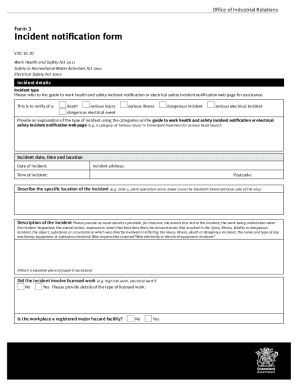
The SafeWork SA Notifiable Incident Report Form is a government document used by South Australian businesses to report serious injuries, illnesses, or dangerous incidents in the workplace under the Work Health and Safety Act 2012.
pdfFiller scores top ratings on review platforms




Who needs AU SafeWork SA Notifiable Incident Report Form?
Explore how professionals across industries use pdfFiller.

AU SafeWork SA Notifiable Incident Report Form is needed by:
-
Employers in South Australia who oversee workplace safety.
-
Employees involved in workplace incidents requiring reporting.
-
Safety officers responsible for incident documentation.
-
Regulatory bodies monitoring workplace safety compliance.
-
Legal representatives handling workplace injury cases.
Comprehensive Guide to AU SafeWork SA Notifiable Incident Report Form
What is the SafeWork SA Notifiable Incident Report Form?
The SafeWork SA Notifiable Incident Report Form is essential for reporting serious injuries, illnesses, or dangerous incidents in the workplace, as mandated by the Work Health and Safety Act 2012. This form plays a vital role in ensuring workplace safety and compliance by facilitating the timely reporting of incidents that could pose risks to employees and the public. By utilizing this form, companies contribute to a safer working environment in South Australia and help government agencies monitor compliance.
Purpose and Benefits of the SafeWork SA Notifiable Incident Report Form
This incident reporting form benefits multiple stakeholders, including workers, employers, and government agencies. Workers can easily report incidents, ensuring their safety and rights are upheld. Employers can streamline their reporting processes, which promotes timely responses and mitigates legal risks. Government agencies utilize this information to enforce compliance and improve regulatory standards.
Furthermore, prompt reporting can significantly impact workplace culture and safety practices, fostering a proactive approach to health and safety management. Timely and accurate reports help in identifying trends that can inform future safety training and prevent recurrence.
Key Features of the SafeWork SA Notifiable Incident Report Form
The SafeWork SA Notifiable Incident Report Form includes several critical features designed for effective incident documentation. Key elements consist of:
-
Fillable fields for incident details.
-
Sections dedicated to the involved parties and nature of the incident.
-
Instructions for accurate and thorough completion.
Ensuring thorough and precise information is paramount, as it aids in the investigation process and compliance verification.
Who Needs to Use the SafeWork SA Notifiable Incident Report Form?
Key stakeholders required to utilize the SafeWork SA Notifiable Incident Report Form include business owners and supervisors. These individuals have obligations under South Australian workplace safety laws to report incidents accurately and promptly. Understanding these legal requirements is crucial for maintaining compliance and promoting a culture of safety within the workplace.
How to Fill Out the SafeWork SA Notifiable Incident Report Form Online
Filling out the SafeWork SA Notifiable Incident Report Form online is a straightforward process. Follow these steps to complete the form digitally through pdfFiller:
-
Access the fillable form on the pdfFiller platform.
-
Choose the appropriate sections to fill in relevant details about the incident.
-
Utilize the digital signature feature for eSigning if required.
This user-friendly approach simplifies the reporting process and minimizes delays in incident submission.
Field-by-Field Instructions for Completing the SafeWork SA Notifiable Incident Report Form
Accurate completion of the SafeWork SA Notifiable Incident Report Form is critical. Key fields include:
-
Date and time of the incident.
-
A detailed description of what happened.
-
Names of individuals involved.
Taking care to fill out each section accurately will ensure that all pertinent information is recorded, facilitating proper investigation and compliance review.
Common Errors and How to Avoid Them When Submitting the SafeWork SA Notifiable Incident Report Form
Individuals often encounter common mistakes when filling out the form. Frequent errors include:
-
Insufficient or incomplete descriptions of the incident.
-
Failing to include the date and time of the incident.
Avoiding these pitfalls involves reviewing each section carefully and double-checking for accuracy before submission. Proper training can also help mitigate these errors.
Submission Methods for the SafeWork SA Notifiable Incident Report Form
There are various methods for submitting the completed SafeWork SA Notifiable Incident Report Form. These include:
-
Online submission through the pdfFiller platform.
-
Email submission to the appropriate SafeWork SA address.
-
Mailing a printed copy to SafeWork SA.
It is essential to adhere to deadlines and processing expectations associated with each submission method to ensure compliance with regulatory requirements.
What Happens After You Submit the SafeWork SA Notifiable Incident Report Form?
After submitting the SafeWork SA Notifiable Incident Report Form, individuals can expect a follow-up process that may vary based on the incident's nature. Tracking the submission status can provide assurance about processing times and necessary next steps. Individuals should remain prepared for possible further inquiries or investigations related to the reported incident.
Enhance Your SafeWork SA Notifiable Incident Reporting Experience with pdfFiller
pdfFiller is designed to enhance your experience when filling out the SafeWork SA Notifiable Incident Report Form. With its intuitive features, pdfFiller simplifies reporting, making the process more efficient and secure. Users can easily navigate the form, ensuring compliance and timely submission for a smoother experience.
How to fill out the AU SafeWork SA Notifiable Incident Report Form
-
1.To access the SafeWork SA Notifiable Incident Report Form on pdfFiller, start by visiting the pdfFiller website and using the search function to find the specific form. You can also directly input the URL if available.
-
2.Once you have located the form, open it in pdfFiller’s editor. Familiarize yourself with the interface, where you will see various fields ready to be filled in.
-
3.Gather all necessary information about the incident before starting. This includes the date and time of the incident, the details of the injured person, and a description of what occurred.
-
4.Click on each field of the form to enter the required information. Use pdfFiller’s tools such as text boxes and checkboxes to accurately complete each section. Make sure to fill in all mandatory fields indicated.
-
5.Review the completed form carefully, ensuring all information is accurate and complete. Look for any missing details or errors that need rectification.
-
6.Once you are satisfied with your form, save your progress. Use the 'Save' option to secure your data and avoid losing any entered information.
-
7.For submission, determine the fastest method based on the incident’s urgency. If needed, download a copy of the filled form either as PDF or other formats to submit it as per the required protocol.

Who is required to submit the SafeWork SA Notifiable Incident Report Form?
This form must be submitted by employers or safety officers when a serious injury or dangerous incident occurs in the workplace as part of compliance with the Work Health and Safety Act 2012.
What are the eligibility requirements for using this form?
Any employer or responsible personnel in South Australia who witnesses or is involved in a serious injury, illness, or dangerous incident in the workplace can use this form to report it.
How soon do I need to submit this form after an incident?
The form should be submitted to SafeWork SA by the fastest means available after the incident occurs, with urgency increasing in life-threatening situations where emergency contact may be necessary.
Is there a specific method for submitting the form?
Submit the SafeWork SA Notifiable Incident Report Form through the fastest means, which may include online submission or direct mailing, depending on the urgency of the incident.
Are supporting documents required when submitting the form?
While the form itself does not require signatures, additional details like witness statements or evidence of the incident might strengthen the report if included.
What are common mistakes to avoid when completing the form?
Common mistakes include leaving required fields blank, not providing enough detail about the incident, and failing to submit the form promptly as required by regulations.
How is the information processed after submission?
Once submitted, SafeWork SA will review the incident report, which may initiate further investigation or follow-up if necessary, though processing times can vary based on incident severity.
Related Content
Related Forms



Related Catalogs
Get the latest insights from our blog


If you believe that this page should be taken down, please follow our DMCA take down process
here
.
This form may include fields for payment information. Data entered in these fields is not covered by PCI DSS compliance.