
Last updated on
Oct 12, 2026

FL AccidentIncident Investigation Report Form free printable template
pdfFiller is not affiliated with any government organization

Fill out
Complete the form online in a simple drag-and-drop editor.

eSign
Add your legally binding signature or send the form for signing.

Share
Share the form via a link, letting anyone fill it out from any device.

Export
Download, print, email, or move the form to your cloud storage.
Why pdfFiller is the best tool for your documents and forms


End-to-end document management
From editing and signing to collaboration and tracking, pdfFiller has everything you need to get your documents done quickly and efficiently.
Accessible from anywhere
pdfFiller is fully cloud-based. This means you can edit, sign, and share documents from anywhere using your computer, smartphone, or tablet.
Secure and compliant
pdfFiller lets you securely manage documents following global laws like ESIGN, CCPA, and GDPR. It's also HIPAA and SOC 2 compliant.
What is FL AccidentIncident Investigation Report Form
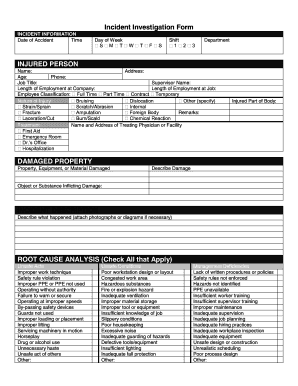
The Accident Incident Investigation Report Form is a workplace document used by supervisors and employees to document and investigate workplace accidents or incidents.
pdfFiller scores top ratings on review platforms




Who needs FL AccidentIncident Investigation Report Form?
Explore how professionals across industries use pdfFiller.

FL AccidentIncident Investigation Report Form is needed by:
-
Supervisors responsible for reporting incidents.
-
Department Directors overseeing safety protocols.
-
Employees involved in workplace accidents.
-
Witnesses to workplace incidents.
-
Human Resource professionals managing workplace safety.
-
Safety Officers implementing safety measures.
Comprehensive Guide to FL AccidentIncident Investigation Report Form
What is the Accident Incident Investigation Report Form?
The Accident Incident Investigation Report Form is a crucial tool designed to enhance workplace safety. This form documents essential details of accidents, capturing information such as the date, time, and location of the incident, as well as specifics about any injuries sustained. Accurate documentation plays a vital role in ensuring accountability and facilitating safety improvements across the organization.
Utilizing an effective accident investigation report form can streamline the process of incident reporting, which is imperative for maintaining a safe work environment. Comprehensive data collected through this form can be pivotal in identifying patterns and areas needing improvement in safety protocols.
Purpose and Benefits of the Accident Incident Investigation Report Form
This form is instrumental for organizations as it serves multiple purposes in the realm of workplace safety. Firstly, it enables clear and standardized incident documentation, ensuring that organizations can track workplace incidents effectively. Secondly, using this form fosters improved safety protocols by providing valuable insights that inform training and preventive measures.
Organizations that implement this employee incident report document can significantly enhance their incident response strategies and overall safety culture, ultimately reducing the risk of future accidents and injuries.
Key Features of the Accident Incident Investigation Report Form
The structure of the Accident Incident Investigation Report Form comprises several detailed sections, each serving an essential role in the reporting process. These sections include the supervisor's report, employee's report, and witness statements, making it easy to collect diverse perspectives on the incident.
The form also incorporates user-friendly features such as fillable fields and checkboxes, allowing for an organized presentation of content. It is important to note the legal significance of the gathered information, necessitating required signatories from relevant parties to ensure authentic and binding documentation.
Who Needs to Use the Accident Incident Investigation Report Form?
Various roles are crucial in the utilization of the Accident Incident Investigation Report Form. This includes the reporting supervisor, department director, employees, and witnesses, each bringing unique responsibilities in completing the form. The reporting supervisor is typically responsible for initiating the report, while the department director ensures oversight of the incident follow-up process.
Specific scenarios warrant the use of this form, such as situations involving injuries or near-misses, require careful and timely documentation to support organizational learning and compliance.
How to Fill Out the Accident Incident Investigation Report Form Online (Step-by-Step)
-
Access the form on pdfFiller’s platform, ensuring you have the required personal details and incident specifics at hand.
-
Begin completing the fillable fields, starting with basic information such as the employee's name and date of the incident.
-
Continue through the form, addressing checkboxes and additional sections concerning the nature of the accident.
-
Review all entries for accuracy and completeness to prevent common errors associated with incident reporting.
-
Once completed, prepare the form for signing by all required parties.
Common Errors When Completing the Accident Incident Investigation Report Form
Users often encounter several typical mistakes while filling out the Accident Incident Investigation Report Form. Common errors include missing signatures, failing to fill out crucial fields, and providing inconsistent information. Such mistakes can hinder the effectiveness of the report and impact safety assessments.
To mitigate these issues, it’s advisable to implement a review process before submitting the report. Conducting a thorough double-check can ensure all necessary information is complete and clear, facilitating better outcomes from the incident analysis.
How to Sign the Accident Incident Investigation Report Form
Signing the Accident Incident Investigation Report Form can be accomplished through either a digital signature or a traditional wet signature, depending on the submission requirements. The completion of all necessary signatures is essential, as it validates the reporting process and adheres to organizational protocols.
Utilizing tools like pdfFiller can streamline the eSigning process, making it easy to add digital signatures efficiently while ensuring compliance with signature requirements.
Where to Submit the Accident Incident Investigation Report Form
Upon completion, organizations have several options for submitting the Accident Incident Investigation Report Form, including online, via email, or through physical delivery. Timely reporting is critical, as it directly influences organizational compliance with safety regulations.
Following submission, organizations typically engage in confirmation processes, ensuring that the reports are received and acknowledged properly, which further supports effective incident management and ongoing safety improvement initiatives.
Security and Compliance with the Accident Incident Investigation Report Form
Maintaining data security is paramount when handling sensitive incident reports. Organizations must prioritize the safety of information collected in the Accident Incident Investigation Report Form to protect confidentiality.
Using pdfFiller ensures compliance with stringent security measures, including 256-bit encryption and adherence to HIPAA and GDPR regulations. This provides users with peace of mind knowing that privacy and data protection are foundational elements of the reporting process.
Use pdfFiller for Your Accident Incident Investigation Report Form Needs
PdfFiller stands out as a comprehensive solution for creating, filling, and managing workplace forms such as the Accident Incident Investigation Report Form. With its user-friendly platform, organizations can easily navigate through the form completion process while benefiting from enhanced efficiency.
The digital solution provided by pdfFiller simplifies form management needs, making it a valuable resource for organizations focused on improving their incident documentation and safety protocols.
How to fill out the FL AccidentIncident Investigation Report Form
-
1.To access the Accident Incident Investigation Report Form on pdfFiller, navigate to the pdfFiller website and use the search bar to find the form by name.
-
2.Once located, click on the form to open it in the pdfFiller interface. You will see interactive fields ready for completion.
-
3.Before you begin filling out the form, gather necessary information such as date and time of the incident, location, detailed descriptions, and names of witnesses.
-
4.Start by entering the employee's name in the designated field, followed by the date and time the accident was reported.
-
5.Move on to the incident description section, providing clear and concise details about what occurred and the nature of any injuries sustained.
-
6.Utilize checkboxes and any additional fields to indicate relevant aspects of the incident, ensuring all information is accurate and up-to-date.
-
7.Once you have completed all sections, review your entries carefully for any mistakes or omissions that may affect the report's validity.
-
8.Finalize your form by ensuring all required signatures are completed. You can send it to the necessary individuals for signing through pdfFiller.
-
9.To save or submit your report, choose the appropriate option from the menu, which may include downloading a copy for your records or sending it directly to your department.

Who is eligible to fill out the Accident Incident Investigation Report Form?
Any involved party, including the reporting supervisor, department director, employee, or a witness, is eligible to fill out the form, ensuring all relevant details are captured.
Are there deadlines for submitting this form following an incident?
While specific deadlines may vary by organization, it is generally advisable to complete and submit the Accident Incident Investigation Report Form as soon as possible after the incident occurs.
What are the methods for submitting the completed form?
The completed form can usually be submitted electronically through the pdfFiller platform or printed and physically submitted to your HR department depending on your organization's protocols.
What supporting documents are needed with this form?
Typically, supporting documents such as witness statements or photographic evidence of the incident may be required to substantiate claims made in the Accident Incident Investigation Report Form.
What common mistakes should be avoided when filling out the form?
Common mistakes include omitting signatures, failing to provide detailed descriptions of the incident, and not checking all applicable boxes. Ensure each section is thoroughly completed.
How long does it take to process the Accident Incident Investigation Report Form?
Processing times can vary; however, once submitted, the report will generally be reviewed within a few business days to ensure compliance and address any necessary follow-up actions.
Are there any fees associated with completing this form?
Typically, there are no fees associated with filling out the Accident Incident Investigation Report Form unless specified by your organization. Check your company's policies for further details.
Related Forms




Related Catalogs
Get the latest insights from our blog


If you believe that this page should be taken down, please follow our DMCA take down process
here
.
This form may include fields for payment information. Data entered in these fields is not covered by PCI DSS compliance.