
Last updated on
Nov 7, 2026

IA Business Fire Safety Preplan Form - City of Clinton 2007 free printable template
We are not affiliated with any brand or entity on this form

Fill out
Complete the form online in a simple drag-and-drop editor.

eSign
Add your legally binding signature or send the form for signing.

Share
Share the form via a link, letting anyone fill it out from any device.

Export
Download, print, email, or move the form to your cloud storage.
Why pdfFiller is the best tool for your documents and forms


End-to-end document management
From editing and signing to collaboration and tracking, pdfFiller has everything you need to get your documents done quickly and efficiently.
Accessible from anywhere
pdfFiller is fully cloud-based. This means you can edit, sign, and share documents from anywhere using your computer, smartphone, or tablet.
Secure and compliant
pdfFiller lets you securely manage documents following global laws like ESIGN, CCPA, and GDPR. It's also HIPAA and SOC 2 compliant.
What is IA Business Fire Safety Preplan Form - City of Clinton
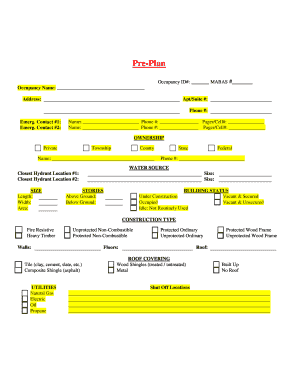
The Business Fire Safety Preplan Form is a government document used by businesses to inform the Clinton Fire Department about their fire safety measures and emergency planning.
pdfFiller scores top ratings on review platforms




Who needs IA Business Fire Safety Preplan Form - City of Clinton?
Explore how professionals across industries use pdfFiller.

IA Business Fire Safety Preplan Form - City of Clinton is needed by:
-
Business owners in Iowa
-
Facility managers responsible for safety
-
Compliance officers ensuring fire safety regulations
-
Insurance agents requiring safety documentation
-
Emergency responders accessing safety plans
Comprehensive Guide to IA Business Fire Safety Preplan Form - City of Clinton
What is the Business Fire Safety Preplan Form?
The Business Fire Safety Preplan Form is a vital document mandated for businesses operating in Iowa, aimed at enhancing fire safety preparedness and compliance. This form serves to communicate essential information about a facility's fire safety measures to the Clinton Fire Department, ensuring accurate and prompt emergency response planning.
By providing precise details regarding building specifications, fire safety systems, and hazardous materials, businesses contribute significantly to community safety. The significance of this form lies in its role in not only regulatory compliance but also in equipping fire services with the necessary data to manage emergencies effectively.
Purpose and Benefits of the Business Fire Safety Preplan Form
This form is crucial for enhancing fire safety protocols across various business sectors. By completing the Business Fire Safety Preplan Form accurately and in a timely manner, businesses can strengthen their emergency response strategies significantly.
The benefits include:
-
Improved fire safety measures tailored to the specific needs of the business.
-
Streamlined coordination and communication during emergency responses.
-
Awareness of legal implications, ensuring businesses fulfill their obligations.
Who Needs the Business Fire Safety Preplan Form?
Every business operating in Iowa, regardless of size or type, is required to complete the Business Fire Safety Preplan Form. Specific sectors that may have heightened fire risks, such as manufacturing and healthcare, must pay particular attention to this requirement.
The 'Responsible Person' designated by the business holds the obligation to fill out this form accurately. This individual must ensure that all relevant information is provided to mitigate risks associated with fire safety.
Eligibility Criteria and Requirements for the Business Fire Safety Preplan Form
To properly complete the Business Fire Safety Preplan Form, certain eligibility criteria and requirements must be adhered to. Only the designated 'Responsible Person' may sign the form, attesting to the accuracy of the information provided.
Necessary details and documentation to be attached include:
-
Building specifications outlining usage and layout.
-
Information on hazardous materials that may be present.
-
Mandatory fields that must be filled to validate the form.
How to Fill Out the Business Fire Safety Preplan Form Online (Step-by-Step)
Filling out the Business Fire Safety Preplan Form online has been made simple with pdfFiller. Follow these step-by-step instructions to ensure a complete and accurate submission:
-
Access the form on pdfFiller's platform.
-
Fill in the required fields, paying close attention to inaccuracies.
-
Review the entire form with key sections highlighted for completion.
-
Save changes and eSign the document as necessary.
-
Submit the completed form to the Clinton Fire Department as per the preferred method.
Accuracy and thoroughness are crucial for an efficient process, ensuring that all information is compliant with fire safety regulations.
Submission Methods for the Business Fire Safety Preplan Form
Once the Business Fire Safety Preplan Form is completed, various submission methods are available to send it to the Clinton Fire Department:
-
Online submission via the pdfFiller platform.
-
In-person delivery at the local fire department office.
-
Mailing the physical form directly to their office.
It’s essential to be aware of important deadlines for submission to avoid any late filing penalties. Users can confirm their submission and track its status through the available options.
Consequences of Not Filing or Late Filing the Business Fire Safety Preplan Form
Failing to file the Business Fire Safety Preplan Form, or submitting it late, can lead to significant repercussions for businesses. Legal consequences may arise from non-compliance with fire safety regulations, potentially compromising the safety of both the business and the wider community.
Additional risks include:
-
Increased vulnerability to fire hazards due to lack of preparedness.
-
Imposition of fines or penalties by local authorities.
Security and Compliance for the Business Fire Safety Preplan Form
When handling sensitive information relating to the Business Fire Safety Preplan Form, utilizing a secure platform such as pdfFiller is imperative. The system employs 256-bit encryption and complies with HIPAA regulations, ensuring privacy throughout the document filling process.
pdfFiller prioritizes user data protection, providing a secure environment for businesses to manage their fire safety documentation confidently.
How pdfFiller Can Assist You with the Business Fire Safety Preplan Form
Using pdfFiller to complete the Business Fire Safety Preplan Form offers several advantages:
-
Effortless editing and eSigning capabilities streamline the form-filling process.
-
User-friendly interface designed for rapid completion.
-
Cloud-based access allows for easy document management.
These features contribute to a smoother experience in preparing critical fire safety documentation.
Get Started with Your Business Fire Safety Preplan Today!
Accessing and filling out the Business Fire Safety Preplan Form is straightforward with pdfFiller. By starting this process now, businesses can ensure they are prepared for emergencies and compliant with local regulations.
Utilizing pdfFiller for your fire safety documentation not only simplifies the task but reinforces the commitment to safety and compliance within your business.
How to fill out the IA Business Fire Safety Preplan Form - City of Clinton
-
1.Access the Business Fire Safety Preplan Form on pdfFiller by searching for the form name or locating it in the Government Forms category.
-
2.Once the form is open, familiarize yourself with the layout. Identify blank fields and checkboxes where information is required.
-
3.Gather detailed information including the building's dimensions, description of fire safety systems in place, and any hazardous materials present on-site.
-
4.Complete each field methodically, using clear and accurate information. Utilize pdfFiller's tools to enter data, ensuring that all sections are filled correctly.
-
5.Review the form to verify accuracy and completeness. Double-check contact details for key personnel, ensuring that they are up to date.
-
6.Once satisfied, finalize the form by ensuring the responsible person signs electronically using pdfFiller's e-signature feature.
-
7.Save your completed form in your pdfFiller account or on your device. You can download it as a PDF or submit it directly to the Clinton Fire Department through the platform.

Who is eligible to complete the Business Fire Safety Preplan Form?
Business owners and designated responsible persons within Iowa are eligible to complete this form. It is intended for those with knowledge of the facility's fire safety measures.
What is the deadline for submitting the form?
While exact deadlines can vary, it is advisable to submit the Business Fire Safety Preplan Form as soon as your safety measures are established or when there are changes to your facility.
How can I submit the completed form to the Clinton Fire Department?
You can submit the completed Business Fire Safety Preplan Form either by downloading it and mailing it to the Clinton Fire Department or directly through pdfFiller if the option is available.
What supporting documents are required when submitting this form?
Typically, no additional supporting documents are required. However, it is beneficial to include any relevant safety certifications or plans that complement your fire safety measures.
What common mistakes should I avoid when filling out the form?
Ensure that all fields are accurately filled out and signed where needed. Common mistakes include overlooking details about hazardous materials or incorrect contact information.
How long does it take to process the form once submitted?
Processing times can vary, but the Clinton Fire Department generally reviews forms promptly. You may want to allow a few weeks for processing during busy periods.
Can I edit the form after it has been submitted?
Once the Business Fire Safety Preplan Form is submitted, it typically cannot be edited. For changes, you may need to complete a new form and submit it anew.
IA Business Fire Safety Preplan Form - City of Clinton Form Versions
Related Content
Related Forms



Related Catalogs
Get the latest insights from our blog


If you believe that this page should be taken down, please follow our DMCA take down process
here
.
This form may include fields for payment information. Data entered in these fields is not covered by PCI DSS compliance.