
Last updated on
Nov 9, 2026
CA WV-110 2014 free printable template
pdfFiller is not affiliated with any government organization

Fill out
Complete the form online in a simple drag-and-drop editor.

eSign
Add your legally binding signature or send the form for signing.

Share
Share the form via a link, letting anyone fill it out from any device.

Export
Download, print, email, or move the form to your cloud storage.
Why pdfFiller is the best tool for your documents and forms


End-to-end document management
From editing and signing to collaboration and tracking, pdfFiller has everything you need to get your documents done quickly and efficiently.
Accessible from anywhere
pdfFiller is fully cloud-based. This means you can edit, sign, and share documents from anywhere using your computer, smartphone, or tablet.
Secure and compliant
pdfFiller lets you securely manage documents following global laws like ESIGN, CCPA, and GDPR. It's also HIPAA and SOC 2 compliant.
What is CA WV-110
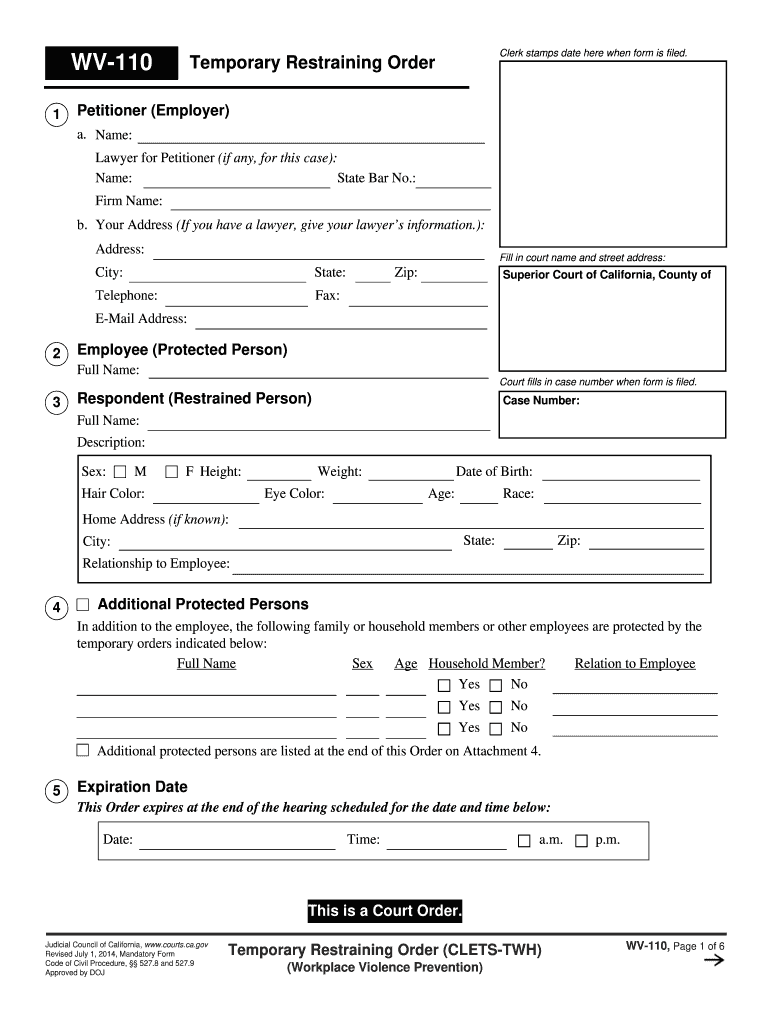
The California Temporary Restraining Order WV-110 is a legal document used by employers to protect employees from workplace violence.
pdfFiller scores top ratings on review platforms




I use PDFfiller to create and sign military and employment documents. It is fairly easy to use. I love being able to save docs to my Google Drive. And the electronic signature is awesome.
It helps greatly for completing my task. It is a wonderful asset.
Who needs CA WV-110?
Explore how professionals across industries use pdfFiller.

CA WV-110 is needed by:
-
Employers seeking to safeguard their employees
-
Employees experiencing workplace threats or violence
-
Judicial officers responsible for processing restraining orders
-
Legal professionals assisting clients with protection from workplace violence
-
Human resources personnel managing employee safety
-
Law enforcement agencies enforcing restraining orders
Comprehensive Guide to CA WV-110
What is the California Temporary Restraining Order WV-110?
The California Temporary Restraining Order WV-110 is a legal form designed to ensure workplace safety by protecting employees from threats and acts of violence. This restraining order plays a crucial role in safeguarding the welfare of employees within a workplace setting. The parties involved in this order include the petitioner, typically the employer, the employee who is considered the protected person, the respondent who is the restrained individual, and a judicial officer who oversees the legal process.
This document serves as a workplace violence prevention measure, allowing employers to take proactive steps in ensuring a secure environment for their staff.
Purpose and Benefits of the California Temporary Restraining Order WV-110
The primary purpose of the WV-110 form is to provide a legal framework for the protection of employees against potential threats and acts of violence. By utilizing this form, employers can enforce personal conduct orders and stay-away provisions, thereby ensuring the safety of their staff. Additionally, this legal order can impose restrictions related to firearm possession, further bolstering safety measures within the workplace.
Employers can experience increased peace of mind knowing they have taken appropriate legal steps to protect their employees through an employer protection form.
Eligibility Criteria for the California Temporary Restraining Order WV-110
The eligibility to file for the California Temporary Restraining Order WV-110 primarily lies with employers. To utilize this form effectively, employers, as petitioners, must meet specific criteria. The protected person, or employee, must also fit certain criteria to be eligible for protection under this order. The respondent's role is equally critical, as their compliance with the order affects the safety and legal standing of all parties involved.
How to Fill Out the California Temporary Restraining Order WV-110 Online (Step-by-Step)
Filling out the WV-110 form electronically involves several steps to ensure accuracy and compliance with legal standards. To begin, gather the necessary information for fillable fields, such as your name and address. Follow these steps to complete the form:
-
Access the online form and locate the appropriate fillable fields.
-
Enter your information, including the court name and address as required.
-
Review all fields for accuracy.
-
Complete the section detailing the expiration date of the order.
Ensuring all information is accurate is critical for the processing of your request.
Common Errors and Tips for Filling the California Temporary Restraining Order WV-110
When completing the WV-110 form, users often encounter several common errors that can delay the process. Some issues include incorrect or incomplete information in the fillable fields. To avoid mistakes, consider these helpful tips for accurate completion:
-
Double-check all filled fields before submission.
-
Understand the requirements for each section of the form.
-
Ensure all necessary parties are included and correctly identified.
Taking the time to review the form thoroughly can increase the chances of a successful submission.
How to Sign and Submit the California Temporary Restraining Order WV-110
Signing and submitting the California Temporary Restraining Order WV-110 involves understanding the differences between digital signatures and wet signatures. Users should follow these steps for signing and submission:
-
Determine whether you will use a digital or wet signature.
-
If opting for a digital signature, utilize tools such as pdfFiller for the eSigning process.
-
Choose your preferred submission method, either in person at the court or online.
Understanding these options can streamline the process and ensure proper legal compliance.
Fees, Deadlines, and Processing Time for the California Temporary Restraining Order WV-110
When filing the California Temporary Restraining Order WV-110, it's essential to be aware of any associated fees and important deadlines. Typically, filing fees are required, and these can vary depending on the jurisdiction. Be mindful of the following:
-
Confirm the filing fee before submitting the form.
-
Mark critical deadlines related to court appearances.
-
Note the expected processing times following submission.
Staying organized and informed can help you meet all necessary requirements within the appropriate timeframes.
Security and Compliance When Handling the California Temporary Restraining Order WV-110
Users handling the California Temporary Restraining Order WV-110 can trust in the security measures provided by pdfFiller. The platform employs 256-bit encryption to safeguard sensitive information and ensures compliance with legal standards such as HIPAA and GDPR. This means you can securely manage your documents while maintaining privacy and data protection.
Rest assured that your information will be handled with the utmost care and compliance standards.
Using pdfFiller to Easily Manage the California Temporary Restraining Order WV-110
pdfFiller offers a user-friendly platform for managing the California Temporary Restraining Order WV-110. With features tailored for editing, filling, and eSigning PDFs, users can enjoy hassle-free document management. The cloud-based management system eliminates the need for downloads, allowing seamless access to your forms from any browser, which enhances user convenience.
Experience the benefits of pdfFiller's comprehensive document management capabilities tailored for legal forms.
Sample of a Completed California Temporary Restraining Order WV-110
A completed sample of the California Temporary Restraining Order WV-110 can serve as a valuable reference for users. This sample provides a visual example of how to correctly fill out the form, highlighting key fields and information. It is advisable to review the sample thoroughly to understand how to effectively complete your own form.
Utilizing the sample can help clarify any uncertainties regarding the filling process.
How to fill out the CA WV-110
-
1.Access pdfFiller's website and sign in or create an account to begin.
-
2.Use the search function to locate the California Temporary Restraining Order WV-110 form.
-
3.Once the form is displayed, click on it to open; this will load the form into the pdfFiller interface.
-
4.Familiarize yourself with the editable fields; hover over each field for instructions on what to enter.
-
5.Collect necessary information about the employees and incidents of workplace violence before starting to fill out the form.
-
6.Begin filling in the form by entering the petitioner's details, including name and address, in the designated fields.
-
7.Input information regarding the protected person (employee) and the restrained person (respondent), ensuring accuracy.
-
8.Utilize checkboxes to indicate the type of personal conduct or stay-away orders applicable to your case.
-
9.Follow the prompts to fill in all required fields, ensuring that the form is complete and accurate.
-
10.Double-check your entries for any omissions or errors that could affect the processing of the order.
-
11.Once completed, review the form thoroughly before finalizing it.
-
12.Click the save option to store the filled form, allowing you to access it later or download a copy.
-
13.To submit the form, follow any provided instructions within pdfFiller for electronic submission or prepare a paper copy for mailing.

Who is eligible to file the California Temporary Restraining Order WV-110?
Eligible parties include employers who need to protect their employees from workplace violence. Forms must be filed by the petitioner, typically an employer, on behalf of their employee.
What is the deadline for submitting the restraining order?
There is no specific submission deadline for filing the California Temporary Restraining Order WV-110. However, it is recommended to file as soon as incidents occur to ensure timely protection.
How do I submit the completed form?
You can submit the completed California Temporary Restraining Order WV-110 form electronically via pdfFiller or print and mail it to the appropriate court. Ensure compliance with your local court’s filing requirements.
What common mistakes should I avoid when filling out the form?
Common mistakes to avoid include incomplete fields, incorrect personal information, and outdated or unclear addresses. Double-check entries to ensure accuracy prior to submission.
What is the processing time for the restraining order?
Processing times for the California Temporary Restraining Order WV-110 can vary by court. Generally, expect a few weeks for a hearing to be scheduled once the form is submitted.
Can I change or withdraw the restraining order after it's filed?
Yes, you can request to change or withdraw the restraining order after it's filed. Consult with the court or a legal professional for guidance on the necessary procedures.
CA WV-110 Form Versions
Related Content
Related Forms




Get the latest insights from our blog


If you believe that this page should be taken down, please follow our DMCA take down process
here
.
This form may include fields for payment information. Data entered in these fields is not covered by PCI DSS compliance.