
Last updated on
Oct 31, 2026

Get the free Rational Numbers Module Quiz
We are not affiliated with any brand or entity on this form

Fill out
Complete the form online in a simple drag-and-drop editor.

eSign
Add your legally binding signature or send the form for signing.

Share
Share the form via a link, letting anyone fill it out from any device.

Export
Download, print, email, or move the form to your cloud storage.
Why pdfFiller is the best tool for your documents and forms


End-to-end document management
From editing and signing to collaboration and tracking, pdfFiller has everything you need to get your documents done quickly and efficiently.
Accessible from anywhere
pdfFiller is fully cloud-based. This means you can edit, sign, and share documents from anywhere using your computer, smartphone, or tablet.
Secure and compliant
pdfFiller lets you securely manage documents following global laws like ESIGN, CCPA, and GDPR. It's also HIPAA and SOC 2 compliant.
What is Rational Numbers Quiz
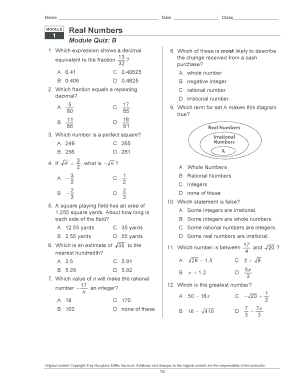
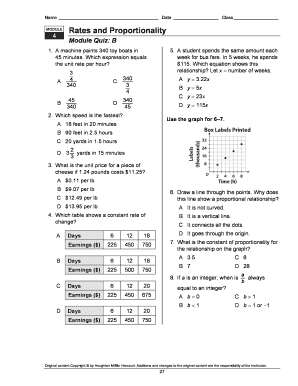
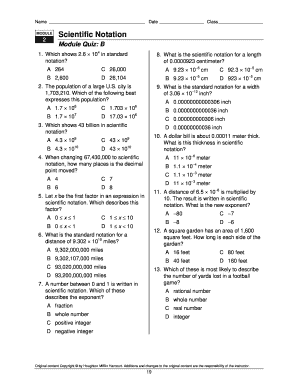
The Rational Numbers Module Quiz is a quiz template used by educators to assess students' understanding of rational numbers and related concepts.
pdfFiller scores top ratings on review platforms




Simple to work with & lots of useful features.
Was simple and easy and I didn't have to leave my house.
Who needs Rational Numbers Quiz?
Explore how professionals across industries use pdfFiller.

Rational Numbers Quiz is needed by:
-
Teachers assessing student comprehension
-
Students completing mathematics quizzes
-
Educational institutions evaluating progress
-
Educators developing assessment tools
-
School administrators managing academic records
Comprehensive Guide to Rational Numbers Quiz
What is the Rational Numbers Module Quiz?
The Rational Numbers Module Quiz is an educational assessment tool designed to evaluate students' understanding of rational numbers and their relevance in mathematics. By defining rational numbers, the quiz underscores their significance for learners, helping educators gauge comprehension through effective testing. This assessment includes multiple-choice and numerical questions, making it versatile for different learning styles.
Purpose and Benefits of the Rational Numbers Module Quiz
The quiz serves as a critical educational assessment form used by educators to enhance students' understanding of important mathematical concepts. It enriches learning by linking fractions, decimals, and real-world applications, emphasizing practical knowledge. Furthermore, the benefit of immediate feedback allows both students and teachers to promptly address misunderstandings and identifies learning gaps, enabling tailored educational approaches.
Key Features of the Rational Numbers Module Quiz
This module quiz template includes specific elements that facilitate student participation and assessment. Features include:
-
Fillable fields for vital information such as student names, dates, and class details.
-
A mix of multiple-choice checkboxes and spaces for numerical answers, ensuring comprehensive evaluation.
-
Accessible design through pdfFiller, optimizing ease of use for various users.
Who Needs the Rational Numbers Module Quiz?
The target audience for the Rational Numbers Module Quiz includes a variety of educational stakeholders. Primarily, educators and schools can benefit from this template to structure assessments. Additionally, tutors and homeschooling parents may find value in employing the quiz to track student progress. Moreover, special education contexts can utilize the quiz for supplementary assessment tools, making it adaptable to diverse learning environments.
How to Fill Out the Rational Numbers Module Quiz Online
To fill out the quiz effectively, follow these steps:
-
Access the quiz through pdfFiller, ensuring you have the necessary permissions.
-
Fill out personal information by completing the designated fields.
-
Provide answers to the quiz questions, ensuring clarity and accuracy.
-
For efficiency, focus on managing your time wisely during class to complete the quiz.
Common Errors and How to Avoid Them
Preventing mistakes while completing the Rational Numbers Module Quiz is essential for accurate assessment. Common errors include:
-
Missing vital information that may result in incomplete submissions.
-
Misinterpretation of questions leading to incorrect answers.
-
Neglecting to double-check numerical responses before submission for clarity.
How to Download and Save the Rational Numbers Module Quiz PDF
Simplifying the process for managing your quiz is straightforward. To download and save the quiz:
-
Follow instructions within pdfFiller to download your completed quiz as a PDF.
-
Utilize secure storage options on various devices to ensure access to the quiz.
-
Take advantage of sharing features to easily distribute the quiz to teachers or peers.
Submission Methods and Delivery of the Rational Numbers Module Quiz
Understanding how to submit your completed quiz enhances the experience. Various methods for submission include:
-
Physical hand-in at school or during class sessions.
-
Emailing the completed quiz to designated recipients.
-
Utilizing online portals for submission to streamline the process.
Additionally, be aware of deadlines and maintain tracking to ensure successful submission, with suggestions for verification where possible.
Why Choose pdfFiller for Your Rational Numbers Module Quiz?
Choosing pdfFiller as your platform to handle the Rational Numbers Module Quiz comes with numerous advantages. Notable features include:
-
Ease of use, enabling smooth navigation for all users.
-
Enhanced security measures ensuring data privacy and compliance with industry regulations.
-
Editing capabilities allowing customization of quizzes and assessments to meet specific needs.
Take the Next Step with Your Rational Numbers Module Quiz Today!
Utilizing pdfFiller for your quiz needs presents an opportunity to explore diverse templates tailored for educational assessments. With simple online form filling and management features, users can benefit significantly from the trusted pdfFiller platform, which serves a vast community of over 100 million users.
How to fill out the Rational Numbers Quiz
-
1.To access the Rational Numbers Module Quiz on pdfFiller, visit the pdfFiller website and use the search bar to find the quiz template by name.
-
2.Once you've located the form, click on it to open the fillable PDF in your browser.
-
3.Before you start filling out the quiz, gather necessary information such as your name, date, and class details, which you will input at the top of the form.
-
4.Begin completing the required fields by clicking on each text box for your name, date, and class. Make sure to enter accurate information to avoid any discrepancies.
-
5.For the multiple-choice questions, read each question carefully and use the checkboxes provided to select your answers by clicking in the appropriate box.
-
6.For numerical answer questions, find the blank lines provided in the quiz template and type your answers directly into these spaces using the keyboard.
-
7.After filling out all the fields, take a moment to review your answers for accuracy and completeness, ensuring that no sections are left blank unless specified.
-
8.Once you are satisfied with your completed quiz, proceed to save your changes by clicking the 'Save' button on pdfFiller's interface, which ensures your work is not lost.
-
9.If you need a hard copy, choose the 'Download' option to save the PDF file to your device, or use the 'Print' function to print it directly.
-
10.Finally, if required, submit the completed form according to your teacher's or institution’s guidelines, typically involving emailing to the educator or submitting through your school's online platform.

Who can use the Rational Numbers Module Quiz?
The Rational Numbers Module Quiz is designed for teachers and students within educational settings, particularly effective for assessing students' understanding of rational numbers.
Are there deadlines for completing the quiz?
Deadlines typically depend on the teacher's instructions. Check with your educator for specific submission timelines and requirements.
How do I submit the completed quiz?
After completing the quiz, submit it according to your teacher's instructions. This may include emailing the PDF or submitting it through a school portal.
What is included in the Rational Numbers Module Quiz?
The quiz contains multiple-choice and numerical answer questions that gauge understanding of rational numbers, fractions, decimals, and real-world applications.
Are there specific sections I should pay attention to?
Ensure you accurately fill in the name, date, and class sections, as these are essential for grading and record-keeping purposes.
Can I edit the quiz after I save it?
Yes, once saved, you can reopen the quiz on pdfFiller to make any necessary edits before final submission.
What common mistakes should I avoid when filling out the quiz?
Avoid leaving any questions unanswered unless instructed, double-check your information, and ensure that your inputs are legible and accurate.
Related Forms



Related Catalogs
Get the latest insights from our blog



If you believe that this page should be taken down, please follow our DMCA take down process
here
.
This form may include fields for payment information. Data entered in these fields is not covered by PCI DSS compliance.