
Last updated on
Nov 6, 2026

Canada Northpoint Resources Form 08-01 2014-2026 free printable template
We are not affiliated with any brand or entity on this form

Fill out
Complete the form online in a simple drag-and-drop editor.

eSign
Add your legally binding signature or send the form for signing.

Share
Share the form via a link, letting anyone fill it out from any device.

Export
Download, print, email, or move the form to your cloud storage.
Why pdfFiller is the best tool for your documents and forms


End-to-end document management
From editing and signing to collaboration and tracking, pdfFiller has everything you need to get your documents done quickly and efficiently.
Accessible from anywhere
pdfFiller is fully cloud-based. This means you can edit, sign, and share documents from anywhere using your computer, smartphone, or tablet.
Secure and compliant
pdfFiller lets you securely manage documents following global laws like ESIGN, CCPA, and GDPR. It's also HIPAA and SOC 2 compliant.
What is Canada Northpoint Resources Form 08-01
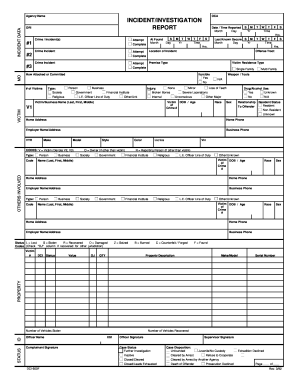
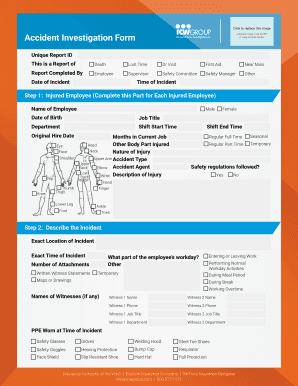
The Incident Investigation Report is a business form used by employees and contractors to document and evaluate incidents, ensuring workplace safety.
pdfFiller scores top ratings on review platforms




Who needs Canada Northpoint Resources Form 08-01?
Explore how professionals across industries use pdfFiller.

Canada Northpoint Resources Form 08-01 is needed by:
-
Employees involved in workplace incidents
-
Contractors requiring incident documentation
-
Production foremen overseeing incident evaluations
-
Calgary Managers responsible for risk assessment
-
Safety officers ensuring compliance with safety regulations
-
Human Resources for incident record-keeping
Comprehensive Guide to Canada Northpoint Resources Form 08-01
What is the Incident Investigation Report?
The Incident Investigation Report serves as a crucial tool in documenting workplace incidents, ensuring proper records are maintained for all occurrences. This report is relevant to businesses as it captures incidents ranging from injuries and property damage to environmental impacts. Accurate documentation plays a vital role in enhancing workplace safety by providing detailed accounts of incidents that can inform future prevention strategies.
Businesses often utilize an incident investigation report template when assessing incidents to ensure all necessary information is captured systematically. Implementing a workplace accident report template can help standardize the documentation process.
Purpose and Benefits of the Incident Investigation Report
The primary purpose of the Incident Investigation Report is to identify and mitigate risks associated with hazardous situations in the workplace. By documenting incidents thoroughly, organizations can significantly improve their workplace safety culture and maintain compliance with industry standards.
Utilizing a safety incident report template allows companies to track patterns and trends, which can inform changes in policies and training initiatives, ultimately leading to a safer work environment.
Who Needs the Incident Investigation Report?
Completing the Incident Investigation Report involves various roles within an organization, including employees, contractors, foremen, and managers. Each of these groups has specific responsibilities that must be adhered to during the reporting process.
The report must be submitted by designated personnel, typically those directly involved in the incident, and will undergo review by management. Understanding when to utilize the company incident investigation form is essential for effective incident management.
How to Fill Out the Incident Investigation Report Online
Filling out the Incident Investigation Report online requires following a straightforward process. Firstly, users need to access the form digitally via the designated platform. They must gather essential information, which typically includes the incident number and the names of all parties involved.
Some sections may be more complex than others, so it is crucial to pay special attention to them. For instance, users should ensure accuracy in reporting details related to injuries or environmental impacts. A well-organized incident investigation form 08-01 can aid users in this process.
Field-by-Field Instructions for the Incident Investigation Report
To accurately complete the Incident Investigation Report, it is important to follow specific field instructions. Key sections such as “Name of Injured Person” and “Driver” require precise input to avoid errors.
-
For the “Name of Injured Person,” ensure correct spelling and full name are provided.
-
Regarding the “Driver” field, include license details if applicable.
Furthermore, examples can help clarify complex fields, while remaining mindful of common errors that should be avoided throughout the process. Using an alberta incident report template can simplify adherence to local guidelines.
Review and Validation Checklist
Before submitting the Incident Investigation Report, it is critical to review the document thoroughly for accuracy and completeness. This ensures that all essential components have been included, reducing the risk of oversight.
-
Check that all fields are filled out correctly.
-
Ensure that supporting documentation, such as witness statements, has been attached.
Utilizing a simple checklist format can assist users in following these guidelines to ensure a comprehensive report is submitted.
Submission Methods for the Incident Investigation Report
After completing the Incident Investigation Report, it is necessary to submit it following the correct procedures. This report can typically be submitted through various methods, including online platforms or via physical submission.
In Alberta specifically, there may be defined requirements regarding submission addresses and deadlines that users should be aware of to ensure compliance.
Security and Compliance for the Incident Investigation Report
When handling sensitive information in the Incident Investigation Report, security and compliance should be top priorities. pdfFiller implements stringent security measures, including data encryption and adherence to compliance standards such as HIPAA and GDPR.
Maintaining confidentiality throughout the process of filling out and submitting this report is essential, reinforcing the importance of safeguarding data in the realm of incident reporting.
Enhance Your Incident Reporting Process with pdfFiller
Utilizing pdfFiller can significantly improve the incident reporting process. This platform offers features such as easy editing, electronic signing, and access to reports through cloud storage, thereby streamlining document management.
By employing pdfFiller for modifications, sharing, and secure storage of forms, organizations can enhance compliance and facilitate a more efficient reporting process.
How to fill out the Canada Northpoint Resources Form 08-01
-
1.Start by accessing pdfFiller and locating the Incident Investigation Report form using the search bar.
-
2.Once you find the form, click to open it and wait for it to load completely.
-
3.Before you begin filling out the form, gather all the necessary information regarding the incident, including the incident number, names of involved parties, and any evidence.
-
4.Begin by entering the 'Incident Number' at the top of the form. Ensure this is accurate and corresponds to the incident you are reporting.
-
5.Next, fill in the 'Name Of Injured Person' field with the correct name of the individual involved in the incident.
-
6.If the incident involves a vehicle, input the 'Driver' details in the provided field.
-
7.Utilize the checkboxes where applicable to denote any injuries, environmental impacts, and property damage.
-
8.As you complete the form, click on the fields to enter text; pdfFiller allows easy editing and adjusting of your entries.
-
9.Once all fields are filled out, review the information for accuracy, checking for any typos or missing details.
-
10.After validating the form's content, you can finalize it by clicking the save option located at the top of the page.
-
11.To submit your form, you can choose to download it and email it directly to the relevant parties or submit it through pdfFiller as guided.

Who is required to sign the Incident Investigation Report?
The Incident Investigation Report requires signatures from the employee, contractor, production foreman, and Calgary manager involved in the incident.
How do I submit the Incident Investigation Report?
You can submit the report by downloading it after completion and emailing it to your designated safety officer or manager, or use pdfFiller's submission options.
Is there a specific deadline for submitting this report?
While specific deadlines may vary by organization, it's recommended to submit the Incident Investigation Report within 24 hours of the incident to ensure timely follow-up.
What kind of information needs to be included in the form?
Essential details such as the incident number, names of involved persons, description of the incident, actions taken, and any follow-up plans should be included.
Can I fill out the incident report on a mobile device?
Yes, pdfFiller is mobile-friendly, allowing you to fill out the Incident Investigation Report on your smartphone or tablet.
What common mistakes should I avoid when completing this form?
Ensure that all required fields are filled accurately, avoid vague descriptions of the incident, and double-check the names of parties involved to prevent any errors.
Will I need supporting documents with the Incident Investigation Report?
It's advisable to include any relevant evidence such as photographs, witness statements, and medical reports if applicable with the report submission.
Related Forms

Related Catalogs
Get the latest insights from our blog


If you believe that this page should be taken down, please follow our DMCA take down process
here
.
This form may include fields for payment information. Data entered in these fields is not covered by PCI DSS compliance.