
Last updated on
Oct 2, 2026

NE DC 19-10 2012 free printable template
pdfFiller is not affiliated with any government organization

Fill out
Complete the form online in a simple drag-and-drop editor.

eSign
Add your legally binding signature or send the form for signing.

Share
Share the form via a link, letting anyone fill it out from any device.

Export
Download, print, email, or move the form to your cloud storage.
Why pdfFiller is the best tool for your documents and forms


End-to-end document management
From editing and signing to collaboration and tracking, pdfFiller has everything you need to get your documents done quickly and efficiently.
Accessible from anywhere
pdfFiller is fully cloud-based. This means you can edit, sign, and share documents from anywhere using your computer, smartphone, or tablet.
Secure and compliant
pdfFiller lets you securely manage documents following global laws like ESIGN, CCPA, and GDPR. It's also HIPAA and SOC 2 compliant.
What is NE DC 19-10
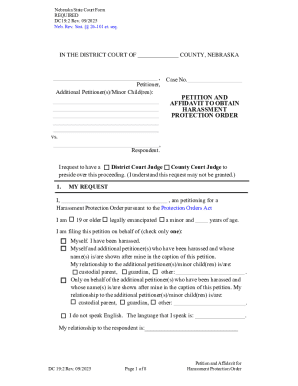
The NE DC 19-10 is a document used by individuals and organizations to submit specific information required by regulatory authorities.
pdfFiller scores top ratings on review platforms




Who needs NE DC 19-10?
Explore how professionals across industries use pdfFiller.

NE DC 19-10 is needed by:
-
Individuals required to report regulatory information
-
Small business owners needing compliance documentation
-
Nonprofits needing to file reports
-
Accountants assisting clients with reporting requirements
-
Legal professionals managing regulatory affairs
Comprehensive Guide to NE DC 19-10
What is the NE DC 19-10?
The NE DC 19-10 form serves a crucial role in specific regulatory contexts, providing a clear framework for compliance. This form functions as an essential document used in various situations that require formal acknowledgment and reporting. Understanding the NE DC 19-10 is vital for individuals and organizations to navigate relevant regulatory requirements effectively.
Its importance is underscored by its applications; the form is often utilized by practitioners in multiple sectors to ensure adherence to necessary legal frameworks. Familiarizing oneself with the NE DC 19-10 can significantly ease the complexities associated with compliance.
Purpose and Benefits of the NE DC 19-10
The primary aim of the NE DC 19-10 is to streamline specific regulatory processes, making compliance simpler for users. By accurately completing this form, individuals and businesses can achieve objectives such as clarity in record-keeping and effective communication with regulatory bodies.
Using the NE DC 19-10 also helps prevent potential legal complications, as proper submission ensures that all necessary information is documented and verified. This form aids in establishing a transparent process, boosting confidence among users regarding their compliance status.
Who Needs to Complete the NE DC 19-10?
Various professionals and organizations may need to fill out the NE DC 19-10 form, particularly those involved in regulated activities. Typical users include businesses, legal entities, and individuals engaged in activities that require official documentation to meet compliance standards.
Eligibility for submitting the form may depend on specific industry requirements, highlighting the need for potential users to assess whether they fall within the applicable categories mandated by regulatory authorities.
How to Fill Out the NE DC 19-10 Online: A Step-by-Step Guide
Completing the NE DC 19-10 form online using pdfFiller is straightforward. Begin by navigating to the online platform and selecting the NE DC 19-10 form. Follow these steps:
-
Open the form in pdfFiller.
-
Carefully read and prepare the necessary information required for each section.
-
Complete the designated fields by inputting accurate data.
-
Review all entries for accuracy before submission.
-
Finalize and submit the form online through the designated portal.
Before starting, ensure that you gather all necessary details to facilitate a smooth filling process, thus enhancing the overall experience.
Field-by-Field Instructions for the NE DC 19-10
For clarity and accuracy, the NE DC 19-10 requires stringent attention to detail in each section. When filling out the form, follow these best practices:
-
Read the instructions for each field carefully to understand the required information.
-
Avoid common mistakes, such as misplacing decimals or omitting required details.
-
Double-check all entries before moving to the next section to ensure completeness.
By adhering to these guidelines, users can enhance the accuracy of their submissions, leading to a smoother compliance process.
How to Sign or Notarize the NE DC 19-10
Signing the NE DC 19-10 can be done through either a digital signature or a traditional wet signature, depending on the submission requirements. Users need to ensure they follow the correct signing method as specified for their situation.
If notarization is required, identify a notary public and follow the necessary steps to obtain the notarization, ensuring this is completed before submission. Proper signature submission plays a crucial role in validating the form and confirming its legitimacy.
Submission Methods for the NE DC 19-10
Once the NE DC 19-10 is completed, users have multiple submission options. Available methods include:
-
Online submission through the designated portal.
-
Mailing the completed form to the specified address.
-
Tracking submission status via the online platform after sending.
Understanding these submission methods helps streamline the process and ensures that users can confirm receipt of their submissions efficiently.
Common Errors When Filing the NE DC 19-10 and How to Avoid Them
Filing the NE DC 19-10 can lead to complications if common errors occur. Typical mistakes include:
-
Incomplete field entries that may lead to processing delays.
-
Incorrect formatting of numbers and dates that deviate from required standards.
-
Failing to double-check information, resulting in inaccuracies.
To minimize these errors, users should establish a validation checklist to review all form elements carefully before submission.
What to Do After You Submit the NE DC 19-10
After submitting the NE DC 19-10, it is important to track the submission status. Users should:
-
Look for a confirmation receipt, either via email or through the submission portal.
-
Allow for adequate processing time before checking the status of the submission.
-
Contact the relevant authority if issues arise post-submission for clarification.
Staying informed about the submission process aids in effective follow-up and can help resolve any potential issues that may emerge.
Enhance Your Filing Experience with pdfFiller
Utilizing pdfFiller for completing the NE DC 19-10 offers numerous advantages. The platform simplifies form completion with user-friendly editing tools and features designed specifically for seamless document management.
Security is a paramount concern for users; pdfFiller employs industry-leading safeguards to protect sensitive information during the form-filling process. Many users have shared success stories, highlighting how pdfFiller has significantly improved their experience with completing regulatory forms. Start your journey with filling out the NE DC 19-10 efficiently and securely today!
How to fill out the NE DC 19-10
-
1.To begin, access pdfFiller and log in to your account or create a new one.
-
2.In the search bar, type 'NE DC 19-10' to locate the form.
-
3.Once found, click to open the form in the pdfFiller editor.
-
4.Carefully review the form fields and familiarize yourself with the required information.
-
5.Gather any necessary information, such as identification details and relevant numeric data, before you start filling out the form.
-
6.Use the cursor to click on each field and enter the appropriate information as prompted.
-
7.If you need to make changes, you can easily delete text or navigate between fields using your keyboard.
-
8.After completing all fields, take a moment to review the filled form for any errors.
-
9.Once satisfied, find the option to save your progress, ensuring you do not lose any information.
-
10.To download or submit the completed form, look for the save or submit button within the interface and follow the prompts.
-
11.You can then print a copy for your records or send it electronically, depending on the submission method required.

Who is eligible to file the NE DC 19-10 form?
Anyone who needs to report specific information required by regulatory authorities is eligible. This may include individuals, businesses, and nonprofit organizations.
What is the deadline for submitting the NE DC 19-10 form?
Deadlines can vary based on regulatory requirements. It's essential to check with the relevant authority for the specific submission timeframes associated with your circumstances.
How can I submit the NE DC 19-10 form?
The NE DC 19-10 form can typically be submitted electronically through platforms like pdfFiller or mailed directly to the appropriate regulatory body, depending on submission requirements.
What supporting documents are needed when filing the form?
While the metadata does not specify, typical supporting documents might include identification proof, financial statements, and any relevant compliance documents pertinent to your situation.
What are common mistakes to avoid when filling out the NE DC 19-10 form?
Common mistakes include missing required fields, entering incorrect information, and failing to review the completed form before submitting. Take time to verify all entries.
How long does it take to process the NE DC 19-10 form?
Processing times can vary by authority and complexity of the information submitted. Generally, expect a few days to weeks, so be sure to submit well ahead of deadlines.
Where can I find assistance for completing the NE DC 19-10 form?
Assistance can be found through guidelines on pdfFiller, professional accountants, or legal advisors who specialize in regulatory documentation.
NE DC 19-10 Form Versions
Related Content
Related Forms




Get the latest insights from our blog


If you believe that this page should be taken down, please follow our DMCA take down process
here
.
This form may include fields for payment information. Data entered in these fields is not covered by PCI DSS compliance.