
Last updated on
Nov 9, 2026
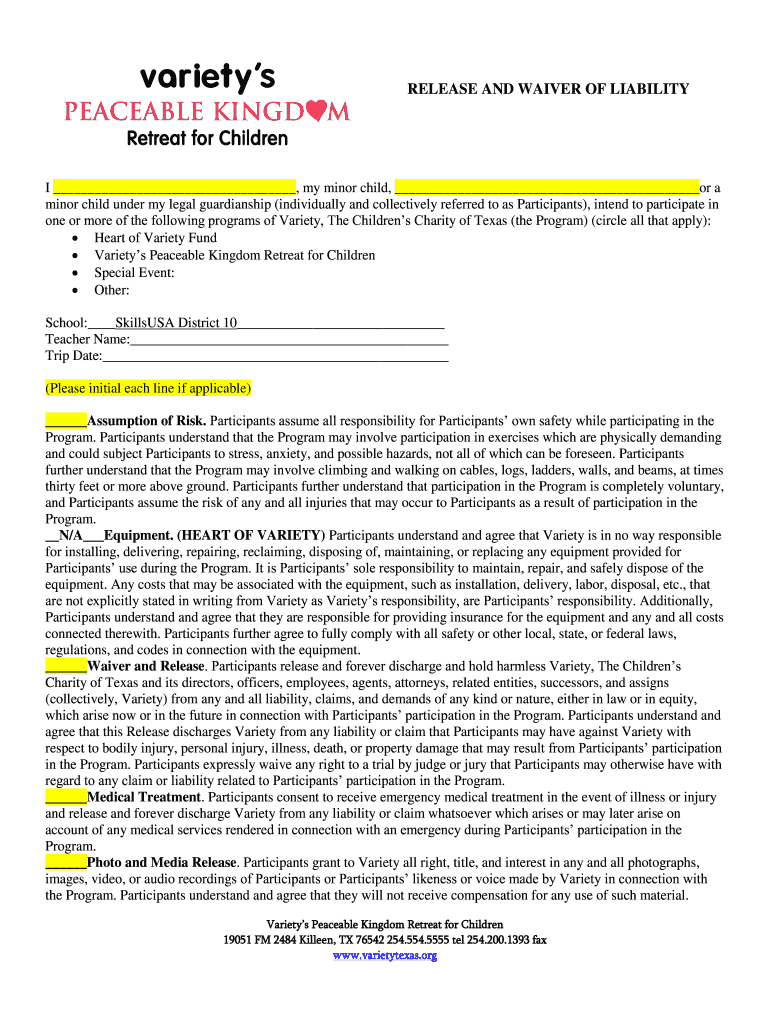
TX Varietys Peaceable Kingdom Release and free printable template
pdfFiller is not affiliated with any government organization

Fill out
Complete the form online in a simple drag-and-drop editor.

eSign
Add your legally binding signature or send the form for signing.

Share
Share the form via a link, letting anyone fill it out from any device.

Export
Download, print, email, or move the form to your cloud storage.
Why pdfFiller is the best tool for your documents and forms


End-to-end document management
From editing and signing to collaboration and tracking, pdfFiller has everything you need to get your documents done quickly and efficiently.
Accessible from anywhere
pdfFiller is fully cloud-based. This means you can edit, sign, and share documents from anywhere using your computer, smartphone, or tablet.
Secure and compliant
pdfFiller lets you securely manage documents following global laws like ESIGN, CCPA, and GDPR. It's also HIPAA and SOC 2 compliant.
What is TX Varietys Peaceable Kingdom Release and
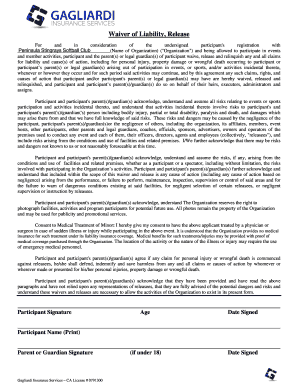
The Release and Waiver of Liability is a legal document used by participants and their parents/guardians to acknowledge and assume risks associated with programs offered by Variety, The Children’s Charity of Texas.
pdfFiller scores top ratings on review platforms




Who needs TX Varietys Peaceable Kingdom Release and?
Explore how professionals across industries use pdfFiller.

TX Varietys Peaceable Kingdom Release and is needed by:
-
Participants in programs offered by Variety, The Children's Charity of Texas
-
Parents or guardians of minors participating in programs
-
Event organizers requiring liability waivers
-
Legal representatives of participants
-
Recreational program administrators
-
Anyone involved in activities with inherent risks
Comprehensive Guide to TX Varietys Peaceable Kingdom Release and
What is the Release and Waiver of Liability?
The Release and Waiver of Liability form serves a critical legal purpose by allowing participants to acknowledge and assume risks associated with activities organized by Variety, The Children’s Charity of Texas. This form effectively releases the charity from liability for any incidents that may arise during participation. It is essential that both participants and their guardians sign the document to ensure that all parties understand the risks involved.
Purpose and Benefits of the Release and Waiver of Liability
The primary purpose of the Release and Waiver of Liability is to protect both participants and organizers by functioning as a safety measure. This form is crucial in risk management and provides a safety net by clearly outlining the responsibilities assumed by participants. Furthermore, it offers peace of mind by ensuring organizers are aware of the potential risks involved.
By completing the form, participants can focus on enjoying the programs without undue worry about liability issues. The advantages include formal recognition of risks and enhanced accountability that comes from a signed agreement.
Who Needs to Complete the Release and Waiver of Liability?
Participants wishing to engage in programs must complete the Release and Waiver of Liability, which typically includes signatures from both the participant and a parent or guardian if underage. Eligibility criteria are based on age and specific program involvement; minors are required to obtain parental consent.
Adults participating in programs must also sign, confirming their understanding and acceptance of the inherent risks involved. This ensures that all involved parties are fully informed.
How to Fill Out the Release and Waiver of Liability Online
Filling out the Release and Waiver of Liability form electronically is straightforward. Here’s how to do it:
-
Access the form through pdfFiller’s online platform.
-
Enter the participant’s name in the designated field.
-
Provide guardian information if applicable.
-
Complete all required fields marked on the form.
-
Review entries for accuracy before submission.
Using pdfFiller’s user-friendly editing capabilities enhances the experience, making it seamless to submit the form online.
Review and Validation Checklist for the Release and Waiver of Liability
Before submitting the form, it’s crucial to ensure the following key elements are complete:
-
All signatures have been gathered.
-
Dates are correctly filled in.
-
The form is fully completed without missing information.
Checking these details helps avoid common errors and ensures the submission is valid. Accuracy in completing the form protects both the participant and the organization.
How to Sign the Release and Waiver of Liability
Signing the Release and Waiver of Liability can be done either digitally or traditionally. For a valid signature, participants and guardians must follow legal guidelines set by Texas state law. A digital signature is acceptable if it meets all required standards, providing a convenient alternative to handwritten signatures.
It's important to ensure that all signatures are clear and correspond to the individuals named in the form to maintain compliance.
Submitting the Release and Waiver of Liability
Methods for submitting the Release and Waiver of Liability differ by program requirements. Here’s a quick overview:
-
Online submission through pdfFiller.
-
Printing and mailing the completed form.
-
Hand-delivering to the program coordinators or at designated Variety locations.
Always check for submission deadlines to ensure participation in chosen programs.
Understanding Security and Compliance with the Release and Waiver of Liability
When using pdfFiller for your form, it’s important to understand the robust security measures in place to protect sensitive documents. pdfFiller employs 256-bit encryption and complies with legal standards such as HIPAA and GDPR, ensuring data protection and management.
This focus on security gives users confidence when handling their personal information.
What Happens After Submission of the Release and Waiver of Liability?
Once the Release and Waiver of Liability has been submitted, participants can expect a confirmation of their form’s receipt followed by further processing. Typically, users will receive information regarding their status in the program shortly thereafter.
It is advisable to keep track of submissions and monitor any necessary amendments to ensure full participation compliance.
Get Started with pdfFiller for Your Release and Waiver of Liability Needs
Utilizing pdfFiller features for filling and submitting the Release and Waiver of Liability significantly streamlines the process. Online platforms like pdfFiller simplify document management, making form completion efficient and intuitive. Leverage the full suite of services that pdfFiller offers for all your form-related needs.
How to fill out the TX Varietys Peaceable Kingdom Release and
-
1.To access the Release and Waiver of Liability form, go to pdfFiller’s website and use the search bar to find it by name.
-
2.Once you find the form, click on it to open in the pdfFiller editing interface.
-
3.Review the form's layout and familiarize yourself with the fillable fields and instructions provided.
-
4.Before beginning, gather all necessary information, such as participant and guardian names, program details, and signatures if applicable.
-
5.Start filling in the form by clicking on the designated fields. Use your keyboard to enter text where needed, and checkboxes to indicate agreement with various statements.
-
6.Make sure to follow any prompts or guidelines provided in the form to ensure all required information is accurately filled out.
-
7.As you complete the form, regularly review the entries to avoid errors. Take your time to ensure all fields are completed as per your program's requirements.
-
8.Once you have filled out all sections and are satisfied with the information provided, click on the review option within pdfFiller to confirm all necessary details are included.
-
9.Finalizing your form can include addressing any errors highlighted by the system and ensuring that there are no missing signatures or required fields.
-
10.After finalizing the document, choose to save or download the form in your preferred format. You can also submit the form directly through pdfFiller if required.

Who needs to sign the Release and Waiver of Liability?
Both the participant and their parent or guardian are required to sign the Release and Waiver of Liability. This ensures that all parties acknowledge and assume the risks involved in the program.
Is notarization required for this form?
No, notarization is not required for the Release and Waiver of Liability form. You can complete and submit it without the need for a notary.
Where is this form applicable?
The Release and Waiver of Liability is specifically governed by Texas state law, making it applicable for programs offered within the state of Texas.
What information do I need before filling out the form?
Before filling out the form, gather necessary details such as the participant's name, guardian's name, details of the program, and any required signatures from both parties.
Are there any common mistakes to avoid while filling out the form?
Common mistakes include missing required signatures, incorrect entries in fillable fields, and failure to review the form for completeness. Double-check all information before finalizing.
How do I submit the form after filling it out?
After completing the form on pdfFiller, you can submit it directly through the platform, download it for your records, or save it according to your needs.
How is this form used to protect participants?
The Release and Waiver of Liability is designed to release Variety from liability for any injuries or damages that may occur during the program. Participants sign to acknowledge their understanding and acceptance of the risks involved.
Related Forms




Related Catalogs
Get the latest insights from our blog


If you believe that this page should be taken down, please follow our DMCA take down process
here
.
This form may include fields for payment information. Data entered in these fields is not covered by PCI DSS compliance.