
Last updated on
Oct 31, 2026

Get the free Satisfactory Academic Progress Report
We are not affiliated with any brand or entity on this form

Fill out
Complete the form online in a simple drag-and-drop editor.

eSign
Add your legally binding signature or send the form for signing.

Share
Share the form via a link, letting anyone fill it out from any device.

Export
Download, print, email, or move the form to your cloud storage.
Why pdfFiller is the best tool for your documents and forms


End-to-end document management
From editing and signing to collaboration and tracking, pdfFiller has everything you need to get your documents done quickly and efficiently.
Accessible from anywhere
pdfFiller is fully cloud-based. This means you can edit, sign, and share documents from anywhere using your computer, smartphone, or tablet.
Secure and compliant
pdfFiller lets you securely manage documents following global laws like ESIGN, CCPA, and GDPR. It's also HIPAA and SOC 2 compliant.
What is Academic Progress Report
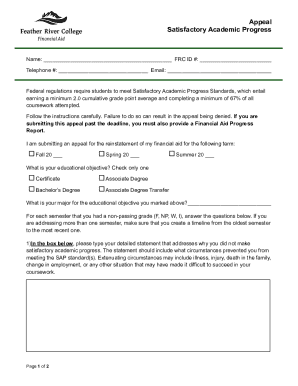
The Satisfactory Academic Progress Report is an academic document used by Miami-Dade County Public Schools to evaluate a student's academic performance and track GPA for each term.
pdfFiller scores top ratings on review platforms




Who needs Academic Progress Report?
Explore how professionals across industries use pdfFiller.

Academic Progress Report is needed by:
-
Instructors responsible for student evaluations
-
Students looking for academic tracking
-
School administrators overseeing progress reports
-
Academic advisors supporting students
-
Parents monitoring student performance
Comprehensive Guide to Academic Progress Report
What is the Satisfactory Academic Progress Report?
The Satisfactory Academic Progress Report is a vital document used by Miami-Dade County Public Schools to monitor student achievement. This report plays a crucial role in assessing students’ academic performance by tracking their Grade Point Average (GPA) and other key metrics.
This report is utilized primarily by instructors and administrators, who depend on accurate data for evaluations and guidance. The key functions include tracking GPA, highlighting academic progress, and maintaining an overview of student performance.
Purpose and Benefits of the Satisfactory Academic Progress Report
This report serves as an essential tool for academic evaluation, enabling instructors to document students’ performance comprehensively. It provides critical insights into each student's academic journey, ensuring that both instructors and students remain informed about their progress.
For instructors, the report simplifies the documentation of student obligations and performance metrics. Additionally, the implications for students are significant; maintaining satisfactory academic progress is crucial for eligibility regarding financial aid and the continuation of enrollment in programs.
Key Features of the Satisfactory Academic Progress Report
Several key features characterize the Satisfactory Academic Progress Report, ensuring it meets educational standards:
-
Student Name: A field to fill in the student's name for identification.
-
Student ID: Essential for tracking individual student records.
-
Trimester GPA: Indicates the student's GPA for each term.
-
Instructor's Signature: Required for form validation and accountability.
Moreover, the report includes completeness criteria, such as the requirement that students complete at least 67% of their maximum scheduled hours, ensuring compliance with academic expectations.
Who Needs the Satisfactory Academic Progress Report?
The Satisfactory Academic Progress Report serves multiple roles within the educational landscape. Instructors are among the primary users, as they utilize the report for assessments and to guide student progress effectively.
Administrators also benefit from the report for monitoring and managing student performance across different courses. Students, particularly those seeking financial aid, must be aware of their academic standing as reflected in this report to understand their eligibility for various benefits.
How to Fill Out the Satisfactory Academic Progress Report Online
Completing the Satisfactory Academic Progress Report online involves several straightforward steps:
-
Access the report through the designated online platform.
-
Fill in the required fields accurately, including personal details and GPA.
-
Ensure that all sections are completed before submission.
-
Review the information provided for accuracy.
-
Submit the form electronically or prepare for in-person submission based on instructions.
Following these steps will help streamline the process and ensure that the report is submitted accurately and on time.
Submission Methods and Delivery for the Satisfactory Academic Progress Report
Submitting the completed Satisfactory Academic Progress Report can be done in various ways. Users have the option of submitting the report online or delivering it in person to their respective administrative offices.
For those submitting online, adherence to specific delivery requirements set forth by Miami-Dade County Public Schools is essential. Additionally, obtaining confirmation of submission is important for tracking and compliance purposes.
Common Errors and How to Avoid Them
As users complete the Satisfactory Academic Progress Report, it is crucial to be mindful of frequent mistakes that may occur:
-
Omitting required fields, such as the instructor's signature.
-
Submitting reports with inaccuracies in GPA calculations.
To avoid these errors, double-check all data against institutional guidelines and ensure that all sections are filled out completely before submitting the form.
Security and Compliance for the Satisfactory Academic Progress Report
Security is a paramount concern when handling educational documents like the Satisfactory Academic Progress Report. pdfFiller employs robust security measures, such as 256-bit encryption and adherence to compliance standards, including HIPAA and GDPR.
These measures are crucial for protecting sensitive academic data from unauthorized access, ensuring that users can complete and manage their reports with confidence in data integrity and privacy.
Take Action: Simplify Your Process with pdfFiller
pdfFiller provides an efficient platform for completing the Satisfactory Academic Progress Report. The service includes features such as fillable fields, electronic signing, and secure storage of documents.
By leveraging pdfFiller's capabilities, users can streamline the process of managing their academic progress reporting, making it easier to fulfill educational requirements.
How to fill out the Academic Progress Report
-
1.To begin, access pdfFiller and search for the Satisfactory Academic Progress Report form in the template library.
-
2.After locating the form, click on it to open it within the editor interface of pdfFiller.
-
3.Before filling out the form, gather essential information, such as the student's name, student ID, and GPA for each term.
-
4.Fill in the student's name and ID in the designated fields at the top of the form.
-
5.Navigate to the 'Program Instructor' section and enter the instructor's name along with their signature.
-
6.In the fields for 'Trimester G.P.A', enter the GPA for each applicable term, ensuring accuracy with the letter grades.
-
7.Next, check the box indicating whether the student has completed at least 67% of the maximum scheduled hours.
-
8.Once all fields are completed, review the entries to ensure all information is correct and complete.
-
9.Finally, save your completed form by selecting the save option in pdfFiller, or download it in your preferred format for submission.

Who is eligible to complete the Satisfactory Academic Progress Report?
The Satisfactory Academic Progress Report must be completed by instructors of Miami-Dade County Public Schools supervising the academic performance of their students.
Is there a deadline for submitting the progress report?
Deadlines for submission of the Satisfactory Academic Progress Report can vary by academic term, so ensure to check with your school’s academic calendar and guidelines for specific dates.
How can I submit the completed progress report?
Once completed, the Satisfactory Academic Progress Report can be submitted electronically via pdfFiller, or printed to be handed in directly to the appropriate school office.
Are there any supporting documents required with the report?
Typically, no additional supporting documents are required with the Satisfactory Academic Progress Report. However, ensure all fields are completed accurately before submission.
What common mistakes should I avoid when filling out the form?
Common mistakes include leaving fields blank, incorrect GPA entries, and not obtaining the instructor's signature. Double-check all entries before submitting.
How long does it take to process the Satisfactory Academic Progress Report?
Processing times can vary. It's advisable to check directly with the school administration for expected timelines regarding the review and acknowledgment of submitted reports.
What should I do if there's an error on the report after submission?
If an error is discovered post-submission, contact the school administration immediately for guidance on how to correct the report or whether a resubmission is needed.
Related Forms




Related Catalogs
Get the latest insights from our blog


If you believe that this page should be taken down, please follow our DMCA take down process
here
.
This form may include fields for payment information. Data entered in these fields is not covered by PCI DSS compliance.