
Last updated on
Oct 2, 2026
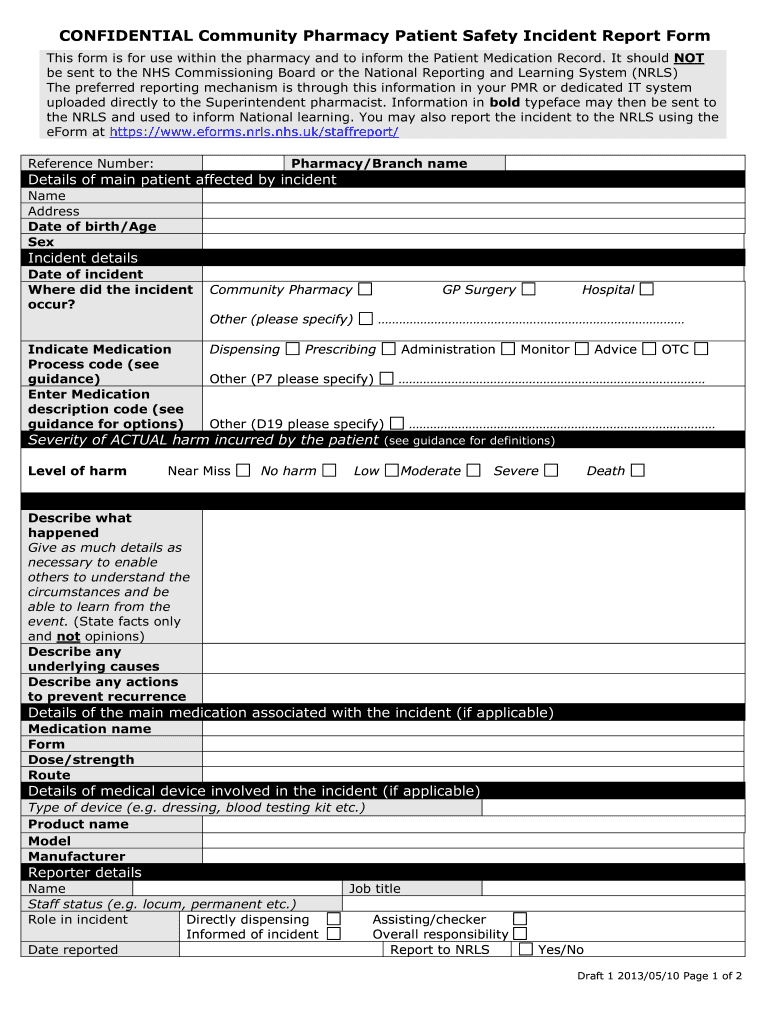
Confidential Community Pharmacy Patient Safety Incident Report Form 2013-2026 free printable tem...
pdfFiller is not affiliated with any government organization

Fill out
Complete the form online in a simple drag-and-drop editor.

eSign
Add your legally binding signature or send the form for signing.

Share
Share the form via a link, letting anyone fill it out from any device.

Export
Download, print, email, or move the form to your cloud storage.
Why pdfFiller is the best tool for your documents and forms


End-to-end document management
From editing and signing to collaboration and tracking, pdfFiller has everything you need to get your documents done quickly and efficiently.
Accessible from anywhere
pdfFiller is fully cloud-based. This means you can edit, sign, and share documents from anywhere using your computer, smartphone, or tablet.
Secure and compliant
pdfFiller lets you securely manage documents following global laws like ESIGN, CCPA, and GDPR. It's also HIPAA and SOC 2 compliant.
What is Confidential Community Pharmacy Patient Safety Incident Report Form
The Community Pharmacy Patient Safety Incident Report Form is a healthcare document used by pharmacy staff to report and document patient safety incidents.
pdfFiller scores top ratings on review platforms




Who needs Confidential Community Pharmacy Patient Safety Incident Report Form?
Explore how professionals across industries use pdfFiller.

Confidential Community Pharmacy Patient Safety Incident Report Form is needed by:
-
Community pharmacy staff reporting incidents
-
Pharmacists involved in patient safety
-
Healthcare administrators tracking patient safety
-
Quality assurance teams in pharmacies
-
Regulatory agencies monitoring pharmacy practices
Comprehensive Guide to Confidential Community Pharmacy Patient Safety Incident Report Form
What is the Community Pharmacy Patient Safety Incident Report Form?
The Community Pharmacy Patient Safety Incident Report Form is designed for use in community pharmacies to systematically report patient safety incidents. This report form is crucial for documenting incidents that may affect patient care, ensuring they are conveyed to appropriate healthcare authorities.
This form serves as a vital tool in connection with the NHS patient safety reporting system, which facilitates accountability and improvement in patient safety practices. By utilizing the community pharmacy incident report form, pharmacy staff can contribute to a national understanding of safety-related events in healthcare.
Purpose and Benefits of the Community Pharmacy Patient Safety Incident Report Form
The primary purpose of this form is to enhance patient safety by providing a structured way to document and analyze safety incidents. By utilizing the patient safety incident form, pharmacies can track occurrences over time, leading to better safety protocols and procedures.
A systematic approach to incident reporting offers numerous benefits to pharmacy staff and improves patient care quality. This reliable method supports the National Reporting and Learning System (NRLS) by delivering insights that inform training and preventive measures against future incidents.
Key Features of the Community Pharmacy Patient Safety Incident Report Form
The report form is structured with essential fields that capture critical patient information, incident specifics, and details about the individual reporting the incident. Key areas include:
-
Patient details for identification
-
Incident details to describe the event accurately
-
Reporter details to establish responsibility
The form also includes sections dedicated to recounting the incident, analyzing underlying causes, and outlining proposed preventive measures. Its design as a fillable document makes it user-friendly, essential for the busy environment of community pharmacies.
Who Needs the Community Pharmacy Patient Safety Incident Report Form?
Various roles within a pharmacy benefit from the Community Pharmacy Patient Safety Incident Report Form. Healthcare professionals who interact with patients, including pharmacists and pharmacy technicians, are primary users.
All pharmacy staff have a responsibility to report incidents, making this form relevant for everyone involved in patient safety practices. Understanding the roles and responsibilities associated with reporting is critical to fostering a culture of safety within the pharmacy environment.
How to Fill Out the Community Pharmacy Patient Safety Incident Report Form Online (Step-by-Step)
Filling out the Community Pharmacy Patient Safety Incident Report Form efficiently is vital. To do this, follow these steps:
-
Access the report form using pdfFiller.
-
Begin by entering the patient's details in the designated fields.
-
Detail the incident, providing a clear and thorough account.
-
Include your details as the reporter, ensuring accurate tracking.
-
Review the information for completeness and accuracy before submission.
Adhering to these steps can help avoid common errors and ensure the form is completed effectively, contributing to more reliable reporting.
Submission Methods and Delivery of the Community Pharmacy Patient Safety Incident Report Form
Once completed, there are various methods to submit the Community Pharmacy Patient Safety Incident Report Form. Options typically include:
-
Submitting online via the NHS portal
-
Filing paper forms directly to the pharmacy's regional NHS office
Timelines for submission may vary; therefore, it is crucial to check any specific deadlines associated with reporting incidents to ensure compliance with NHS procedures.
Security and Compliance for the Community Pharmacy Patient Safety Incident Report Form
Handling the Community Pharmacy Patient Safety Incident Report Form requires strict adherence to security protocols to protect patient data. Compliance with privacy standards, including GDPR regulations, is essential for all healthcare documentation.
pdfFiller enhances document security through robust measures such as 256-bit encryption and SOC 2 Type II compliance, ensuring that both forms and sensitive information are safeguarded against unauthorized access.
Sample or Example of a Completed Community Pharmacy Patient Safety Incident Report Form
To assist users, a sample of the completed Community Pharmacy Patient Safety Incident Report Form is available. This example serves as a reference point, illustrating the necessary details and proper formatting.
Pay attention to key aspects in the sample that enhance clarity and completeness in reporting. Familiarity with such real-world examples can significantly improve the quality of incident reporting in community pharmacies.
Make the Most of Your Community Pharmacy Patient Safety Incident Report Form Experience
Utilizing pdfFiller for your form needs can enhance the experience of completing the Community Pharmacy Patient Safety Incident Report Form. The platform facilitates efficient form filling and provides document management features to streamline workflow.
Take advantage of capabilities such as eSigning and secure sharing. These features not only simplify the process but also ensure that all documentation remains compliant and secure.
How to fill out the Confidential Community Pharmacy Patient Safety Incident Report Form
-
1.Access the Community Pharmacy Patient Safety Incident Report Form on pdfFiller by searching the form's name in the platform's search bar.
-
2.Open the form and familiarize yourself with the layout, including sections for patient details, incident information, and reporter details.
-
3.Before filling out the form, gather all necessary information, such as patient details, the nature of the incident, and any relevant documentation that supports the incident report.
-
4.Use pdfFiller's tools to click on each field and type in the required information, including specifics about the incident and any underlying causes.
-
5.Make sure to fill in all mandatory fields clearly, as these are crucial for proper reporting and potential follow-up.
-
6.Once you have entered all necessary information, review the completed form to ensure accuracy and completeness.
-
7.Utilize pdfFiller's highlighting feature for any areas that may need double-checking or clarification.
-
8.After reviewing, save your progress frequently to avoid data loss, and consider downloading a copy for your records.
-
9.To submit the form, follow pdfFiller's submission options, choosing to email the report or download it as a PDF to send to the relevant authorities.

Who is eligible to use the Community Pharmacy Patient Safety Incident Report Form?
The form is intended for use by pharmacy staff, including pharmacists and technicians, responsible for reporting patient safety incidents.
Are there any deadlines for submitting this form?
While the form should be completed and submitted as soon as possible after an incident occurs, specific deadlines may vary based on pharmacy policy or NHS guidelines.
How can I submit the completed form?
You can submit the form via email through pdfFiller, or download it and manually submit it to the required authority as specified by your pharmacy's protocols.
What supporting documents are required to complete this form?
Typically, no additional documents are required, but it's helpful to include any relevant records or notes that provide context for the incident being reported.
What common mistakes should I avoid when filling out this form?
Avoid leaving mandatory fields blank, ensure all details are accurate, and double-check for any typographical errors that could lead to misunderstandings.
What are the processing times after I submit the form?
Processing times may vary depending on your pharmacy's policies and the urgency of the incident reported, but it's essential to follow up if you do not receive feedback promptly.
Is there a fee associated with submitting this form?
Submitting the Community Pharmacy Patient Safety Incident Report Form through pdfFiller is generally free of charge, but check with your pharmacy for any specific fees related to internal processing.
Related Content
Related Forms



Related Catalogs
Get the latest insights from our blog


If you believe that this page should be taken down, please follow our DMCA take down process
here
.
This form may include fields for payment information. Data entered in these fields is not covered by PCI DSS compliance.