
Last updated on
Nov 6, 2026

Get the free Non-Resident Account Opening Form
We are not affiliated with any brand or entity on this form

Fill out
Complete the form online in a simple drag-and-drop editor.

eSign
Add your legally binding signature or send the form for signing.

Share
Share the form via a link, letting anyone fill it out from any device.

Export
Download, print, email, or move the form to your cloud storage.
Why pdfFiller is the best tool for your documents and forms


End-to-end document management
From editing and signing to collaboration and tracking, pdfFiller has everything you need to get your documents done quickly and efficiently.
Accessible from anywhere
pdfFiller is fully cloud-based. This means you can edit, sign, and share documents from anywhere using your computer, smartphone, or tablet.
Secure and compliant
pdfFiller lets you securely manage documents following global laws like ESIGN, CCPA, and GDPR. It's also HIPAA and SOC 2 compliant.
What is NR Account Form
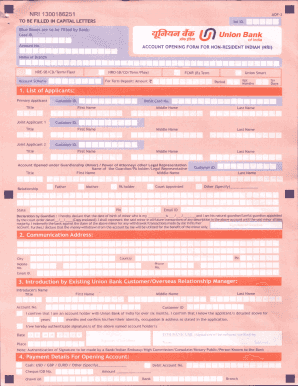
The Non-Resident Account Opening Form is a business document used by non-resident Indians to open various types of bank accounts with Lakshmi Vilas Bank.
pdfFiller scores top ratings on review platforms




PDF Filler is great!! I use it every time I need a PDF completed and signed.
Easy to use
Easy to use, awesome product!
Who needs NR Account Form?
Explore how professionals across industries use pdfFiller.

NR Account Form is needed by:
-
Non-Resident Indians looking to open bank accounts
-
Applicants for NRE, NRO, FCNR, and RFC accounts
-
Individuals seeking financial services in India from abroad
-
Banking professionals assisting clients with account setup
-
Account holders needing to manage investments and savings
Comprehensive Guide to NR Account Form
What is the Non-Resident Account Opening Form?
The Non-Resident Account Opening Form serves a vital function for non-resident Indians wishing to establish banking relationships in India. This form allows users to open various account types, including NRE, NRO, FCNR, and RFC accounts with Lakshmi Vilas Bank. Key sections include personal details, initial deposit information, and account type selection, ensuring that all necessary data is efficiently collected for processing.
-
Personal details such as full name and address
-
Initial deposit amount and account preferences
-
Selection of account types (NRE, NRO, etc.)
Benefits of Using the Non-Resident Account Opening Form
This specific form provides numerous advantages for non-resident Indians managing their finances from abroad. Utilizing the Non-Resident Account Opening Form simplifies the process of accessing essential banking services tailored to your status as a non-resident. This creates an efficient avenue for managing personal finances in India while living overseas.
-
Streamlined process for account creation and access to services
-
Saves time by collecting all necessary information upfront
Who Needs the Non-Resident Account Opening Form?
The target audience for the Non-Resident Account Opening Form consists of individuals who qualify as non-resident Indians (NRIs). Typically, NRIs are Indian citizens residing outside India for more than 182 days during the previous financial year. Various life situations, such as employment abroad or studying, may necessitate the form.
Key Information Required in the Non-Resident Account Opening Form
Completing the Non-Resident Account Opening Form requires several key pieces of information. This includes personal identification and financial details that are crucial for successful account setup. Providing accurate data in these fields ensures a smooth application process.
-
Full name and residential address
-
Passport details including number and issue date
-
Details of the initial deposit
How to Fill Out the Non-Resident Account Opening Form Online
Filling out the Non-Resident Account Opening Form online is straightforward if you follow these detailed steps. Begin with personal information, followed by account type selection, ensuring that all fields are accurately completed to avoid common mistakes.
-
Enter your full name and contact information.
-
Select the type of account you wish to open (NRE, NRO, etc.).
-
Provide the required initial deposit amount.
Be cautious while completing each section to minimize errors.
Understanding Statements and Declarations in the Form
The Non-Resident Account Opening Form includes several statements and declarations that must be accurately completed. These declarations serve as legal agreements and verification of information provided, making it essential to fill them out correctly.
-
Explanation of account type choices such as NRE and NRO
-
Details about financial declarations required for compliance
How to Submit the Non-Resident Account Opening Form
Submitting the Non-Resident Account Opening Form can be done through various methods. Understanding your options for online and offline submission is crucial, along with adhering to any important deadlines for processing.
-
Submit online through the bank's secure portal
-
Alternately, mail the completed form to the specified branch
Processing times for approvals may vary, so be sure to check confirmation and tracking options.
Security and Compliance in Handling the Non-Resident Account Opening Form
When handling the Non-Resident Account Opening Form, it is important to address security and compliance concerns. Various measures are in place to protect sensitive information as part of the application process.
-
256-bit encryption for data protection
-
Compliance with regulations such as GDPR for user privacy
Using pdfFiller for Non-Resident Account Opening Form
pdfFiller offers an ideal solution for filling out and managing the Non-Resident Account Opening Form. The platform provides features that enhance the user experience and ensure that all sensitive data remains secure.
-
Edit and create fillable forms easily
-
Use eSignature capabilities for prompt submission
Choosing pdfFiller simplifies document management while providing peace of mind with security features.
Get Started Today with the Non-Resident Account Opening Form
Take the first step towards setting up your non-resident bank account by utilizing the Non-Resident Account Opening Form. By leveraging the capabilities of pdfFiller, you can efficiently manage the form completion process.
-
Enjoy quick access to financial services
-
Experience the advantages of online form usage
How to fill out the NR Account Form
-
1.Access the Non-Resident Account Opening Form by visiting pdfFiller's website and searching for the form by its name.
-
2.Once you find the form, click on it to open it in the pdfFiller editor, where you can edit the document directly.
-
3.Before starting to fill in the form, gather all necessary personal information, including your full name, passport details, and initial deposit amount.
-
4.As you navigate through the form, use pdfFiller's tools to fill in each field, making sure to provide complete and accurate information in sections such as 'Account Type' and 'Deposit Details.'
-
5.Utilize the checkboxes for 'Nomination Details' and other options, ensuring you select all applicable answers.
-
6.After filling in all the fields, review your entries carefully by checking each section to avoid mistakes and ensure accuracy.
-
7.Once you are satisfied with your completed form, save your work and either download the document or submit it directly through pdfFiller, following the instructions provided within the platform.

Who is eligible to fill out the Non-Resident Account Opening Form?
The Non-Resident Account Opening Form is specifically designed for non-resident Indians who wish to open bank accounts such as NRE, NRO, FCNR, and RFC accounts with Lakshmi Vilas Bank.
What documents are required to complete this form?
To complete the form, you will need personal identification documents such as your passport, proof of address, and details regarding your initial deposit. Be prepared to provide information that verifies your status as a non-resident.
Is there a deadline for submitting this form?
There is no specific deadline for submitting the Non-Resident Account Opening Form; however, it is advisable to submit your application as soon as possible to avoid any delays in account setup, especially if you are making time-sensitive investments.
How do I submit the completed form after filling it out?
After completing the form on pdfFiller, you can submit it directly through the platform by following the provided instructions, or download it and submit it in person or via email to Lakshmi Vilas Bank.
What common mistakes should I avoid when filling out this form?
Common mistakes include providing incomplete information, overlooking required signatures from witnesses, and failing to read the instructions carefully. Always double-check each section to ensure all necessary details are included.
How long does it take to process the account opening after submission?
Processing times for account opening may vary, but typically it takes several business days for the bank to review your application and approve the account. Check with Lakshmi Vilas Bank for specific processing times.
Can I make changes to the form after I've started filling it out?
Yes, pdfFiller allows you to edit the form at any time before final submission. Ensure all corrections are made before saving or submitting the completed document.
Related Content
Related Forms





Related Catalogs
Get the latest insights from our blog


If you believe that this page should be taken down, please follow our DMCA take down process
here
.
This form may include fields for payment information. Data entered in these fields is not covered by PCI DSS compliance.